
 Catherine Hu
⚡ Quick Answer
How do you cheat in Graveyard Keeper?
To cheat in Graveyard Keeper, you can manually attach Cheat Engine to the game’s executable and scan for changing numeric values (like Energy, Gold, or Blue Tech Points).
However, because the game’s Unity engine frequently shifts memory addresses, making Cheat Engine tables (.CT files) highly unstable, the safest and easiest alternative is using an auto-updating mod manager like XMODhub, which provides 1-click cheats without requiring any memory scanning.
1. How to Use Cheat Engine for Graveyard Keeper (The Manual Way)
Before we start, it is important to clarify a huge misconception: Graveyard Keeper does not have a native developer console in the vanilla game. You cannot simply press a key to open a command line and type in item IDs to spawn Gold-star corpses. Because the console is practically nonexistent without installing heavy third-party mods, your only real option to cheat is memory editing.
If you want to go the old-school route and find the memory addresses yourself, here is the basic “First Scan/Next Scan” method. Let’s use it to get infinite Blue Tech Points, arguably the most annoying resource to farm:
- Launch Both Programs: Open Graveyard Keeper and load your save. Then, run Cheat Engine as an Administrator.
- Attach to Process: Click the glowing PC icon in the top-left of CE, find
GraveyardKeeper.exein the process list, and click Open. - First Scan: Note your exact amount of Blue Tech Points (let’s say it is 25). Type 25 into the CE ‘Value’ box and hit First Scan. You will see thousands of results.
- Change the Value: Go back into the game. Study a body part at the study table or craft some glass so that number changes (e.g., increases to 45).
- Next Scan: Pause the game, type 45 into CE, and hit Next Scan. The results should narrow down to 1 or 2 addresses.
- Edit the Memory: Double-click the address to bring it to the bottom window. Change the value to 9999, check the “Active” box to freeze it, and return to your game! Enjoy unlocking the entire tech tree.
⚠️ The Catch
This works for simple numbers. But trying to find dynamic variables like “Infinite Energy” or “Perfect Corpse Skulls” requires complex pointer scanning, which can take hours of trial and error.
2. Common CE Errors: Pointers Breaking & Not Attaching
If you are pulling your hair out because CE isn’t working for Graveyard Keeper, you aren’t alone. Here is what’s probably happening:
Error: “Cannot attach to process” / Game Crashes
Graveyard Keeper is built on the Unity engine, which handles memory in ways that can occasionally trip up debuggers. You often have to go into CE Settings -> Debugger Options -> and switch to “Use VEH Debugger” to prevent the game from crashing when you hook into it.
The Pointer Problem (Values reset after restarting)
You finally found your exact energy address, but when you reload the save or enter the dungeon, it is gone. Graveyard Keeper uses dynamic memory allocation. The memory address changes every time you load a new screen. To fix this, you have to find the base pointer—which requires writing assembly scripts. Or… you can just skip to the next section.
3. The Better Alternative: 1-Click Cheats with XMODhub
Here is the dirty little secret of the modding community: Nobody actually wants to spend two hours updating Cheat Engine tables every time a minor patch drops. The moment Graveyard Keeper updates on Steam, your hard-earned memory addresses shift, and your game crashes to the desktop.
If you are tired of playing amateur programmer just to have fun managing your cemetery, XMODhub is the modern solution. Our team does the frustrating pointer-scanning for you.
Why XMODhub beats manual CE for Graveyard Keeper:
- ✓ Zero Hex Codes Needed: Just toggle a beautiful switch on our UI.
- ✓ Auto-Updating Cloud Tech: When the game patches, XMODhub updates its trainer automatically. No more broken scripts.
- ✓ Premium Features Instant Access:
- Infinite Energy (Never sleep again)
- Unlimited Gold Coins and Tech Points (Red/Green/Blue)
- Super Speed & Fast Crafting (Move logs and stone slabs instantly)
- One-Hit Kills for annoying dungeon monsters.
How to Use XMODhub for Graveyard Keeper?

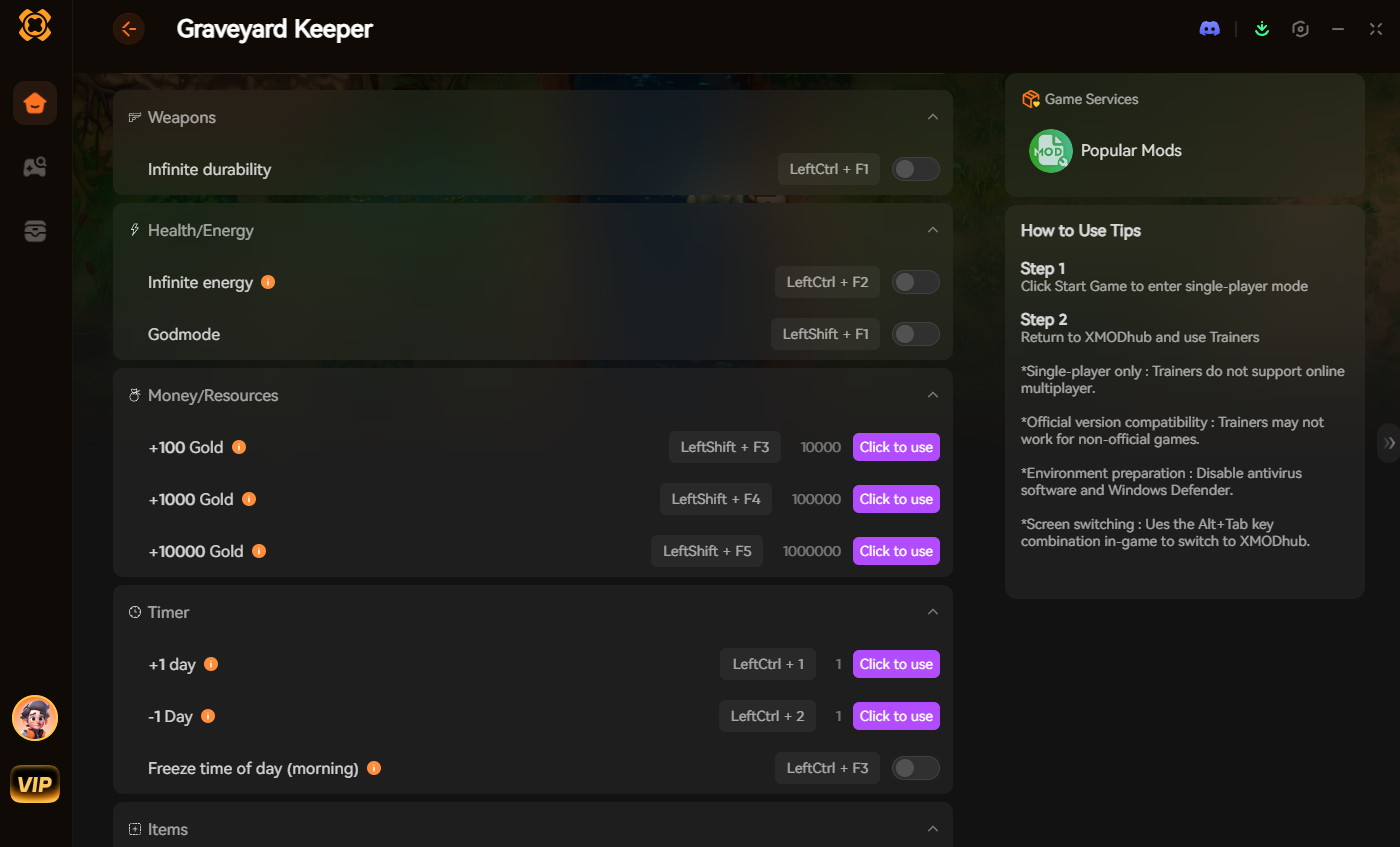
- Download and Launch the free XMODhub desktop app.
- Search for Graveyard Keeper.
- Click “Play”.
- Toggle your desired cheats (Infinite Energy, Max Money, Fast XP) directly from the clean UI or via hotkeys.
4. Where to Find Safe Graveyard Keeper Cheat Tables (.CT)?
If you absolutely insist on using CE, you will want a pre-made Cheat Table (.CT file) from community sites like Fearless Revolution.
A massive warning, though:
Downloading .CT files from unverified Reddit threads or random Discord servers is incredibly dangerous. Hackers frequently hide trojans and crypto-miners inside fake cheat tables.
Furthermore, finding a .CT file that matches your exact game version of Graveyard Keeper is a nightmare. This is exactly why a sandboxed, verified app like XMODhub is much safer for your PC.
5. Frequently Asked Questions (FAQ)
Q: Can I use Cheat Engine on the Xbox Game Pass version of Graveyard Keeper?
A: Usually, no. Game Pass uses strict UWP file encryption that actively blocks Cheat Engine from attaching to the process. However, XMODhub is specifically engineered to bypass these Xbox App restrictions seamlessly.
Q: Is it illegal to use Cheat Engine?
A: Modifying data on your own PC for a single-player experience like Graveyard Keeper is completely legal. Just never bring memory editors into a multiplayer server, or you will get banned by anti-cheat engines immediately.
Q: Why do the values I changed in Cheat Engine revert back to normal?
A: This is a common issue with modern Unity engine games. Graveyard Keeper constantly refreshes its data, especially when you zone between the graveyard and the village. Unless you find the static pointer or “freeze” the correct display and structural addresses, the game will overwrite your changes. Using a dedicated trainer bypasses this issue entirely.
Q: Will using Cheat Engine drop my FPS or slow down my PC?
A: Running Cheat Engine in the background won’t heavily impact your FPS, but performing a “First Scan” on a game like Graveyard Keeper can temporarily freeze your game or max out your CPU and RAM usage. Once the scan is done, performance should return to normal.
Conclusion: Work Smarter, Not Harder
Learning how memory manipulation works in Cheat Engine is a cool flex. But let’s be real—when you come home from a long day at work, you just want to spawn in that perfect 12-White-Skull corpse and expand your graveyard without taking a computer science class.
Why spend 45 minutes digging through hex codes when you can click one button and instantly get Infinite Energy? And the best part? XMODhub supports over 5,000+ PC games. Once you install the app, you can ditch the complicated cheat tables for good.
Whether you are trying to survive the darkness in Spark in the Dark, managing farms in Stardew Valley, or exploring the wild mods in Mad Island, the exact same app has you covered.

I am a passionate gamer and writer at XMODhub, dedicated to bringing you the latest gaming news, tips, and insights.
Connect with me:
LinkedIn Profile ↗


 Nancy Miller

Thanks for sharing this—especially the part about how unstable Cheat Engine tables are in Unity games. I’ve been there, spending hours tracking down addresses only to have them shift after a scene change. Your point about the sanity-saving alternative really hit home, and it’s great to see a practical solution that doesn’t require deep technical knowledge.