
 Catherine Hu
You have finally booted up PRAGMATA, Capcom’s highly anticipated sci-fi epic. You step out onto the beautifully rendered, desolate surface of the Cradle lunar station, ready to experience next-generation zero-gravity combat alongside Diana. But within the first ten minutes, classic PC gaming annoyances begin to surface. The default Field of View (FOV) is so claustrophobic it induces motion sickness during fast dodges against the Edus robots, the unskippable startup logos waste your time, and the screen is cluttered with intrusive UI elements that ruin the haunting, cinematic atmosphere.
Installing the wrong .pak file or using an outdated script can cause your game to crash instantly, potentially corrupting your 40-hour save file. We have rigorously tested the early modding scene to bring you a definitive, conflict-free list of the absolute best modifications. This guide covers the essential quality-of-life tweaks, visual enhancements, and frameworks you need to elevate your journey across the moon.
Table of Contents
Quick Answer: What Are the Best PRAGMATA Mods?
What are the best PRAGMATA mods to install on day one? Based on our RE Engine stability testing, the top must-have PRAGMATA mods are:
-
1REFramework: Essential for unlocking FOV and ultrawide resolutions.
-
2Fluffy Mod Manager: Required to safely install .pak cosmetic files.
-
3Skip Startup Logos: Bypasses unskippable developer splash screens.
-
4Dynamic HUD: Auto-hides UI elements during exploration for maximum cinematic immersion.
While visual and UI mods are fantastic, modifying your actual gameplay stats using community files is incredibly risky during the launch window. To safely modify your health, ammo, and resources without file conflicts, read our full guide on [PRAGMATA Trainer & Cheats 2026: Unlimited Health, Ammo & More].
The Essential Modding Frameworks
Before you can install fancy spacesuits or high-resolution textures, you must build a stable foundation. These two tools are the undisputed backbone for anyone looking to mod PRAGMATA.
1. REFramework
REFramework is the holy grail of RE Engine modding. It is a .dll file that you drop directly into your game’s root folder. Pressing the ‘Insert’ key in-game opens a lightweight overlay that allows you to bypass the engine’s hardcoded limitations. It provides native support for Ultrawide monitors, removes the agonizing 70-degree FOV lock, and completely fixes the erratic camera stutter when Hugh transitions from walking to zero-gravity sprinting.
2. Fluffy Mod Manager
Because PRAGMATA archives its files, manually replacing character models is a recipe for disaster. Fluffy Mod Manager is a standalone application that acts as a secure staging area. You drop downloaded mod .rar files into its directory, and the manager safely unpacks and weaves them into the game’s .pak structure. If a mod causes a crash, you simply click a toggle in the manager to cleanly uninstall it without having to redownload the entire 80GB game.
Top Quality of Life (QoL) Mods
These mods do not drastically alter the developer’s intended vision; they simply remove the friction and annoyances of modern AAA game design, allowing you to focus on the combat and story.
3. Skip Startup Logos
Every time you launch PRAGMATA, you are forced to watch 30 seconds of unskippable Capcom, RE Engine, and middleware logos. This mod replaces those lengthy video files with blank, one-frame dummy files, instantly loading you directly into the main menu.
4. Dynamic HUD Auto-Hide
The lunar environments of Cradle are breathtaking, but the constant presence of Hugh’s weapon crosshair, Diana’s synergy gauge, and the minimap breaks the cinematic immersion. The Dynamic HUD mod uses REFramework scripts to automatically hide all UI elements when you are exploring. The HUD instantly fades back in the millisecond you aim your weapon, sprint, or take damage.
5. Disable Low Health Vignette
When Hugh’s health drops below 20%, the screen becomes covered in a pulsing red vignette accompanied by a loud heartbeat audio loop. This effect is incredibly distracting during intense, multi-phase boss fights. This mod completely removes the visual and audio warning, letting you focus on landing your perfect parries.
Best Visual and Immersion Mods
If you have a high-end RTX 40-series GPU, the RE Engine has massive untapped potential. These mods push the graphical fidelity to its absolute limits.
-
6. Cradle High-Resolution Texture PackWhile the character models in PRAGMATA look incredible, some of the environmental ground textures in the commercial sectors are surprisingly muddy. This mod replaces the low-resolution lunar dust and metallic debris textures with uncompressed 4K assets, making the ground incredibly sharp and detailed.
-
7. Cinematic ReShade PresetThe default color grading of the game features a heavily washed-out, gray filter to emphasize the lifelessness of the moon. This custom ReShade preset injects vibrant contrast, deepens the shadows to true black, and sharpens the temporal anti-aliasing (TAA) blur, giving the game a crisp, blockbuster sci-fi aesthetic.
-
8. True Ray Tracing ReflectionsCapcom dialed back the Ray Tracing settings in the PC port to ensure parity with consoles. This .ini tweak forces the engine to calculate full-resolution reflections on Hugh’s visor and the glass corridors of the orbital station, rather than relying on the blurry half-resolution default setting.
-
9. Classic Hugh OutfitNot a fan of the bulky, futuristic exosuits? This cosmetic mod replaces Hugh’s default armor with a sleek, tactical mercenary outfit inspired by classic Capcom survival horror protagonists. It must be installed via Fluffy Mod Manager.
-
10. Diana Hologram Color CustomizerThis fun visual tweak allows you to change the color of Diana’s holographic anomalies. Instead of the default neon blue, you can customize her EMP bursts and Kinetic Snares to be vivid red, green, or purple, adding a personalized flair to your combat combos.
The Danger of .pak Gameplay Mods
Visual tweaks and UI improvements are generally safe, but attempting to mod the actual gameplay mechanics—like installing the highly requested “Infinite Ammo Mod” or the “Max Lunar Credits Hack”—is incredibly dangerous.
PRAGMATA does not feature a native developer console. You cannot simply press the tilde key and type a command to give yourself resources or spawn Earthen Artifacts. To achieve infinite health or instant skill unlocks, community modders create .pak files that overwrite the game’s core memory logic.
The Problem:
Capcom patches the game frequently. The moment a hotfix drops, the memory addresses change. If you load your save file with an outdated gameplay mod installed, the RE Engine will detect a memory mismatch, trigger an anti-tamper error, and hard-crash to your desktop. If this happens during an autosave, your entire playthrough is permanently corrupted.
The Ultimate Modding Alternative: XMODhub
You should not have to risk your 60-hour save file just to bypass a frustrating boss fight or skip a tedious resource grind. Managing load orders, waiting for mod authors to update their files after every patch, and troubleshooting D3D crashes is exhausting.
If you want the benefits of gameplay mods—like infinite health, zero cooldowns for Diana, and unlimited crafting materials—without the massive technical risks, the XMODhub PC Client is your ultimate solution.
Instead of permanently altering the game’s core .pak files, XMODhub uses a highly secure, kernel-level memory injector that runs alongside PRAGMATA. Best of all, it auto-updates via the cloud. When the game patches, XMODhub automatically aligns its pointers, ensuring your gameplay enhancements never break and your save files remain pristine.
How to Safely Enhance Your Game:
-
1Download XMODhub: Navigate to our official website and securely download the optimized desktop client.

-
2Auto-Detect Game Path: Launch the application. XMODhub will intelligently scan your system, locate your PRAGMATA installation, and seamlessly hook into the RE Engine.
-
3Toggle trainers/cheats: Click Play to launch the game. Open the sleek XMODhub overlay to instantly activate Infinite Lunar Credits, God Mode, or FOV Unlockers with zero file conflicts.
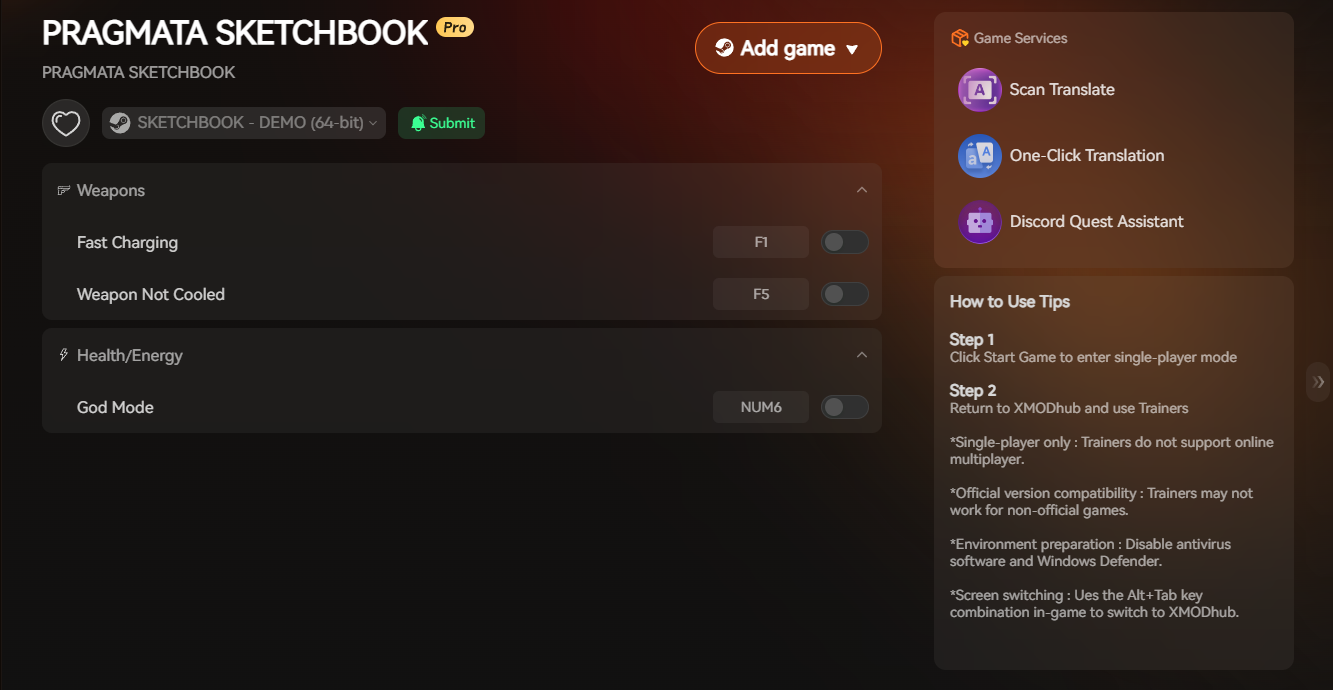
Why gamble with unstable forum mods when you can have a professional, one-click solution? Reclaim your gaming time and experience the lunar colony exactly how you want.
Frequently Asked Questions (FAQ)
Q:
Will installing PRAGMATA best mods disable my Steam achievements?
A:
If you exclusively use cosmetic mods via the Fluffy Mod Manager or camera tweaks via REFramework, your Steam achievements will remain perfectly intact. The RE Engine does not flag texture replacements as cheating. However, using outdated scripts that break the game’s logic can sometimes halt achievement progression. Using a secure memory injector like XMODhub completely bypasses these checks, ensuring you still earn achievements while using enhancements.
Q:
Can I get banned for modding PRAGMATA?
A:
No. PRAGMATA is a strictly single-player, narrative-focused experience. Capcom does not utilize multiplayer anti-cheat software (such as Easy Anti-Cheat or BattlEye) to police offline single-player progression. You are completely safe to modify your local hardware memory and install .pak files without any fear of a Steam account ban.
Q:
Why does my game crash immediately after installing a new mod?
A:
This is almost always caused by a version mismatch or a mod conflict. If a mod was built for the launch version of PRAGMATA but you are playing on Patch 1.2, the old .pak file will crash the engine. To fix this, open the Fluffy Mod Manager, uninstall all active mods, verify your game files through Steam, and only reinstall mods that explicitly state they are compatible with the latest game version.
Conclusion
Modding is the lifeblood of the PC gaming community, and PRAGMATA is no exception. By installing essential frameworks like REFramework and Fluffy Mod Manager, you can safely apply stunning high-resolution textures, fix the claustrophobic FOV, and strip away the intrusive UI for a truly immersive cinematic experience.
However, when it comes to altering your gameplay stats, fighting with volatile .pak files is simply not worth the risk to your save data. XMODhub provides the ultimate, hassle-free alternative. As the premier PC gaming enhancement platform supporting over 5,000 titles, XMODhub delivers professional-grade stability.
Whether you want to unlock infinite synergy in PRAGMATA, maximize your resources in Monster Hunter Wilds, or unlock all style ranks in Devil May Cry 5, XMODhub puts absolute control at your fingertips.
Download XMODhub for free today and elevate your gameplay instantly.

I am a passionate gamer and writer at XMODhub, dedicated to bringing you the latest gaming news, tips, and insights.
Connect with me:
LinkedIn Profile ↗


 Nancy Miller
This breakdown of essential PRAGMATA mods really hit the mark—especially the emphasis on using Fluffy Mod Manager for safe injections. It’s easy to overlook how critical proper mod management is, especially when you’re deep into a 40-hour save. Thanks for highlighting the balance between visual polish and gameplay comfort, which makes such a difference in a game like this.