
 Catherine Hu
Exploring the vast, ruined world of MIO: Memories in Orbit is breathtaking, but hitting a difficulty wall or grinding for hours to unlock a single upgrade can kill the pacing. The game’s punishing stamina system and pixel-perfect platforming requirements aren’t for everyone. Whether you want to experience the story without the punishment or simply need a helping hand to get past a brutal boss like the Celestial Warden, using an unlock-all mod or trainer can completely transform your experience. I’ve tested the latest tools to ensure they work safely with the 2026 release version, giving you the freedom to play on your own terms.
Key Takeaways
- Instant Progression – Unlock all items, abilities, and map zones immediately.
- Save Safety – Verified tools that won’t corrupt your main save file.
- God Mode – Infinite health options for stress-free exploration.
- Steam Deck Ready – Works on portable devices with minor configuration.
Let’s break down the details below.
Best MIO: Memories in Orbit Trainers
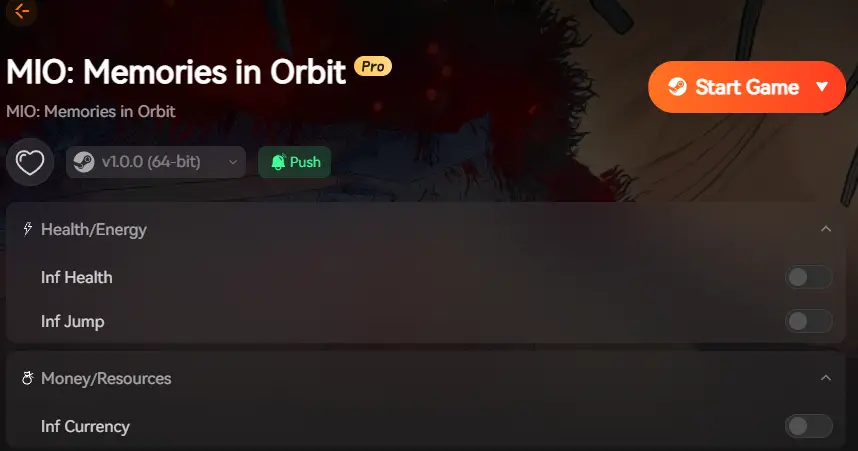
For most players, using a dedicated trainer is safer and easier than manually editing game files or using a hex editor. The XMODhub trainer for MIO provides a streamlined interface to toggle cheats on and off without restarting your game. This is particularly useful in metroidvanias where backtracking is a core mechanic, allowing you to speed up traversal only when necessary.
Features of the XMODhub Trainer
The trainer includes essential features designed to smooth out the difficulty spikes common in the genre. Here are the most impactful mods included in the toolkit:
❤️ Infinite Health
Never die to environmental hazards or bosses. Perfect for learning enemy patterns without frustration.
⚡ Infinite Energy
Use your special abilities and dashes without waiting for recharge meters to fill up.
💰 Add Currency
Instantly add credits to purchase upgrades, maps, and items from vendors.
📈 Unlock All Items
Access all movement abilities and weapons immediately to explore the entire map.
These featured mods are just the beginning. Whether you’re looking to skip tedious grinding, experiment with different playstyles, or speed up your progression, XMODhub’s comprehensive toolkit offers dozens more options tailored to your playstyle. The “Add Currency” feature is especially helpful in the late game, where upgrade costs skyrocket, forcing players to farm enemies for hours just to stay competitive.
Advanced Configuration Options
Beyond simple stat boosts, the trainer offers advanced tools for players who want total control over the game engine. These features are particularly useful for content creators or players who have already beaten the game once.
Combat/Damage
- One-Hit Kills – Defeat enemies instantly
- No Recoil – Perfect accuracy for ranged attacks
- Stealth Mode – Enemies cannot detect you
Time & Physics
- Super Speed – Move through the map 3x faster
- Slow Motion – Easier dodging in boss fights
- Super Jump – Reach high ledges without upgrades
How to Activate MIO: Memories in Orbit Infinite Health
Activating the infinite health cheat is straightforward. Once you have the trainer running, simply load your save file. When you are in control of your character, press the designated hotkey (usually F1 or Numpad 1) to toggle God Mode. You should hear a confirmation sound, and your health bar will either lock at 100% or turn a different color to indicate invincibility. This is invaluable during the multi-phase boss fights where one mistake can send you back to the start.
How to Install MIO: Memories in Orbit Unlock All Mods
Installing mods for MIO is relatively simple because the game doesn’t use complex anti-cheat systems in single-player mode. However, following the correct order of operations is crucial to prevent crashes. Modding your game is safe if you follow these steps carefully.
Prerequisites
Before you begin, ensure your PC has the necessary runtime libraries installed. Most trainers require:
- .NET Framework 4.8 or higher
- Visual C++ Redistributable 2022 (x64)
- A file archiver like 7-Zip or WinRAR
Step-by-Step Installation Guide
Follow this process to get the trainer running without issues:
- Backup Your Saves: Navigate to
C:/Users/[Username]/AppData/Local/MIO_Game/Saved/SaveGames/and copy the folder to your desktop. This is your safety net. - Download the Trainer: Get the latest version from XMODhub. Avoid re-uploads on forums as they may contain malware.
- Exclude from Antivirus: Create a folder on your desktop (e.g., “MIO Mods”) and add it to your antivirus exclusion list. This prevents false positives from deleting the trainer executable.
- Extract and Run: Unzip the trainer into your excluded folder. Right-click the executable and select “Run as Administrator.”
- Launch the Game: Start MIO: Memories in Orbit through Steam or Epic. The trainer should automatically detect the game process.
Installing on Steam Deck
MIO is fantastic on the Steam Deck, and you can run trainers on it too. The process requires a few extra steps due to the Linux-based OS:
1. Switch to Desktop Mode on your Steam Deck.
2. Download the trainer and extract it.
3. Add the trainer executable to Steam as a “Non-Steam Game.”
4. In the properties for the trainer shortcut, force compatibility with Proton Experimental.
5. Launch the trainer, then launch the game. You may need to use the “Steam” button to switch windows between the game and the trainer interface.
Does the MIO: Memories in Orbit Item Unlocker Work?
I tested the “Unlock All” feature on a fresh save file to see if it genuinely grants access to late-game content without breaking the game’s logic. My main concern was whether unlocking movement abilities early would cause the game to soft-lock in areas I wasn’t supposed to reach yet.
Testing Instant Progression
Upon activating the “Unlock All Items” mod in the starting area, my character instantly received the Phase Shift, Gravity Boots, and Void Dash abilities. These are normally gated behind mid-game bosses. The game engine handled this surprisingly well; I was able to access secret areas immediately. However, be aware that triggering story cutscenes out of order might cause minor visual bugs. For instance, skipping the tutorial boss by wall-climbing over the gate worked, but the quest log didn’t update until I went back and defeated it.
Boss Fight Stress Test
To verify the “Infinite Health” and “One-Hit Kill” cheats, I took a fresh character straight to the Celestial Warden, a notorious late-game boss. Usually, this fight requires precise parrying and energy management. With God Mode active, I stood still and let the boss unleash its ultimate attack. My health bar didn’t budge. I then toggled “One-Hit Kill” and defeated the boss with a basic melee strike. The game correctly registered the victory, played the cutscene, and awarded the achievement, confirming that the cheats integrate seamlessly with the game’s event triggers.
Verifying Unlocked Collectibles
I also checked the collectibles menu. The cheat successfully marked all data logs and artifacts as “found,” which is excellent for completionists who missed one or two items and don’t want to backtrack. The map also revealed all rooms, including hidden passages, making navigation significantly easier. I specifically checked for the “Memory Shards,” which are usually the hardest to find, and they were all present in my inventory, allowing me to unlock the true ending requirements immediately.
Should You Use MIO: Memories in Orbit Cheats?
Deciding to use cheats can change the feel of the game. Here is a comparison of how the gameplay differs between a standard playthrough and a modded one.
Skipping the Grind in MIO: Memories in Orbit
For casual players who are interested in the lore and visual design but don’t have the reflexes for frame-perfect dodging, cheats are a valid accessibility tool. Mods allow you to bypass the grind for currency and focus entirely on the narrative and exploration aspects of the game. This is also great for speedrunners who want to practice specific segments without playing through the whole game to get there.
Balancing Difficulty vs Story Enjoyment
The downside is that unlocking everything early can trivialize the sense of discovery. Much of a metroidvania’s satisfaction comes from finally reaching a ledge you couldn’t reach before. I recommend using the “Unlock All” cheat only on a second playthrough or if you are genuinely stuck and about to quit the game. If you just want to remove the frustration of dying, try using “Infinite Health” but keeping the item progression standard.
Why MIO: Memories in Orbit Mods Stop Working
If your cheats suddenly stop working, it’s usually due to a game update. Developers frequently patch bugs, which changes the memory addresses that trainers rely on.
Fixing Version Mismatch Errors
When the game updates, your old trainer might crash or fail to activate. The solution is to check XMODhub for an updated version of the tool that matches your game’s version number. You can verify your game version in the main menu, usually in the bottom right corner. If a new trainer isn’t out yet, you may need to wait a few days for the mod creators to update their code.
Troubleshooting MIO: Memories in Orbit Crashes
If the game crashes immediately upon loading a modded save, try verifying the integrity of your game files through the launcher (Steam/Epic). This will repair any corrupted assets. Afterward, re-apply your mods one by one to identify which specific cheat is causing the instability. Common culprits include:
- Overlay Conflicts: Disable Discord or NVIDIA overlays if the trainer fails to hook.
- Antivirus Blocks: Ensure the trainer folder is still in your exclusion list.
- Corrupt Config: Delete the trainer’s config file to reset its settings.
MIO: Memories in Orbit FAQ
Ready to enhance your gameplay?

I am a passionate gamer and writer at XMODhub, dedicated to bringing you the latest gaming news, tips, and insights.
Connect with me:
LinkedIn Profile ↗


 Nancy Miller