
 雄海港
雄海港1.Download the Mod prerequisite tool – This must be installed before installing the mod. Click here to download
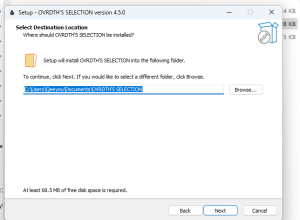
2.Download the MOD file and place it in the corresponding folder.
Go to Documents\OVRDTH’S SELECTION\pooled_saves
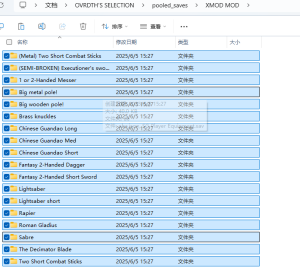
Extract the zip file into the folder
open Ovrdths selector and enjoy!
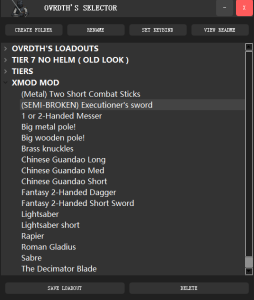
How to Use OVRDTH’S SELECTION
Loading Equipment Presets:
- In the Half Sword main menu (MAIN MENU), click on the enemy difficulty level you wish to challenge.
- In the Equipment Preset Selector, double-click the preset you want to use.
- Return to Half Sword, click “Start Game,” and select your game mode.
- You should now spawn with your chosen equipment preset.
- Note: Equipment changes are not visible in the main menu—you must enter a match to see the effects.
Setting a Hotkey:
- You can assign a hotkey to quickly load your last-selected equipment preset. This works even when the program window is not in focus.
Creating a Folder:
- Click the ”Create Folder” (CREATING FOLDER) button.
- By default, new folders or saved presets will be placed in the currently selected (highlighted) folder.
- If no folder is selected, they will be saved to the root directory.
Important Note:
- Critical Reminder: When saving a new equipment preset, ensure no existing preset is selected. While rare, rapid actions (e.g., double-clicking too fast after loading a preset) might cause accidental overwrites. If this happens, no major issues will occur.
Folder Organization:
- You can freely drag and drop folders within the program to reorganize them as needed.
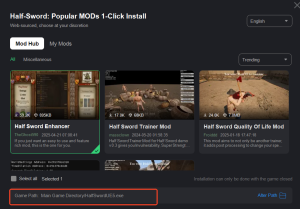
Note: Mods downloaded via XMOD will be saved to your game’s root directory. You can access them at:
Example Path: F:\SteamLibrary\steamapps\common\Half Sword Demo\
1.Скачайте обязательное вспомогательное ПО для мода – его необходимо установить перед установкой самого мода.
2.Скачайте MOD-файл и поместите его в соответствующую папку.
Перейдите в:
Документы\OVRDTH’S SELECTION\pooled_saves
Распакуйте ZIP-архив в эту папку.
Запустите Ovrdth’s Selector и наслаждайтесь!
Как использовать OVRDTH’S SELECTION
Загрузка пресетов экипировки:
- В главном меню Half Sword (MAIN MENU) выберите уровень сложности противников.
- В селекторе пресетов экипировки дважды кликните на нужный вам пресет.
- Вернитесь в Half Sword, нажмите “Начать игру” и выберите режим.
- Вы появитесь в игре с выбранной экипировкой.
Примечание: Изменения экипировки не видны в главном меню — эффект будет виден только в матче.
Настройка горячей клавиши:
- Вы можете назначить горячую клавишу для быстрой загрузки последнего выбранного пресета. Функция работает даже когда программа не в фокусе.
Создание папки:
- Нажмите кнопку “Создать папку” (CREATING FOLDER).
- По умолчанию новые папки и пресеты сохраняются в текущую выделенную папку.
- Если ничего не выделено, сохранение произойдёт в корневую директорию.
Важное примечание:
- Крайне важно: При сохранении нового пресета убедитесь, что никакой существующий пресет не выделен. В редких случаях при быстрых действиях (например, двойной клик сразу после загрузки) может произойти случайное перезаписывание. Это не критично.
Управление папками:
- Вы можете свободно перетаскивать папки в программе для организации.
Примечание:
Моды, скачанные через XMOD, сохраняются в корневую директорию игры. Пример пути:
F:\SteamLibrary\steamapps\common\Half Sword Demo\

 XMODhub_Official
 Catherine Hu
Thanks , I have recently been looking for information about this subject for ages and
yours is the best I have found out so far. But, what
in regards to the bottom line? Are you certain in regards to the source?