Summary: Discover all Palworld console commands and cheats for all of the time. Learn how to enable commands for single-player and multiplayer, use admin controls, and enhance gameplay with technical tools.
Palworld has taken the gaming world by storm with its unique blend of creature collecting, survival mechanics, and base building. Whether you’re managing a dedicated server, exploring the Palpagos Islands solo, or building the perfect base with friends, sometimes you need a little extra control. That’s where console commands come in.
Before diving into the full list of commands, it’s worth mentioning that Xmod is a powerful PC tool designed to enhance your single-player gaming experience.
With Xmod, you can manage mods, activate cheats more easily, and use built-in features for games like Palworld — all without manually editing files or installing risky third-party trainers.
This comprehensive guide covers everything you need: how to enable console commands for both single-player and multiplayer modes, the most useful admin commands, technical debug tools, and safe ways to customize your Palworld experience.

Table of Contents
- What Are Palworld Console Commands?
- How to Enable Console Commands in Palworld
- Most Useful Palworld Console Commands
- Full Palworld Console Commands List: Updated
- How to Enhance Palworld with Xmod
- Conclusion
What Are Palworld Console Commands?
Console commands in Palworld are developer and admin tools that let players modify gameplay, manage servers, and control various game settings in real time. By accessing the command system, you can teleport players, manage server operations, enable spectator mode, or adjust game parameters. These commands are especially popular among server administrators who need to manage communities, and single-player enthusiasts who want to experiment freely — offering significant control over your creature-catching adventure.
Important Note: Official console commands in Palworld are primarily designed for dedicated servers and multiplayer management. Single-player command access requires third-party tools or mods, which we’ll cover in this guide.
How to Enable Console Commands in Palworld
The process for enabling console commands differs between multiplayer servers and single-player mode. Here’s how to get started in both scenarios.
For Multiplayer/Dedicated Servers:
Step 1: Set Admin Password
- Navigate to your Palworld installation folder
- Go to
Pal\Saved\Config\WindowsServer (or LinuxServer for Linux)
- Open
PalWorldSettings.ini with a text editor
- Find the line
AdminPassword="" and add your chosen password between the quotes
- Example:
AdminPassword="MySecurePassword123"
- Save the file and restart your server
Step 2: Use Admin Commands In-Game
- Join your server and press Enter to open the chat
- Type
/AdminPassword [your password] and press Enter
- You’re now authenticated as an admin and can use all admin commands
- Simply press Enter and type any command to execute it
Note: The chat window won’t be visible when typing commands, but they’ll still work when you press Enter.
For Single-Player Mode (Requires Third-Party Tools):
Official Limitation: Pocketpair disabled native console commands in single-player after version 0.1.3.0 to maintain game balance and prevent cheating in online modes.
Alternative Methods:
1: UE4SS Console Enabler (Recommended)
- Download the UE4SS mod from trusted modding communities
- Extract files to your Palworld installation directory
- Launch the game and press F2 to open the console
- Type commands directly into the console window
2: Xmod Enhancement Tool
- Use Xmod for safe, built-in trainer functionality
- No manual file editing required
- Includes protection against malware from untrusted trainers
- See the “How to Enhance Palworld with Xmod” section below
3: WeMod Trainer
- Download the official WeMod application
- Offers pre-configured cheats like infinite health, instant crafting, and stat modifications
- Safer than random internet trainers
- Limited to predefined cheats (no custom commands)
Warning: Always download third-party tools from official sources only. Unofficial trainers may contain malware or compromise your system security.
Most Useful Palworld Console Commands
Here are the essential commands organized by function. Most commands require admin privileges on servers.
Admin Authentication
/AdminPassword [password] — Authenticate as admin using the password set in server configuration.
Example: /AdminPassword MySecurePassword123
Server Management Commands
/Shutdown [seconds] [message] — Shut down server after specified seconds with optional message.
Example: /Shutdown 60 Server restarting in 1 minute!
/DoExit — Force immediate server shutdown without countdown.
/Broadcast [message] — Send announcement to all players on server.
Example: /Broadcast Welcome to our Palworld server!
/Info — Display current server information and settings.
/Save — Manually save current game state (useful before risky operations).
Player Management Commands
/ShowPlayers — Display list of all connected players with Steam IDs and player IDs.
/KickPlayer [Steam ID] — Remove player from server immediately.
Example: /KickPlayer 76561198012345678
/BanPlayer [Steam ID] — Permanently ban player from server.
Example: /BanPlayer 76561198012345678
/TeleportToPlayer [Steam ID] — Teleport yourself to specified player’s location.
/TeleportToMe [Steam ID] — Teleport specified player to your location.
Note: To unban players, you must manually edit Pal/Saved/SaveGames/banlist.txt and remove their Steam ID.
Technical Debug Commands (Requires Console Enabler)
SetSpectatorMode 1 — Enable spectator/noclip mode (fly through walls).
SetSpectatorMode 0 — Disable spectator mode and return to normal.
KillPlayer — Instantly kill your character (useful for testing respawn mechanics).
World Settings (Accessed Through Settings Menu)
While not console commands, Palworld offers extensive customization through the World Settings menu at game start:
- Experience multiplier (0.1x to 20x)
- Pal capture rate (0.5x to 2x)
- Item drop rate (0.5x to 10x)
- Damage settings for players and Pals
- Death penalties (none, item drop, or full loss)
- Day/night cycle speed
- Hunger depletion rate
- And many more parameters
These settings effectively function as built-in “cheats” without requiring console commands.
Full Palworld Console Commands List: Updated
Below is a comprehensive list of all available Palworld commands, organized by category.
Admin Authentication
/AdminPassword [password] — Authenticate as server administrator
Server Control Commands
/Shutdown [seconds] [message] — Schedule server shutdown
/DoExit — Force immediate shutdown
/Save — Manually save game state
/Info — Display server information
/Broadcast [message] — Send server-wide announcement
Player Management
/ShowPlayers — List all connected players with IDs
/KickPlayer [Steam ID] — Kick player from server
/BanPlayer [Steam ID] — Ban player from server
/TeleportToPlayer [Steam ID] — Teleport to player
/TeleportToMe [Steam ID] — Teleport player to you
Unban Method (Not a Command)
To unban players:
- Navigate to
Pal/Saved/SaveGames/
- Open
banlist.txt with text editor
- Delete the Steam ID line for the player you want to unban
- Save the file
- Restart the server
Single-Player Console Commands (UE4SS/Third-Party Only)
These commands only work with console enabler mods:
SetSpectatorMode 1 — Enable noclip/spectator mode
SetSpectatorMode 0 — Disable spectator mode
KillPlayer — Suicide command (kills your character)
Debug Menu Access: With proper console enablers, you can access debug menus that provide additional options, though most buttons may not function properly due to developer restrictions.
Item Spawning (Mod-Dependent)
With proper mods installed, you can spawn items using codes. However, this requires community-created item ID lists and compatible mod frameworks. Check modding communities like NexusMods for:
- Complete item ID databases
- Pal spawning codes
- Resource generation scripts
Note: Item spawning is not officially supported and requires extensive modding.
Alternative: World Settings Configuration
For single-player customization without console commands, edit PalWorldSettings.ini:
Location: %LOCALAPPDATA%\Pal\Saved\Config\WindowsNoEditor\PalWorldSettings.ini
Key settings you can modify:
- Difficulty
- DayTimeSpeedRate
- NightTimeSpeedRate
- ExpRate
- PalCaptureRate
- PalSpawnNumRate
- DropItemMaxNum
- DeathPenalty
- bEnablePlayerToPlayerDamage
- bEnableFriendlyFire
Make a backup before editing!
How to Enhance Palworld with Xmod

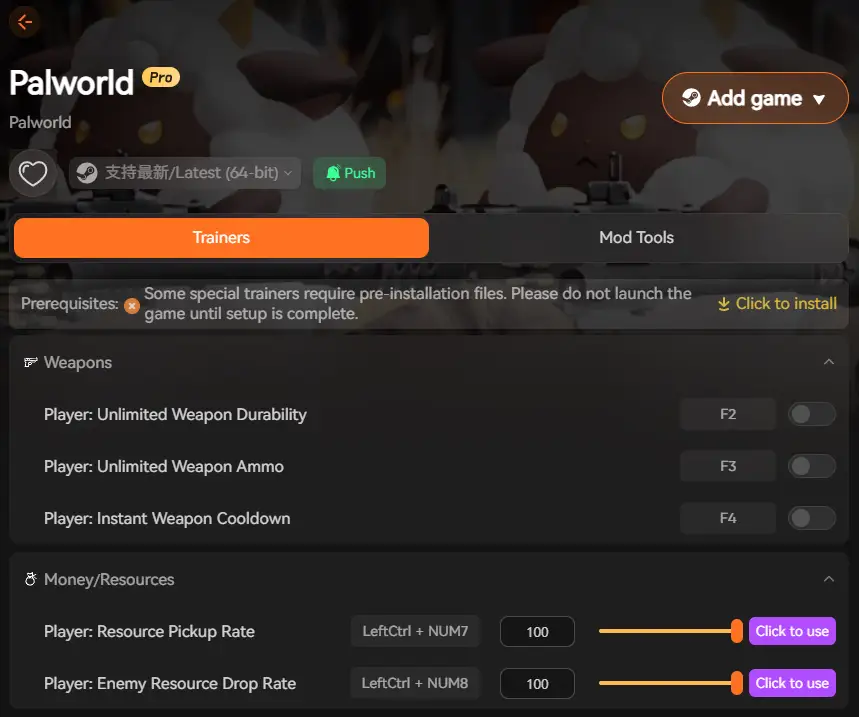
To take your Palworld experience even further, Xmod offers powerful tools that go beyond standard console commands and risky third-party trainers. With Xmod, you can safely customize your single-player gameplay without the security risks of random internet downloads.
Xmod provides:
- One-click trainer activation for stat modifications, resource cheats, and quality-of-life improvements
- Safe installation without malware or system compromise that often comes with free trainers
- Built-in mod management for popular Palworld mods from trusted sources
- Performance optimization tools to improve frame rates and loading times
- No manual file editing — configure everything through a user-friendly interface
- Regular updates to maintain compatibility with new Palworld patches and updates
Whether you want to experiment with builds, skip resource grinding, or explore the game without survival pressure, Xmod gives you complete control while keeping your system safe. It’s the perfect solution for players who want single-player cheats without the hassle and risks of traditional trainer software.
Conclusion
Console commands in Palworld offer powerful server management tools for multiplayer administrators and limited options for single-player enthusiasts willing to use mods. While the game’s official command support focuses primarily on dedicated server operations, the extensive World Settings menu provides substantial customization options for everyone. From managing player communities to tweaking gameplay parameters, these tools give you meaningful control over your Palworld experience.
Combined with Xmod, you can take your gameplay even further — safely activating cheats, installing quality mods, and optimizing performance without the security risks of untrusted trainers. Together, official commands and Xmod transform Palworld into a fully customizable adventure, perfect for both server administrators managing communities and solo players exploring the Palpagos Islands on their own terms.

 Catherine Hu