summary:星露谷 item codes are a powerful and popular trick that allows PC players to instantly obtain items by using the game’s internal item ID system. Whether you’re short on time, testing farm layouts, or simply want to enjoy a more relaxed playthrough, item codes offer a fast and flexible solution.
In this guide, you’ll learn how item codes work, how to use them safely, and explore a full, well-organized item ID list covering resources, crops, fish, weapons, and more. We’ll also introduce XMOD, a PC-friendly helper tool that enhances gameplay without complex mod setups.
目錄
- What Are Stardew Valley Item Codes?
- How Stardew Valley Item Codes Work
- How to Use Item Codes (Step-by-Step)
- Full Stardew Valley Item ID List
- Best Item Code Combinations
- PC Compatibility & Limitations
- Item Codes vs Mods & Tools (XMOD)
- Tips for Safe & Balanced Use
- 常見問題
- 總結
What Are Stardew Valley Item Codes?
Item codes are numeric IDs assigned to every item in 星露谷. When these IDs are placed inside square brackets—such as [74]—the game recognizes them as items and automatically spawns them into your inventory when triggered.
This feature is mainly used in single-player PC gameplay and is widely considered a quality-of-life shortcut rather than cheating.
How Stardew Valley Item Codes Work
- Each item has a unique numeric ID
- Codes must be wrapped in [square brackets]
- The game reads the code when a name is spoken
- Items are instantly added to your inventory
For best results, item codes should be used on PC versions of Stardew Valley.
How to Use Item Codes in Stardew Valley
Character Name Method
- Start a new game
- Enter a name like:
Alex [74] [337]
- When NPCs say your name, items spawn
Note: Limited by name length and stability.
Animal Naming Method (Recommended)
- Visit Marnie’s Ranch
- Buy an animal
- Name it using item codes:
[74] [454]
- Items spawn instantly
Note: Most stable and repeatable method.
Full Stardew Valley Item ID List
Valuable & Rare Items
Bars, Ores & Resources
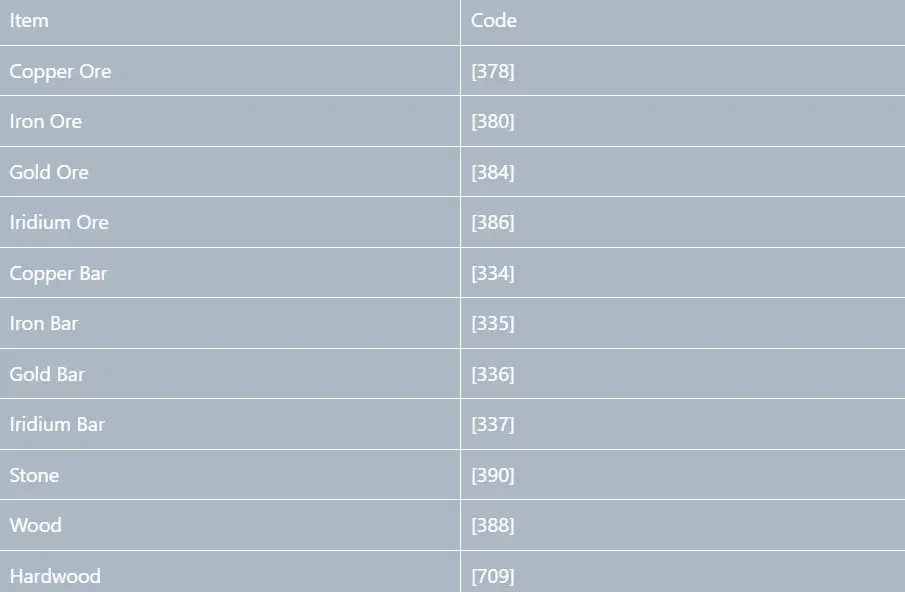
Crops, Seeds & Farming Items
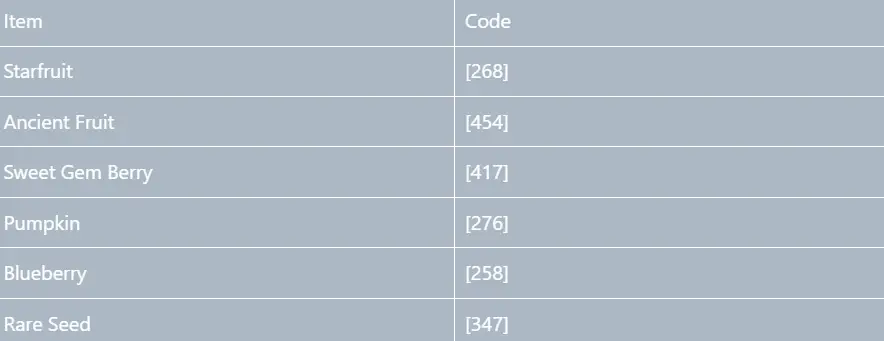
Fish & Legendary Fish

Weapons, Rings & Combat Items
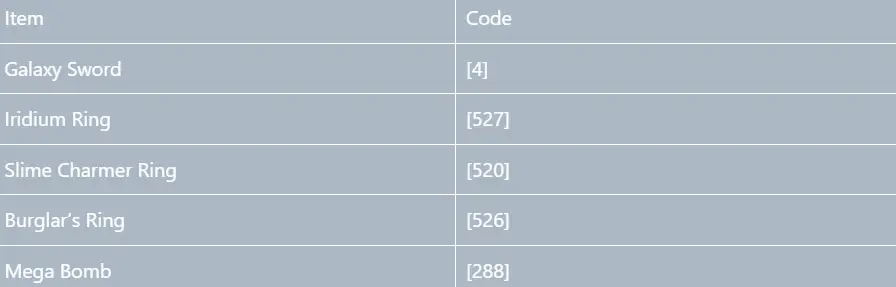
Food & Buff Items

Artisan Goods & Special Items
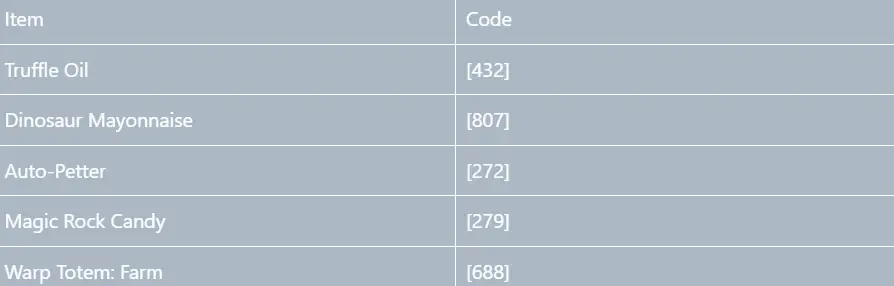
Best Item Code Combinations
Safe and popular examples:
[74] [337]
Prismatic Shard + Iridium Bar
[268] [454]
Starfruit + Ancient Fruit
Stick to two or three codes at once for stability.
PC Compatibility & Limitations
Item codes work reliably on PC (Steam). Other platforms may restrict naming inputs, making this method unavailable.
Item Codes vs Mods & Tools (XMOD)
Item codes are ideal for quick item access, but they have limitations. XMOD provides a complementary solution for PC players by offering resource management support, progression assistance, and quality-of-life features without requiring complex mod installations.
Used together, item codes and XMOD allow players to customize their Stardew Valley experience while keeping gameplay smooth and controlled.
How to Use XMOD for Stardew Valley?
XMOD is designed to support single-player gameplay by helping you manage resources, progression, and repetitive tasks more efficiently, making it a natural addition alongside item codes.
1: Install and Launch XMOD
First, install XMOD on your PC and open the application. Once launched, sign in and make sure Stardew Valley is properly installed on your system. For best results, keep the game closed before activating XMOD.
2: Launch 星露谷 Through XMOD
Within XMOD, locate 星露谷 in the game list and launch it directly from the app. This ensures XMOD attaches correctly and activates its supported features as the game starts.
Launching the game through XMOD helps maintain stability and compatibility during gameplay.
3: Enable Helpful Gameplay Features
After entering the game, you can enable XMOD features based on your preferences. These typically focus on:
- Resource and inventory management
- Reducing repetitive or time-consuming tasks
- Improving overall gameplay flow
These features are designed to reduce unnecessary grind while preserving the core farming and progression experience.
4: Use XMOD Together with Item Codes
Many players combine XMOD with Stardew Valley item codes for maximum flexibility:
- Item codes provide instant access to specific items
- XMOD helps manage progression, resources, and daily activities more smoothly
Used together, they allow you to customize your playstyle without relying on heavy modding or extensive configuration.
5: Save Progress and Adjust Gradually
As with any gameplay enhancement, it’s best to:
- Save your game regularly
- Enable features gradually instead of all at once
- Back up your save files before major changes
This approach ensures a stable experience and keeps gameplay balanced.
Tips for Safe & Balanced Use
- Avoid spawning late-game items too early
- Back up save files before heavy use
- Use item codes to reduce grind, not remove progression entirely
- Combine item codes with XMOD for better gameplay balance
常見問題
- Do item codes still work in 星露谷?
Yes, especially via animal naming on PC.
- Can item codes break my save?
This is rare, but excessive use can cause instability. Backups are recommended.
- Do item codes disable achievements?
No, achievements unlock normally.
- Can item codes be used multiple times?
Yes. Item codes can be reused repeatedly, especially through the animal naming method, as long as you rename or purchase new animals.
- What is the safest way to use item codes?
The safest method is to use one to three item codes at a time, avoid spawning too many rare items at once, and always keep a backup of your save file before heavy use.
總結
星露谷 item codes give PC players a flexible way to enjoy the game at their own pace, and a full item ID list makes them easier than ever to use. When combined responsibly and supported by tools like XMOD, they can significantly improve your farming experience while preserving the charm of the game.
我是一名熱情的遊戲玩家,也是 XMODhub 的作家,致力於為您帶來最新的遊戲新聞、秘訣和見解。.
與我聯繫:
LinkedIn 個人資料

 胡凱琳
胡凱琳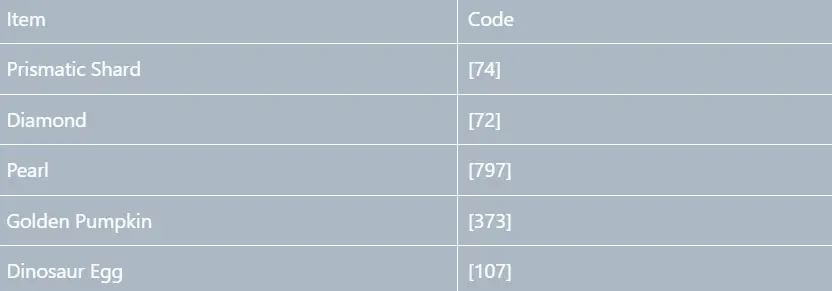





 南希-米勒
南希-米勒