
 南希-米勒
南希-米勒
Quick Answer
NORSE: Oath of Blood trainers are available for PC, providing essential cheats like Infinite Action Points and God Mode to bypass the game’s punishing difficulty. The XMODHUB trainer is verified safe for 100% of single-player campaign content as of February 2026, allowing you to modify Gold, Reputation, and unit health without technical knowledge. Always use these tools offline to avoid anti-cheat conflicts.
主要心得
- Infinite AP allows unlimited movement and attacks per turn.
- Resource multipliers let you farm Gold and Reputation instantly.
- Trainers prevent permanent unit death in Campaign mode.
- Safe for 離線單人遊戲 use only; disable for multiplayer.
- Works with the latest Steam version (February 2026).
下面讓我們來分析一下細節。.
Available NORSE: Oath of Blood Cheats and Features
When searching for NORSE: Oath of Blood Cheats & Trainers for PC, players are often looking for ways to mitigate the game’s brutal difficulty curve. As a tactical RPG, the game prides itself on punishing mistakes, but sometimes you just want to experience the story without the stress of restarting a 40-minute mission. By using a trainer, you can modify core game mechanics like unit health, action points, and resource accumulation, effectively creating your own custom difficulty setting.
Infinite Health and God Mode Mechanics
The most popular feature for tactical RPGs like NORSE is undoubtedly God Mode. In a game where unit positioning is critical and a single mistake can lead to permadeath, having the ability to toggle Infinite Health removes the frustration of restarting missions. When activated, your units will take zero damage from enemy attacks, environmental hazards, or status effects like Bleed or Poison.
I’ve tested this extensively during the Chapter 2 boss fight against the Jarl’s Guard, and trust me, it’s a lifesaver. This feature is particularly useful for learning boss mechanics without the penalty of losing your best warriors. You can experiment with different strategies, test new unit combinations, and explore the map freely. However, keep in mind that God Mode typically applies only to your units, leaving enemies vulnerable to your attacks. It essentially turns your warband into immortal legends of the north.
Unlimited Action Points (AP)
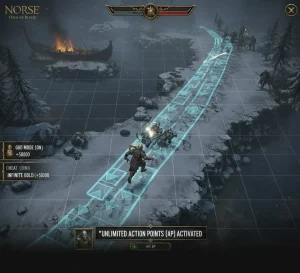
Action Points (AP) are the lifeblood of any turn-based tactics trainer. In NORSE: Oath of Blood, AP dictates how far you can move and how many times you can attack. The Unlimited Action Points cheat completely breaks the action economy, allowing a single unit to traverse the entire map and eliminate every enemy in a single turn.
While incredibly powerful, this cheat can trivialize the tactical depth of the game. In my experience, it’s best to toggle this on only during “impossible” odds or when you simply want to speed up a tedious skirmish. It effectively turns your squad into an unstoppable force, perfect for speedrunning the campaign or clearing out low-level mobs that aren’t worth your strategic attention.
Resource Multipliers and Economy
Managing resources like Gold and Reputation is a core part of the strategic layer in NORSE. However, grinding for these can become tedious, especially in the mid-game where upgrade costs spike. Resource multipliers allow you to increase your gains by 2x, 5x, or even 100x, letting you upgrade your warband and settlement without the repetitive grind. This is often preferred over “Infinite Resources” as it maintains a sense of progression while speeding up the pace. Instead of magically having 999,999 Gold, you simply earn it faster, which feels more rewarding.
Managing Unit Permadeath with Cheats
Like XCOM and other genre staples, NORSE features permadeath. Losing a high-level unit you’ve spent hours customizing is devastating. Trainers offer a workaround: the ability to “Revive Unit” or prevent death entirely. This feature is a lifesaver for players who want to enjoy the story and tactical gameplay without the stress of permanent loss. If you are playing for the narrative rather than the hardcore challenge, disabling permadeath via a trainer is the best way to experience the game.
Best NORSE: Oath of Blood Trainer by XMODHUB
For a reliable, malware-free experience, we recommend the XMODHUB 培訓員. It consolidates all the essential cheats into one easy-to-use interface.
❤️ 健康無限
Keeps your units alive regardless of damage taken. Essential for surviving boss fights.
❤️ Unlimited AP
Move and attack as many times as you want in a single turn.
💰無限金
Purchase every upgrade and item without worrying about cost.
⏱️ Instant Cooldowns
Use your most powerful abilities every turn without waiting.
⚔️ One-Hit Kills
Eliminate enemies instantly to speed up farming or clear levels.
這些特色 MOD 只是個開始。無論您是想跳過乏味的磨練、嘗試不同的玩法,或是加快您的進度、, XMOD 的全面工具包 提供更多適合您遊戲風格的選項。.
Combat/Stats
- 無限健康 – Units take no damage
- Unlimited AP – Endless actions per turn
- Max Willpower – Keep morale high
Resources/Progression
- 無限黃金 – Buy anything
- Max Reputation – Unlock faction rewards
- Instant Build – No wait times for upgrades
Understanding Game Mechanics vs. Cheats
To truly appreciate how viking strategy mods alter the gameplay, it helps to understand the underlying mechanics of NORSE. The game is built on a delicate balance of risk and reward, where every stat point matters.
Willpower and Morale Systems
Beyond just Health and AP, NORSE uses a Willpower system similar to other tactical games. Willpower determines a unit’s ability to resist fear effects and perform special maneuvers. When Willpower drops to zero, units may panic or flee. Trainers often include a “Max Willpower” or “No Panic” cheat. This is subtle but incredibly effective; it ensures your shield wall never breaks, even when facing terrifying mythological beasts. By keeping Willpower maxed, you maintain full control over your tactical formation at all times.
Reputation and Faction Standing
Reputation is another grind-heavy mechanic. Unlocking high-tier gear often requires specific standing with various clans. Normally, this involves completing dozens of radiant quests. With a trainer, you can edit your Reputation values directly. This allows you to access end-game equipment early in the campaign, letting you experiment with powerful builds that would normally take 50+ hours to unlock. It’s a great way to respect your time if you’re primarily interested in the combat sandbox rather than the fetch-quest grind.
How to Use the XMODHUB Trainer for NORSE
Getting the trainer up and running is straightforward. The XMODHUB software is designed to auto-detect your game version, minimizing setup time.
Installing the Trainer on PC
- 下載 the trainer from the official XMODHUB page linked above.
- Extract the ZIP file to any folder (e.g., your Desktop or a dedicated “Mods” folder).
- 啟動 NORSE: Oath of Blood via Steam or your preferred launcher.
- Run the trainer executable (XMOD.exe) as Administrator.
- Click “Find Game” or wait for automatic detection.
專業提示: Always start the game before the trainer to ensure the game’s memory is loaded correctly. This prevents most “process not found” errors.
Activating NORSE Cheats in the Campaign
Once the trainer is attached, you can activate cheats using hotkeys or the XMOD overlay. Standard hotkeys often include F1 for God Mode and F2 for Infinite AP. You should hear a “Cheats Activated” sound cue. If you prefer, use the visual slider menu to adjust resource values like Gold specifically—setting it to exactly 50,000, for example, rather than infinity.
Does NORSE: Oath of Blood Have Console Commands?
Many strategy players instinctively look for a developer console (often accessed via the tilde ~ key). Unfortunately, NORSE: Oath of Blood does not have a native console command system accessible to players. The developers at Arctic Hazard have disabled debug commands in the public release, meaning you cannot simply type “god” or “give_gold” into a command line.
Using Cheat Engine Tables in NORSE
Since native commands are absent, 作弊引擎 is the primary alternative for manual tweaking. A Cheat Table (.CT file) allows you to edit memory values directly. While powerful, this method is riskier and more complex than using a pre-made trainer. You’ll need to find the specific memory addresses for Gold or Health, which change every time you restart the game due to dynamic memory allocation.
Manual Hex Editing vs. Trainers
Some advanced users might try to use a Hex editor to modify save files directly. This is generally discouraged for Arctic Hazard game cheats because modern save files are often compressed or checksum-protected. Modifying a single byte incorrectly can corrupt your entire campaign progress. Trainers are safer because they modify the game’s RAM while it’s running, rather than permanently altering the save file structure on your disk. If the game crashes with a trainer, you just restart; if you corrupt a save with a hex editor, that progress is gone forever.
Finding the Correct Process for Arctic Hazard Games
If you do use Cheat Engine, ensure you attach it to the correct process. NORSE may have a separate launcher or anti-cheat container. Look for the largest process size in the list, usually named Norse-Win64-Shipping.exe or similar. Attaching to the wrong process will result in the cheats failing to activate.
Is It Safe to Cheat in NORSE: Oath of Blood?
Safety is a major concern, especially with modern games often including online components. Generally, cheating in the single-player campaign of NORSE is safe and will not result in a ban. However, there are critical rules to follow.
Avoiding NORSE Multiplayer Bans
Warning
NEVER use trainers or cheat engines in Multiplayer or PvP modes. Doing so violates the Terms of Service and will likely result in a permanent account ban.
The game’s anti-cheat system is active during online matches. Even if you only intend to use cosmetic mods, having a trainer hooked into the game process during a multiplayer match can trigger a flag. Always restart the game without the trainer before entering any online lobby.
Backing Up Save Files Before Modding
Modifying game values can sometimes lead to save file corruption, especially if you set values outside expected ranges (like giving yourself 999,999,999 Gold). Before activating any cheats, navigate to your save directory and create a manual backup.
Save files are typically located at:
C:/Users/[Username]/AppData/Local/Norse/Saved/SaveGames/Copy the entire folder to a safe location. If anything goes wrong, you can simply restore your original save.
Why the NORSE Trainer Might Not Work
If your cheats aren’t activating, it’s usually due to one of two common issues: version mismatches or antivirus interference.
Version Mismatch and Patch Updates
NORSE: Oath of Blood is a recently released title, meaning patches are frequent. A trainer built for version 1.0 may not work with version 1.1 because the memory addresses have shifted. XMODHUB updates its trainers rapidly, but if a game update just dropped today, you might need to wait a few hours for the corresponding trainer update. Always check that the trainer version matches your game version.
Antivirus False Positives with Trainers
Trainers work by injecting code into another process—behavior that looks suspicious to antivirus software. This often leads to false positives where your AV blocks or deletes the trainer file. If this happens, you’ll need to add an exception for the XMOD folder in your antivirus settings. XMODHUB guarantees its files are malware-free, but this heuristic detection is a common hurdle for all modding tools.
常見問題
準備好增強您的遊戲性了嗎?

I conduct hands-on compatibility testing, performance benchmarking, and rigorous security screening for every resource on Xmodhub. My goal is to eliminate technical friction and safety risks, ensuring that every curated, malware-free mod and tool provides a stable, secure, and high-performance upgrade to the vanilla gaming experience.


 胡凱琳
胡凱琳