
 胡凱琳
胡凱琳摘要: This guide provides the full list of Mount & Blade II: Bannerlord cheat codes and console commands, including gold, influence, troops, skills, and more to customize your gameplay.
Mount & Blade II: Bannerlord offers a deep sandbox RPG experience, but cheats and console commands can make it even more customizable.
With a few simple steps, you can enable cheat mode and unlock the developer console to access powerful tools for combat, movement, skills, and campaign management.
This guide provides the full list of codes and commands, from spawning troops and gold to reshaping your entire kingdom.
We’ll also show you how to take it further with XMOD, giving you unlimited freedom to play Bannerlord your way.
目錄
- What are Mount and Blade 2 Bannerlord Cheat Codes and Console Commands?
- How to Enable Cheats in Bannerlord?
- How to Enable Console Commands in Bannerlord?
- Combat Cheats List
- Movement and Map Cheats
- Skill Console Commands
- Campaign Console Commands
- All Console Commands
- 如何增強 Mount and Blade 2 with XMOD?
- 總結
What are Mount and Blade 2 Bannerlord Cheat Codes and Console Commands?

Mount & Blade II: Bannerlord cheat codes and console commands are special inputs you can use to alter or customize the game beyond normal gameplay. They allow you to do things like:
- Instantly give yourself gold, influence, renown, or XP
- Spawn troops, items, or horses directly into your party
- Instantly heal yourself or your army
- Teleport across the map
- Adjust game difficulty or AI behavior
- Experiment with debug tools
There are two main types:
- Cheat Codes (Hotkeys): Enabled by setting
cheat_mode = 1in theengine_config.txtfile. These are built-in key combos (likeCtrl + Xto gain gold in inventory). - Console Commands: Entered into the in-game developer console (opened with Alt + ~ after enabling cheats). These are text commands, such as:
campaign.add_gold_to_hero [amount]→ Adds gold.campaign.add_influence [amount]→ Adds influence.campaign.add_skill_xp_to_hero [skill] [amount]→ Gives XP in a chosen skill.campaign.give_troops [troopID] [amount]→ Spawns troops.
They’re mostly used for testing, experimenting, or making gameplay easier and more flexible.
How to Enable Cheats in Bannerlord?
To enable cheats, you’ll need to edit one file. Go to Documents > Mount and Blade II Bannerlord > engine_config.txt on your PC. Open the file with a text editor such as Notepad, then find the line cheat_mode = 0. Change the value from 0 至 1, save the file, and restart Bannerlord. Cheats should now be available in-game.
請注意: Some forum posts suggest you must start a new campaign for cheats to work. However, I tested them on both an existing character and a new one, and they functioned fine in both cases. That said, Fraser reported that enabling cheats this way only affected his performance without unlocking them. Results may vary, so share your experience if you try it.
How to Enable Console Commands in Bannerlord?
Once cheat mode is turned on, you can use the console to customize your Bannerlord gameplay with a variety of cheats. The commands are short, case-sensitive phrases that you type into the console and confirm to trigger changes in the game. They’re simple to use, and you’ll quickly see how each one reshapes your Bannerlord experience.
To open the console, press Alt + ~ (tilde). Enter the command you want, then press Enter to apply it. Some cheats require values inside angle brackets (e.g., <number>); in those cases, replace the brackets with the number you want. Press Alt + ~ again to close the console—and feel free to open it as often as needed!
Combat Cheats List
- Ctrl + F4: Knocks out enemy combatant
- Ctrl + Alt + F4: Knocks out all enemy combatants
- Ctrl + F3: Knocks out the player character
- Ctrl + Shift + F3: Knocks out the player’s horse
- Ctrl + F2: Knocks out one of your own troops
Movement and Map Cheats
- Ctrl + left click: Holding Ctrl while you left click on the world map teleports you to that spot, allowing instant travel to any desired location.
Skill Console Commands
|
Skill |
指令 |
|
Athletics |
campaign.add_skill_xp_to_hero Athletics # |
|
弓形 |
campaign.add_skill_xp_to_hero Bow # |
|
Charm |
campaign.add_skill_xp_to_hero Charm # |
|
Crossbow |
campaign.add_skill_xp_to_hero Crossbow # |
|
Engineering |
campaign.add_skill_xp_to_hero Engineering # |
|
Leadership |
campaign.add_skill_xp_to_hero Leadership # |
|
Medicine |
campaign.add_skill_xp_to_hero Medicine # |
|
One-Handed |
campaign.add_skill_xp_to_hero OneHanded # |
|
Polearm |
campaign.add_skill_xp_to_hero Polearm # |
|
Riding |
campaign.add_skill_xp_to_hero Riding # |
|
Roguery |
campaign.add_skill_xp_to_hero Roguery # |
|
Scouting |
campaign.add_skill_xp_to_hero Scouting # |
|
Smithing |
campaign.add_skill_xp_to_hero Smithing # |
|
Steward |
campaign.add_skill_xp_to_hero Steward # |
|
Tactics |
campaign.add_skill_xp_to_hero Tactics # |
|
Throwing |
campaign.add_skill_xp_to_hero Throwing # |
|
Trade |
campaign.add_skill_xp_to_hero Trade # |
|
Two-Handed |
campaign.add_skill_xp_to_hero TwoHanded # |
Campaign Console Commands
|
What it does |
指令 |
|
List active quests |
campaign.list_active_quests |
|
Complete current quest |
campaign.complete_active_quest |
|
Cancel active quest |
campaign.cancel_active_quest |
|
Conceive child (if unmarried, will wed you to someone) |
campaign.conceive_child |
|
Adopt AI hero as player’s child |
campaign.adopt_hero [HeroName] |
|
Force two factions to declare war |
campaign.declare_war [Faction1] [Faction2] |
|
Force all factions to declare war |
campaign.start_world_war |
|
Force two factions to declare peace |
campaign.declare_peace [Faction1] [Faction2] |
|
Make peace between with all major factions |
campaign.start_player_vs_world_truce |
|
Force AI hero to move toward settlement |
campaign.ai_goto_settlement [HeroName] [SettlementName] |
|
Force AI hero to attack a settlement |
campaign.ai_siege_settlement [HeroName] [SettlementName] |
|
Force AI hero to seek out and attack another |
campaign.ai_attack_party [AttackerHeroName] [HeroName] |
|
Place AI hero in another’s captivity |
campaign.take_hero_prisoner [PrisonerName] [CaptorName] |
|
Give settlement to player |
campaign.give_settlement_to_player [SettlementName] |
|
Set building project progress in settlement |
campaign.add_progress_to_current_building [SettlementName] [0-100] |
All Console Commands
Below is a more extensive list of console commands, though we haven’t tested them all, so you may need to experiment.
- Log.Campaign.hide_log
- Log.Campaign.show_log
- Log.Campaign.show_unfiltered_logs
- Log.Campaign.start_capturing
- Log.Campaign.stop_capturing
- Mission_Highlights.AddHighlight
- Mission_Highlights.Initialize
- Mission_Highlights.OpenGroup
- Mission_Highlights.OpenSummary
- Mission_Highlights.RemoveHighlight
- Mission_Highlights.SaveVideo
- agent.change_action_set
- agent.delete_agent
- agent.equip_clear
- agent.fade_in
- agent.fade_out
- agent.goto
- agent.main_agent_play_action_at_channel
- agent.main_mount_play_action_at_channel
- ai.debug_enable_cs
- ai.driven_property
- ai.formation_debug
- ai.formation_speed_adjustment_enabled
- ai.help_show_chars
- ai.help_show_items
- ai.help_spawn
- ai.set_health
- ai.set_health_help
- ai.show_chars
- ai.show_items
- ai.spawn
- atmosphere.current
- atmosphere.list
- atmosphere.reset
- atmosphere.set_by_index
- atmosphere.set_by_name
Campaign
- campaign.activate_all_policies_for_player_kingdom
- campaign.add_attribute_points_to_hero
- campaign.add_building_level
- campaign.add_caravan_to_hero
- campaign.add_companion
- campaign.add_focus_points_to_hero
- campaign.add_gold_to_all_heroes
- campaign.add_gold_to_hero
- campaign.add_horse
- campaign.add_influence
- campaign.add_morale_to_party
- campaign.add_prisoner
- campaign.add_progress_to_current_building
- campaign.add_random_hero_to_party
- campaign.add_random_prisoner_hero
- campaign.add_renown_to_clan
- campaign.add_sample_children_to_main_character
- campaign.add_skill_xp_to_hero
- campaign.adopt_hero
- campaign.ai_attack_party
- campaign.ai_defend_settlement
- campaign.ai_goto_settlement
- campaign.ai_raid_village
- campaign.ai_siege_settlement
- campaign.boost_cohesion_of_all_armies
- campaign.boost_cohesion_of_army
- campaign.burn_village
- campaign.calculate_distance_from_main_party
- campaign.call_faction_heroes_to_settlement
- campaign.cancel_active_quest
- campaign.change_clan_leader
- campaign.change_current_building
- campaign.change_faction_relation
- campaign.change_hero_relation
- campaign.change_main_hero_age
- campaign.check_camp_locations
- campaign.check_village_bandit
- campaign.clear_settlement_defense
- campaign.complete_active_quest
- campaign.conceive_child
- campaign.control_party_ai_by_cheats
- campaign.create_faction_army
- campaign.create_perk_main_hero
- campaign.create_player_kingdom
- campaign.declare_peace
- campaign.declare_war
- campaign.destroy_clan
- campaign.destroy_kindgom
- campaign.destroy_party
- campaign.difficulty
- campaign.election_chooser_cheat
- campaign.election_supporter_cheat
- campaign.enable_party_count
- campaign.expel_clan_from_kindgom
- campaign.fill_party
- campaign.fill_party_alt_solution_test
- campaign.fill_party_tableau_test
- campaign.find_alley_owners_with_more_than_one_alley
- campaign.find_hero
- campaign.find_issue
- campaign.find_mobile_party
- campaign.find_settlement
- campaign.free_player_through_barter
- campaign.get_character_id_from_character_code
- campaign.get_conversations_tags
- campaign.get_criminal_ratings
- campaign.get_game_progress
- campaign.get_heroes_at_age
- campaign.get_infested_hideout
- campaign.get_invalid_family_members
- campaign.get_lords_inside_settlement
- campaign.get_main_party_position
- campaign.get_settlement_common_area_states
- campaign.get_stance_between_factions
- campaign.give_all_crafting_materials_to_main_party
- campaign.give_item_to_main_party
- campaign.give_money_to_main_party
- campaign.give_settlement_to_player
- campaign.give_troops
- campaign.give_troops_xp
- campaign.give_workshop_to_player
- campaign.give_xp_to_main_party
- campaign.go_to_settlement
- campaign.grow_player_babies_to_child
- campaign.grow_player_children_to_teen
- campaign.grow_player_teen_to_adult
- campaign.heal_main_party
- campaign.hide_hideouts
- campaign.is_hero_suitable_for_marriage_with_player
- campaign.join_kingdom
- campaign.kill_capturer_party
- campaign.kill_hero
- campaign.lead_your_faction
- campaign.leave_faction
- campaign.leave_faction_by_rebellion
- campaign.list_active_quests
- campaign.list_all
- campaign.list_children_heroes_suitable_for_marriage
- campaign.list_heroes_suitable_for_marriage
- campaign.list_heroes_without_party
- campaign.list_home_settlement_of_player
- campaign.list_player_traits
- campaign.list_tournaments
- campaign.list_trade_rumors
- campaign.make_hero_fugitive
- campaign.make_hero_wounded
- campaign.make_main_hero_ill
- campaign.make_peace_with_every_faction
- campaign.marry_player_with_hero
- campaign.move_camera_between_fights
- campaign.move_camera_between_fights_automatically
- campaign.move_time_forward
- campaign.multiply_campaign_speed
- campaign.normalize_hideouts
- campaign.open_town_mission_spawn_at_workshop
- campaign.print_all_issues
- campaign.print_issue_statistics
- campaign.print_issues
- campaign.print_party_count_statistics
- campaign.print_party_prisoners
- campaign.print_player_progress
- campaign.print_projects_in_settlement
- campaign.print_settlement_goods
- campaign.print_workshop_info
- campaign.print_workshops_in_settlement
- campaign.rebellion_enabled
- campaign.refresh_icon
- campaign.refresh_parties
- campaign.remove_tracked_object
- campaign.reset_player_skills_level_and_perks
- campaign.reset_tracker
- campaign.set_all_skills_main_hero
- campaign.set_army_notifications
- campaign.set_banner_editor_is_enabled
- campaign.set_crafting_is_enabled
- campaign.set_criminal_rating
- campaign.set_desertion_enabled
- campaign.set_face_gen_is_enabled
- campaign.set_hero_age
- campaign.set_intensity
- campaign.set_kingdom_notifications
- campaign.set_main_hero_age
- campaign.set_main_hero_stats_to_mid_game
- campaign.set_main_party_attackable
- campaign.set_midgame_archetype
- campaign.set_mood
- campaign.set_parties_visible
- campaign.set_player_reputation_trait
- campaign.set_player_siege_as_sally_out
- campaign.set_quest_debug_mode
- campaign.set_skill_companion
- campaign.set_skill_main_hero
- campaign.set_skills_of_hero
- campaign.set_town_test_scene
- campaign.set_village_test_scene
- campaign.show_character_feats
- campaign.show_current_location_heroes
- campaign.show_direction_of_player_around_settlement
- campaign.show_direction_of_settlement_around_main_party
- campaign.show_hideouts
- campaign.show_party_morale_detail
- campaign.show_party_size_limit_detail
- campaign.show_possible_battle_scenes
- campaign.show_prisoners
- campaign.start_barter_with_hero
- campaign.start_barter_with_lucon
- campaign.start_conversation
- campaign.start_election_to_change_policy
- campaign.start_election_to_declare_war
- campaign.start_election_to_make_peace
- campaign.start_king_selection_decision
- campaign.start_player_vs_world_truce
- campaign.start_player_vs_world_war
- campaign.start_rebellion_in_settlement
- campaign.start_test_conversation_mission
- campaign.start_tournament
- campaign.start_world_war
- campaign.take_hero_prisoner
- campaign.teleport_hero_to_settlement
- campaign.throw_prisoner_to_settlement
- campaign.toggle_add_castles_to_villages_cheat
- campaign.track_object
- campaign.use_test_scenes
- chatlog.can_focus_while_in_mission
- chatlog.clear
- close
- cloth.reset_meshes
- config.antialiasing_technique
- config.brightness
- config.brightness_calibrated
- config.brightness_max
- config.brightness_min
- config.character_detail
- config.cheat_mode
- config.control_mouse_movement_accumulation_decay_speed
- config.control_mouse_movement_max_accumulation
- config.control_mouse_movement_y_scale
- config.decal_quality
- config.disable_sound
- config.display_height
- config.display_mode
- config.display_referesh_rate
- config.display_width
- config.dynamic_resolution_fps_target
- config.enable_cloth_simulation
- config.enable_dynamic_resolution_scale
- config.enable_flora_sway
- config.environment_detail
- config.first_time
- config.foliage_quality
- config.force_vsync
- config.gamma
- config.graphics_adapter
- config.invert_mouse
- config.lighting_quality
- config.master_volume
- config.max_framerate
- config.max_simultaneous_sound_event_count
- config.mouse_sensitivity_coefficient
- config.music_volume
- config.number_of_ragdolls
- config.particle_detail
- config.particle_quality
- config.postfx_bloom
- config.postfx_chromatic_aberration
- config.postfx_dof
- config.postfx_grain
- config.postfx_hexagon_vignette
- config.postfx_lens_flares
- config.postfx_motion_blur
- config.postfx_ssr
- config.postfx_sssss
- config.postfx_streaks
- config.postfx_sunshafts
- config.postfx_vignette
- config.resolution_scale
- config.safely_exited
- config.save_window_positions
- config.selected_monitor
- config.shader_quality
- config.shadowmap_filtering
- config.shadowmap_resolution
- config.shadowmap_type
- config.sharpen_amount
- config.show_framerate
- config.sound_device
- config.sound_output
- config.sound_volume
- config.terrain_quality
- config.tesselation
- config.texture_budget
- config.texture_filtering
- config.texture_quality
- config.water_quality
- config.weapon_trail_amount
- console.clear
- crafting.disable_contour
- crafting.dismantle_all
- crafting.give_random_weapons
- crafting.list_mats
- crafting.unlock_all_parts
- debug.clear_permanent_debug_render_meshes
- debug.mission_spawnpoint_count_and_mesh_checker_ui
- debug.print_materials_with_name
- debug.print_meshes_with_name
- debug.print_meta_meshes_without_lods
- debug.print_textures_with_name
- debug.reset_ignored_asserts
- eventmanager.print_registered_events_and_types
- facegen.dress_player
- facegen.referesh_character_as_kid
- facegen.show_debug
- facegen.undress_player
- game.reload_animations
- game.reload_managed_core_params
- game.reload_native_params
- game.siege_test
- gfx.set_quality
- global.illumination
- granite.clear_cache
- granite.generate_xml
- granite.pause
- help
- items.export_nav_mesh_face_marks
- items.find_and_clear_unused_resources
- items.find_meshes_without_lods
- items.print_all_items_with_generated_lod
- items.print_all_items_without_generated_lod
- items.print_all_items_without_lod
- items.print_faulty_materials
- items.take_ss_from_top
- localization.check_for_erros
- memory.stats
mission
- mission.AddDebugTeleporter
- mission.AddObjectDestroyer
- mission.begin_camera_fade_in
- mission.begin_camera_fade_out
- mission.begin_camera_fade_out_and_in
- mission.disable_fall_avoid
- mission.draw_formation_arrangement_debug_lines
- mission.draw_formation_order_debug_spheres
- mission.draw_point_of_interest_directions
- mission.draw_siege_origin_positions
- mission.enable_debug_window
- mission.enable_fall_damage_warnings
- mission.equipment_debug
- mission.fix_camera_toggle
- mission.flee_enemies
- mission.killAgent
- mission.list_agent_ids
- mission.retreat_side
- mission.set_battering_ram_speed
- mission.set_camera_position
- mission.set_deployment_visualization_selector
- mission.set_facial_anim_to_agent
- mission.set_shift_camera_speed
- mission.set_siege_tower_speed
- mission.toggleDisableDying
- mission_cpp.fast_forward_mission
- mission_cpp.kill_agent
- mission_cpp.kill_all_agents_excluding_this
- mp_client.list_agent_infos
- mp_host.help
- mp_host.kick_player
- profiler.generate_performance_report
- profiler.start_task_profilinf
- replay.invisible_agents
- replay.read_current_replay
- replay.seek_frame
- replay.tick_replay
- replay.write_current_replay
- resource.add_default_levels_to_prefab_file
- resource.add_new_water_prefab
- resource.clear_gpu_morph_textures
- resource.export_meta_mesh_as_obj
- resource.save_prefab_files
- resource.set_visibility_distance_to_meshes_without_lods
- resource.shader.clear_shader_cache
- resource.shader.compile_shader_combinations
- resource.shader.compile_terrain_shaders
- resource.shader.compile_terrain_shaders_of_scene
- resource.shader.create_compressed_shader_cache
- resource.shader.generate_shaders
- resource.shader.recompile_single_shader
- resource.shader.save_shader_combinations
- resource.shader.save_shader_identifiers
- rgl_module_ini_options.always_check_modifications
- rgl_module_ini_options.check_colormap_flags
- rgl_module_ini_options.detailed_sound_log
- rgl_module_ini_options.disable_async_physics
- rgl_module_ini_options.disable_async_predraw
- rgl_module_ini_options.disable_async_render_jobs
- rgl_module_ini_options.disable_camera_precision_offset
- rgl_module_ini_options.disable_data_parallelization
- rgl_module_ini_options.disable_dynamic_instancing
- rgl_module_ini_options.disable_gui_messages
- rgl_module_ini_options.disable_oros
- rgl_module_ini_options.disable_shadow_occlusion_pass
- rgl_module_ini_options.disable_tableau_cache
- rgl_module_ini_options.do_sound_one_shot_events
- rgl_module_ini_options.enable_deterministic_mode
- rgl_module_ini_options.enable_occluder_depth_prepass
- rgl_module_ini_options.high_quality_screenshot_height
- rgl_module_ini_options.high_quality_screenshot_width
- rgl_module_ini_options.limited_framerate
- rgl_module_ini_options.log_failed_weapon_collision_sound_events
- rgl_module_ini_options.log_level
- rgl_module_ini_options.prt_edit_data_folder
- rgl_module_ini_options.record_missions
- rgl_module_ini_options.screenshot_format
- rgl_module_ini_options.screenshot_mod
- rgl_module_ini_options.show_scene_terrain_layer_errors
- rgl_module_ini_options.supports_postfx_chromatic_aberration
- rgl_module_ini_options.supports_postfx_hexagon_vignette
- rgl_module_ini_options.supports_postfx_lens_flares
- rgl_module_ini_options.supports_postfx_streaks
- rgl_module_ini_options.supports_postfx_vignette
- rgl_module_ini_options.use_depth_flipping
- rgl_module_ini_options.use_physics_engine
- rgl_module_ini_options.use_texture_tags
- show_memory
- siege_test.set_level
- siege_test.set_scene
- siege_test.set_wallhp
- sound.enable_wav_output
- sound.reload_sounds
- spitems.reload.xml
- storymode.activate_conspiracy_quest
- storymode.advance_to_kingdom_quests
- storymode.complete_banner_investigation
- storymode.destroy_all_anti_imperial_kingdoms_except_player_kingdom
- storymode.reinforfce_kingdom
- storymode.skip_character_creation
- storymode.skip_first_phase
- storymode.skip_intro
- storymode.skip_tutorial_quests
- storymode.weaken_kingdom
- test_mission.change_faction_armor_color
- ui.test_random_admin_message
- ui.toggle_ui
How to Enhance Mount and Blade 2 with XMOD?
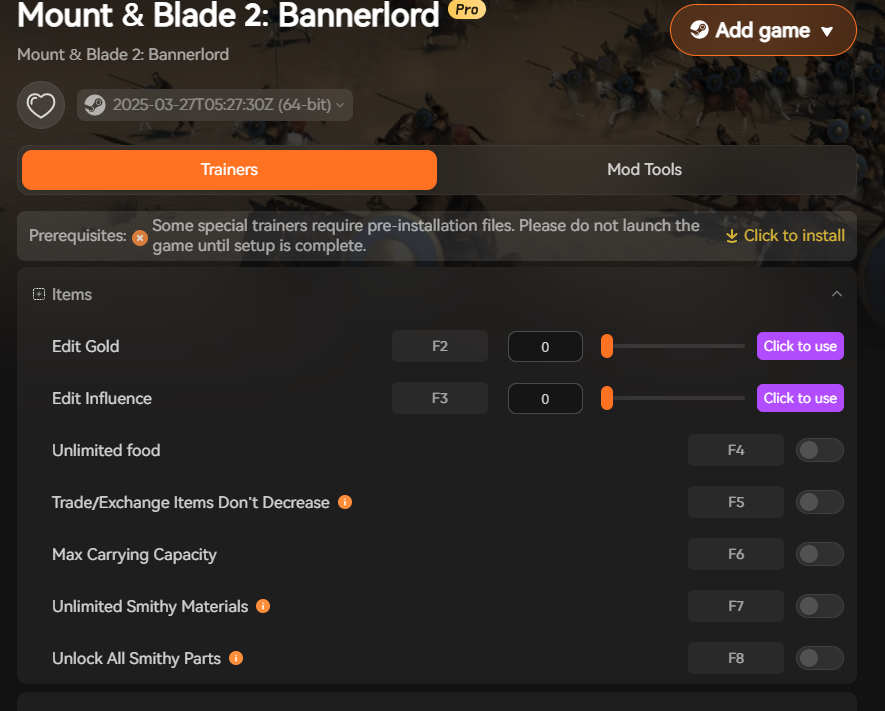
You can enhance Mount & Blade II: Bannerlord with XMOD by using its built-in trainers and mod tools, which let you go far beyond the game’s normal limits. From your screenshot, here’s what XMOD adds to your gameplay: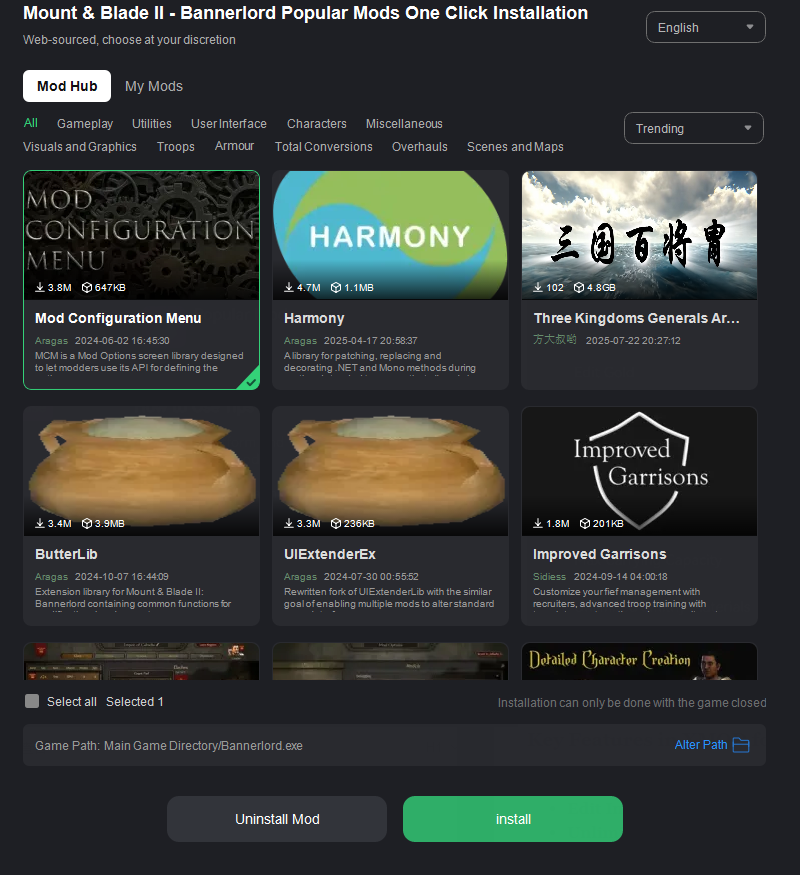
Key Features in XMOD for Bannerlord
- Edit Gold (F2): Instantly adjust your gold balance to any value.
- Edit Influence (F3): Control your kingdom’s influence without grinding.
- Unlimited Food (F4): Keep your armies fed forever, no matter the size.
- Trade/Exchange Items Don’t Decrease (F5): Duplicate items while trading or exchanging.
- Max Carrying Capacity (F6): Carry as much loot as you want without slowing down.
- Unlimited Smithy Materials (F7): Craft weapons endlessly without resource limits.
- Unlock All Smithy Parts (F8): Gain instant access to all weapon parts for crafting.
- Max Character Relationship (NUM1): Instantly max out your reputation with NPCs.
How to Use XMOD in Bannerlord
Preparation
- Select the platform and version of your game.
- Run it in offline mode (to avoid conflicts).
啟用作弊器
- Launch the game normally.
- Once inside, activate XMOD’s trainer features (like Edit Gold, Unlimited Food, etc.) by pressing the assigned hotkeys (F2, F3, etc.).
Play Freely
- Mix and match cheats to build wealth, expand influence, and dominate battles without the usual restrictions.
總結
Enhancing Mount & Blade II: Bannerlord with XMOD transforms the game into a fully customizable experience. Instead of grinding for gold, influence, or resources, you can instantly unlock what you need and focus on the fun parts—leading armies, forging weapons, and shaping your kingdom. With features like unlimited food, max relationships, and smithy unlocks, XMOD gives you the freedom to play Bannerlord your way—whether that’s pure experimentation, a relaxed power fantasy, or testing new strategies without limits.


 南希-米勒
南希-米勒

