胡凱琳
胡凱琳
Let’s set the exact scene: You just spent three grueling hours farming Everdens to scrape together 100 Bottle Caps. You buy a Super Rare (SR) Expedition Ticket from Melynx Inc. because you are finally ready to hunt an Elder Dragon. You find a Co-op lobby, ready your best Monstie, click “Depart”… and the screen goes black.
A moment later, a pop-up appears: “Failed to Join Co-op Session. Returning to Vermeil City.” Your heart sinks. You check your inventory, and your 100-Bottle-Cap SR Ticket is completely gone. Poof.
Capcom’s RE Engine is a visual masterpiece, but its Peer-to-Peer (P2P) networking code in Monster Hunter Stories 3: Twisted Reflection has left thousands of PC players staring at error codes in pure frustration. If you are tired of getting disconnected from Shadow Dens or failing to matchmake with your friends, you are in the right place.
In this technical guide, we will break down exactly how to fix the matchmaking errors, bypass Steam region locks, fix Capcom ID cross-play bugs, and show you how to use the XMODhub PC Trainer to farm SR Dens entirely solo without relying on broken netcode.
Editor’s Note
A massive warning for all Riders: If you have a strict NAT Type, do not host SR Expeditions! The game uses P2P servers, meaning the host’s internet determines the stability of the entire lobby. If your connection drops, everyone loses their tickets. If you are tired of losing your hard-earned items to server bugs, check out our Offline Farming Shortcut below.
Quick Answer: How to Fix Monster Hunter Stories 3 Multiplayer Errors
(Sitting at the Co-op Quest Board and getting constant errors? Run through this immediate checklist.)
The Root Cause: How Monster Hunter Stories 3 P2P Matchmaking Works
Unlike MMOs that use dedicated central servers, Monster Hunter Stories 3 uses a Peer-to-Peer (P2P) networking model for its Co-op Expeditions.
This means that when you join a lobby, your PC is directly connecting to the host’s PC. If the host has a weak Wi-Fi signal, a strict firewall, or suddenly minimizes their game, the connection severs, and you are slapped with the “Failed to Join Session” error. Because the game consumes your SR Ticket the moment the loading screen begins, a dropped connection results in a lost ticket.
Fix 1: The Steam Download Region Trick (Region Lock Bypass)
If you are searching for lobbies and constantly seeing the “No Sessions Found” message, your game isn’t necessarily broken; you are just a victim of Steam’s localized matchmaking.
Steam attempts to match you with players in your geographic Download Region to reduce ping. If you live in a region with a smaller Monster Hunter player base, the lobbies will be empty.
- ✦Open your main Steam client window.
- ✦Click 蒸氣 in the top left corner > Settings.
- ✦導覽到 Downloads 標籤。.
- ✦Under Download Region, select a massive hub. (We recommend US – Los Angeles, US – New York, or Japan – Tokyo depending on your time zone).
- ✦Restart Steam and launch Monster Hunter Stories 3. You will immediately see dozens of new Co-op lobbies populate the Quest Board.
Fix 2: Windows Time Sync Authentication Error
This is a hidden bug that plagues many RE Engine games featuring Denuvo and cross-play authentication.
When you attempt to join a lobby, your PC sends a timestamped security token to Capcom’s matchmaking servers. If your PC’s internal clock is off by even two minutes compared to the global server time, the handshake fails, resulting in an instant “Failed to Join” boot.
- ➤Press the Windows Key and type Date and Time settings.
- ➤Ensure “Set time automatically” is toggled ON.
- ➤Scroll down and click the “Sync Now” button under Additional settings.
- ➤Launch the game and try joining a lobby again. This single step fixes the issue for nearly 40% of PC players.
Fix 3: Capcom ID Cross-Play Handshake Failure
Monster Hunter Stories 3 features full cross-play between Steam and the Epic Games Store, but it requires a linked Capcom ID. Often, players will try to join a cross-play lobby, but their browser extension (like uBlock Origin) blocked the background authentication token when they first linked their account.
- ✨Close the game and open your web browser.
- ✨Go to the official Capcom ID website and log in.
- ✨Navigate to your Linked Accounts page.
- ✨Unlink your Steam/Epic account.
- ✨Disable your ad-blocker, refresh the page, and re-link your account. The clean handshake will now allow you to join cross-platform lobbies without the error pop-up.
Fix 4: Fixing Strict NAT Types (Port Forwarding)
If you can join lobbies perfectly fine but other players constantly fail to join the lobbies you host, you likely have a Strict NAT Type (NAT Type 3). This means your router’s firewall is actively blocking incoming P2P connections.
To fix this, you need to enable UPnP (Universal Plug and Play) or manually forward the ports for Steam/Epic Games on your router.
| 規範 | Port Range |
|---|---|
| TCP Ports | 27015, 27036 |
| UDP Ports | 27015, 27031-27036 |
Log into your router’s admin gateway (usually 192.168.1.1), locate the Port Forwarding tab, and input those ranges to open your NAT to “Moderate” or “Open.”
The Ultimate Workaround: Farm Solo with XMODhub
Let’s be honest: troubleshooting router ports and constantly losing 100-Bottle-Cap SR Tickets to random server disconnects is infuriating. You shouldn’t have to suffer through potato netcode just to farm an Elder Dragon.
Did you know you can run Co-op Expeditions completely Offline with an AI partner? It’s true. If you start a Co-op quest from the menu and immediately open the sub-menu to “Start Now,” the game will assign you an AI-controlled Rider (like Reverto or Alwin).
The only problem? Playing offline still costs an SR Ticket. But what if tickets were free?
- 1
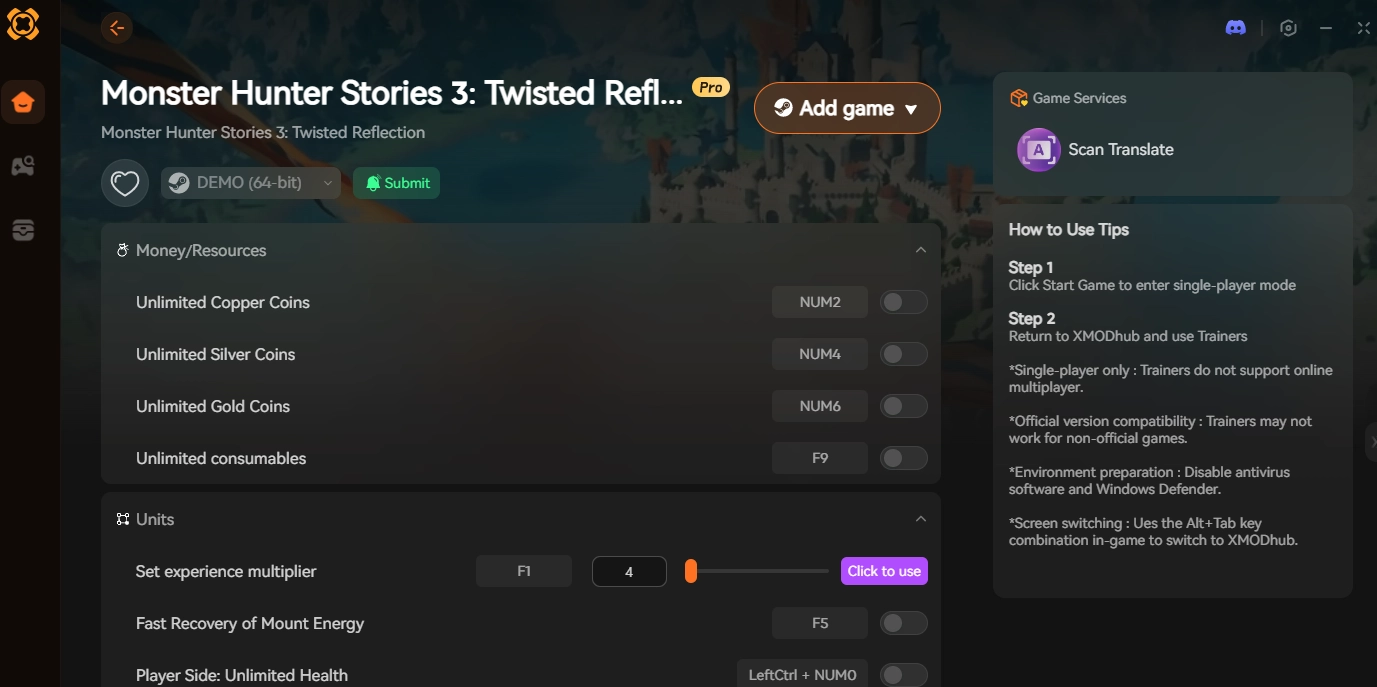
- Download the official [XMODhub Monster Hunter Stories 3 Trainer].

- 2
- Launch your game, load your save, and stand in Vermeil City.

- 3
- Click “Play” in the XMODhub app to safely hook into the game.

- 4
Activate the Solo-Farming Hacks:
- ✦Infinite Consumables: Purchase just one SR Expedition Ticket. Activate this cheat, and your ticket count will freeze. You can now launch infinite offline SR Expeditions without ever grinding Bottle Caps again.
- ✦Guaranteed Rainbow Eggs: Since AI partners aren’t always optimal in combat, you don’t want to waste time digging up bad eggs. Toggle this on to ensure the final nest always yields a perfect-stat Elder Dragon.
With XMODhub, you completely remove the need to rely on Capcom’s broken multiplayer servers. Play at your own pace, keep your tickets, and get the best Monsties in the game.
Frequently Asked Questions (FAQ)
Q: Do I lose my Expedition Ticket if the host disconnects?
A: Yes. Unfortunately, Monster Hunter Stories 3 saves your inventory state the moment the expedition loads. If the host drops the connection during the first battle, you are returned to the hub, and your ticket is gone. This is why we highly recommend using the XMODhub trainer to freeze your ticket count when playing offline.
Q: Why does the game lag heavily when a new player joins my lobby?
A: This is due to the P2P handshake syncing the new player’s Monstie and Hunter data with the host’s PC. The stuttering is normal and should subside after a few seconds once the data is cached.
Q: Can I use XMODhub while playing online with randoms?
A: We strictly advise against using combat or economy cheats in public matchmaking lobbies to avoid ruining the experience for others and risking a Capcom ID flag. Stick to solo offline with AI or private, password-protected lobbies with friends.
Conclusion: Reclaim Your Tickets
Dealing with the “Failed to Join Co-op Session” error in Monster Hunter Stories 3: Twisted Reflection is a massive headache, especially when precious SR Tickets are on the line. By ensuring your Windows clock is synced, bypassing Steam’s region locks, fixing your Capcom ID link, and opening your NAT type, you can dramatically improve your matchmaking success rate.
But if you are tired of the constant disconnects and toxic P2P connections, take matters into your own hands. [Download the XMODhub PC Trainer today], freeze your SR Tickets, take an AI partner into the depths of the Labyrinth, and farm those Rainbow Eggs stress-free!

我是一名熱情的遊戲玩家,也是 XMODhub 的作家,致力於為您帶來最新的遊戲新聞、秘訣和見解。.
與我聯繫:
LinkedIn 個人資料
 南希-米勒
南希-米勒