胡凱琳
胡凱琳
You finally booted up Monster Hunter Stories 3: Twisted Reflection. You are ready to dive into the epic conflict between Azuria and Vermeil, hatch your Twin Rathalos, and master the new Rock-Paper-Scissors combat.
But right after a grueling 20-minute boss fight, or during a transition into a new Shadow Den, the music loops. The screen goes entirely dark. You are hit with the dreaded Infinite Loading Screen or a hard Black Screen.
Let’s be real: nothing is more soul-crushing than losing hours of unsaved progress. As Capcom pushes the massive open-world boundaries of the RE Engine, PC players are bound to run into launch-week technical walls.
Do not panic. We have compiled the exact technical fixes to get you past this loading bug. Furthermore, once your game is running smoothly, we will show you how to use XMODhub to fix the other broken parts of the game—specifically, the agonizing RNG egg grind and tedious material farming.
TL;DR: How to Fix MHS3 Black Screen
If your game is stuck on a black screen or an endless loading loop, immediately try these proven RE Engine fixes:
➤
Press Alt + Enter: If the game hangs on launch, pressing this shortcut forces it into Windowed Mode, bypassing fullscreen resolution conflicts.
➤
Delete Shader Cache: Navigate to your Steam Monster Hunter Stories 3 directory and delete the shader.cache file to force the engine to rebuild corrupted graphics data.
➤
Update GPU Drivers: The 2026 RE Engine requires the absolute latest NVIDIA (551.xx+) or AMD Adrenalin game-ready drivers.
➤
Force DirectX 11: Right-click the game in Steam > Properties > Launch Options. Type -d3d11 to run a more stable graphics API.
➤
Disable Steam/Discord Overlays: Background overlays frequently conflict with RE Engine asset streaming during loading screens.
1. Why Does the Infinite Loading Bug Happen?
The transition to a seamless open world is demanding. When you fly your Monstie from the icy borders of Azuria straight into the volcanic trenches of Vermeil, the game must stream massive amounts of data.
If your PC’s VRAM spikes, or if a shader fails to compile correctly during a cinematic Kinship attack, the RE Engine halts the rendering process. This results in the audio continuing while the visual output gets stuck on a black screen. Deleting the shader cache and ensuring your game is installed on a fast NVMe SSD are the best ways to permanently resolve this.
2. PC Performance & Stutter Fix: Taming the RE Engine
Fixing the black screen is only the first step. If you are experiencing aggressive micro-stuttering while exploring or fighting, you need to optimize your settings.
✨
Lower Volumetric Clouds: Flying high in the skybox looks gorgeous, but volumetric rendering eats your GPU. Turn this to “Medium” for an instant 15 FPS boost.
✨
Enable DLSS / FSR: Always keep upscaling set to ‘Quality’ or ‘Balanced’ to smooth out heavy particle effects during combat.
✨
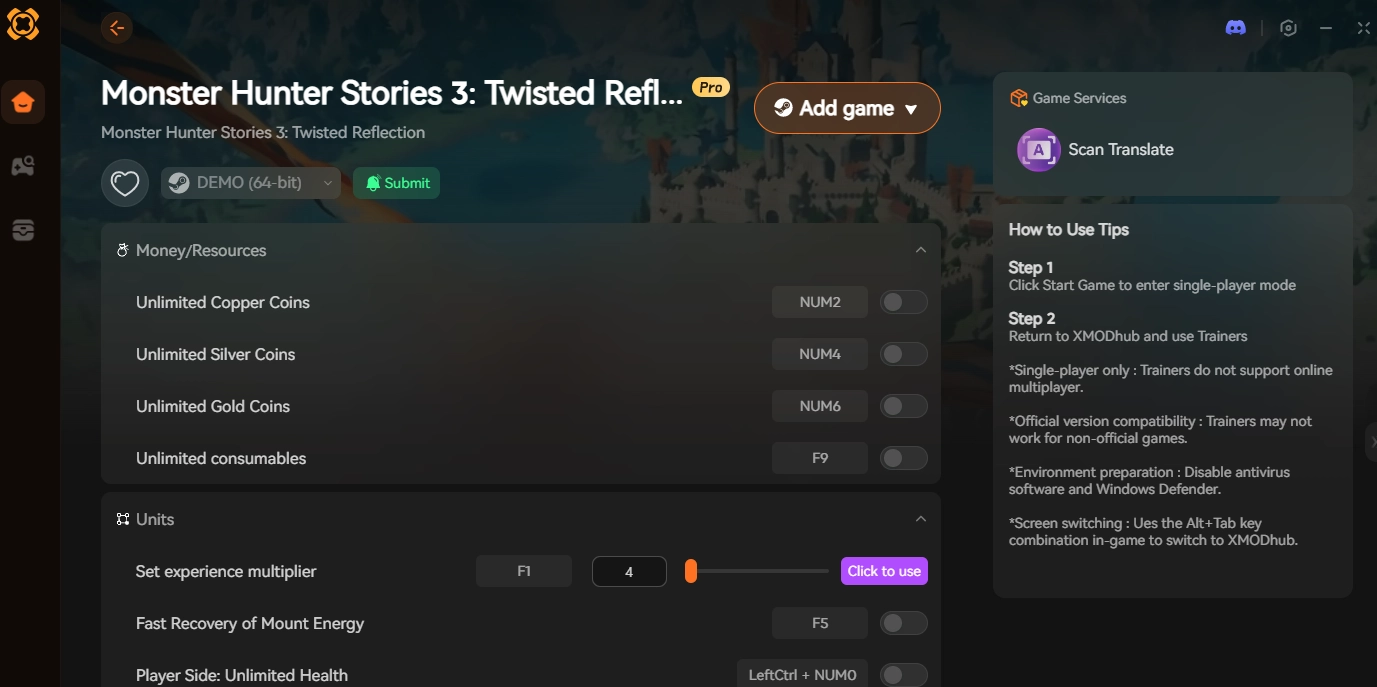
The Combat Speed Hack: Stuttering often peaks during repetitive turn-based animations. XMODhub features a highly stable Combat Speed Multiplier. Fast-forwarding these long animations at 3x speed saves your GPU from rendering heavy effects and cuts your grinding time in half.
3. How to Get Rare Eggs Fast (Skip the Grind)
Now that your game is running flawlessly, we need to address the Gammoth in the room: the brutal endgame RNG.
To get a competitive Monstie, you must force a monster to retreat by winning the Rock-Paper-Scissors (Power/Speed/Technical) combat loop and hitting it with a Paintball. Once in the den, you pray to the RNG gods to dig up an egg that “Smells amazing” (Rainbow glow). Doing this 50 times for a single good drop is a massive, frustrating time-sink.
You have a life; you shouldn’t have to treat egg farming like a second job. The XMODhub PC Trainer acts as your ultimate Quality of Life (QoL) upgrade.
- ✦Toggle on 100% Retreat Rate to force any monster back to its nest.
- ✦Then, enable 100% Rare Egg Drop. Every nest you search will instantly yield a heavy, Rainbow-smelling egg with maximum gene slots. Get your dream Monstie instantly.
4. Best Gene Builds Guide: Mastering the Rite of Channeling
The Rite of Channeling is how you build god-tier Monsties. You align genes in a 3×3 grid to create Bingo Bonuses (matching elements or attack types in a row).
🔥 The Problem: You finally farm the perfect Fire Boost Gene (XL), but the slot you need on your Silver Rathalos’s Bingo board is locked. Unlocking it requires expensive Stimulants.
✨ The Smart Fix: Farming Bottle Caps and monster parts to buy Stimulants is exhausting. Use XMODhub’s Ignore Crafting Requirements 和 Infinite Materials mods. You can instantly forge anything you need at the smithy or Melynx Inc., bypassing the soul-crushing material tax. Go straight to theory-crafting and assembling your perfect build.
5. Claim Your Ultimate Roster with XMODhub
Monster Hunter Stories 3: Twisted Reflection is a beautiful game, but technical bugs and archaic JRPG grinding mechanics can quickly ruin the experience.
XMODhub is designed for gamers who respect their own time. We provide a safe, intuitive PC overlay that removes the frustration entirely.
Download the Client: Get the verified XMODhub app from our official site.

Auto-Detect Game: Open the app and select MHS3: Twisted Reflection.
Inject Safely: Launch the game through Steam, then click “Play” in XMODhub.
Activate Mods: Use the clean overlay to toggle Infinite Zenny, Combat Speed Hacks, and Guaranteed Rainbow Eggs.

Fix your crashes, skip the endless material farming, and build the ultimate team of Elder Dragons on your own terms.
6. FAQ
Q: Will forcing DX11 fix the black screen permanently?
A: For many older or mid-tier GPUs, yes. DX12 offers better lighting features, but DX11 provides much more stability during the RE Engine’s heavy open-world asset streaming, preventing infinite loading loops.
Q: Does the XMODhub Combat Speed hack cause crashes?
A: No. Our Combat Speed Multiplier is specifically engineered for the RE Engine. It safely accelerates the internal tick rate without desyncing the audio or causing black screens during Kinship attacks.
Q: Can I use these mods online?
A: XMODhub safely modifies local RAM for your single-player experience. However, to protect your Capcom ID and maintain fair play, you must toggle off all combat cheats before entering public Co-Op Expeditions or the Ranked PvP Rider Arena.
7. Conclusion: Reclaim Your Save File
A black screen crash during a massive RPG campaign is terrifying, but following the RE Engine troubleshooting steps above will quickly get you back into the action.
Once you are safely exploring Azuria and Vermeil again, do not let the artificial progression walls stop your fun. The brutal mechanics of gene grinding and endless material farming are just as frustrating as a technical glitch.
By utilizing the XMODhub PC Trainer, you strip away the bad RNG and focus entirely on the brilliant turn-based combat and deep customization. Take absolute control of your game, force those Rainbow egg drops, and ride into battle without limits.

我是一名熱情的遊戲玩家,也是 XMODhub 的作家,致力於為您帶來最新的遊戲新聞、秘訣和見解。.
與我聯繫:
LinkedIn 個人資料
 南希-米勒
南希-米勒