摘要: This guide explains how to fix Dead Island 2 error 0x1606, troubleshoot multiplayer issues like co-op not working, and how to get free mods to enhance your gameplay experience.
Are you struggling with Dead Island 2 errors that ruin your zombie-slaying experience?
Whether you’ve encountered the frustrating Error 0x1606, can’t access multiplayer co-op, or are searching for solutions to Error 0x1410, you’re not alone.
In this guide, we’ll walk you through the most common Dead Island 2 issues and how to fix them fast.
目錄
What Is Dead Island 2 Error 0x1606?
Why Isn’t Multiplayer Working in Dead Island 2?
How to Fix Dead Island 2 Error 0x1410: Co-op not Working
How to Get Free Mods for Dead Island 2?
總結
What Is Dead Island 2 Error 0x1606?
Dead Island 2 error 0x1606 is a connectivity issue that typically occurs when the game fails to connect to the servers, often due to network problems, server outages, or firewall restrictions. It prevents players from accessing online features like multiplayer co-op.
With that in mind, you might be wondering why this error occurs. Here’s the answer.
Why Isn’t Multiplayer Working in Dead Island 2?
If you’re experiencing issues with co-op multiplayer in Dead Island 2 and seeing the “Failed to Join Session” error 0x1410, several factors could be causing the problem. Here’s a breakdown of the most common reasons:
Dead Island 2 Servers Are Down If the game’s servers are experiencing downtime or maintenance, you won’t be able to join or create multiplayer sessions. This can also cause the game to mistakenly report that you’re not connected to the internet.
Your Internet Connection Is Offline or Unstable A poor or disconnected internet connection will prevent the game from accessing online features. Restart your modem and router to ensure a stable connection before trying again.
Router or Network Settings Are Blocking the Connection If UPnP (Universal Plug and Play) is disabled on your router, it might block the connection to Dead Island 2 servers. Enabling UPnP or manually forwarding the necessary ports can resolve this. Also, having a Strict NAT type can interfere with multiplayer matchmaking and connectivity.
By checking these potential issues, you can identify the source of the problem and take the right steps to restore multiplayer functionality.
How to Fix Dead Island 2 Error 0x1410: Co-op not Working
If you’re encountering the “Failed to Join Session, Please Check Your Network Connection” message with error code 0x1410 in Dead Island 2, you’re not alone. This issue is commonly linked to network problems, server outages, or game settings. Follow the steps below to troubleshoot and resolve the problem.
1. Confirm Co-op Mode is Unlocked
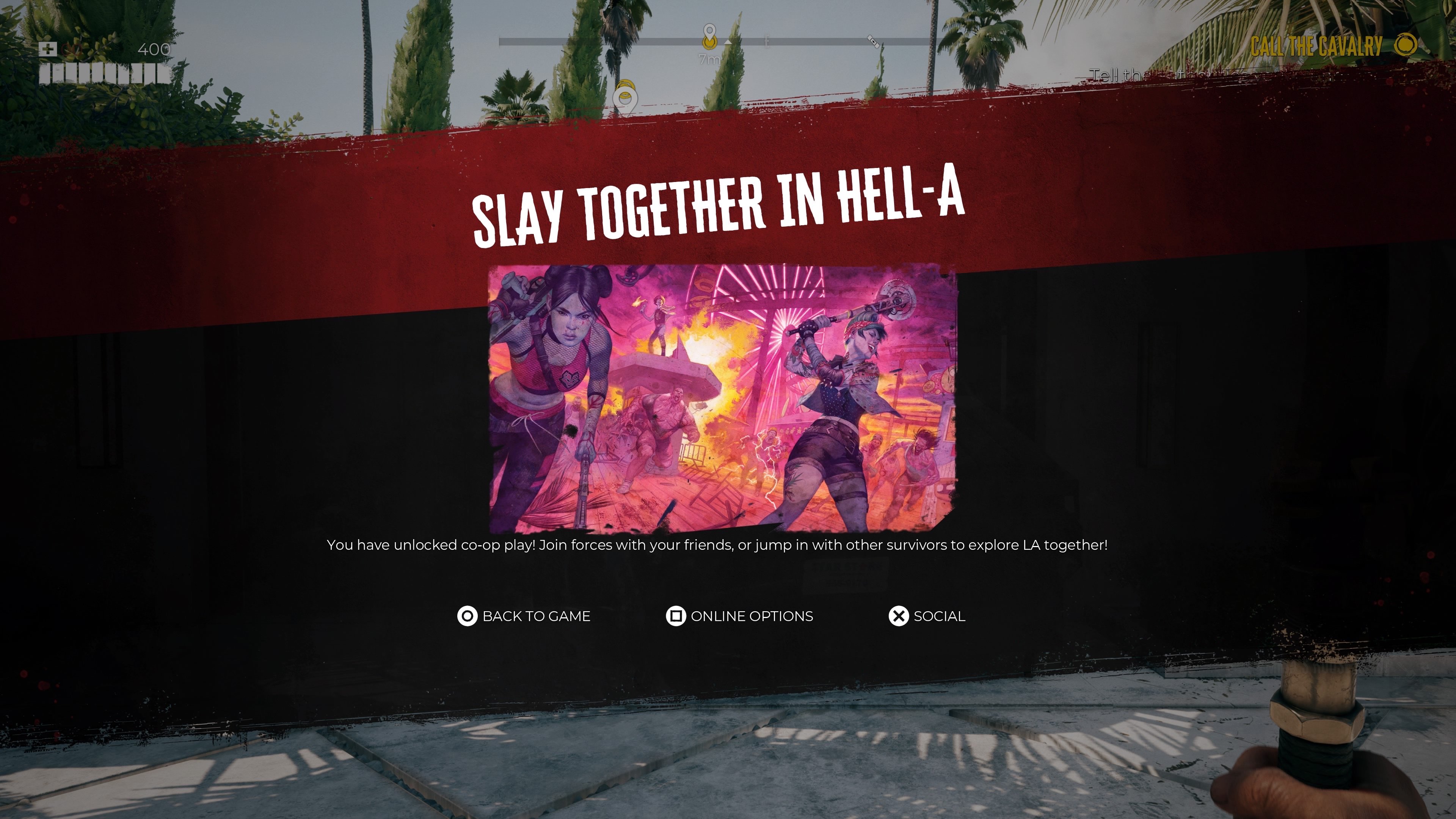
Co-op mode is only available after you complete the prologue. If you haven’t done so yet, that may be the reason multiplayer isn’t working. Make sure you’ve unlocked the feature before attempting other fixes.
2. Check Server Status
Multiplayer issues are often due to server maintenance or outages.
Visit the official Dead Island 2 Twitter or Reddit to check for any announcements.
If other players are reporting issues, the problem may be temporary.
3. Restart the Game and Your System
Restarting often resolves connection errors.
Fully close the game.
Reboot your PC or console.
Launch the game again and ensure it is fully updated.
4. Test Your Internet Connection
Unstable internet can block multiplayer features.
Run a speed test to check latency and connection quality.
Restart your router or modem.
Use a wired Ethernet connection for a more stable experience.
Ensure no firewall or antivirus is interfering with the connection.
5. Disable VPN
If you’re using a VPN, disable it and test the game again.
VPNs can introduce latency and connection issues that may prevent access to online servers.
6. Check NAT Type and UPnP
A restricted NAT type can block multiplayer features.
Go to your network settings and check your NAT type.
It should be Open (Type 1) for PlayStation, Open (Type A) for Xbox, and NAT Type 1 for PC.
If it’s Strict or Moderate, enable UPnP on your router or set up port forwarding.
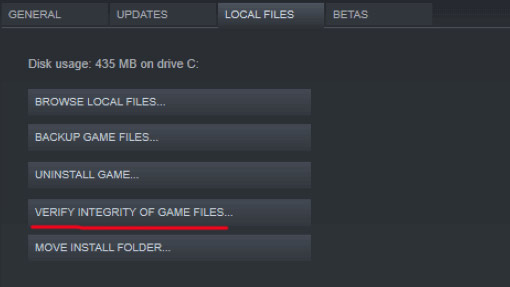
7. Verify Game Files (PC Only)
Corrupted or missing files may cause multiplayer to fail.
關於 蒸氣 or Epic Games Launcher, go to Library > Dead Island 2 > Properties > Local Files.
選擇 “Verify integrity of game files.”
8. Temporarily Disable Firewall and Antivirus
Firewall or antivirus software may block server connections.
Go to Control Panel > Windows Defender Firewall and select “Turn off Windows Defender Firewall” temporarily.
In Windows Security > Virus & Threat Protection, disable real-time protection as a test.
Be sure to re-enable these features after testing.
9. Update Network Drivers (PC Only)
Outdated drivers can affect online connectivity.
Open 裝置管理員 via the Start menu.
Expand Network adapters, right-click your adapter, and choose Update driver.
選擇 Search automatically for drivers.
10. Perform a Clean Boot (PC Only)
Background applications may interfere with connectivity.
Press Windows + R, type msconfig, and press Enter.
In the Services tab, check Hide all Microsoft services and click Disable all.
In Task Manager, disable high-impact startup programs.
Restart your computer.
11. Reinstall the Game
As a last resort, uninstall Dead Island 2 and reinstall it.
Your save data is safe as long as you are logged into your game account (Epic, Steam, PSN, Xbox Live).
A fresh installation can resolve deep-seated file or configuration errors.
Error 0x1410 in Dead Island 2 can be caused by anything from server outages to local network settings. Start with the simple steps like restarting and checking your connection, then move on to more advanced fixes such as adjusting NAT settings, verifying files, or reinstalling the game. One of these solutions should get your co-op mode working again.
Error fixed—now let’s look at how to get free mods for Dead Island 2.
How to Get Free Mods for Dead Island 2?
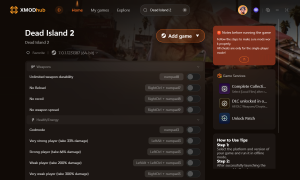
如果您想在以下遊戲中增強單人遊戲體驗 Dead Island 2, Xmod is a reliable tool worth trying. This platform allows you to access cheats and game trainers to customize and elevate your gameplay.
Steps to Use Xmod for Dead Island 2:
1.Download and install the Xmod app on your device.
3.Launch the game through Xmod to enable mod support.
Dead Island 2 mods
4.Choose and activate your preferred mods or cheats within the app to enjoy a more tailored and enhanced gaming experience.
Xmod provides a user-friendly way to experiment with different features, making your playthrough more dynamic and enjoyable. Just be sure to use mods responsibly and only in single-player mode to avoid conflicts or violations in online multiplayer.
總結
In conclusion, whether you’re dealing with Dead Island 2 error 0x1606, co-op connectivity problems, or looking to enhance your game with free mods, these tips and fixes will help you get back into the action smoothly and enjoy a seamless zombie-slaying adventure.
Solasta 2 Class Tier List & Best Party Comp (Patch 1.0) | XMODhub
Let’s speak adventurer to adventurer. Solasta 2 is a brilliant, uncompromising translation of the tabletop Dungeons & Dragons 5e ruleset into a video game. The grid-based tactical combat, the verticality, and the strict…
Solasta 2 Cheats & Trainers: Always Roll 20 & Max Stats (2026) | XMODhub
Let’s be completely honest with each other. Solasta 2 is a masterpiece of tactical CRPG design. It captures the authentic, tabletop Dungeons & Dragons 5e rule set better than almost any other game…

 胡凱琳
胡凱琳




 南希-米勒
南希-米勒