摘要: Looking for a safe and reliable Cheat Engine alternative for 迷霧之域? XMOD’s trainer tool offers one-click boosts and customizable enhancements for a smoother, more enjoyable farming adventure.
迷霧之域 blends cozy farm-life simulation with RPG elements—farming, mining, crafting, magic and social interactions—all wrapped in a charming pixel-art world. As you rebuild the town of Mistria, improve your farm, level up your character and deepen relationships, progression can feel slow and tedious especially when blinking from resource to resource and waiting for stamina, gold, or essence to accumulate.
In the past, many players turned to Cheat Engine to shortcut the grind—but Cheat Engine often requires technical know-how, risks game instability, and tends to break on new updates.
That’s why XMOD stands out: a safer, user-friendly trainer alternative that gives you secure boosts—like infinite stamina, gold or experience—so you spend more time enjoying your farm, your friends and your story in Fields of Mistria rather than slogging through repetitive tasks.

目錄
- 什麼是 迷霧之域?
- 玩家為何尋找作弊引擎替代方案
- Why XMOD Is the Best Alternative to Cheat Engine
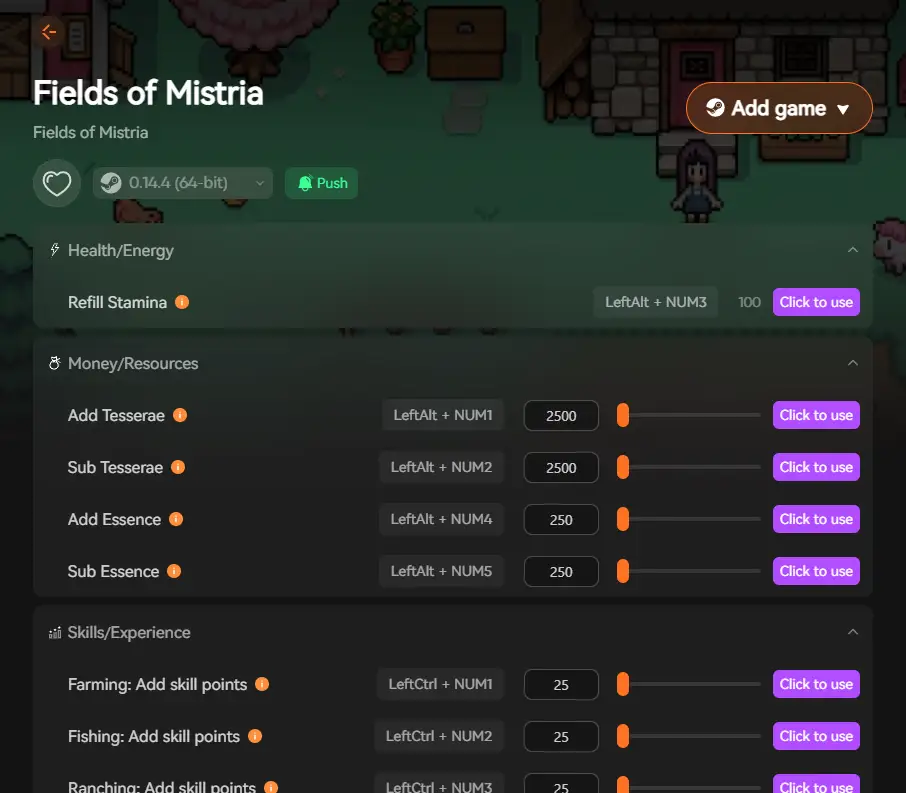
- Key Features of XMOD for 迷霧之域
- How to Use XMOD Safely
- Benefits of Using XMOD Over Cheat Engine
- Tips for Getting the Most Out of XMOD
- Other Games You Can Enhance with XMOD
- 常見問題
- 最終想法
什麼是 迷霧之域?
迷霧之域 is a cozy single‑player farming‑life simulation RPG where you inherit an overgrown homestead in the village of Mistria, rebuild the town after an earthquake, farm, fish, mine, craft and unlock magic along the way.
Players can also build relationships with 30+ villagers, raise animals, explore ruins and attend seasonal festivals, but the breadth of activities means progression can be time‑consuming.
玩家為何尋找作弊引擎替代方案
Because Fields of Mistria features deep progression loops — farming crops across seasons, raising animals, unlocking upgrades, exploring mines and building town renown — some players feel the pace slows down considerably. Traditional tools like Cheat Engine allow direct value edits (currency, experience, item counts), but carry risks:
- Manual pointer editing required
- Potential save‑file corruption or game crashes
- Scripts often break with updates or patches
- Security/antivirus flags and steep learning curve These issues make many players seek a safer, simpler overlay solution — which is where XMOD comes in.
Why XMOD Is the Best Alternative to Cheat Engine
XMOD positions itself as a modern trainer/mod‑platform that supports thousands of single‑player PC games. It offers one‑click activation, ready‑made trainers and mod integration rather than manual memory scanning. In the context of Fields of Mistria, XMOD offers:
- Easier access to resource boosts (e.g., crops, materials, currency)
- Safe mod integration tailored for the game’s version
- Reduced risk of broken scripts after updates This makes it a practical “Cheat Engine alternative” for players seeking smoother progression.
Key Features of XMOD for 迷霧之域
When using XMOD with Fields of Mistria, you can expect features like:
- Boosted resources: increased gold, crafting materials, rare item counts
- Unlocking upgrades faster: home upgrades, greenhouse items, museum sets
- Skill‑tree or magic unlocks: quicker access to spells or skill perks
- Performance or quality‑of‑life enhancements: smoother framerates, less lag during exploration/mining
- One‑click overlay activation: simpler than manual edits, safer for your save file
How to Use XMOD Safely

Implementing XMOD for Fields of Mistria requires just a few simple steps:
- Download XMOD from the official website
- Install and launch the application
- Locate “迷霧之域” in the game library

- Launch the game through XMOD
- Activate desired trainers via the intuitive overlay interface
All XMOD enhancements are pre-tested to ensure compatibility with current game versions.
Benefits of Using XMOD Over Cheat Engine
Setup Complexity
Save File & Stability Risk
Compatibility with Game Patches
Resource & Mod Variety
Beginner Friendliness
Tips for Getting the Most Out of XMOD
- After you’ve learned early gameplay (first season/few weeks), activate resource boosts to unlock expensive upgrades (home, greenhouse) more quickly.
- Use skill‑ or magic unlock features to experiment with spells and farm/mining builds you might otherwise skip.
- Combine performance enhancements (if available) with exploration/mining, since deeper zones and ruins can strain PC hardware.
- Always check for XMOD updates when Fields of Mistria receives major patches — compatibility can change.
- Enable one trainer feature at a time initially (e.g., material boost), confirm everything works, then add more to avoid conflicts.
Other Games You Can Enhance with XMOD
XMOD supports an extensive collection of PC titles including:
Mount & Blade 2: Bannerlord
Hearts of Iron IV
黑幕突擊者
Transience
Dragon Age: The Veilguard
The platform consistently expands its library to include new and popular simulation and RPG titles.
常見問題
Q1: Is XMOD safe for Fields of Mistria?
A1: When downloaded from the official site and used in single‑player mode, yes — XMOD is a safer alternative to manual hacks. Always back up saves beforehand.
Q2: Do I need advanced technical skill to use it?
A2: No — XMOD is designed for ease of use with one‑click trainer activation.
Q3: Will using XMOD affect achievements or progression?
A3: Possibly — some achievements may require no modifications, so use with awareness.
Q4: Can I use multiple trainer features at once?
A4: Yes — XMOD supports multiple features, but you should test stability with one first.
Q5: What about updates and compatibility?
A5: Major patches for Fields of Mistria may affect trainer functionality — always update XMOD and verify support.
最終想法
迷霧之域 offers a rich and delightful farming‑life simulation: nostalgic art style, magic and romance options, deep customization, and expansive mechanics from farming to mining, crafting and exploration. (See official features list.)
While its depth provides lasting appeal, the sheer volume of activities can make progression feel slow at times. With XMOD Secure Boost, you gain a safe, user‑friendly alternative to traditional hacking tools like Cheat Engine — enabling faster resource access, smoother progression and more freedom to experiment with builds. If you’re looking to tailor your Fields of Mistria experience and spend more time enjoying the world than grinding, XMOD offers a practical and modern solution.
我是一名熱情的遊戲玩家,也是 XMODhub 的作家,致力於為您帶來最新的遊戲新聞、秘訣和見解。.
與我聯繫:
LinkedIn 個人資料

 胡凱琳
胡凱琳

 南希-米勒
南希-米勒

