摘要: This guide covers Knightica’s system requirements, detailing the minimum and recommended specifications. It helps players determine if their PC can run the game smoothly and enjoy optimal performance.
Knightica is an action-packed strategy game that combines fast-paced combat with tower defense mechanics, offering a unique and engaging gameplay experience.
Before diving in, it’s important to understand the minimum and recommended system requirements to ensure smooth performance.
Many players may wonder, can you run Knightica on a low-end PC, or whether their current system is compatible.
This guide will also show you how to check if your PC can run Knightica and provide practical tips to boost your gameplay experience.
Following these recommendations will help you enjoy the game to its fullest.
目錄
- What is Knightica
- Minimum and Recommended System Requirements 為 Knightica
- 你能跑嗎 Knightica on a Low-End PC?
- 我的 PC 能否執行 Knightica
- Tips to Boost Gameplay Experience
- 總結
What is Knightica

Knightica is a fast-paced action-strategy game that blends tower defense mechanics with real-time combat. Players control heroes to defend against waves of enemies, strategically deploy defenses, and utilize unique abilities to survive increasingly challenging levels. With its mix of strategy, action, and progression, Knightica offers an engaging experience for both casual and hardcore gamers who enjoy tactical gameplay and dynamic battles.
Minimum and Recommended System Requirements 為 Knightica
Knowing the minimum and recommended system requirements will help you determine whether your setup is ready for an enjoyable experience or if you’ll need an upgrade for better performance.
Here are the full specifications to guide you.
最低系統需求
- OS: Windows 10 (64-bit only)
- Processor: Intel Core i3 or AMD equivalent
- Memory: 4 GB RAM
- Graphics: Intel UHD Graphics 630
- Storage: 4 GB available space
As for the recommended requirements, the officials haven’t released it yet.
你能跑嗎 Knightica on a Low-End PC?
運行 Knightica on a low-end PC may be possible, but performance could be limited. The minimum requirements call for Windows 10 (64-bit), an Intel Core i3 or AMD equivalent, 4 GB of RAM, and Intel UHD Graphics 630. Systems below these specs might experience lower frame rates, longer loading times, or graphical glitches. To improve performance on low-end hardware, consider lowering in-game graphics settings, closing background applications, and ensuring your drivers are up to date. Meeting or exceeding the minimum requirements is recommended for a smoother gameplay experience.
我的 PC 能否執行 Knightica
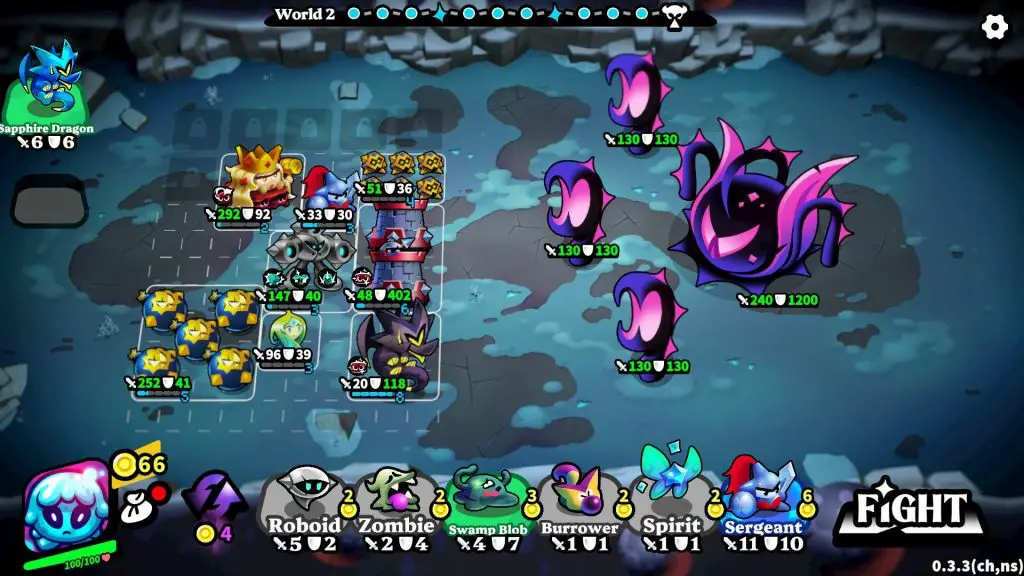
To determine if your PC can run Knightica, compare your system specs with the game’s minimum requirements: Windows 10 (64-bit), Intel Core i3 or AMD equivalent, 4 GB RAM, Intel UHD Graphics 630, and 4 GB of free storage. If your PC meets or exceeds these specs, the game should run, though performance may be smoother on higher-end hardware. Tools like Can You Run It can also help automatically check your system’s compatibility.
Tips to Boost Gameplay Experience
- Optimize Graphics Settings – Lower resolution, shadows, and visual effects if your PC struggles to maintain smooth frame rates.
- Update Drivers – Keep your GPU and system drivers up to date for better performance and stability.
- Close Background Applications – Free up RAM and CPU resources by shutting down unnecessary programs while playing.
- Use a Controller (Optional) – Some players may find a game controller offers a smoother and more comfortable experience than keyboard and mouse.
- Explore Game Mechanics – Learn hero abilities, tower placements, and enemy patterns to strategize effectively.
- Leverage XMOD Tools – Once Knightica is supported, XMOD can provide trainers, mods, and utilities to enhance gameplay, improve UI, or customize mechanics.
Following these tips will help you maximize performance and fully enjoy the strategic and action-packed gameplay of Knightica.
總結
Knightica is an engaging action-strategy game that combines tower defense mechanics with real-time combat, offering both challenge and excitement. Understanding the minimum system requirements helps ensure your PC can run the game smoothly, while checking compatibility allows low-end PC users to gauge performance. By following tips to boost gameplay, such as optimizing settings, updating drivers, and managing background processes, players can enjoy a seamless experience. Additionally, using tools like XMOD after the game’s launch can further enhance gameplay through trainers, mods, and utilities. With proper preparation, Knightica promises an enjoyable and strategic adventure for all players.
我是一名熱情的遊戲玩家,也是 XMODhub 的作家,致力於為您帶來最新的遊戲新聞、秘訣和見解。.
與我聯繫:
LinkedIn 個人資料

 胡凱琳
胡凱琳