
 胡凱琳
胡凱琳摘要: Discover the top 20 Mount and Blade 2 mods to try in 2025. From gameplay tweaks to visual upgrades, these mods offer new ways to enjoy Bannerlord.
Mount and Blade 2: Bannerlord continues to thrive thanks to its dedicated modding community. With hundreds of mods available, choosing the right ones can be overwhelming.
Whether you’re looking for immersive overhauls, quality-of-life tweaks, or enhanced visuals, 2025 has plenty to offer.
In this guide, we’ve handpicked the 20 best mods 為 Mount and Blade 2 worth downloading this year.
We’ll also walk you through the mod installation process and show how Xmod can help streamline your modding setup and improve overall gameplay performance.
目錄
- What are the Best Mods for Bannerlord?
- 20 Best Mount and Blade 2 Mods in 2025?
- How to Install Mods in Bannerlord?
- How to Enhance Mount and Blade 2 Gaming with Xmod?
- 總結
What are the Best Mods for Bannerlord?
Mount and Blade 2: Bannerlord has a massive modding community that constantly expands and improves the game. The best mods in 2025 range from complete overhauls and enhanced AI to quality-of-life improvements and visual upgrades. Some focus on realism and immersion, while others add entirely new factions, weapons, or campaign mechanics.
Whether you’re a seasoned player or new to Calradia, mods can tailor the game to your preferences. The best ones not only fix long-standing issues but also add depth and replayability, making Bannerlord feel fresh again.
20 Best Mount and Blade 2 Mods in 2025
Here are the 20 best mods for Mount and Blade 2 in 2025:
Harmony

創建者: Aragas
Harmony is a library for patching, replacing and decorating .NET and Mono methods during runtime.
Intended to ensure that all mods in a player’s modlist are using the latest version of Harmony to minimize conflicts.
Mod Configuration Menu

創建者: Aragas
Mod Configuration Menu is a Mod Options screen library designed to let modders use its API for defining the options.
Open Source Armory

創建者: The Open Source Armory Team
The #1 stop for all your custom armor needs! This mod combines existing popular armor mods adding 1,600+ new custom armors, 83 new shields and 148 weapons!
It is compatible with 1.1.0 and later versions.
Improved Garrisons

創建者: Sidies
This mod can help customize your fief management with recruiters, advanced troop training with templates, automatic garrison recruitment, a standalone UI, custom parties with orders and more!
Realistic Battle Mod

創建者: Marnah93 and Philozoraptor
This mod makes combat more realistic and improves AI. Armor and damage is reworked according to experimental data and physics. Units try to survive. AI uses proper formations and new custom culturally specific tactics were introduced. Tournaments were overhauled to be more balanced and rewarding experience.
Diplomacy

創建者: Diplomacy Team
A vanilla-friendly mod for the campaign and sandbox modes of Bannerlord. Diplomacy’s goal is to provide balanced, fun, and creative options for characters to have an impact on the world, including both the player and NPCs. Diplomacy creates more believable world behaviors while giving the player the agency to shape their world.
Detailed Character Creation

創建者: PoPoWanObi – Maintained by Designer225
This mod enables detailed character customization options, such as weight, build, and age and the ability to modify NPC appearances.
DismembermentPlus

創建者: TheSchwarz1
This mod adds full dismemberment/decapitation to Mount & Blade II: Bannerlord.
If you have the skill you can remove the enemy’s head, arm, hand, leg or foot. All options are on the table or rather at the edge of your axe, sword or glaive.
Bannerlord Software Extender (BLSE)

創建者: BUTR Team
The Bannerlord Software Extender (BLSE) is a tool for Bannerlord mods that expands modding capabilities and adds additional functionality to the game.
Unblock Dlls

創建者: GP0007
Unblock Dlls is a script for unblocking all DLL mods in modules.
ModLib

創建者: mipen-Tokashi-joshimoo
ModLib is a dependancy mod that provides useful code and a settings menu for mods to use.
Bannerlord Tweaks

創建者: mipen-Tokashi-joshimoo
Bannerlord Tweaks is a collection of tweaks that seek to improve the balance and reduce grind in Bannerlord. Everything is configurable through the in-game options menu and can be disabled if you don’t like it.
Realm of Thrones

創建者: Carolina Warlord
A total conversion mod for Mount & Blade 2 Bannerlord, which will change Calradia into Westeros and Essos from the HBO series, Game of Thrones. Hundreds of characters added, along with over twenty kingdoms from the Free Folk, north of the Wall, to the Dothraki of the Great Grass Sea.
Serve as soldier

創建者: LL Muse
This mod is a reimplementation of the freelancer idea.
Xorberax’s Legacy

創建者: TheSchwarz1
This collection provides a working update to some of the great mods originally developed by Xorberax all compiled into a single module.
This pack incorporates MCM integration. Granting the abilily to adjust settings while in game. You can also disable any mod in the pack you don’t want to use in the same MCM menu.
Swadian armoury

創建者: ADamnSexyName
This mod adds a lot of random armor pieces not meant to be historically but for practice and fun.
Fast Dialogue
 Basileus TheUnknown Sval Carrasco
創建者: Dallen
This mod removes loading screens from interactions with essentially all map interactions. Including lords, bandits, villagers, caravans, and small faction meetings.
Banner Kings

創建者: Basileus TheUnknown Sval Carrasco
Banner Kings is a suite of features to deepen non-combat gameplay. Populations, feudal titles, village projects, settlement management overhaul & more.
Raise your Banner

創建者: ShutUpMalfoy
This mod adds more banners to the battlefield.
Calradia Expanded

創建者: Drezavelt
This mod adds an extra 14 Towns, 8 Castles, and 77 Villages. It also relocates many vanilla towns, castles, and villages to other locations for them to make more sense. For example, a castle defending a pass rather than at the arse end of nowhere. It also attempts to move village resources into sensible geographical locations.
How to Install Mods in Bannerlord
Installing mods in Mount and Blade 2: Bannerlord is a straightforward process, especially with modern tools available in 2025. Here’s a simple step-by-step guide:
- Find and Download Mods Visit trusted modding sites like Nexus Mods or ModDB. Make sure the mod version matches your game version.
- Extract the Mod Files. Most mods come in
.zip或.rarformat. Use tools like WinRAR or 7-Zip to extract the files. - Place Mods in the Correct Folder Move the extracted mod folder to:
...\Steam\steamapps\common\Mount & Blade II Bannerlord\Modules - Activate Mods in the Launcher. Start the game and go to the Mods tab in the launcher. Check the boxes next to the mods you want to enable. Pay attention to load order if the mod author mentions it.
- Check for Dependencies Some mods require other mods or libraries (like Harmony, ButterLib, or UIExtenderEx). Make sure to install those as well.
- Use a Mod Manager (Optional but Recommended). Tools like Xmod can help you organize, enable/disable, and update your mods more efficiently, reducing conflicts and errors.
Always read the mod description for special instructions, and back up your save files before trying new mods.
How to Enhance Mount and Blade 2 Gaming with Xmod?
Xmod is a powerful mod manager designed to simplify and optimize your Mount and Blade 2: Bannerlord modding experience. Whether you’re a beginner or a seasoned mod user, Xmod can enhance your gameplay in several key ways: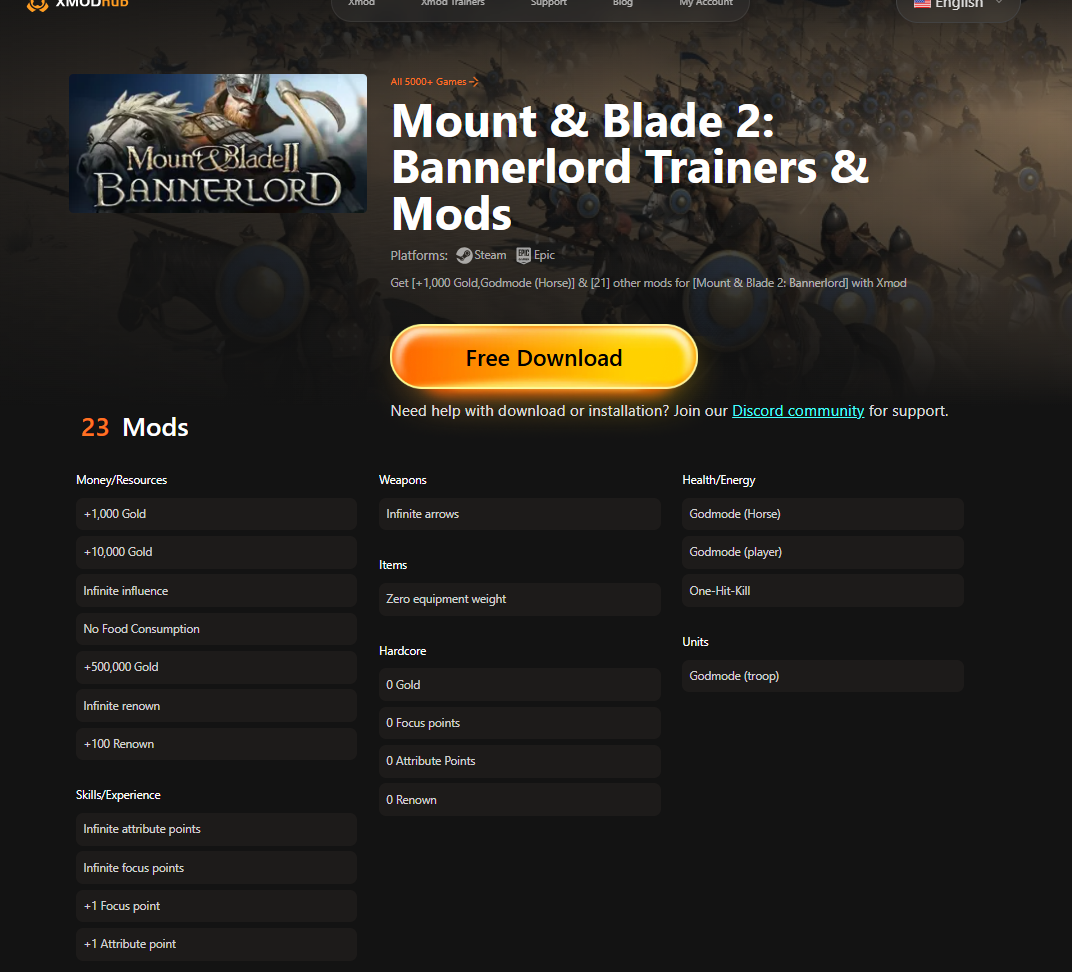
Easy Mod Installation 與 Xmod, you can install mods with just a few clicks—no manual file extraction or folder management required.
Automatic Updates Stay up to date effortlessly. Xmod automatically checks for updates to your installed mods and applies them safely.
Load Order Management Proper load order is critical for avoiding crashes and conflicts. Xmod helps you organize your mods correctly with smart load order suggestions.
Conflict Detection Xmod scans for mod compatibility issues and alerts you if two or more mods might clash, saving you time troubleshooting.
Backup and Restore Quickly back up your mod configurations and save files. You can experiment freely knowing you can revert to a stable setup anytime.
Performance Boosting Features Xmod can tweak in-game settings and optimize performance automatically, especially helpful when running multiple large mods.
透過使用 Xmod, you not only make modding easier but also ensure a smoother, more stable Bannerlord experience tailored to your playstyle.
總結
Modding is one of the best ways to extend the life and enjoyment of Mount and Blade 2: Bannerlord. With the right selection of mods, you can overhaul combat, expand the campaign, improve visuals, and fix long-standing issues—all while tailoring the game to your personal playstyle.
In 2025, the modding scene is more active than ever, offering a wide range of high-quality content. By following proper installation steps and using tools like Xmod for easier management and optimization, you can create a smooth, enhanced Bannerlord experience. Dive in, experiment, and rediscover the world of Calradia like never before.
