
 胡凱琳
胡凱琳
👑 Quick Answer:
Does Baldur’s Gate 3 have console commands?
Natively, no. The retail version of Baldur’s Gate 3 has its developer console completely locked. To enable it on PC, you must install a third-party mod called the BG3 Script Extender. Once installed, a separate console window opens alongside the game where you can execute Lua script commands.
The 3 most popular Baldur’s Gate 3 cheats (using Lua syntax) are:
Osi.ApplyStatus(GetHostCharacter(), "INVULNERABLE", -1, 1) enables God Mode.Osi.AddGold(GetHostCharacter(), 99999) instantly grants maximum in-game currency.Osi.AddExperience(GetHostCharacter(), 10000) instantly levels up your party.📜 Editor’s Note
This guide was last updated and verified against Baldur’s Gate 3 Patch 7. Because BG3 runs on Larian’s proprietary Divinity Engine 4.0, all console commands listed below require the BG3 Script Extender and use raw Lua code. They have been manually tested by our team to ensure they work in the current build. Please back up your save files located at %LOCALAPPDATA%\Larian Studios\Baldur's Gate 3\PlayerProfiles\Public\Savegames\Story\ before modifying game memory, as injecting scripts can occasionally break quest flags.
We have all been there. You just spent two hours getting wiped by Raphael on Tactician difficulty, or you simply do not have the time to scrounge for Camp Supplies after a long day at work. Single-player RPGs are meant to be enjoyed on your own terms, and there is no shame in bending the rules to experience the story. Let us get your party powered up.
💻 How to Enable Console Commands in Baldur’s Gate 3
Before you can start typing god codes, you need to forcefully unlock the developer backend. Because Larian Studios locked the console for the retail launch, a simple .ini tweak will not work.
Step-by-Step Guide:
C:\Program Files (x86)\Steam\steamapps\common\Baldurs Gate 3\bin.DWrite.dll file directly into this \bin folder.📜 The Complete List of Baldur’s Gate 3 Cheats
Here are the verified console commands. 請注意: Because this is raw Lua script, you must type the commands exactly as shown, paying strict attention to capitalization, brackets, and quotation marks.
God Mode & Combat Commands
Osi.ApplyStatus(GetHostCharacter(), "INVULNERABLE", -1, 1):Grants permanent immunity to all damage types for your main character.
Osi.ApplyStatus(GetHostCharacter(), "HASTE", -1, 1):Grants permanent Haste (extra actions and movement speed).
Osi.RestoreActionResources(GetHostCharacter()):Instantly restores all Actions, Bonus Actions, and Spell Slots mid-combat.
Exploration & Utility
Osi.ApplyStatus(GetHostCharacter(), "POTION_OF_ANIMAL_SPEAKING", -1, 1):Grants permanent ability to speak with animals.
Osi.ApplyStatus(GetHostCharacter(), "DETECT_THOUGHTS", -1, 1):Grants permanent Detect Thoughts.
Osi.AddGold(GetHostCharacter(), 50000):Adds 50,000 gold directly to your inventory.
Progression & Stats
Osi.AddExperience(GetHostCharacter(), 50000):Grants 50,000 XP to your entire party, instantly rocketing you toward the Level 12 cap.
Osi.SetChangeDetails(GetHostCharacter(), "Approval", 100):Modifies companion approval (requires targeting specific companion UUIDs for precise results).
📦 Item IDs and Spawning Guide
Spawning items in the Divinity Engine 4.0 requires using specific UUIDs (Universally Unique Identifiers), which are long strings of alphanumeric characters.
Use the command format: Osi.TemplateAddTo("Item_UUID", GetHostCharacter(), Amount)
Popular Item IDs:
"d90abf24-3c4e-4b26-92aa-9cbaf006b54f""e84860b0-a50e-45df-9ed1-aefde274cb76""5e55e425-4c27-4638-963e-00438a164b3c""7e39ad11-f8c3-421a-940c-05348c420c7d"🏆 Do Cheats Disable Achievements?
By default, yes. The moment Baldur’s Gate 3 detects a modified .dll or standard mod file in your directory, it flags your save file and disables all Steam and GOG achievements.
However, the BG3 Script Extender actually includes a built-in feature that attempts to re-enable achievements automatically. While this works most of the time, major Larian hotfixes frequently break the Extender, meaning you could clear a massive boss fight only to realize your achievements were disabled in the background.
🛑 Why Native Cheats Can Break Your Save Files
Beyond the achievement lock, forcing Lua scripts through the developer console is notoriously unstable. These commands interact directly with the game’s core logic.
If you use a command to force an NPC to spawn or skip a quest phase, you can trigger massive logic conflicts. Companions might stop talking to you, Act transitions can crash to the desktop, or your camp might permanently bug out. Memory leaks and corrupted .lsv save files are incredibly common when you bypass intended story triggers using raw code.
🛡️ The Safer Alternative: Using XMODhub
If you want the benefits of cheats—like unlimited Spell Slots, God Mode, or infinite Camp Supplies—without risking your 100-hour save file or dealing with complex Lua UUID strings, you need a dedicated game modification tool.
This is exactly what XMODhub is built for. Instead of typing risky code into a black command prompt, the XMODhub app hooks into Baldur’s Gate 3 safely and cleanly.
Osi.ApplyStatus. Just hit a hotkey or click a toggle to turn on Unlimited Movement or Max Dice Rolls instantly.🚀 How to Use XMODhub for Baldur’s Gate 3

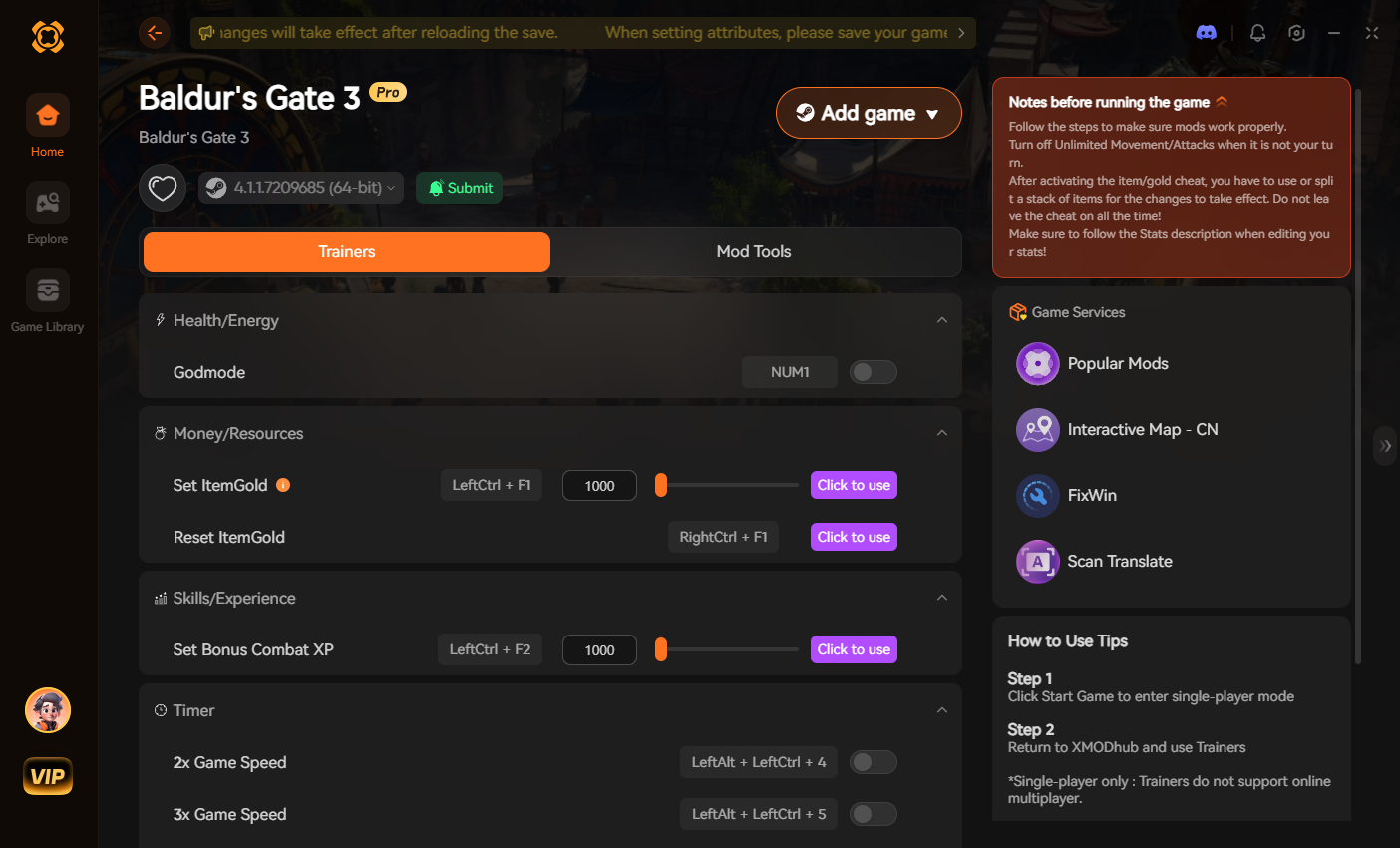
[Download the Baldur’s Gate 3 XMODhub Trainer Here]
⚠️ Troubleshooting: Console Not Opening
If you installed the Script Extender but the console isn’t appearing, try these fixes:
ScriptExtenderSettings.json file in your \bin folder with the line "CreateConsole": true to force the window to open.GetHostCharacter() exactly, with both parentheses.💬 Frequently Asked Questions (FAQ)
A: No. The developer console and Script Extender for Baldur’s Gate 3 are strictly limited to the PC version. Console players cannot access the backend architecture required to execute these cheats.
A: There is no account ban or official penalty from Larian for cheating in your own campaign. However, if you are playing co-op, the host must be the one executing the console commands or running the XMODhub trainer.
A: If you applied a status via the console, you must type the exact opposite command to remove it: Osi.RemoveStatus(GetHostCharacter(), "INVULNERABLE"). If you use XMODhub, you just click the toggle switch off.
🌟 Conclusion
While using the Script Extender console in Baldur’s Gate 3 gives you absolute power over the game engine, it comes with the headache of typing complex Lua code and significant risks to your save file logic. For a flawless, risk-free experience where you can simply focus on the incredible D&D story, using a dedicated modification tool is always the smarter choice.
Whether you are trying to survive Honour Mode in Baldur’s Gate 3, or exploring other massive RPGs like 賽博朋克 2077 和 Dragon’s Dogma 2, XMODhub has you covered. With secure support for over 5,000+ single-player PC games, you can easily customize your gameplay, skip the tedious grind, and play exactly the way you want.
