胡凱琳
胡凱琳
⚡ Quick Answer
What is the best and safest Far Far West mods tool?
To modify your gameplay safely without corrupting your 50-hour bounty hunter save file, you need to use the right Far Far West mods tools:
- ▸XMODhub: The absolute easiest, crash-free memory injector for instant progression, infinite health during horde waves, and zero file conflicts.
- ▸Thunderstore (r2modman) / Vortex: The community standard for managing heavy custom weapon mods and complex Unreal Engine .pak load orders without breaking your root directory.
- ▸UE4SS / Universal Unreal Engine Unlocker (UUU): A mandatory background utility required to run advanced community scripts and bypass the locked developer console.
簡介
Let’s be brutally honest: vanilla gameplay in Far Far West is incredible for the first 20 hours as you team up to blast monsters and sling spells in the Spooky West, but eventually, you hit a wall. Whether you are exhausted by a ridiculous grind for bounty payouts to upgrade your favorite revolver, tired of getting wiped by an unfair horde wave on higher difficulties, or just want to overhaul the graphics to push your RTX card, you are going to need a dependable Far Far West mods guide and tool.
I cannot tell you how many save files I have completely ruined over the years because I downloaded a sketchy utility or dragged Unreal Engine script files into the wrong folder. Finding a safe tool that actually works—without triggering a massive red flag on your antivirus or causing a desktop crash during a chaotic extraction—can be incredibly frustrating.
In this guide, I am breaking down the exact utilities you actually need. We will cover the best community managers, where to find your hidden game folders, and the ultimate plug-and-play solution for gamers who just want to tweak their stats and get straight back to the fun.
您可能也會喜歡: Far Far West Item IDs List & Console Spawn Codes
Why You Need a Dedicated Mods Tool
Listen to me carefully: never manually drag and drop loose files into your Far Far West root folder unless you know exactly what you are doing. When I first started modding UE5 shooters, I did this constantly. The result? Total disaster.
Without a proper mods tool, the game engine gets confused. If two different .pak files try to alter the same spell damage stat or enemy spawn rate, the game will panic and instantly crash to the desktop (CTD).
A dedicated tool manages your “load order,” acting as a traffic controller that ensures the engine reads your custom files in the exact sequence they need to safely load without destroying the core combat scripts.
Where is the Far Far West Mods Folder Located?
If you are using a community manager like r2modman, you rarely need to dig into your files. But if you need to do manual cleanups or create the necessary override folders, finding the correct directory is the most common roadblock for new players.
Depending on where you bought the game, navigate to:
- ✦Steam Users:
C:\Program Files (x86)\Steam\steamapps\common\Far Far West\FarFarWest\Content\Paks\~mods(You must manually create the ~mods folder if it does not exist). - ✦Epic Games Users:
C:\Program Files\Epic Games\Far Far West\FarFarWest\Content\Paks\~mods - ✦Local AppData (For Configs): Press
Win+R, type%localappdata%\FarFarWest, and look for theSavedfolder to find your local settings, crash logs, and save files.
Top Far Far West Mods Tools Compared
Depending on what you are actually trying to achieve in the Spooky West, you need to pick the right software architecture. Here is what the veteran community uses:
-
The Visual Organizer: r2modman / Thunderstore
If you want to install massive 4K texture packs, custom horse skins, or UI fixes, use this. It handles gigabytes of
.pakdata and isolates your mods cleanly away from your root folder. -
The Core Enabler: UE4SS
You will see this listed as a “Requirement” on almost every advanced download page. It is a background tool that bypasses the engine’s original script limitations, allowing third-party logic to run. You must install this first for complex mechanics mods.
-
The Progression Hacker: XMODhub
If you do not care about shiny graphics and just want to bypass the bounty grind, give yourself infinite ammo during massive horde extractions, or activate God Mode to carry your team, use XMODhub. It is a standalone utility that alters your stats in real-time.

The Easiest, Crash-Free Alternative: XMODhub
Here is the dirty secret about traditional mod managers: they are incredibly fragile. Every time Evil Raptor releases a tiny bug-fix patch during Early Access, your traditional tools will break. Your weapon progression becomes a hostage until the mod authors update their C++ code weeks later.
As an adult with a job and responsibilities, I do not have time to troubleshoot load orders on my only day off. If your primary goal is to gain an advantage—such as activating Ghost Mode to skip tedious traversal, getting unlimited currency to buy all spells, or instantly reloading your six-shooters—XMODhub is the undisputed king.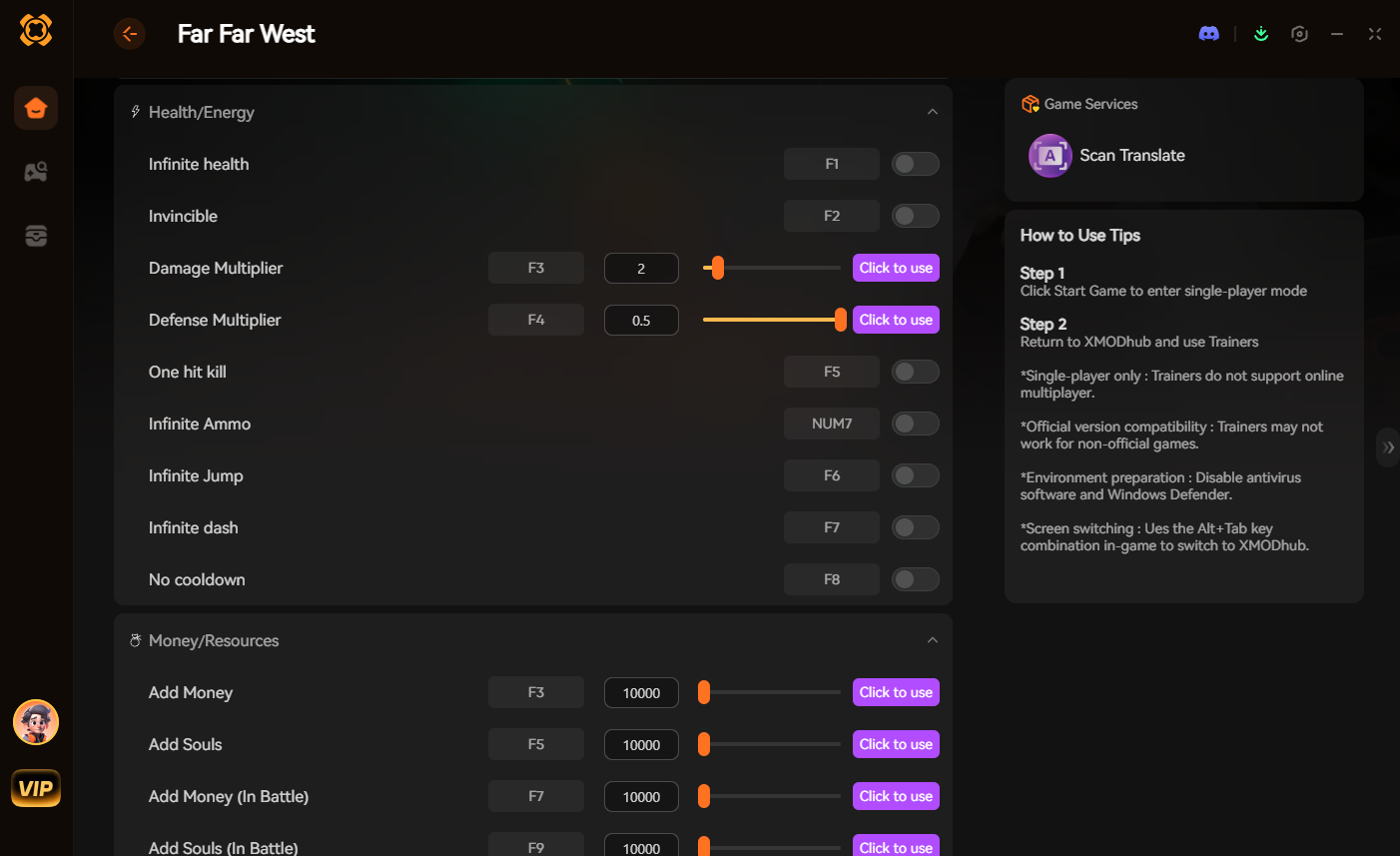
I highly recommend XMODhub for gameplay enhancements because:
- ✓Zero Installation Conflicts: XMODhub uses advanced memory injection. It never touches or overwrites your actual
.pakgame files on your SSD. Load-order crashes are literally impossible. - ✓Patch-Proof Architecture: When the game updates on Steam, XMODhub updates seamlessly in the background. You never have to wait for a script extender to be patched.
- ✓Maximum Security: Because it does not alter permanent game code, it is completely safe for your hard drive and will not lock your hard-earned Steam achievements.
Download the XMODhub Far Far West Mods Tool Here and Play on Your Terms
Troubleshooting: What to Do When Your Mods Tool Breaks
Even with the best tools, things go wrong. If your game refuses to launch and gives you a UE5 fatal error, follow my emergency checklist:
- 1.Disable the Last 3 Additions: 99% of the time, the culprit is the very last
.pakfile you downloaded. Open your manager, disable them, and try booting again. - 2.Check the Game Version: Did the game auto-update overnight? If so, your UE4SS script extenders are outdated. Roll back your game version via Steam Beta properties, or wait for a tool update.
- 3.Verify Game Files: If you accidentally deleted something important in the core directories, right-click Far Far West in Steam, go to Properties > Installed Files, and click Verify integrity of game files.
How to Avoid Malware and Fake Download Buttons
The PC gaming space is filled with fake download buttons and malicious software disguised as gaming utilities. Protect your rig by following these strict rules:
- ▸Verify the Source: Only download tools from universally trusted platforms like Thunderstore, Nexus Mods, GitHub, or the official XMODhub website.
- ▸Check the File Extension: A legitimate manager or trainer will typically be an
.exeinstaller or a clean.ziparchive. Never execute random.batfiles from unknown Discord links. - ▸Understand False Positives: Safe memory-injection tools (like XMODhub) often trigger a warning from Windows Defender because they alter another program’s memory. This is completely normal behavior for a trainer, provided you downloaded it directly from the official source.
Frequently Asked Questions (FAQ)
Does using a mods tool disable my achievements in Far Far West?
If you use traditional file-replacement methods or unlock the native UE5 console, the engine will often detect the altered code and disable achievements. Using a memory-based tool like XMODhub bypasses this check entirely, keeping your achievement progression active.
Can I get banned for using a mods tool?
Far Far West is primarily a PvE co-op experience. Modifying local files or using trainers will not trigger bans from a competitive server, but to be courteous, you should strictly use memory tools in private lobbies with consenting friends or during solo play, rather than matching with random public players.
總結
Customizing your experience is the absolute best part of owning Far Far West on PC. By choosing the correct mods tool, you can skip the tedious bounty grind, bypass the frustration of being swarmed by monsters, and focus entirely on the fun parts of the game—like slinging spells and mastering the chaotic combat.
For visual overhauls and custom horse skins, stick to established community managers and always back up your files. But if you want a seamless, crash-free way to dominate the horde instantly without needing a computer science degree, download XMODhub.
Join thousands of us who are taking back control of our gaming sessions in Far Far West and other massive co-op hits like 墜落 4, Starfield, 以及 賽博朋克 2077. Launch your tool, load your save, and play exactly how you want today.

我是一名熱情的遊戲玩家,也是 XMODhub 的作家,致力於為您帶來最新的遊戲新聞、秘訣和見解。.
與我聯繫:
LinkedIn 個人資料

 南希-米勒
南希-米勒