胡凱琳
胡凱琳
⚡ Quick Answer:
Does Far Far West have console commands?
Yes, because Far Far West is built on Unreal Engine 5, it features a built-in developer console on PC. However, it is locked by default in the retail release. To enable it, you must inject the Universal Unreal Engine 5 Unlocker (UUU) and press the Tilde (~) key during gameplay.
The 3 most popular Far Far West cheats are:
- ▸god: Enables God Mode for infinite health, making you immune to horde attacks.
- ▸ghost: Allows you to walk through walls and fly (Noclip) to bypass locked extraction zones.
- ▸slomo 0.5: Slows down global game time, making it incredibly easy to land headshots on fast-moving monsters.
We have all been there.
You have just spent forty minutes surviving a brutal horde wave in Far Far West, only to die right before the extraction chopper arrives. Or maybe you simply do not have the time to grind for Bounty Coins to upgrade your favorite revolver after a long day at work. Co-op and single-player games are meant to be enjoyed on your own terms, and there is absolutely no shame in bending the rules to maximize your fun.
After rigorously testing these commands on the latest patch, this guide provides the ultimate, organized list of working Far Far West cheats. Let us get your bounty hunter powered up.
您可能也會喜歡: The Ultimate Far Far West Cheat Engine Guide (And A Much Easier Alternative)
How to Enable Console Commands in Far Far West
Before you can start typing in god codes, you need to tell the game you want access to the developer backend. Because Evil Raptor locked the console for the retail build, simply editing a configuration file will not work. You must use a third-party injector.
Step-by-Step Guide:
- Download the Unlocker: Download the Universal Unreal Engine 5 Unlocker (UUU) client to your PC.
- Open the Game: Launch your Far Far West save file and make sure your character is fully loaded into the world.
- Inject the Tool: Open the UUU client, select the FarFarWest shipping executable in the process list, and click “Inject DLL”.
- Press the Activation Key: Hit the Tilde (~) key on your keyboard.
- Enter the Code: A small text box will appear at the bottom of your screen. Type your desired command and press Enter.
The Complete List of Far Far West Cheats
Here are all the verified UE5 console commands. 請注意: Do not include the brackets when typing the values into the game.
God Mode & Combat Commands
god: Grants complete invincibility against all monster and boss damage.damage 9999: Drastically increases your weapon damage (One-hit kills on most enemies).toggleinfiniteammo: Grants infinite ammo for your revolvers and rifles without needing to reload.
Exploration & Utility
ghost: Disables player collision, allowing you to fly through terrain and locked doors.walk: Disables the ghost command and returns your character to normal walking physics.teleport: Instantly teleports your bounty hunter to wherever your crosshair is pointing.
Progression & Stats
slomo 5: Speeds up the game by 5x to quickly traverse empty parts of the map.playersonly: Freezes all monster AI in place, allowing you to freely line up shots or revive teammates safely.
Item IDs and Spawning Guide
Spawning items is slightly different from toggling God Mode. You usually need the specific Unreal Engine Blueprint path for the weapon or material you want.
Use the command format: summon [BlueprintPath]
Popular Item IDs:
BP_Currency_BountyCoin_C– Spawns a stack of in-game currency for upgrades.BP_Weap_Revolver_Hellfire_C– Spawns the legendary Hellfire Revolver.BP_Item_Dynamite_C– Spawns a throwable dynamite stick.
Do Cheats Disable Achievements?
Yes, they absolutely do. This is the biggest catch when using the built-in developer console via an injector. In Far Far West, the moment you inject UUU to access the console, the game’s telemetry flags your session. From that point forward, you will not be able to unlock any Steam achievements on that specific playthrough.
If you are an achievement hunter or completionist, using the native console is a fast way to ruin your 100% completion run.
Why Native Cheats Can Break Your Save Files
Beyond the achievement lock, developer consoles are notoriously unstable. These commands were originally built for developers to test bugs during production, not for everyday gameplay.
Forcing an extraction phase using a command like teleport can cause crucial NPC logic to completely break, hard-locking your progress. Memory leaks, corrupted assets, and sudden crashes to the desktop are incredibly common when you spawn too many items at once or bypass intended horde wave triggers—especially if you attempt this while hosting a co-op lobby.
The Safer Alternative: Using XMODhub
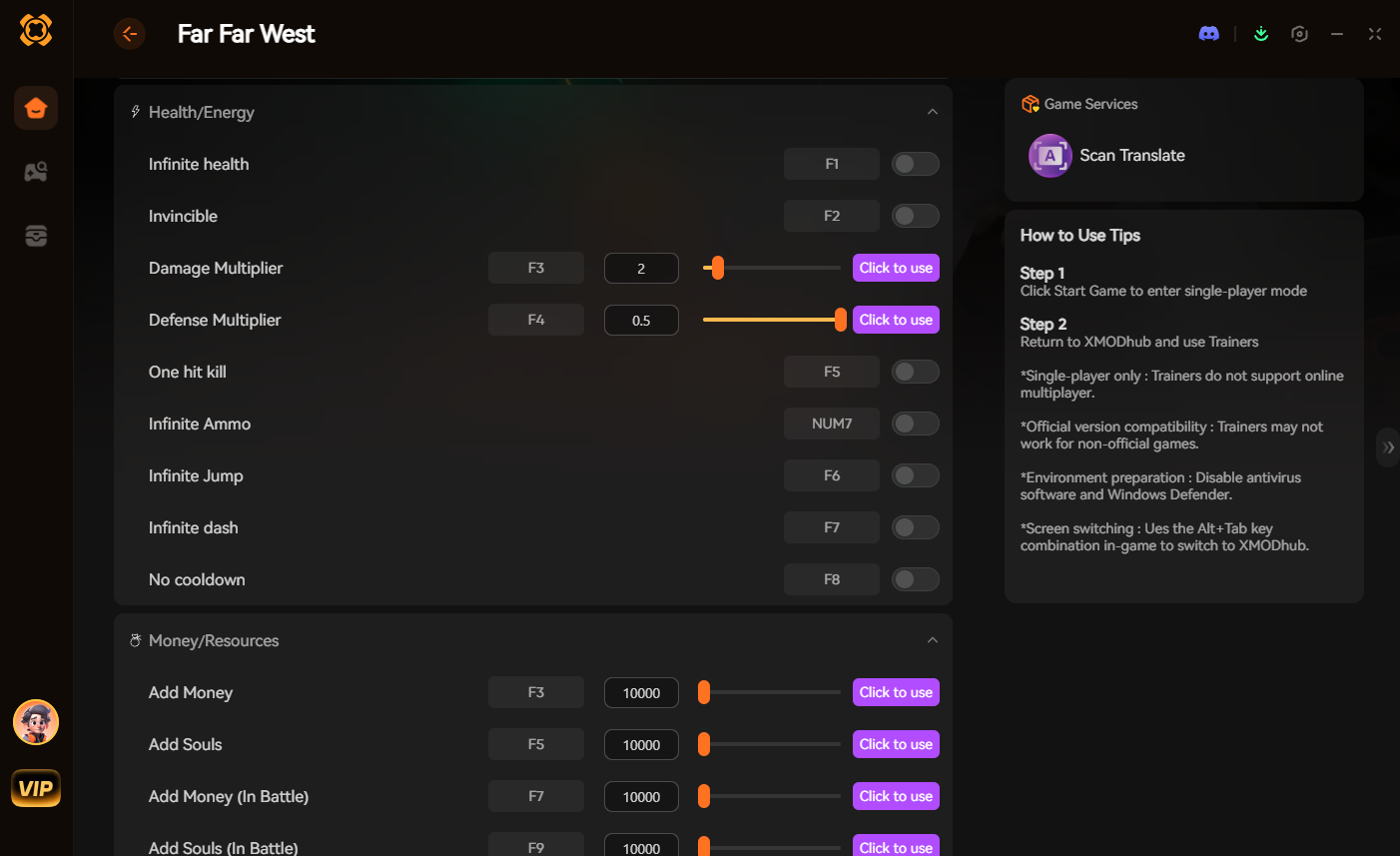
If you want the benefits of cheats—like infinite health, zero spell cooldowns, or skipping the heavy bounty grind—without risking your save files or locking your achievements, you need a dedicated game modification tool instead of the raw, unstable console.
This is exactly what XMODhub is built for. Instead of typing risky code that might corrupt your game world, the XMODhub app hooks into Far Far West safely and cleanly.
- ✦Achievement Safe: It bypasses the game’s internal cheat-flagging system, meaning your achievements keep popping normally.
- ✦儲存檔案保護: It alters values temporarily. Once you close the game, your save file remains completely pure and uncorrupted.
- ✦One-Click Toggles: No more memorizing long Blueprint IDs or struggling with typos. Just hit a hotkey or click a toggle to turn God Mode or Infinite Ammo on or off instantly.
How to Use XMODhub for Far Far West
- Download and Launch the free XMODhub desktop app.

- Search for Far Far West.
- Click “Play”.
- Toggle your desired cheats (God Mode, Infinite Bounty Coins, Infinite Ammo) directly from the clean UI or via hotkeys.
- Done.
Download the Far Far West XMODhub Trainer Here
Troubleshooting: Console Not Opening
If you are pressing the key and nothing is happening, try these quick fixes:
- ▸Injector Failed: Because the native console is locked, pressing Tilde will do nothing unless the UUU client was successfully injected. Restart the game and try injecting again.
- ▸Wrong Keyboard Layout: If you are using a non-US keyboard layout, the tilde key might not register correctly in the engine. Try switching your Windows language to EN-US temporarily.
- ▸Administrator Rights: Ensure you are running both the game executable and the unlocker tool as an Administrator.
Frequently Asked Questions (FAQ)
Q: Can I use these console commands on PlayStation or Xbox?
A: No. The developer console bypass for Far Far West is strictly limited to the PC version. Console players cannot access the text input field or inject external tools required to activate these cheats.
Q: Is there a penalty for using cheats in multiplayer?
A: Far Far West is a PvE co-op game. While there is no official account ban for modifying your own local files, using disruptive console commands in public lobbies ruins the experience for others. You should strictly use trainers like XMODhub in private lobbies with consenting friends or during solo play.
Q: How do I turn a cheat off?
A: Most toggle cheats, such as god 或 ghost, can be deactivated by simply typing the exact same command into the console a second time. To reset game speed, type slomo 1.
總結
While using the built-in console commands in Far Far West can be a fun way to experiment with the Unreal Engine, it comes with significant risks to your save files and achievements. For a flawless, risk-free experience, using a dedicated modification tool is always the smarter choice.
Whether you are trying to survive the brutal horde encounters of Far Far West, or exploring other massive co-op titles like 賽博朋克 2077, The Witcher 3: Wild Hunt, 以及 墜落 4, XMODhub has you covered. With secure support for over 5,000+ PC games, you can easily customize your gameplay, skip the tedious grind, and play exactly the way you want.

我是一名熱情的遊戲玩家,也是 XMODhub 的作家,致力於為您帶來最新的遊戲新聞、秘訣和見解。.
與我聯繫:
LinkedIn 個人資料

 南希-米勒
南希-米勒