Editor’s View: Nova Roma invites you to build and manage a bustling ancient Roman city, handling everything from aqueducts and temples to citizens’needs and divine whims. Although the official system requirements look modest, real‑world performance can vary as your city grows and simulations become more complex.
I tested Nova Roma on both an entry‑level PC and a mid‑range rig. While the game runs on most hardware that meets the minimum, I’ve seen noticeable performance dips once your population and infrastructure scale up. If you’re struggling with slowdowns, I’ve gathered practical settings to help your city run smoother. And the XMOD Trainer can offer helpful tweaks to ease your experience without sacrificing the city‑building core.
Quick Summary: What You Really Need
Nova Roma isn’t as GPU‑intensive as some modern 3D titles, but having a decent CPU and GPU helps with city simulation performance, especially as your city grows. Save time and frustration by tweaking settings and installing on fast storage.
目錄
- Official System Requirements
- Real‑World Performance Overview
- Best Optimization Tips (2026)
- How XMOD Tools Can Help Your Game Run Better
- 疑難排解與常見問題
- Conclusion: Smooth City Building Matters
Official System Requirements
Here’s what the developers list for playing Nova Roma on PC:
Minimum Requirements (Low/Stable Performance)
- OS: Windows 10 (64‑bit)
- Processor: Intel Core i5‑6600K / AMD Ryzen 3 2200G
- Memory: 4 GB RAM
- Graphics: NVIDIA GeForce GTX 1050 (2 GB) / AMD Radeon R9 285 (2 GB)
- DirectX: Version 11
- Storage: 2 GB available space
Recommended Requirements (Smooth Play)
- OS: Windows 10 (64‑bit)
- Processor: Intel Core i7‑12700K / AMD Ryzen 7 2700X
- Memory: 8 GB RAM
- Graphics: NVIDIA GeForce RTX 2070 (8 GB) / AMD Radeon RX 7600 (8 GB)
- DirectX: Version 12
- Storage: 2 GB available space
Real‑World Performance Notes
Many players report that Nova Roma runs well on mid‑range hardware and even laptops because of its strategy/simulation design, but slow storage or background apps can still create noticeable pop‑in or delays in screen updates. Installing on an SSD reduces load times and improves in‑game fluidity.
Best Optimization Tips (2026)
Nova Roma doesn’t have as many graphics sliders as modern shooters, but you can still boost performance effectively:
- Lower Terrain/Shadow Detail: Reduces CPU/GPU load during large city expansions.
- Turn Off Unneeded Effects: Simple visual tweaks like disabling deep water reflections help FPS.
- Limit Background Apps: While building big cities, free up CPU/RAM to avoid simulation lag.
- Use SSD Storage: Significantly speeds up loading and map transitions.
How XMOD Helps When Performance Struggles

Even optimized builds can lag when your city gets big or your CPU is maxed out. That’s where XMOD tools can help without altering game balance:
- Performance Boost Mode: Temporarily eases simulation load to reduce stutters.
- Quick Build Enhancer: Speeds up large construction batches when your PC lags behind your planning.
- Resource Adjustment Tools: If simulation pauses ruin pacing, these mods help smooth outcomes.
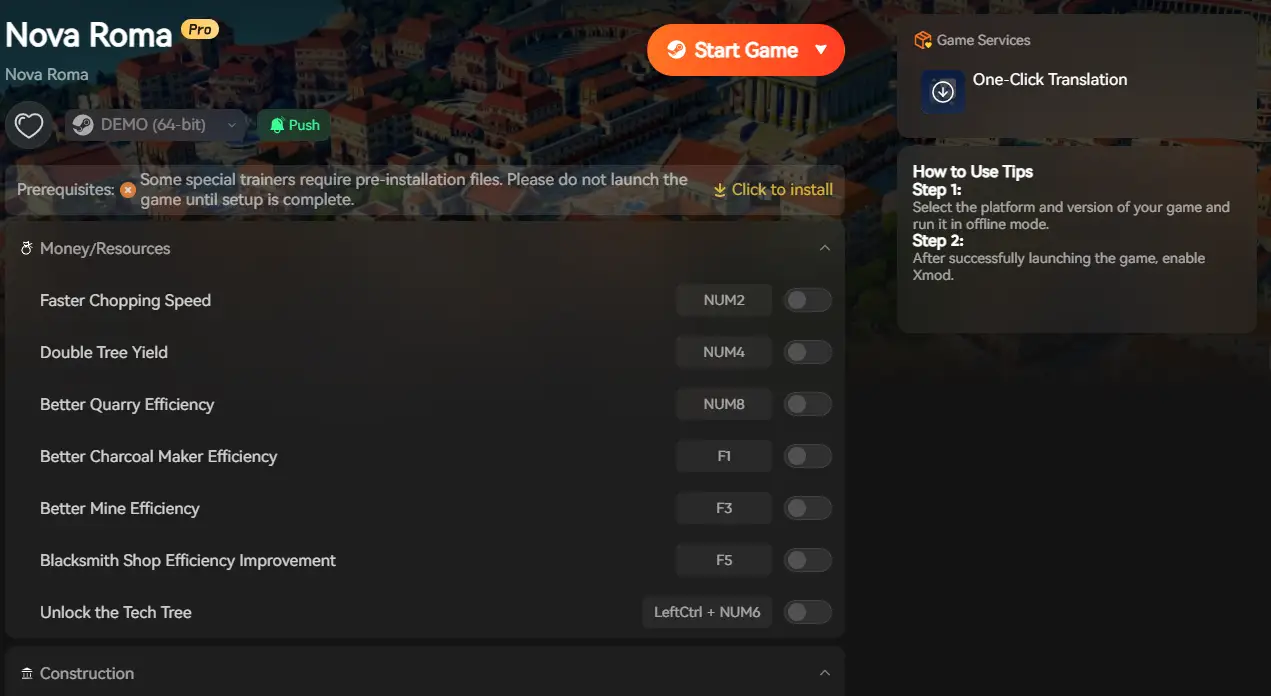
Download the Nova Roma PC Optimization Trainer
疑難排解與常見問題
Q: Why does the game lag even if I meet the recommended specs?
A: Simulation games often rely more on CPU and memory management than raw GPU power. Close background apps and ensure your CPU isn’t thermal throttling to improve performance.
Q: Is an SSD required?
A: It’s not mandatory, but installing on an SSD significantly improves load times and reduces in‑game stutter, especially during large city updates.
Q: Should I expect frame drops with big cities?
A: Yes — as settlements grow, more systems are processed simultaneously. Tweaking settings and using XMOD tools helps maintain responsiveness.
Conclusion: Optimization Matters
Nova Roma is accessible to a wide range of PCs, but your experience depends on tuning both hardware and settings. Make sure you check your specs, install on fast storage, and use available tools like XMOD to keep gameplay smooth even when your city hits its stride.
Check Your Specs, Then Check Our Tools:
- Dying Light 2 Stay Human: Infinite Stamina for parkour, Indestructible Weapons, and Easy Crafting.
- Resident Evil 4 Remake: Infinite Ammo, Max Pesetas (Money), and Frozen Timers.
- State of Decay 2: Unlimited Resources, Instant Construction, and Infinite Gas.
- Left 4 Dead 2: God Mode, Infinite Ammo, and No Recoil for classic co‑op fun.
- 7 Days to Die: Creative Mode cheats including Instant Level Up and No Hunger/Thirst.
我是一名熱情的遊戲玩家,也是 XMODhub 的作家,致力於為您帶來最新的遊戲新聞、秘訣和見解。.
與我聯繫:
LinkedIn 個人資料

 胡凱琳
胡凱琳

 南希-米勒
南希-米勒
It’s helpful to have practical advice for improving performance as the game scales. I think it’s easy to overlook how much system demand can change as the city grows—definitely going to tweak my settings after reading this.