Summary: This guide covers VEIN’s system requirements, detailing the minimum and recommended specs needed for smooth gameplay and an optimal survival experience.
VEIN is an upcoming post-apocalyptic survival multiplayer game that challenges players to scavenge, fight, and rebuild in a harsh, zombie-infested world.
This guide covers everything you need to know before diving in: from an overview of what VEIN is, to the minimum and recommended system requirements, and tips on whether it can run on a low-end PC.
We’ll also show you how to check if your specific setup can handle the game and explore ways to enhance your gameplay experience with XMOD.
Finally, the guide wraps up with a concise conclusion to help you prepare for the full adventure.
Table of contents
- What is VEIN?
- System Requirements: Minimum and Recommended
- Can You Run VEIN on a Low-End PC?
- Can My PC Run VEIN?
- How to Enhance Gameplay Experience with XMOD?
- Conclusion
What is VEIN?

VEIN is an upcoming post-apocalyptic survival multiplayer sandbox game developed by Ramjet Studios. Set in a world devastated by a mysterious calamity, players must scavenge for resources, fight hostile zombies and bandits, and rebuild civilization either solo or in co-op with friends.
Key features of VEIN include:
- Survival Mechanics: Manage hunger, thirst, and health while crafting tools, weapons, and shelters.
- Exploration: Navigate a dynamic, open-world environment with changing seasons, abandoned buildings, and hidden resources.
- Combat: Face off against zombies, hostile NPCs, and other threats using a variety of weapons and tactics.
- Multiplayer Co-op: Collaborate with friends to survive, defend bases, and rebuild settlements.
- Progression & Customization: Unlock new regions, perks, and equipment as you advance, tailoring the experience to your playstyle.
With its combination of survival strategy, exploration, and multiplayer cooperation, VEIN offers an immersive and challenging post-apocalyptic experience for both solo players and co-op teams.
System Requirements: Minimum and Recommended
Here are the updated official system requirements for VEIN:
Minimum Requirements
- OS: Windows 10 (64-bit)
- Memory: 12 GB RAM
- Graphics: NVIDIA RTX 2060 or equivalent
- DirectX: Version 12
- Storage: 52 GB available space
- Processor: 64-bit CPU
Recommended Requirements
- OS: Windows 10 (64-bit)
- Memory: 24 GB RAM
- Graphics: NVIDIA RTX 3080 or equivalent
- DirectX: Version 12
- Storage: 80 GB available space
- Processor: 64-bit CPU
- Network: Broadband Internet connection
Meeting the minimum requirements allows the game to run, but for optimal performance, higher-quality visuals, and smoother gameplay, the recommended specifications are advised.
Can You Run VEIN on a Low-End PC?
Running VEIN on a low-end PC can be challenging due to its demanding system requirements. The game recommends a minimum of 12 GB RAM and an NVIDIA RTX 2060 or equivalent, along with DirectX 12 support and 52 GB of storage. PCs below these specs may experience low frame rates, stuttering, or graphical issues, especially in large, resource-intensive areas.
Tips for Low-End PC Users
- Lower Graphics Settings: Reduce resolution, shadows, and texture quality to improve performance.
- Update Drivers: Ensure your GPU drivers are up to date for the best optimizations.
- Close Background Programs: Free up system resources by closing unnecessary applications while playing.
- FPS Boosters or Performance Mods: Tools like XMOD can help enhance frame rates and smooth out gameplay.
While these adjustments can help, the best experience comes from meeting or exceeding the minimum requirements, as VEIN’s dynamic environments and multiplayer features are resource-intensive.
Can My PC Run VEIN?
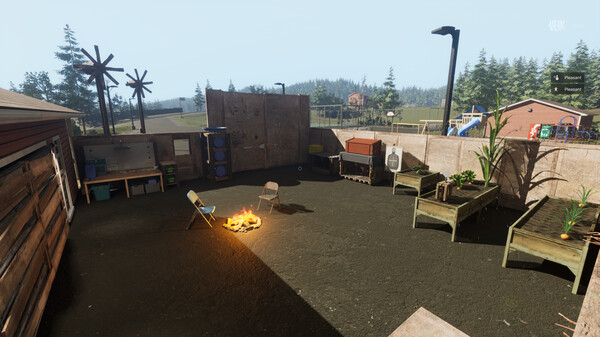
To check if your PC can run VEIN, compare your system specs with the game’s requirements. The minimum specs include Windows 10 (64-bit), 12 GB RAM, an NVIDIA RTX 2060 or equivalent GPU, DirectX 12, 52 GB of storage, and a 64-bit CPU, while the recommended specs call for 24 GB RAM, an NVIDIA RTX 3080 or equivalent, 80 GB storage, and broadband internet for multiplayer. Press Windows + R, type dxdiag, and review your CPU, RAM, and GPU to see if your system meets these requirements. Meeting the minimum allows the game to run with limited performance, whereas meeting or exceeding the recommended specs ensures smoother gameplay and higher-quality visuals. Tools like XMOD can also help optimize performance on lower-end systems.
How to Enhance Gameplay Experience with XMOD?
XMOD is a comprehensive platform designed to elevate your gaming experience with tools that go beyond standard gameplay. For VEIN, it will provide cheats, trainers, and mods right after launch, with full compatibility and regular updates. Players can access a library of over 5,000 free and premium trainers and mods to customize the game to their preferred playstyle.
- Mods: Enhance graphics, update textures, adjust the interface, or introduce new gameplay elements for a more immersive experience.
- Trainers: Alter in-game values such as health, stamina, ammo, or skill points to simplify progression or experiment with different strategies.
- Cheats: Unlock items instantly, bypass challenging sections, or spawn weapons and equipment to focus on exploration and story.

Additionally, XMOD offers utilities like translation tools for international players, FPS boosters for smoother performance, DLC unlockers, and other quality-of-life improvements. Whether you want to make survival easier, uncover hidden content, or optimize gameplay, XMOD gives you full control over how you experience VEIN.
Conclusion
VEIN offers an immersive post-apocalyptic survival experience, combining exploration, resource management, combat, and multiplayer cooperation. By understanding the system requirements, players can ensure their PC is ready to run the game smoothly, whether on minimum or recommended specs. Tools like XMOD further enhance the experience by optimizing performance, improving visuals, and providing gameplay customization options. Proper preparation, combined with these enhancements, allows players to fully enjoy the challenging and dynamic world of VEIN, whether tackling it solo or with friends.
I am a passionate gamer and writer at XMODhub, dedicated to bringing you the latest gaming news, tips, and insights.
Connect with me:
LinkedIn Profile ↗

 Catherine Hu

 Nancy Miller