
 Catherine Hu
Surviving on a hostile planet is hard enough without scrambling for basic schematics. If you’re stuck wandering the volcanic wastelands looking for that elusive stabilizer blueprint or fighting off a constantly infected base core, you aren’t alone. The procedural generation in StarRupture can be unforgiving, hiding essential tech behind walls of lava and elite mobs. This guide cuts through the noise to help you secure the essential upgrades you need to turn your fragile outpost into an industrial fortress.
Key Takeaways
- Industrial Complex – The primary zone for high-tier loot and schematics, though heavily guarded.
- Infection Management – Regular maintenance with Bio-Scrubbers is cheaper than replacing a destroyed core.
- Key Requirements – Some doors require specific access cards found on elite commanders in nearby outposts.
- Safe Modding – Use trainers offline to test builds without risking save corruption or resource loss.
Let’s break down the details below.
Where to Find StarRupture Blueprint Locations
Locating blueprints is the central loop of progression. Unlike typical survival games where you learn by doing, here you must physically retrieve data chips from the old world. The map is divided into distinct biomes, each with its own threat level and specific loot table. If you are looking for Tier 1 basics, stay in the crash zone, but for anything related to automation, you need to venture out.
Navigating the Industrial Complex for Loot
The Industrial Complex is a mid-game biome teeming with hostile machinery. It is also the most reliable source for advanced manufacturing schematics. Look for orange crates marked with the faction logo; these often contain the “starrupture blueprint” items required for tier 2 automation. Be warned: this area is patrolled by Rust-bucket Sentinels that deal high energy damage. You will want to bring EMP grenades or energy-shielded armor before attempting a run here. The verticality of the complex also means many crates are hidden on top of pipes or suspended walkways, so look up often.
How to Locate the StarRupture Stabilizer Blueprint Location
The stabilizer is critical for late-game base expansion, as it prevents your structures from taking damage during seismic events. Players often miss it because it spawns in a vertical section of the map that requires a jetpack or advanced grappling hook to reach. Check the upper catwalks of the central refinery tower in the Industrial Complex. If you haven’t unlocked the jetpack yet, you can sometimes cheese the climb by stacking storage crates, but it’s risky. Once you grab the chip, you must extract safely; dying before you upload it to your analyzer means losing the data permanently.
How to Unlock Blueprints and Use the Research Tree
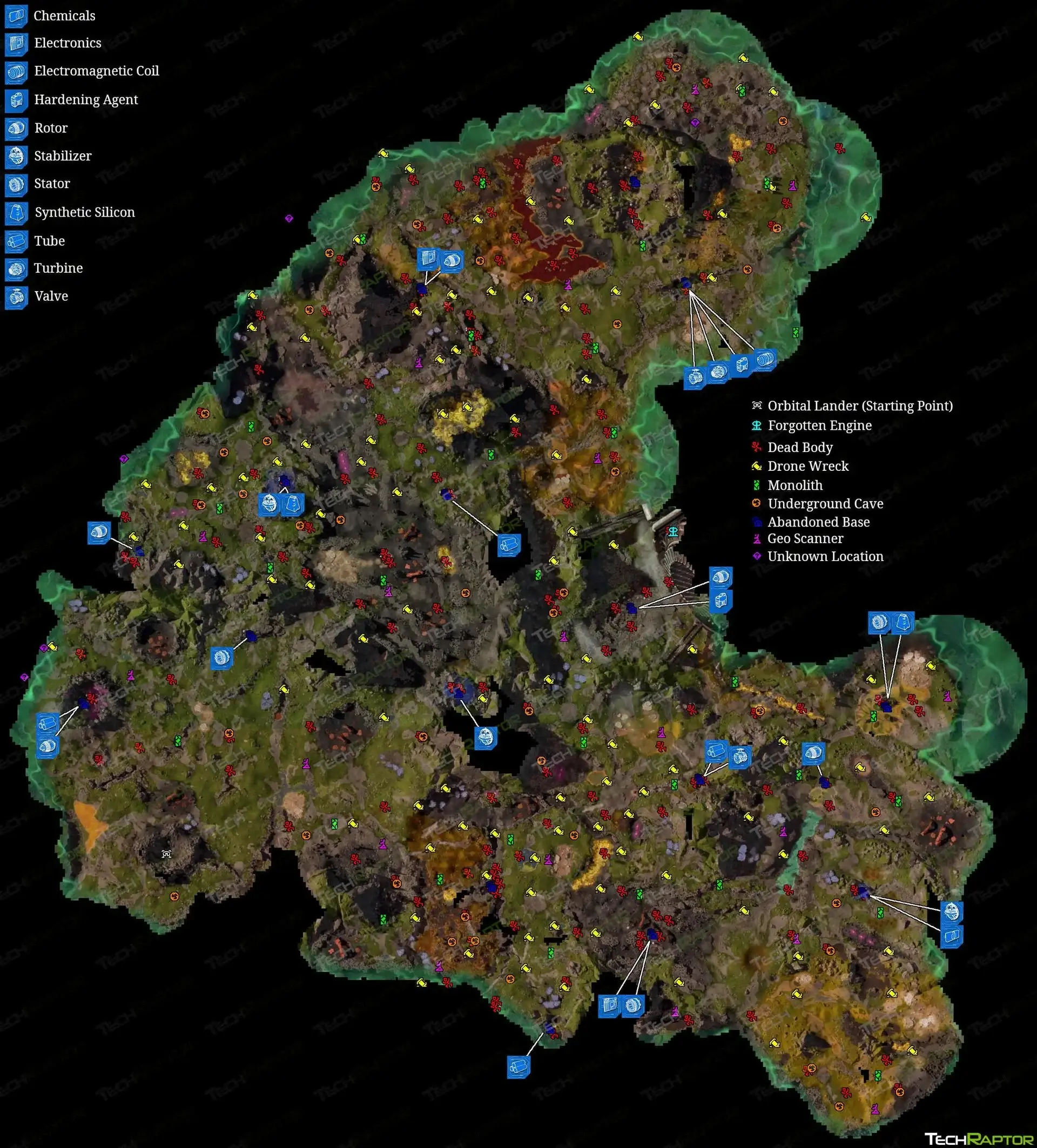
Finding the schematic is only half the battle. You need to return it to your base analyzer to actually add it to your crafting menu. Be careful during transport—dying often means dropping the blueprint, and in a persistent world, it might despawn before you get back. Once analyzed, the tech is permanently unlocked for that save file.
Using the StarRupture Key for Access
Certain high-value rooms are locked behind color-coded doors. The “starrupture key” items are consumable access cards usually found on the bodies of elite enemies nearby. Always check the belts of fallen commanders before leaving a combat zone. The Red Key opens armories, while the Blue Key is typically for server rooms containing data logs. If you find a locked door but no key, scan the area for a Commander unit; they usually spawn within a 200-meter radius of the objective.
Gathering Resources for Research Upgrades
Early game research requires vast amounts of iron and copper. I recommend setting up automated miners as soon as possible, as manual mining becomes too slow once you hit Tier 2 research costs. You will also need “Data Discs,” which are a secondary currency found in loot crates. Don’t waste these on cosmetic upgrades early on; save them for essential power grid improvements. Efficient resource management is the difference between a thriving base and one that goes dark during a night raid.
Why Is Your StarRupture Base Core Infected?
The “starrupture base core infected” status is a mechanic that punishes neglect. It occurs when biological spores from the environment breach your base’s filtration system. You’ll know it’s happening when green fog starts accumulating near your floor vents and your production efficiency drops by 50%.
Preventing Infection in StarRupture
Build airlocks. It sounds simple, but many players build direct doors to the outside. An airlock system with a decontamination shower significantly reduces the risk of spores entering your main hub. Additionally, keep your base sealed; a single missing wall panel can let the infection in. Later in the game, you can research automated Bio-Scrubbers that passively clean the air, but they consume a lot of power.
Cleansing the Core to Restore Functionality
If your core gets infected, production stops. To fix this, craft a Cleansing Canister at the chemistry station. You will need to manually apply it to the core interface. Do this quickly, or the infection will spread to connected storage crates, potentially corrupting organic items like food or seeds. It’s a brutal mechanic, so keep a stash of canisters ready in a sealed container just in case.
Can You Use StarRupture Mods for Unlocks?
Yes, “starrupture mods” are a popular way to bypass the grind, especially for players who have already beaten the game once and want to experiment with base building without resource limits. The open world nature of the game makes it perfect for sandbox experimentation.
Installing Safe StarRupture Mods
Always backup your save file before installing mods. The modding community is active, but Early Access updates can break compatibility overnight. Using a dedicated trainer is often safer than replacing game files, as trainers run externally and don’t permanently alter the game’s installation data.
Speed Up Progression with StarRupture Trainers
If you are tired of losing blueprints to random deaths or want to build a mega-base without farming for hours, XMODhub’s all-in-one trainer offers a safe, malware-free solution. It allows you to toggle cheats on and off instantly, giving you control over the difficulty curve.
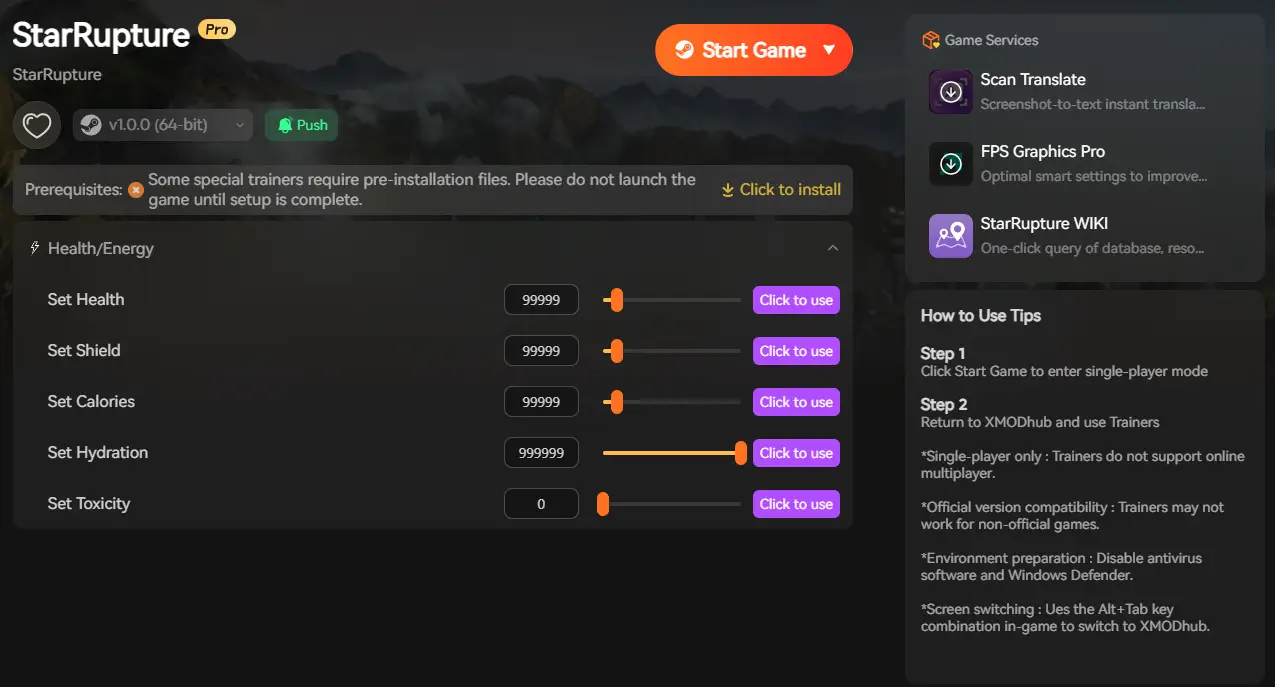
❤️ Infinite Health
Survive lava, enemy attacks, and fall damage while exploring dangerous biomes for blueprints.
💰 Unlimited Resources
Instantly fill your inventory with iron, copper, and rare materials for building and research.
⏱️ Instant Crafting
Remove the wait times for refining ores and constructing complex machinery.
⚔️ God Mode
Become completely invincible to all environmental hazards and enemy damage.
These featured mods are just the beginning. Whether you’re looking to skip tedious grinding, experiment with different playstyles, or speed up your progression, XMODhub’s comprehensive toolkit offers dozens more options tailored to your playstyle.
Health/Energy
- Infinite Oxygen – Explore without air limits
- No Hunger/Thirst – Remove survival pressure
- Infinite Stamina – Sprint and jump forever
Money/Resources
- Add Biomass – Instantly gain fuel
- Add Minerals – Get rare crafting ores
- Max Inventory Stack – Carry unlimited items
Troubleshooting Common StarRupture Issues
Even without mods, the game can be buggy. Early Access titles often suffer from instability, and StarRupture is no exception. Here is how to handle the most frequent errors players encounter.
What to Do When a Blueprint Is Missing
If you arrive at a known “starrupture stabilizer blueprint location” and the crate is empty, it is likely a spawn glitch. This often happens in multiplayer sessions where the host’s data desyncs from the client. Try saving the game 100 meters away, exiting to the main menu, and reloading. This forces the area to repopulate its loot tables. If that fails, verify your game files through the launcher.
Fixing StarRupture Save File Corruption
Corruption usually happens during auto-saves, especially if the game crashes while writing data. Always keep a manual save rotation; rely on at least three different slots. If your save won’t load, check the backup folder in your AppData directory; the game keeps the last 3 auto-saves as backups automatically. Renaming the `.bak` file to `.sav` can often restore your progress with only a few minutes of lost gameplay.
Frequently Asked Questions
Ready to enhance your gameplay?

I am a passionate gamer and writer at XMODhub, dedicated to bringing you the latest gaming news, tips, and insights.
Connect with me:
LinkedIn Profile ↗

 Nancy Miller