
 Catherine Hu
To skip Eirene cutscenes AI Limit forces you to watch, you must manually rename the pre-rendered video files in your game directory so the engine cannot load them. Navigate to your Steam installation path at SteamLibrary\steamapps\common\AILimit\AILimit\Content\Movies.
Locate the .mp4 or .bk2 files for the Eirene Region and rename their file extensions to .bak. When Unreal Engine 5 attempts to play the video, it will fail and instantly drop you into the gameplay.
Because the developers disabled the native command console, players suffering through unskippable in-engine boss dialogue can use the XMODhub PC Client’s Speedhack to fast-forward through the animations instantly.
In this guide, we will break down why these cinematics are locked in the first place, provide the exact Unreal Engine folder paths needed to disable these videos safely, explain the difference between pre-rendered and in-engine cutscenes, and show you how to use external tools to reclaim your time.
Editor’s View: The Boss Run Monologue Trap
“During my New Game Plus (NG+) run of AI LIMIT – Eirene’s Furnace of War, my biggest enemy wasn’t the increased enemy damage; it was the unskippable cinematics. The lore of Eirene’s Furnace is incredible the first time you see it, but by the third playthrough, being locked in a 2-minute camera pan of an industrial smelter is agonizing.”
“I tried mashing the pause button, checking the settings for an auto-skip feature, and found nothing. I eventually had to go directly into the Steam local files and manually disable the video formats.”
“However, that didn’t stop the in-game NPC dialogue lockouts. I ultimately started running a background trainer to speed the game up to 10x velocity whenever an NPC started talking. It is the only way to maintain your sanity during repeat boss attempts.”
Why AI LIMIT – Eirene’s Furnace of War Forces Unskippable Cutscenes
Before you start modifying your game files, it helps to understand why the developers took the skip button away. In Unreal Engine 5, pre-rendered cutscenes and long dialogue sequences are frequently used as hidden loading screens.
While a boss is monologuing, the engine is aggressively streaming in high-resolution textures, particle effects, and combat logic in the background. If the developers allowed you to instantly skip the cutscene, the sudden camera transition could cause severe texture pop-in or even hard-crash the game due to a VRAM bottleneck. Furthermore, Lion Shield wants to ensure the narrative pacing remains intact. Unfortunately, while this works for a cinematic first playthrough, it completely disrupts the pacing of a hardcore action RPG where dying and retrying is part of the core gameplay loop.
How to Skip Eirene Cutscenes in AI LIMIT – Eirene’s Furnace of War?
Method 1: Rename the Content/Movies Folder Files
The most reliable way to skip Eirene cutscenes AI Limit triggers between major zones is to remove the physical video files from the game’s directory. When Unreal Engine 5 calls for a movie file that does not exist, it instantly aborts the media player sequence and loads the next 3D environment.
How to disable the pre-rendered videos safely:
- Close AI LIMIT – Eirene’s Furnace of War completely.
- Open Steam, right-click the game in your library, select Manage, and click Browse local files.
- Open the folder named
AILimit, then navigate toContent, and finally open theMoviesfolder. - You will see several video files (usually in
.mp4or.bk2format). Look for the files labeled with “Eirene” or “Intro”. - Do not delete them. Instead, right-click the file, select Rename, and add
.bakto the end of the file name (e.g.,EireneIntro.mp4.bak). - Launch the game. The next time you trigger that cutscene, the screen will flash black for a millisecond, and you will instantly regain control of your character.
Method 2: Handling In-Engine Dialogue vs. Pre-Rendered Video
It is vital to understand that the file-renaming trick only works for pre-rendered cinematic videos (CGI movies).
Many of the unskippable sequences in AI LIMIT – Eirene’s Furnace of War—especially the boss monologues right before a fight begins—are rendered in real-time within the 3D engine. Your character and the boss are physically standing in the arena, but the game locks your controller inputs while the audio plays. You cannot delete a movie file to skip these because no movie file is playing. The only way to bypass these in-engine scripted events is to accelerate the engine’s internal tick rate.
Method 3: The Developer Console Myth (Unreal Engine Facts)
When trapped in a 60-second boss dialogue loop, many PC players immediately search Reddit for a way to open the developer console, hoping to type an Unreal Engine command like cinematic_skip 1 or end_dialogue.
Do not waste your time searching for a hidden text prompt. Because the game is shipped as a securely packaged retail Unreal Engine 5 build, the developers have stripped out the native command console entirely. Pressing the tilde (~) key will do nothing.
Furthermore, you cannot manually alter your save file to mark a boss cutscene as watched. The game compiles your progression logs into encrypted binary strings located in your %LOCALAPPDATA%\AILimit\Saved\SaveGames folder. Opening this file with a text editor to force a cutscene bypass will instantly corrupt the file’s checksum, wiping your character permanently. To safely bypass in-engine scripts, you must use a verified memory tool.
The Ultimate Solution: Force-Skip and Speedhack with XMODhub
If you are tired of watching the same boss intro animation over and over, or if you are speedrunning the game and cannot afford to lose minutes to unskippable dialogue, you do not have to play by the developer’s rigid pacing.
The XMODhub PC Client gives you total control over the game’s timeline, allowing you to blast through the fluff and get straight to the Bladework combat.
How XMODhub Restores Your Pacing:
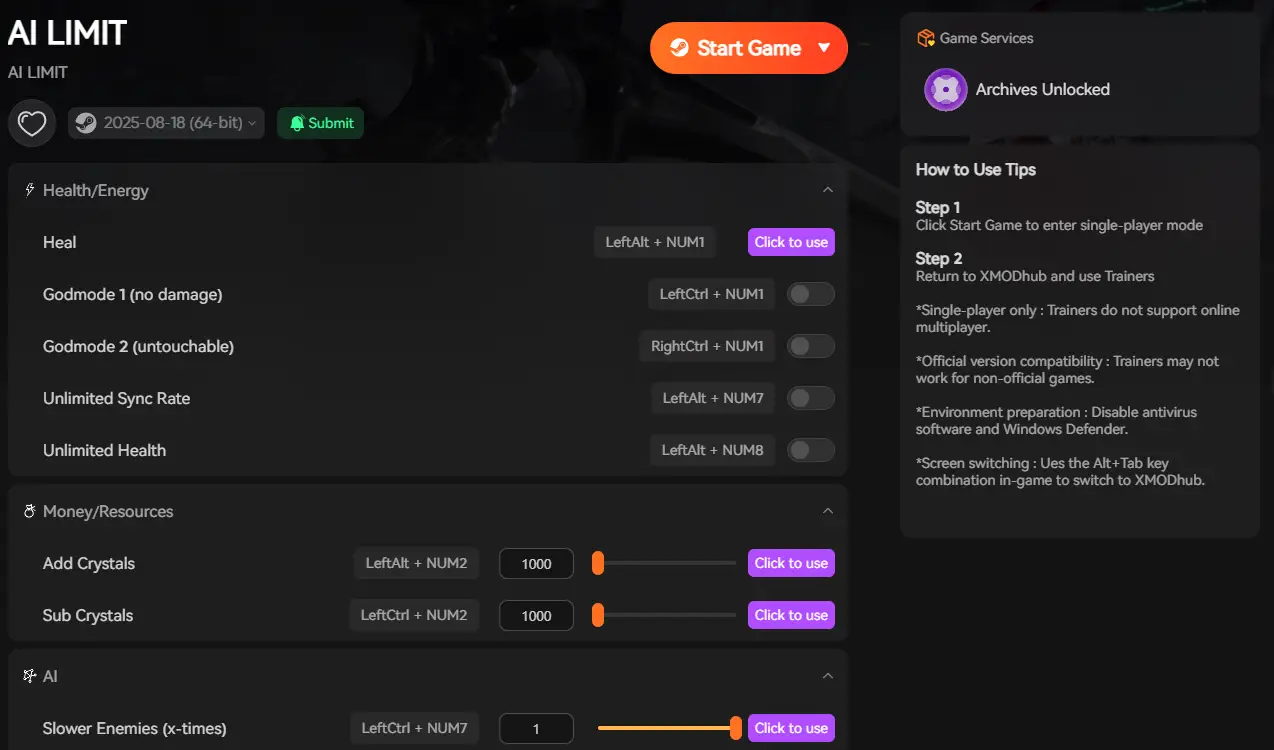
- The 10x Speedhack: This is the ultimate tool for skipping in-engine dialogue. When a boss starts talking and locks your controls, press your designated XMODhub hotkey to multiply the game speed by 10. The 45-second monologue will play out at chipmunk speed, finishing in 4 seconds and instantly unlocking your controller for the fight.
- Cinematic Bypass Toggle: Enable our “Skip Cutscenes” hook in the overlay. XMODhub will intercept the engine’s media framework, forcefully terminating any pre-rendered video the exact millisecond it attempts to play, entirely removing the need to dig through your Steam folders and rename files.
- Save Manager (Checkpoint Teleport): If a specific cutscene is causing your game to crash entirely, use our community Save Manager to inject a save file positioned immediately after the cinematic, bypassing the broken code completely.
How to Get Started:
- Download XMODhub: Grab the secure, ad-free PC client directly from our official website.

- Auto-Detect Game Path: Launch the app. It will instantly map out your AI LIMIT – Eirene’s Furnace of War installation and hook into the engine safely.
- Activate the Trainer: Launch the game through the XMODhub dashboard. Keep your Speedhack hotkey ready to blast through any unskippable boss intro the second it starts.
Frequently Asked Questions (FAQ)
Q: Will renaming the movie files cause AI LIMIT – Eirene’s Furnace of War to crash?
A: Generally, no. Unreal Engine 5 is designed to fail gracefully if a media file is missing, instantly skipping to the next logic trigger. However, if a specific area requires a hidden loading screen disguised as a video, skipping it may cause a temporary stutter as the environment loads abruptly.
Q: Is there an auto-skip feature in New Game Plus (NG+)?
A: No. The game currently forces players to watch all cinematics and dialogue again during NG+ and subsequent playthroughs.
Q: Can I skip the end credits using these methods?
A: Yes. The end credits are typically stored as a standard video file in the Content/Movies folder. Renaming the credits file will instantly return you to the main menu after the final cutscene.
Conclusion
Having your adrenaline-fueled boss run interrupted by an unskippable monologue is incredibly frustrating. By navigating to your local Unreal Engine directories and renaming the pre-rendered movie files, you can successfully skip Eirene cutscenes AI Limit forces upon you. Understanding the difference between a video file and an in-engine script is crucial for maintaining your sanity during difficult combat encounters.
However, if digging through hidden folders and dealing with locked in-game dialogue feels like a chore, you do not have to endure it. The XMODhub PC Client provides a seamless bypass, letting you speedhack through long conversations or automatically intercept media players. Take back your time, skip the lore you already know, and get straight back to the action.
Think Bigger: XMODhub is the ultimate gaming companion for hardcore PC action gamers. With native support for over 5,000+ games, we provide safe Save Managers and game speed automation. Whether you are fast-forwarding through cutscenes in AI LIMIT – Eirene’s Furnace of War, skipping repetitive dialogue in Black Myth: Wukong, or rushing straight back to the boss fog in Sekiro: Shadows Die Twice, XMODhub ensures you conquer every game in your library on your own terms.

I am a passionate gamer and writer at XMODhub, dedicated to bringing you the latest gaming news, tips, and insights.
Connect with me:
LinkedIn Profile ↗