Summary: This guide outlines the complete system requirements for the Shift At Midnight Demo, covering minimum and recommended specs along with tips to ensure smooth performance on your PC.
Shift At Midnight is a story-driven survival-horror game that blends exploration, stealth, and psychological tension into a gripping experience.
Before diving into its dark mysteries, it’s important to understand the official system requirements to ensure your PC can run the demo smoothly.
This guide will help you determine whether a low-end setup can handle the game, explain how to check if your specific PC meets the necessary specs, and show you how to enhance your gameplay experience using XMOD for better performance and customization.
Let’s break down everything you need to know before stepping into the shadows of Shift At Midnight.
Table of contents
- What is Shift At Midnight?
- System Requirements: Minimum and Recommended
- Can You Run Shift At Midnight Demo on a Low-End PC?
- Can My PC Run Shift At Midnight Demo?
- How to Enhance Gameplay Experience with XMOD?
- Conclusion
What is Shift At Midnight?

Shift At Midnight is a first-person survival-horror game that combines stealth, atmospheric tension, and narrative-driven exploration. Set in a remote and unsettling environment, the game follows a character trapped in a mysterious facility filled with supernatural threats and hidden secrets. Players must navigate dark corridors, solve environmental puzzles, manage limited resources, and avoid deadly entities as they uncover the truth behind the Midnight experiments. With its eerie sound design, immersive environments, and focus on psychological suspense, Shift At Midnight delivers a modern horror experience designed to keep players on edge from start to finish.
System Requirements: Minimum and Recommended
Before diving into the atmospheric horror of Shift At Midnight, make sure your PC meets the necessary hardware specs. Below are the official minimum and recommended requirements to ensure smooth gameplay.
Minimum Requirements
- OS: Windows 10 (64-bit)
- Processor: Intel Core i3-2100 / AMD FX-4300 or equivalent (dual-core or better)
- Memory: 4 GB RAM
- Graphics: NVIDIA GeForce GTX 750 Ti / AMD Radeon R7 260X (2 GB VRAM)
- Network: Broadband Internet connection
These specs support basic performance at lower settings, suitable for older or budget systems.
Recommended Requirements
- OS: Windows 10 (64-bit)
- Processor: Intel Core i5-6500 / AMD Ryzen 3 1200 or equivalent
- Memory: 8 GB RAM
- Graphics: NVIDIA GeForce GTX 1050 Ti / AMD Radeon RX 560 (4 GB VRAM)
- Network: Broadband Internet connection
Meeting these requirements ensures smoother frame rates, better visual quality, and an overall more immersive horror experience.
Can You Run Shift At Midnight Demo on a Low-End PC?

Yes — the demo for Shift At Midnight is designed to be accessible and should run on many lower-end PCs, especially if you’re willing to adjust some settings. According to previews, the minimum requirement of 4–8 GB RAM with a basic GPU like a GTX 750 Ti or RX 260X is sufficient for light play.
If your system is below minimum, you’ll want to:
- Lower resolution (720p) or disable extras like shadows and post-processing
- Close background applications to free up RAM and CPU
- Play in windowed mode rather than fullscreen to reduce graphics load
In short: With a few tweaks, even a modest system can handle the demo — just expect to compromise on visual detail for smoother performance.
Can My PC Run Shift At Midnight Demo?
Most PCs released in the past decade should be able to run the Shift At Midnight demo, thanks to its fairly lightweight system requirements. If your system meets or exceeds the minimum specs—a dual-core CPU, 4 GB RAM, and a GTX 750 Ti–level GPU—you’ll be able to launch and play the demo without major issues.
For smoother performance, aim for the recommended specs like an Intel i5-6500 or Ryzen 3 1200 paired with a 1050 Ti/RX 560. If your hardware falls slightly below these thresholds, you may still run the game by lowering resolution, turning off post-processing effects, and enabling performance-friendly settings.
How to Enhance Gameplay Experience with XMOD?

You can enhance your Shift At Midnight demo experience dramatically with XMOD, thanks to its powerful cheats, modifiers, and quality-of-life tools tailored for smoother, more customizable gameplay. Here’s how XMOD helps you get more out of every run:
1. Boost Your Resources Instantly
XMOD lets you add tokens, increase revenue, and prevent shelf items from decreasing, making it easier to manage your store and progress without grinding. Simply press the assigned hotkeys (like NUM2, NUM4, or F5) or click the on-screen buttons to activate these boosts.
2. Improve Combat & Survival
Struggling with tough encounters? Enable unlimited ammunition (F1) to keep firing without worrying about weapon supplies—perfect for getting through intense moments in the demo.
3. Adjust Game Speed
Want faster progression or easier multitasking?
Use XMOD’s game speed multiplier (F3) to speed up or slow down gameplay, helping you complete tasks and manage in-game time more efficiently.
4. Streamline Your Playstyle
XMOD’s one-click interface makes it simple for beginners and advanced players alike. Just launch your game in offline mode, enable XMOD, and toggle the features you need.
5. Additional Tools for Even Better Gameplay
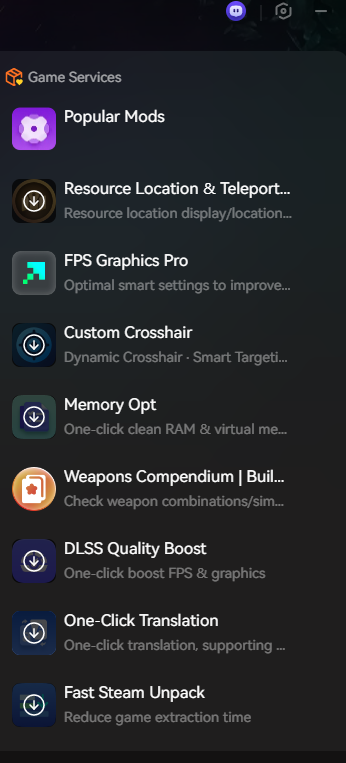
XMOD also includes extras like one-click translation, framerate optimizers, and performance helpers—ideal for low-end PCs or players who want a smoother overall experience.
Conclusion
The Shift At Midnight demo already delivers a tense and atmospheric experience, but using XMOD allows you to tailor that experience to your preferred pace and playstyle. Whether you want easier resource management, smoother performance, or helpful boosts during tougher scenarios, XMOD gives you the flexibility to play the game your way.With its easy setup and strong tools, it’s one of the simplest and most effective ways to enhance gameplay.
I am a passionate gamer and writer at XMODhub, dedicated to bringing you the latest gaming news, tips, and insights.
Connect with me:
LinkedIn Profile ↗

 Catherine Hu

 Nancy Miller


Great breakdown of the system requirements! I appreciate that you included guidance for low-end PC users too — it’s often overlooked but super helpful for players who don’t have high-end rigs. The section about enhancing gameplay performance was a nice touch; optimizing settings before starting the demo definitely makes for a smoother first experience.