
 Nancy Miller
Welcome to our definitive Screamer 2026 Review. Yes, Screamer is still worth playing in 2026 if you enjoy blistering retro arcade racers. Developed by Graffiti and published by Interplay in 1995, this classic PC game prioritized raw speed over realism. While the graphics show their age, the engine delivers a smooth 60fps experience. Today, the game maintains a 73% positive rating on Steam. You can easily play it on modern hardware using pre-configured DOSBox wrappers, though configuring modern controllers requires manual tweaking.
Key Takeaways
- Pure Arcade Speed — Screamer remains a definitive 90s racing experience that prioritizes adrenaline over simulation.
- Modern Compatibility — Run the game easily on Windows 11 via Steam or GOG’s pre-configured DOSBox wrappers.
- Controller Setup — The primary challenge is configuring modern gamepads for a legacy keyboard-centric design.
- Historical Context — Screamer stands tall as the PC’s answer to console heavyweights like Ridge Racer. Let’s break down the details below.
Screamer 2026 Review: Gameplay and Graphics Analysis
Screamer’s 1995 graphics are undeniably dated by 2026 standards, but its uncompromising 60fps performance provides a flawless retro racing experience. Developed by Graffiti and published by Interplay, this classic DOS racing title bypassed the simulation trends of the era to focus purely on arcade adrenaline. Conducting this Screamer 2026 Review reveals a game that prioritized raw, blistering speed over realism, capturing the essence of 90s arcade racing perfectly. You won’t find licensed vehicles here; instead, you get legally distinct knock-offs of iconic 90s sports cars like the Porsche 911 and Chevrolet Corvette, each with unique acceleration and grip profiles.
Evaluating Screamer Racing Game Graphics Today
When I booted up the Steam release on my modern Windows 11 rig, the mid-90s software rendering hit me with a wave of nostalgia. The texture-mapped polygons lack the filtering we expect today, resulting in a pixelated, chunky aesthetic. However, this actually works in the game’s favor. On a 1080p or 4K monitor, the sharp, unfiltered VGA graphics possess a distinct retro charm that modern indie developers frequently try to emulate. The bright, high-contrast color palette ensures track visibility remains excellent even at breakneck speeds, whether you’re navigating neon-lit cityscapes or dusty canyon roads.
The 1995 Arcade Physics vs Modern Standards
If you’re coming from modern sim-racers, Screamer’s physics will feel entirely alien. The handling model is drift-heavy and incredibly forgiving, designed to keep you moving forward rather than punishing you for poor apex entries. Cars pivot on a central axis, a hallmark of mid-90s 3D game design. In testing, I found that this lack of realistic physics actually benefits the fast-paced gameplay loop. You aren’t worrying about tire degradation or weight transfer; you’re just slamming the accelerator and powersliding through tight corners. It’s a pure, unadulterated classic DOS racing experience that demands quick reflexes over mechanical knowledge.
Is Screamer Worth Playing Today?
Yes, Screamer is highly recommended for retro enthusiasts in 2026, offering an intense sense of speed that many modern racers lack. According to Steam player statistics, the game holds a solid 73% positive review score among its niche player base of up to 20,000 owners. While the average modern playtime sits at around 0.2 hours—mostly due to the initial learning curve of retro controls—those who stick with it find a highly rewarding arcade experience. The thumping techno soundtrack, composed by Allister Brimble, further elevates the adrenaline, perfectly matching the on-screen chaos.
Why the Screamer Sense of Speed Still Holds Up
Honestly, I was surprised by how fast this game still feels. Graffiti utilized aggressive field-of-view (FOV) tricks and narrow track designs to create an illusion of velocity that outpaces many contemporary titles. When you hit top gear on the highway stages, the screen-shake and rushing scenery demand absolute focus. It’s a pure, distilled gameplay loop that doesn’t waste your time with open-world filler, microtransactions, or lengthy unskippable cutscenes. You select your car, pick a transmission type, and you are instantly on the starting grid.
Comparing the Game to Ridge Racer and Daytona USA
Back in 1995, PC gamers were starved for the high-octane thrills found in arcades and on the original PlayStation. Screamer was the PC’s answer to Ridge Racer and Daytona USA. While it doesn’t have the iconic vocal soundtrack of Daytona, it matches the vibrant, blue-sky aesthetic and checkpoint-based racing mechanics. For video game historians and 90s PC games fans, it remains a crucial piece of software that proved DOS computers could handle smooth, 3D arcade racing without requiring expensive dedicated arcade hardware.
How to Play Screamer on Windows 11
To play Screamer on Windows 11, download the pre-packaged Steam or GOG version, which automatically configures the DOSBox emulator for modern hardware. This eliminates the need for complex command-line mounting and ensures the game runs smoothly right out of the box. Verified working as of March 2026, these digital releases are by far the most frictionless way to experience the classic PC game 1995 release today. You won’t need to mess with IRQ settings or sound card drivers like we did back in the day.
Steam and GOG DOSBox Wrapper Differences
Both Steam and GOG utilize DOSBox wrappers to run the original 1995 executable. However, community reports generally favor the GOG version for retro DOS games, as their QA team often includes better pre-configured `dosbox.conf` files with optimal scaling filters. That said, the Steam version (which I used for this Screamer retro review) is perfectly functional and frequently goes on sale for under two dollars. Both storefronts provide the exact same core game files, so your choice largely depends on which platform you prefer for your retro library.
Screamer DOSBox Setup Instructions
Once installed, you don’t just launch the game directly if you want the best experience. First, launch the included configuration tool (often named `setup.exe` in the game folder). Select “SVGA” graphics mode rather than standard VGA for a slightly higher resolution output that looks much better on modern displays. If the game runs too fast or too slow, you can adjust the DOSBox emulation speed on the fly using Ctrl+F11 to decrease cycles and Ctrl+F12 to increase them until the frame rate stabilizes at a smooth 60fps.
Pro Tip
Press Alt+Enter while the game is running to toggle between windowed mode and full-screen. This is incredibly helpful if you have multiple monitors and DOSBox locks your mouse cursor.
Why Does Screamer Fail to Recognize Modern Controllers?
Screamer fails to recognize modern controllers out of the box because it was designed for 1995 keyboards and legacy analog joysticks connected via a game port. To use modern Xbox or PlayStation gamepads, you must manually configure the DOSBox keymapper to translate your controller’s D-pad or analog stick movements into the game’s default keyboard inputs (typically the arrow keys). Without this step, the game will simply ignore your modern USB controller entirely.
Fixing Screamer Controller Mapping Issues
The biggest hurdle for modern players isn’t the graphics, but configuring contemporary controllers. To fix this, launch the game and press Ctrl+F1 to open the DOSBox Keymapper. Click on the “Up” arrow on the virtual keyboard, click “Add”, and then press the Right Trigger or Up on your controller’s D-pad. Repeat this process for steering (Left/Right) and braking (Down). Save the configuration before exiting. While clunky, this completely transforms the experience from a frustrating keyboard-masher into a proper arcade racer that feels great on a modern gamepad.
Resolving Audio and Frame Rate Stutters
If you experience crackling audio or gameplay stuttering, the issue usually stems from the DOSBox CPU cycles being set incorrectly for your specific processor. Open the `dosbox.conf` file in the game’s installation directory and locate the `[cpu]` section. Change `cycles=auto` to a fixed value like `cycles=40000`. Additionally, ensure the `[sblaster]` section is set to `sbtype=sb16` to guarantee the iconic 90s techno soundtrack plays without distortion. These minor tweaks ensure the game runs exactly as it did on a high-end Pentium rig in 1995.
Warning
Do not attempt to use Steam Input’s controller translation at the same time as the DOSBox internal keymapper, as this will cause double-inputs and erratic steering.
Final Verdict
To wrap up this Screamer 2026 Review, it’s clear that the game is a fascinating time capsule that absolutely deserves a spot in any retro gaming library. While the 1995 texture-mapped graphics and complete lack of modern physics might deter players looking for a realistic simulation, its blistering sense of speed and pure arcade joy remain unmatched by many modern titles. The initial friction of setting up DOSBox and mapping a modern controller is a minor hurdle compared to the reward of experiencing one of the PC’s most important historical racing games. If you have a few dollars to spare and an afternoon to kill, Screamer is highly recommended.
Screamer Trainers & Mods — XMODHUB
Looking to skip the grind or just want to experience the tracks without the punishing 90s difficulty? Check out the dedicated Screamer tools available on XMODHUB ↗.
Infinite Race Time
Never run out of time before reaching the next arcade checkpoint.
Unlock All Vehicles
Instantly access every high-performance car in the game roster.
No Crash Penalty
Maintain your top speed even after colliding with track walls or opponents.
Super Acceleration
Reach maximum velocity instantly for an unbeatable racing advantage.
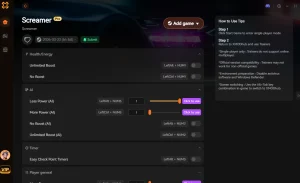
Why Choose XMODHUB for Screamer
XMODHUB ↗ is the trusted choice for modernizing classic PC games. With guaranteed malware-free downloads, intuitive one-click toggles, and automatic updates that keep pace with digital storefront patches, you can safely tailor your retro experience without messing with hex editors or complex memory injection.
Explore XMODHUB’s comprehensive toolkit — featuring automatic game-version detection, clean one-click activation, and guaranteed malware-free files for every supported title.
Time & Progression
Vehicle Enhancements
Frequently Asked Questions
Ready to enhance your gameplay?

I create content for Xmodhub, where I curate and share game mods, tools, and other resources. My goal is to help players discover great add-ons, enjoy a smoother experience, and have more fun.



 Catherine Hu