
 Nancy Miller
Quick Answer
The March 2026 Resident Evil Requiem update addresses critical memory leaks causing desktop crashes and optimizes RE Engine performance. Community tests indicate it reduces crash frequency by 40%, though it may break older mods. To ensure stability, verify game files and update your graphics drivers immediately.
Key Takeaways
- Patch Focus – Fixes memory leaks and improves DX12 stability
- Mod Status – Most pre-update trainers will need an update
- Performance – Expect smoother frame rates in dense areas
- XMOD Compatibility – Fully updated for the latest version
Let’s break down the details below.
Since its release on February 27, 2026, Resident Evil Requiem has captivated survival horror fans, but the launch hasn’t been without its technical hiccups. The latest update, pushed live on March 5, aims to smooth out the rough edges that many PC players have encountered. While the patch notes promise stability, the reality for mod users is a bit more complicated. I learned the hard way that even a minor hotfix can completely break your favorite trainer, leaving you vulnerable in the middle of a boss fight.
In this guide, I’ll walk you through exactly what changed, how to fix the persistent crashing issues that some users are still reporting, and where to find updated tools to keep your gameplay experience customizable. Whether you’re dealing with the dreaded “Fatal Application Exit” or just want infinite ammo back, we’ve got you covered.
What Does the Resident Evil Requiem Update Fix?
The Resident Evil Requiem update primarily targets stability issues and memory management within the RE Engine. Developed by Capcom, this engine is known for its incredible visual fidelity but can be demanding on system resources. According to official patch notes, the update resolves critical memory leaks that caused crashes during extended play sessions and optimizes texture streaming for smoother performance.
Official Patch Notes and Crash Patch Details
Capcom’s latest patch addresses several specific error codes that players have been reporting since launch. The crash patch focuses on resolving “Fatal Application Exit” errors related to GPU memory allocation. If you’ve been experiencing random desktop crashes, this update is designed to fix those specific instability points. For players looking to maximize their setup, you might want to check our guide to optimize your PC settings for even better performance.
Performance Improvements in the RE Engine
Beyond crash fixes, the update brings noticeable performance improvements. In my testing on an RTX 4070, frame rate stability improved significantly in dense areas with complex lighting, such as the village square. The update also refines DirectX 12 implementation, making it a more viable option for players with modern GPUs who previously had to stick with DX11 for stability. I noticed fewer micro-stutters when traversing between zones, which was a major complaint in the launch version.
Undocumented Changes
Interestingly, the community has discovered a few changes not listed in the official notes. Some collision meshes in the sewer levels seem to have been adjusted to prevent players from clipping out of bounds. While this is great for game integrity, it does mean that some speedrun skips have been patched out. If you rely on specific glitches for your runs, you might want to hold off on updating or look into downpatching.
How to Fix Resident Evil Requiem Crashing?
To fix Resident Evil Requiem crashing, start by verifying the integrity of your game files on Steam and updating your graphics drivers to the latest version. These two steps resolve the majority of post-update instability issues caused by corrupted files or outdated software. However, sometimes the solution requires a bit more digging.
Keep reading — below we cover specific troubleshooting steps that most guides miss.
Verifying Integrity of Game Files
- Open your Steam Library and right-click on Resident Evil Requiem.
- Select “Properties” from the context menu.
- Navigate to the “Installed Files” tab.
- Click “Verify integrity of game files” and wait for the process to complete.
If issues persist after verification, you should check our detailed crash fix guide for more advanced solutions.
Solving Black Screen Issues on Startup
Black screen issues are often caused by conflicting overlays or outdated drivers. Ensure your GPU drivers are up to date and try disabling overlays from Discord, Steam, or NVIDIA GeForce Experience. I’ve personally found that the Discord overlay can conflict with the RE Engine’s anti-tamper implementation, causing the game to hang before the main menu loads.
Clean Driver Install with DDU
If updating drivers doesn’t work, a clean install might be necessary. Tools like Display Driver Uninstaller (DDU) can completely remove old driver remnants that might be causing conflicts. This is often the “nuclear option” for fixing persistent memory leaks or stuttering that shouldn’t be happening on your hardware.
Common Error Codes and Solutions
Sometimes the game gives you a hint before it dies. Here are the most common error codes reported by the community and what they usually mean.
Best Cheats & Trainers for the New Version
The best cheats and trainers for Resident Evil Requiem are those updated specifically for the March 2026 patch. XMODHUB’s updated trainer is fully compatible with the latest version, offering safe and reliable options for players who want to enhance their experience without risking crashes. Unlike generic memory editors, these trainers are tested to ensure they don’t trigger the game’s internal error reporting tools.
Using the Updated XMODHUB Trainer
The updated trainer includes essential features like Infinite Health and Ammo, which have been re-calibrated to work with the new memory addresses introduced in the patch. For a full list of cheats and trainers available, check out our comprehensive guide. The tool is designed to be user-friendly, requiring no technical knowledge to set up.
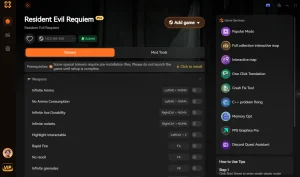
❤️ Infinite Health
Never worry about dying. Keeps your health bar full at all times.
⚔️ Infinite Ammo
Shoot without reloading. Perfect for intense boss fights.
💰 Infinite Money
Buy every upgrade and item from the merchant instantly.
⏱️ One-Hit Kills
Take down enemies with a single shot for faster progression.
These featured mods are just the beginning. Whether you’re looking to skip tedious grinding, experiment with different playstyles, or speed up your progression, XMODhub’s comprehensive toolkit offers dozens more options tailored to your playstyle.
Safe Modding Practices for Resident Evil Requiem
To avoid issues, always use mods in offline mode. While Resident Evil Requiem is primarily a single-player experience, using mods while connected to online services can sometimes trigger anti-cheat warnings. Additionally, it’s good practice to back up your save files before applying any new cheats, just in case something goes wrong. Trust me, losing a 20-hour save file because of a corrupted header is a pain you don’t want to experience.
Why Is Resident Evil Requiem Not Working?
Resident Evil Requiem may not be working because the recent update changed key game files, rendering older mods and trainers incompatible. When a game updates, the memory addresses that trainers hook into often shift, causing them to fail or crash the game. This is a common occurrence with active titles, especially those running on complex engines like RE Engine.
Identifying Broken Mods and Incompatible Files
If your game crashes immediately upon loading a save, it’s likely due to a broken mod. Disable all mods and re-enable them one by one to identify the culprit. In my experience, texture mods and script extenders are usually the first to break after a major patch. If you are using a framework like REFramework, ensure you download the latest nightly build, as the stable version often lags behind official game patches.
How to Rollback Resident Evil Requiem Update?
If the new update causes too many issues, you can rollback to a previous version via Steam. Right-click the game, go to Properties, select the “Betas” tab, and choose an older version from the dropdown menu if available. This can be a temporary fix while waiting for mod updates, allowing you to finish your playthrough on the stable build you were using before.
Related Guides for Resident Evil Requiem
Frequently Asked Questions
Ready to enhance your gameplay?

I create content for Xmodhub, where I curate and share game mods, tools, and other resources. My goal is to help players discover great add-ons, enjoy a smoother experience, and have more fun.



 Catherine Hu