Catherine Hu
Editor’s Note: Can You Cheat in REANIMAL?
“REANIMAL runs on Unreal Engine 5. In the current release build, the developers have Hard-Locked the console key to preserve the horror atmosphere and prevent players from breaking the scripted events.
While you can try using generic ‘Unreal Unlocker’ tools to force the console open, this often causes the game to crash during cutscenes or breaks the lighting engine (Lumen). At XMODhub, we recommend using an external memory trainer to inject cheats like ‘God Mode’ safely.”
Mastering REANIMAL can be brutal. One moment you are sneaking past a grotesque monstrosity, and the next, a slight miscalculation in jump timing sends you back to a checkpoint 10 minutes ago.
Whether you are stuck on a frustrating chase sequence or simply want to use Noclip to explore the horrifyingly beautiful world Tarsier Studios has created, using REANIMAL console commands is a popular request.
However, accessing the developer debug menu in this Unreal Engine 5 title isn’t straightforward. Below is the complete guide on why the console is hidden, the standard UE5 commands (if you can unlock them), and the safer alternative to cheat without crashing your game.
You may also like:
REANIMAL Cheat Engine Table vs. XMODhub Trainer: Best Free Alternative (2026)
How to Enable the Console in REANIMAL
To access the debug menu, standard PC methods usually fail in Tarsier Studios games. Here is the reality:
- Method A (Default): Pressing the Tilde key (
~) orF1does nothing. The key bindings are stripped. - Method B (Launch Options): Adding
-consoleto Steam Launch Options will not work. - Method C (Config File): Editing
Input.inirequires decryption and often resets upon launch.
(Conclusion: You cannot open the console natively. You need a third-party tool like XMODhub to access debug features.)
Essential Console Commands List
If you manage to force the console open (using a Universal Unreal Unlocker), here are the standard UE5 cheats that work in REANIMAL.
Survival & Movement
| Command | Effect | Notes |
|---|---|---|
| god | Grants invincibility. | The monster can grab you, but “Death” won’t trigger. |
| slomo [value] | Changes game speed. | Use slomo 0.5 to slow down intense chases. |
| ghost / noclip | Fly through walls. | Useful if you get stuck in geometry. |
| walk | Disables noclip. | Returns to normal movement. |
Visuals & Camera
- toggledebugcamera: Detaches the camera from the player. Great for taking screenshots of the environment.
- showdebug: Displays coordinates and player state.
- r.SetRes [Width]x[Height]f: Forces a custom resolution.
REANIMAL Debug Features: Why No Item IDs?
Unlike RPGs, REANIMAL is a linear narrative adventure. There are no “Item IDs” because there is no inventory system to add items to.
However, players often look for ways to skip sections. Since you cannot “spawn” keys, the best way to bypass a locked door is:
Ghost Mode
Clip through the door directly.
Teleport
Use a trainer to teleport forward.
(Tired of typing commands? The XMODhub Trainer has a built-in “Teleport to Checkpoint” feature, so you don’t need to mess with coordinates.)
The Problem: Why Console Commands Break the Game
Using raw console commands in a scripted horror game comes with risks:
- Script Breakage: If you use
noclipto bypass a trigger volume (an invisible line that starts a cutscene), the game logic will break, and you will be soft-locked. - Co-op Desync: REANIMAL relies on precise synchronization between two players. Typing
slomoin the console will only slow your game, causing an immediate disconnect from your partner. - Atmosphere Killer: Typing codes manually ruins the tension.
The Better Alternative: XMODhub Trainer (No Typing)
Stop memorizing commands and risking crashes. XMODhub acts as a visual overlay that bypasses the need for the developer console entirely.
| Feature | Console Commands | XMODhub Trainer |
|---|---|---|
| Method | Typing text manually | One-Click Hotkeys |
| Co-op Safety | High Risk (Disconnects) | Client-Side Safe |
| Invisibility | Requires complex setup | Toggle Switch |
| Camera Tools | Basic Debug Camera | Photo Mode Tools |
| Game Updates | Breaks with patches | Auto-Updated via Cloud |
How to Use XMODhub Trainer for REANIMAL
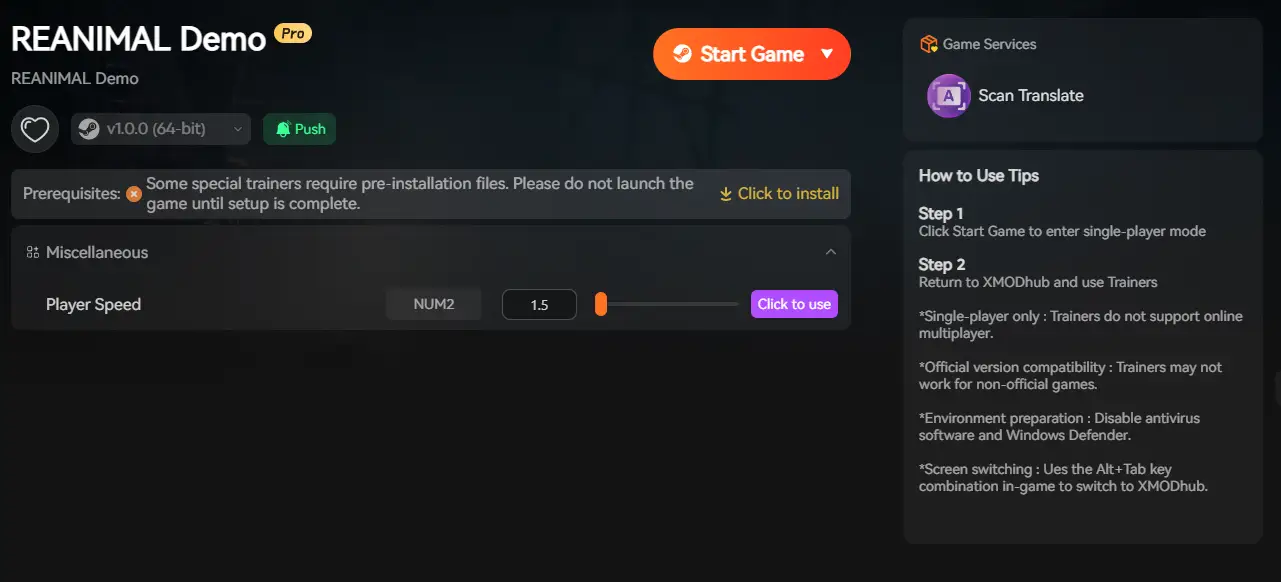
Don’t waste time editing config files. Here is how to use XMODhub in 3 simple steps:
1. Download: Get the free XMODhub Client safely.

2. Launch: Open XMODhub—it automatically detects your installed copy of REANIMAL.
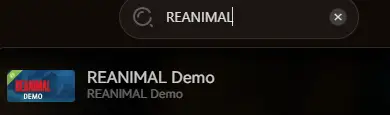
3. Activate: Click “God Mode” or “Invisibility” and survive the nightmare.
FAQ
Q: Can I use cheats in REANIMAL Online Co-op?
A: Yes, but only via XMODhub in private lobbies with friends. Console commands will cause desync. Be respectful and ask your partner before toggling cheats.
Q: Is there a cheat to freeze the monster?
A: There is no native console command for this. However, the XMODhub Trainer includes a “Freeze AI” feature that stops enemies in place.
Q: Does God Mode prevent fall damage?
A: Yes. It protects you from enemy attacks and environmental deaths.
Conclusion: Cheat Smarter
While classic console commands are a staple of PC gaming, Tarsier Studios has locked them down in REANIMAL to preserve the experience. Attempting to force them open often leads to crashes.
XMODhub offers a safer, visual, and co-op friendly way to customize your horror experience. Whether you need to get past a bug or just want to explore freely.

I am a passionate gamer and writer at XMODhub, dedicated to bringing you the latest gaming news, tips, and insights.
Connect with me:
LinkedIn Profile ↗

 Nancy Miller