Summary: This guide provides a full breakdown of the PIONER system requirements to help you assess whether your PC can handle this ambitious open‑world MMO first‑person shooter, and discuss how performance enhancements and customizations via XMOD can elevate your experience.
Before venturing into the harsh, post-apocalyptic world of PIONER, it’s crucial to ensure your PC is fully prepared. This MMOFPS features massive open-world maps, intense PvP and PvE battles, and dynamic events that push your hardware to its limits. Running the game smoothly requires more than just a decent PC—it demands a setup that can handle high-quality graphics, fast load times, and stable performance during large-scale encounters.
To help you get ready, it’s important to know the Minimum specs and Recommended specs for PIONER. Meeting these requirements will ensure you enjoy smooth gameplay, detailed visuals, and a seamless experience across the game’s challenging world.
For even better performance and customization, tools like XMOD can help optimize your settings, giving you the edge in both exploration and combat.
Table of contents
- What is PIONER?
- System Requirements for PIONER: Minimum and Recommended
- Can You Run PIONER on a Low‑End PC?
- Can My PC Run PIONER?
- How to Enhance Gameplay Experience with XMOD?
- Conclusion
What is PIONER?
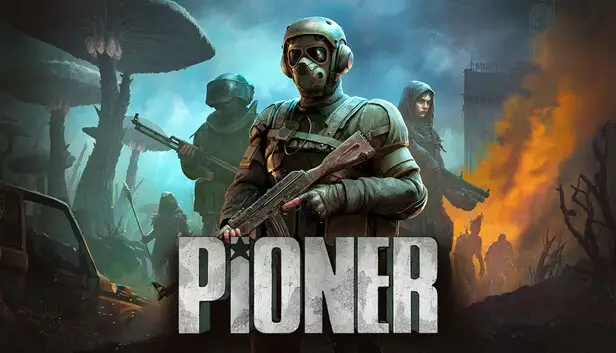
PIONER is an open‑world MMO first‑person shooter developed by GFAGAMES. Set on a desolate, haunting island with Soviet‑era ruins, it blends PvE and PvP gameplay with story missions, faction progression, survival mechanics, and extensive weapon customization.
The game emphasizes realism over traditional health bars and levels, offering both solo story play and high‑stakes multiplayer modes across a sprawling world.
System Requirements for PIONER: Minimum and Recommended
Before launching PIONER, especially if you plan to use XMOD for performance tuning or mod support, check that your PC hardware meets these requirements.
Minimum Requirements (to launch the game):
- OS: Windows 10 (64‑bit) or later
- Processor: Intel Core i3‑6100 or equivalent
- Memory: 16 GB RAM
- Graphics: NVIDIA GTX 1060 6GB or comparable GPU
- Network: Broadband Internet connection
- Storage: ~100 GB available, SSD recommended
Recommended Requirements (smoother experience):
- OS: Windows 11 (64‑bit)
- Processor: Intel Core i5‑8600 or equivalent
- Memory: 24 GB RAM
- Graphics: NVIDIA RTX 2060 or AMD RX 6600 series
- Network: Broadband Internet connection
- Storage: ~100 GB available space, SSD required
Can You Run PIONER on a Low‑End PC?
PIONER is a demanding open‑world title. Meeting the minimum requirements allows the game to launch, but performance will vary:
Older or weaker GPUs:
Cards below GTX 1060 may struggle with stability even at low settings, especially in populated zones or during intense firefights.
Memory:
16 GB RAM is the baseline—systems with less will likely experience crashes or severe stuttering.
Network:
A stable broadband connection is essential, as PIONER is MMO‑centric and requires online play even for many PvE elements.
XMOD Considerations:
Using XMOD performance tools (like FPS boosters, memory optimizers, or custom configs) will add overhead.
If your hardware barely meets minimum specs, these enhancements could push performance below acceptable levels, so aim for recommended specs if you plan to mod or optimize heavily.
Can My PC Run PIONER?
To check if your PC is ready:
- Identify Your Specs: Use Windows “dxdiag” (press Windows + R → type dxdiag) or check System Information.
- Compare Components: Note your OS, CPU, GPU, RAM, and available storage. Match them vs. the minimum and recommended requirements above.
- Assess Expectations: Minimum specs should allow entry into the game, but for stable frame rates, especially in large battles or dense areas, recommended specs provide a smoother experience.
- Plan for XMOD: If you intend to use XMOD for FPS enhancements, graphical mods, or custom tools, make sure your PC exceeds recommended specs to maintain performance under additional load.
How to Enhance Gameplay Experience with XMOD?

Integrating XMOD with PIONER can elevate both performance and customization:
Performance Tools:
XMOD’s FPS boosters and memory optimizers help stabilize frame rates in open‑world environments and during heavy action.
Custom Config Tweaks:
XMOD can modify settings beyond standard in‑game menus, such as adjusting FOV, engine threading behavior, or GPU‑specific adjustments, improving responsiveness and visibility.
Visual Enhancements:
Use XMOD for reshade profiles, UI tweaks, or custom graphical presets that maintain performance while tailoring visual fidelity.
Gameplay Customization:
While XMOD shouldn’t alter core balance in multiplayer, quality‑of‑life tools like customizable crosshairs or informational overlays can aid situational awareness—especially useful in PvP zones.
Best Practices with XMOD:
- Stability First: Prioritize performance tweaks before visual mods.
- Backup Saves: Always backup configs and key bindings before applying mods.
- Check Compatibility: Ensure XMOD tools are updated for PIONER’s Early Access version before use.
Conclusion
PIONER is a rich, ambitious MMO FPS that demands modern mid‑to‑high‑end hardware to deliver its full open‑world experience. Confirming your PC meets or exceeds the minimum and recommended system requirements is essential for smooth gameplay.
If you plan to use XMOD for performance boosts or custom enhancements, giving yourself extra hardware headroom will ensure the best blend of visual fidelity, responsiveness, and mod‑powered control.
I am a passionate gamer and writer at XMODhub, dedicated to bringing you the latest gaming news, tips, and insights.
Connect with me:
LinkedIn Profile ↗

 Catherine Hu

 Nancy Miller
It’s great that the post breaks down the specs so clearly. For people running lower-end PCs, are there any specific settings or adjustments to focus on for a smoother experience?