
 Catherine Hu
Summary: Discover all Of Ash and Steel console commands and cheats for 2025. Learn how to enable the developer console, adjust character stats, and enhance gameplay using advanced tools on PC.
Of Ash and Steel is a gritty, choice-driven RPG where narrative decisions, faction alignment, and character progression shape every outcome. With its open-ended quests and tactical combat, no two playthroughs feel the same. But sometimes you may want to test builds, streamline progression, or explore hidden routes without replaying the same segments repeatedly. That’s where console commands become invaluable.
Before diving into the full cheat list, it’s worth noting that XMOD is a powerful PC tool designed to improve your single-player experience. With XMOD, you can activate safe trainers, manage optional boosts, and streamline gameplay adjustments — all without editing config files or risking corrupted saves. It’s a reliable way to control stats, resources, or difficulty settings for Of Ash and Steel.

Table of Contents
- What Are Of Ash and Steel Console Commands & Cheat Tools?
- How to Enable Console / Cheats in Of Ash and Steel
- Most Useful Cheats and Trainer Options
- Full Cheats / Trainer Options List for Ash and Steel
- How to Enhance Of Ash and Steel with XMOD
- Conclusion
What Are Of Ash and Steel Console Commands?
Console commands in Of Ash and Steel (or third-party trainers) let players modify game variables on the fly: add gold, refill health/stamina, boost attributes, teleport, enable flight or noclip, edit inventory, stats or resources — effectively giving you full control over your character and world.
- Use a Reshade addon / console-enable mod: There is a community mod (Reshade addon) for Of Ash and Steel that re-enables the developer console and allows FOV / camera adjustments. Installing this mod may expose a console or debug interface.
- Use trainer / cheat-table / external tool: Tools like Cheat Engine with a proper cheat table, or recent trainers listed on cheat/trainer websites, can hook into the game process directly and allow toggling of many cheats — no in-game console needed.
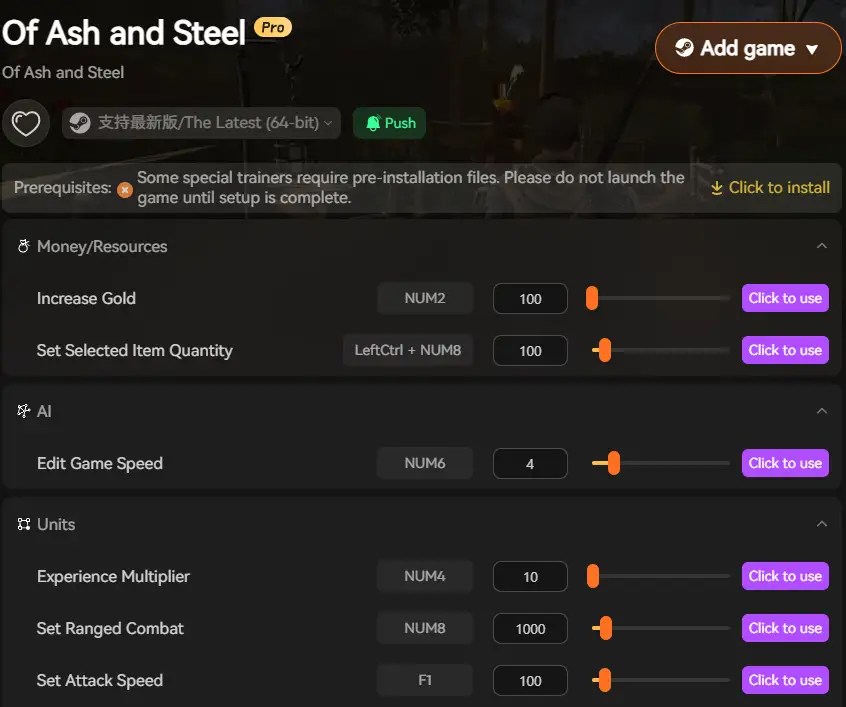
- Use XMOD or equivalent mod-manager / trainer-manager: XMOD supports Of Ash and Steel; launching the game through XMOD gives access to built-in trainer toggles with user-friendly overlay for cheats.
- Backup your save files before enabling cheats or mods, especially when using powerful cheats (infinite health, no-clip, speed edits), to avoid save corruption or unintended consequences.
Most Useful Of Ash and Steel Console / Trainer Cheats
Here are some of the most used cheats / commands (or trainer toggles) that players tend to rely on:
Economy & Resources
addgold [amount]— Grants you specified amount of gold.- Resource cheats (via trainer): remove hunger, thirst, fatigue; set hunger/thirst/fatigue to maximum or disable depletion.
Character Stats, Health & Vitality
- Infinite / Max Health — keep your character alive regardless of damage.
- Infinite / Max Stamina — no more stamina drain while sprinting, fighting or performing actions.
setattribute [stat] [value]— set base attributes such as Strength, Dexterity, Stamina, Insight directly.addskillpoints [amount]orunlockallskills— immediately unlock all skills or give yourself extra skill points.
Movement, Exploration & Utility
fly— toggle flight mode (if supported).noclip— walk through walls or terrain.speed [multiplier]— change movement speed, move faster or slower.
Combat & Gameplay Adjustments
- Unlimited stamina/health or one-hit kills (via trainer) — make combat trivial or enable “godlike” runs.
- Adjust resistances / defenses / damage / speed / jump height / etc. Many trainers expose sliders for these parameters.
Utility & Debug / Quality-of-Life
- Inventory editing: add/remove gold, items, resources.
- Adjust game speed, camera FOV, enable free-cam or no-clip for exploration or cinematic screenshots (depending on trainer).
Full Cheats / Trainer Options List for Ash and Steel
Below is a complete overview of the most commonly used cheats and trainer options for Ash and Steel, designed to help players reduce grind, test builds, and explore the game freely in single-player mode.
- Infinite Health / God Mode – Prevents your character from taking damage
- Infinite Stamina – Perform actions without stamina drain
- Infinite Mana / Energy – Cast abilities and skills without limits
- One-Hit Kill – Defeat enemies instantly
- Defense Multiplier – Reduce or negate incoming damage
- Unlimited Gold / Currency – Buy gear and upgrades freely
- Infinite Crafting Materials – Craft without consuming resources
- No Item Weight / Max Carry Capacity – Remove inventory limits
- Instant Item Pickup – Collect items without delay
- Damage Multiplier – Increase outgoing damage
- Attack Speed Modifier – Faster attacks and skill execution
- Skill Cooldown Reset / No Cooldown – Use abilities repeatedly
- Max Skill Level – Instantly unlock or upgrade skills
- Free Camera / No Clip – Move freely through the map
- Teleport to Waypoints – Instantly travel between locations
- Reveal Map / Fog Removal – Uncover the entire map
- Freeze Time / Time Control – Pause or speed up time
- Disable Enemy AI – Enemies stop attacking
- Freeze Enemies – Lock enemies in place
- Enemy Health Modifier – Adjust enemy difficulty manually
- Instant Level Up – Gain levels immediately
- Max Attributes / Stats – Fully upgrade character attributes
- Instant Quest Completion – Skip quest requirements
- Skip Dialogue / Cutscenes – Faster replays
- Save Anywhere – Save at any point in the game
- Auto-Loot – Automatically collect nearby loot
- Speed Hack – Adjust game speed (slow motion / fast mode)
- Crash-Safe Toggle – Enable or disable features safely during gameplay
How to Enhance Of Ash and Steel with XMod

If you prefer a more user-friendly, trainer-style approach to cheats rather than messing with console commands manually:
- XMod supports Of Ash and Steel — just download and install XMod, launch the game through XMod, and use the in-game overlay to toggle cheats.
- Compared to manual cheat engine or console hacking, XMod offers stability, ease of use and mod management — no messing with memory addresses or risky saves.
- Cheats can be toggled on or off on the fly: health, stamina, hunger/thirst, movement speed, resources, no-clip/fly camera, attribute/skill editing etc. This makes it ideal for experimentation, casual playthroughs or sandbox-style runs.
- Always make a backup of your save files before using powerful cheats or trainers. Using cheats may break quests, disable achievements or cause unforeseen bugs.
Conclusion
Console commands and cheats for Of Ash and Steel unlock a world of possibilities — from god-mode immortality and infinite stamina to full attribute customization, resource control, super-speed movement, and inventory editing. If you want a classic “cheat-console” approach, try mods that re-enable the dev console (or community cheat tables). If you prefer simplicity and security, using XMod (or similar trainers) is often the easiest and safest way.
Whether you’re testing builds, speeding through the early grind, or just exploring the world without limits — cheat and mod tools give you full control over your journey.
If you like, I can also provide a ready-to-copy command list (30-50 of the most useful commands / toggles) for Of Ash and Steel + XMod. Want me to build that for you now?

I am a passionate gamer and writer at XMODhub, dedicated to bringing you the latest gaming news, tips, and insights.
Connect with me:
LinkedIn Profile ↗

 Nancy Miller