You finally defeated Warrick the Torn. You are ready to rebuild Sacrament. But then you realize: You need 20 Clay and 30 Spruce Wood.
Suddenly, your dark fantasy ARPG turns into a lumberjack simulator. And to make matters worse, your favorite sword just broke, and you don’t have enough Silver to repair it.
No Rest for the Wicked is brilliant, but the grind for resources and the punishing durability system can kill the pacing.
If you want to skip the tree-chopping and focus on the combat, you are in the right place.
Below is the verified list of Internal Item Names (IDs) used by debug mods and trainers to spawn items instantly.
Table of Contents
Quick Reference: Top 10 “Grind Skippers”
The Hard Truth: How to Enable Console
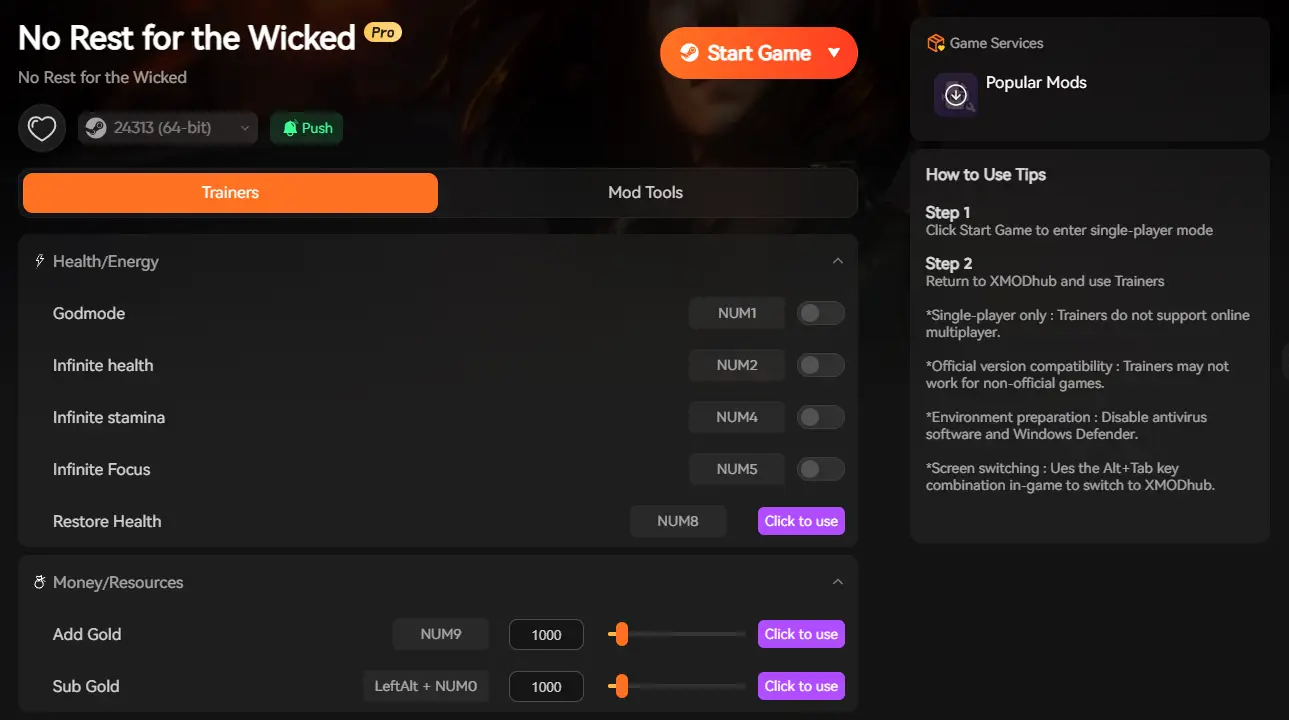
The Easy Way: XMODhub Visual Spawner
Building Material IDs (Clay, Wood, Ingots)
Currency & Upgrade IDs (Plague Ichor)
Weapon & Armor Internal Names
Stats & Respec Cheats
Troubleshooting
FAQ
Conclusion
Editor’s Note: The “Durability” Dilemma
“Let’s be real: No Rest for the Wicked is an incredible ARPG, but the durability system is controversial. There is nothing worse than being deep in the Nameless Pass, miles from a Whisper, and having your weapon break mid-combo.
While the list of Internal Names below is verified for the latest patch, I personally stopped using raw spawn codes. Why? Because spawning a ‘Claymore’ gives you a white, common version. To get the game to feel right, I use the XMODhub Visual Spawner to force ‘Infinite Durability’ and roll Legendary stats. It fixes the frustration without ruining the challenge.”
Don’t want to read the whole guide? Here are the internal names for the items that bottleneck your progress the most.
Item Name
Internal ID / Name
Why you need it?
[Clay]
Clay
Required for almost all Building Projects
[Silver Coins]
CurrencySilver
Essential for repairs and housing
[Plague Ichor]
PlagueIchor
Unlocks Inventory Slots (Crucial)
[Birch Wood]
BirchWood
Basic Tier 1 Wood
[Spruce Wood]
SpruceWood
Tier 2 Wood (The Shallows)
[Copper Ingot]
IngotCopper
Upgrading the Smithy
[Weapon Shard]
WeaponShard
Upgrading Weapon Stats
[Fallen Embers]
FallenEmber
Key to enter the Cerim Crucible
[Repair Powder]
RepairPowder
Fixes broken gear in the field
[EXP Potion]
ExperiencePotionSmall
Fast leveling
The Hard Truth: How to Enable Console
Important: Unlike The Elder Scrolls V – Skyrim or Fallout4, No Rest for the Wickeddoes not have a built-in developer console that you can open with a simple key press.
To use the IDs listed below directly, you must be comfortable with modding:
Install BepInEx: An open-source plugin framework for Unity games.
Install a “Debug Menu” or “UnityExplorer” Mod: Available on NexusMods.
The Process: Once installed, you press F1 to open the mod interface, navigate to the “Item Spawner” or “Console” tab, and type the Internal Name (e.g., Clay) to add it to your inventory.
Warning: Game updates often break these mods, leading to crashes or corrupted save files.
The Easy Way: XMODhub Visual Spawner
Don’t want to risk corrupting your save file with outdated mods?
The XMODhub Visual Spawner works differently. Instead of injecting code files, it acts as a memory overlay. It is safer, easier, and doesn’t break when the game updates.
No Codes Needed: Just type “Clay” in the search bar and click “Add 50”.
Durability Switch: Toggle “Infinite Durability” ON and never repair again.
Rarity Control: Force spawn items as Legendary (Gold) instead of Common (White).
Skip the risky DLL mods. XMODhub is a standalone overlay that safely hooks into the game memory.
1. Auto-Detect: Install XMODhub. It automatically scans for your No Rest for the Wicked installation.
2. Launch: Click “Play” inside the XMODhub app.
3. Open Overlay: Press F4 in-game. The game will pause automatically.
4. Spawn: Search for “Clay” or “Silver”. Select Legendary (Gold) rarity to force high-tier drops.
5. Edit Stats: Switch to the “Editor” tab to toggle Infinite Durability, Infinite Weight, or respec your Attributes instantly.
Building Material IDs (Clay, Wood, Ingots)
Building Sacrament is the main goal, but waiting 4 real-time hours for shops to build is painful. Speed it up with these IDs.
Resource Name
Internal Name / ID
Clay
Clay
Pine Wood
PineWood
Refined Wood
RefinedWood
Iron Ore
OreIron
Silver Ore
OreSilver
Coarse Leather
LeatherCoarse
Bear Paw
BearPaw
Currency & Upgrade IDs (Plague Ichor)
The most valuable resource in the game isn’t Gold, it’s Plague Ichor, because it unlocks more inventory slots at the Watcher.
Item Name
Internal Name / ID
Usage
Gold Coin
CurrencyGold
High value currency
Silver Coin
CurrencySilver
Standard currency
Plague Ichor
PlagueIchor
Trade for Inventory/Ring Slots
Weapon Shard
WeaponShard
Tier 1 Upgrades
Armor Shard
ArmorShard
Tier 1 Armor Upgrades
Gem Shard
GemShard
Socketing items
Weapon & Armor Internal Names
Note: When spawning weapons via raw ID, they usually appear with Common (White) rarity. To get Purple or Gold versions with enchantments, we recommend using the XMODhub Item Editor.
Weapon_Claymore (Greatsword)
Weapon_Daggers_Cerim (Fast Dual Wield)
Weapon_Staff_Fire (Mage Build)
Weapon_Bow_Short (Ranged)
Armor_Set_Cerim_Plate_Chest
Armor_Set_Mesh_Legs
Stats & Respec Cheats
Messed up your build? Put too many points into Intelligence and now want to play Strength?
The game has limited respec options early on.
XMODhub Exclusive Feature:
You can’t spawn “Attribute Points” as an item. However, the XMODhub overlay includes a “Character Editor” tab:
Infinite Weight: Set Carry Capacity to 9999 so you are never “Heavy” rolling.
Troubleshooting: Why Codes Don’t Work
Case Sensitivity: Internal names are strict. clay will fail. Clay works.
Mod Version Mismatch: If you are using BepInEx, a game patch (e.g., “Early Access Patch 2”) will often break the console mod until the creator updates it. XMODhub is auto-updating and generally safer.
“Item Not Found”: Some unique quest items (like the “Key to the Sewer”) have complex GUIDs (e.g., Quest_Key_82371) and are hard to spawn via text. Use the Visual Spawner’s search function for these.
FAQ
Q: Is there a console command to fix durability?
There is no direct “command” to repair items in the vanilla game. However, you can spawn Repair Powder using the ID Consumable_Repair_Powder. If you use the XMODhub Visual Spawner, you can toggle a script called “Infinite Durability” that prevents your gear from ever degrading.
Q: Can I get banned for using these cheats?
No Rest for the Wicked is currently a PvE focused game, and these modifications are client-side. As long as you are playing Solo or hosting your own Realm, you will not be banned. However, be respectful and do not bring modded “One-Hit Kill” weapons into public multiplayer sessions.
Q: How do I spawn Legendary (Gold) items?
Using the basic item.spawn [ID] command usually creates a Common (White) item with no enchantments. To get Legendary or Unique gear, you need to use the Enchanting table in Sacrament, or use an external tool like XMODhub to “Force Rarity” upon generation.
Q: Where is the console key? Pressing ~ does nothing.
The game does not ship with an active developer console. You must install a mod (like UnityExplorer or a Debug Menu enabler) via BepInEx to access the command line. If you don’t want to install mod loaders, use the XMODhub standalone trainer instead.
Conclusion
No Rest for the Wicked is a game about precision combat, not about running in circles waiting for trees to grow back. Using Item IDs or the Visual Spawner lets you bypass the survival grind and enjoy the best part of the game: the boss fights.
XMODhub works with your entire library. If you love hardcore RPGs but hate the grind, check out our tools for:
I am a passionate gamer and writer at XMODhub, dedicated to bringing you the latest gaming news, tips, and insights.
Connect with me:
LinkedIn Profile ↗
Slay the Spire 2 Co-Op & Performance Guide: Best Settings
The highly anticipated launch of Slay the Spire 2 Early Access is finally here. Mega Crit has completely rebuilt the game using the Godot engine, leaving Java behind. This massive technical leap brings…
Slay the Spire 2 All Classes & Best Builds Guide (2026)
With Slay the Spire 2 officially dropping into Early Access on March 5, 2026, the Godot-engine sequel has completely revolutionized deckbuilding. Mega Crit has brought back the iconic original trio with overhauled kits…

 Catherine Hu


 Nancy Miller