
 Catherine Hu
Summary: XMOD is the top choice for Monster Hunter Wilds modders, providing easy, safe access to mods and trainers that enhance performance, resource gathering, and gameplay features—all through a user-friendly interface.
Monster Hunter Wilds launched on February 28, 2025, bringing hunters to the dynamic Forbidden Lands where they face challenging monsters, gather materials, and craft powerful equipment.
While mods are technically against Capcom’s terms of service, the company doesn’t actively enforce restrictions on single-player modifications.
XMOD stands out as the best mods tool for this title, giving players a safe and simple way to customize and improve their single-player experience without complicated manual installations.
- Why Use Mods in Monster Hunter Wilds?
- What Makes a Good Modding Tool?
- The Best Modding Tool for Monster Hunter Wilds-XMOD
- Popular Types of Monster Hunter Wilds Mods from XMOD
- How to Use XMOD with Monster Hunter Wilds
- Safety Tips for Using Monster Hunter Wilds Mods
- Conclusion
Why Use Mods in Monster Hunter Wilds?
Monster Hunter Wilds‘ launch performance left much to be desired, with many players struggling with low frame rates and optimization issues. Performance optimizer mods can boost frame rates by over 10fps and decrease CPU usage by 10-15%, leading to smoother gameplay.
Beyond performance, mods enhance the base game by offering new ways to manage resources, adjust difficulty, and reduce repetitive grinding. Popular modifications include health bars for monsters, stat displays on the HUD, shop tweaks for easier item access, and material cost removal for crafting.
Quality-of-life mods like Auto Restock automatically assign Item Pouch loadouts to specific weapons, while buff glow removal eliminates visual clutter from persistent skill effects. These enhancements make surviving the Forbidden Lands more varied and enjoyable without compromising core gameplay.
What Makes a Good Modding Tool?
- Intuitive and Safe: A good modding tool should be easy to use, stable, and protect game files from corruption.
- Easy Mod Management: Players should be able to browse, install, and manage mods without deep technical knowledge.
- Traditional Modding Challenges: Monster Hunter Wilds modding usually requires manual installation of REFramework and Fluffy Mod Manager, file extraction to specific directories, and compatibility management.
- Key Features of a Good Tool: Support for multiple mod types, automatic updates after patches, simple toggle controls, and minimal setup complexity.
- Focus on Gameplay: The tool should let players enjoy the game without worrying about technical issues, a role where XMOD excels.
The Best Modding Tool for Monster Hunter Wilds-XMOD
- All-in-One Mod Platform: XMOD is a unified mod and trainer tool that simplifies customization for Monster Hunter Wilds.
- One-Click Activation: Unlike manual installation requiring .dll extraction or multiple mod managers, XMOD offers streamlined one-click toggles for various enhancements.
- Gameplay Enhancements: Provides performance optimizers, resource boosts, crafting shortcuts, and other gameplay tweaks to improve the overall experience.
- Cross-Game Support: XMOD works with thousands of single-player games, making it a versatile tool for PC gamers beyond just Monster Hunter Wilds.
- Seamless Integration: Works alongside REFramework, the backbone of the modding community, offering an accessible interface for casual and experienced modders alike.
Best Monster Hunter Wilds Mods from XMOD
XMOD categorizes mods to help you tailor your Monster Hunter Wilds experience:
- Item Editor
- Item Box Editor
- 3x Monster Drops
- Crown Only
- Quest Reward Up 2x
- Buffer
- Charm Editor
- Free Craft
- Auto Meal
- Auto Restock
Item Editor
Allows you to modify your inventory on the fly, adding money, crafting tickets, materials, and even accessories, or setting item quantities and pouch limits to whatever you want through REFramework’s in‑game UI.
Item Box Editor
Lets you directly edit the contents of your item box, adjusting how many of each item you own, adding rare materials, or clearing slots without needing to farm or craft everything manually (similar concept to the Item Editor’s pouch functions).
3x Monster Drops
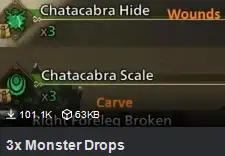
Triples the amount of materials you get from monster parts like carves, wound breaks, and quest target rewards so you can craft and upgrade gear much faster than in the base game.
Crown Only
Forces the game to spawn only crown‑sized monsters, whether big or small crowns, for players who want to hunt for trophies or achievements without waiting for rare RNG to trigger them.
Quest Reward Up 2x
Doubles (or optionally increases more) the rewards you get from completing quests, giving you more zenny, items, and crafting nets for each hunt.
Buffer
Provides quality‑of‑life combat enhancements such as automated buffs or scripted assistance so your hunter maintains important effects (like damage boosts or defense up) without micromanaging consumables mid‑fight.
Charm Editor
Lets you view and edit talisman/charm stats and skills in‑game, enabling you to tweak skill levels or slot setups on the fly without farming for perfect charms.
Free Craft
Removes all material requirements for crafting gear and items, letting you craft anything instantly without needing gathered resources or rare drops (similar in purpose to other free‑craft QoL mods featured in top mod lists).
Auto Meal
Automatically eats a pre‑selected meal set based on your weapon or loadout when you start a quest, saving time and ensuring you always get the right food buffs without manually selecting them.
Auto Restock
Automatically fills your item pouch with a configured loadout based on your weapon type whenever you accept a quest, so you’re always stocked with the right consumables for the hunt.
How to Use XMOD with Monster Hunter Wilds
Install XMOD
Download XMOD from the official site and install it. Launch XMOD and log in to access the platform.

Add the Game
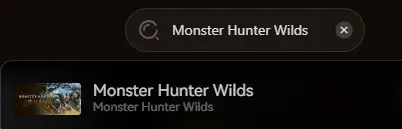
Search for Monster Hunter Wilds in the game list. Let XMOD automatically detect your game installation path.
Launch with Mods
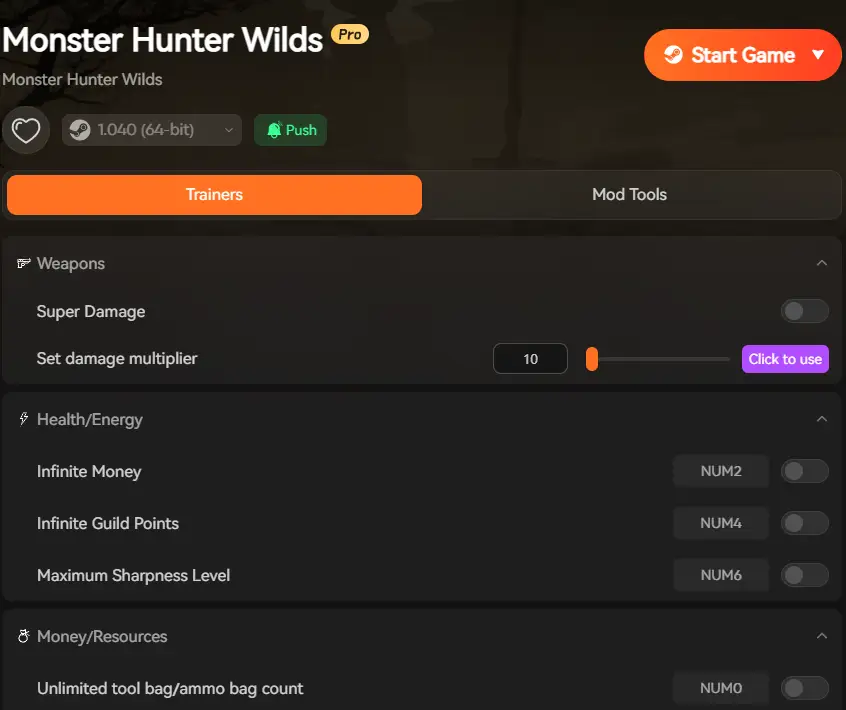
Use XMOD’s Start Game button to launch with mods enabled. Browse available enhancements and toggle desired features before entering gameplay.
Manage Mods
Update mods through XMOD after game patches. Turn mods on or off without affecting core saves or requiring manual file management.
Customize Experience
Mix performance optimizers with resource tweaks and QoL features to create your ideal hunting experience across the Forbidden Lands.
Safety Tips for Using Monster Hunter Wilds Mods
Backup Saves:
Always maintain save backups before applying new mods or trainers, especially those affecting progression or crafting systems.
Stick to Single-Player:
Use mods only in offline single-player mode to avoid potential issues, as Capcom doesn’t officially support modifications. Multiplayer with cheat-style mods can disrupt other players’ experiences.
Use Trusted Sources:
Install mods and trainers only through XMOD to reduce risk of malware, corrupted files, or game instability.
Avoid Excessive Cheats:
Be cautious with mods that directly compete with paid DLCs, such as unlimited character edits, as Capcom may crack down on their use.
Monitor Performance:
Start with performance optimization mods before adding gameplay-altering features to ensure stable operation.
Conclusion
XMOD is the most reliable and user-friendly modding tool for Monster Hunter Wilds, offering safe access to performance enhancements, resource management, crafting shortcuts, and gameplay tweaks that enrich your hunting experience. With the modding community rapidly developing quality-of-life improvements and visual enhancements, XMOD provides the easiest path to customization.
Whether you want subtle performance boosts, streamlined material gathering, or powerful gameplay modifications, XMOD gives you control with minimal technical hassle. Focus on epic monster battles across the Forbidden Lands while XMOD handles the complexity of mod management and compatibility.

I am a passionate gamer and writer at XMODhub, dedicated to bringing you the latest gaming news, tips, and insights.
Connect with me:
LinkedIn Profile ↗

 Nancy Miller
The performance boost from mods is a game changer, especially for those of us dealing with frame rate drops. It’s great that tools like XMOD make it so much easier to install and enjoy these improvements.