Catherine Hu
Metroidvanias like MIO: Memories in Orbit are designed to be punishing, but sometimes the difficulty spike between exploration and boss fights feels less like a challenge and more like a wall. Whether you’re stuck on a specific boss or just want to explore the map without constantly backtracking for resources, a trainer can smooth out the experience. As a dedicated PC game enthusiast, I’ve tested the latest tools to help you customize the difficulty exactly how you want it.
Key Takeaways
- God Mode – Survive impossible boss patterns without restarting
- Infinite Energy – Use your special abilities freely during exploration
- Safe Progression – Works with the latest 2026 game patch
- Virus Free – Verified clean installation process
Let’s break down the details below.
Why Mod MIO: Memories in Orbit?
MIO: Memories in Orbit is a stunning entry in the genre, featuring a vast, interconnected spaceship known as the Ark. However, like many games in this category, it demands pixel-perfect precision and significant time investment for backtracking. For players with limited gaming schedules, the repetitive nature of farming currency or retrying a boss fight twenty times can become a barrier to enjoying the narrative.
Using a trainer isn’t just about breaking the game; it’s about accessibility. By adjusting parameters like health or energy, you can tailor the experience to your skill level. Whether you want to breeze through the combat to enjoy the art style or simply need a helping hand to get past a particularly brutal platforming section, modding the game allows you to play on your own terms. The XMODhub trainer provides these options without permanently altering your game files, giving you the flexibility to toggle cheats on and off as needed.
Top MIO Memories in Orbit Cheats and Features
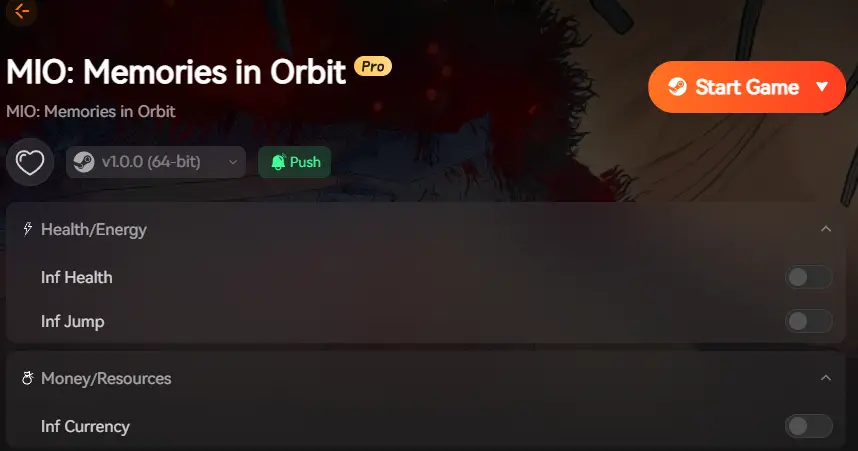
The right cheats can transform MIO from a frustrating grind into an enjoyable adventure. Below are the most essential features available in the XMODhub trainer that address the common pain points players face.
❤️ Infinite Health
Never worry about dying to traps or bosses again. This toggle keeps your HP full regardless of damage taken.
⚡ Infinite Energy
Use your special abilities and dashes without cooldowns or resource costs, perfect for speedrunning sections.
💰 Infinite Currency
Instantly add resources or money to your inventory, allowing you to upgrade gear without the tedious farming.
These featured mods are just the beginning. Whether you’re looking to skip tedious grinding, experiment with different playstyles, or speed up your progression, XMODhub’s comprehensive toolkit offers dozens more options tailored to your playstyle.
Activating MIO Infinite Health and Energy
Infinite health is the most popular cheat for a reason. In Metroidvania games like MIO, a single mistake can send you back to a distant save point, forcing you to replay challenging sections repeatedly. Activating this feature allows you to learn boss patterns without the punishment of restarting. I usually toggle this on just to practice a boss’s second phase, observing their telegraphs and timing my dodges, then turn it off for the actual kill to maintain a sense of accomplishment.
Using MIO God Mode for Difficult Sections
Sometimes the environment is deadlier than the enemies. God Mode protects you from environmental hazards like spikes, lava, or crushing walls. This is particularly useful in MIO’s platforming gauntlets where precision is demanded. By enabling God Mode, you can bypass these difficulty spikes and focus on the exploration and story elements that drew you to the game in the first place. It essentially turns the game into a sandbox where you are the master of the Ark.
MIO: Memories in Orbit Resource Cheats
Crafting and upgrades often require rare materials that have low drop rates. Instead of spending hours farming the same enemies, resource cheats let you inject the exact amount of currency or materials you need. This respects your time and lets you experiment with different weapon builds immediately. For example, if you want to test out a heavy weapon build but lack the scrap to upgrade it, a quick toggle can give you the resources to max it out instantly, letting you see if the playstyle suits you before committing.
How to Install MIO PC Mods and Tools
Getting the trainer running is straightforward, but taking a few precautions ensures your game files stay safe. The installation process is designed to be beginner-friendly, requiring no technical knowledge of scripting or game files. However, ensuring your system meets the basic requirements is the first step to a smooth experience.
Prerequisites for MIO Trainer
Before you begin, ensure that you have the latest version of .NET Framework installed on your PC, as the trainer relies on these libraries to function correctly. Additionally, it is recommended to run the game in “Borderless Window” mode if you plan to use the trainer overlay, although the hotkeys will work in Fullscreen mode as well. Disabling any other overlay software (like Discord or GeForce Experience) can also prevent potential conflicts during the injection process.
Preparing Your MIO: Memories in Orbit Game Files
Before installing any mods, it is crucial to back up your save files. While the XMODhub trainer is safe, game updates or conflicts can occasionally cause issues. Locate your save directory, usually found in your AppData folder or Steam directory, and copy the files to a safe location on your desktop. This simple step acts as an insurance policy for your progress.
C:/Users/[Username]/AppData/Local/MIO/Saved/SaveGames/Launching the Trainer with MIO Cheat Engine
Once you have downloaded the MIO trainer, extract the files and run the executable. The tool will automatically detect your game installation. Launch the game through your usual platform (Steam, Epic, etc.), and then press the ‘Play’ button on the trainer. You should hear a confirmation sound indicating the injection was successful. If the trainer fails to attach, try running it as an Administrator to give it the necessary permissions to access the game’s memory process.
Verifying Trainer Functions in MIO: Memories in Orbit
To verify that the cheats are working, load into your save and try a simple toggle like Infinite Energy. Use an ability that normally consumes energy; if the bar doesn’t deplete, the trainer is active. If it doesn’t work immediately, try restarting the game and launching the trainer *after* you reach the main menu. Sometimes, the game’s anti-tamper checks are most active during the initial boot sequence, so waiting until the menu loads can bypass these checks.
Is the MIO: Memories in Orbit Trainer Safe?
Safety is a top priority when downloading third-party tools. The XMODhub trainer is scanned regularly and is designed to work exclusively in single-player modes to avoid anti-cheat bans. We understand the hesitation that comes with downloading executable files, which is why transparency is key to our process.
Antivirus False Positives for MIO Trainer Tools
You might encounter a warning from your antivirus software when downloading the trainer. This is a common occurrence known as a false positive. Because trainers inject code into the game’s memory—similar to how some malware behaves—security software often flags them automatically. XMODhub trainers are malware-free, and you can safely whitelist the application in your security settings. If you are unsure, you can always upload the file to a service like VirusTotal to see the consensus from multiple security vendors.
Protecting Your MIO: Memories in Orbit Save Files
While the trainer itself won’t harm your PC, using cheats like “Unlock All Items” can sometimes break game progression sequences. Always keep a clean backup of your save file before experimenting with inventory or progression cheats. This ensures that if a quest trigger fails to fire because you acquired an item too early, you can restore your previous state without losing hours of progress. It is best practice to use cheats conservatively during your first playthrough to avoid accidentally skipping key story beats.
Why MIO Infinite Health and Cheats Stop Working?
If your cheats suddenly stop working, it is usually due to a game update. Developers frequently patch games to fix bugs, which changes the memory addresses the trainer relies on. This is a constant game of cat and mouse between game developers and modders.
Fixing MIO: Memories in Orbit Version Mismatches
When MIO receives a patch, the trainer may need an update to match the new game version. XMODhub automatically checks for updates when you launch the tool. Ensure you are using the trainer version that corresponds to your game client version. If the game just updated today, give the team a few hours to release a compatibility fix. You can often check the “History” tab in the trainer to see which game versions are supported.
Solving Common MIO Cheat Engine Script Errors
Sometimes hotkeys might conflict with other software or game bindings. If pressing a cheat key does nothing, check the trainer settings to remap the hotkey to a different button. Additionally, running the trainer as Administrator can resolve permission issues that prevent the tool from hooking into the game process. If you are using a firewall, ensure that the trainer is allowed to communicate with the internet to verify the latest offsets and updates.
MIO: Memories in Orbit Trainer FAQ


I am a passionate gamer and writer at XMODhub, dedicated to bringing you the latest gaming news, tips, and insights.
Connect with me:
LinkedIn Profile ↗
 Nancy Miller