
 Catherine Hu
Getting lost in a Metroidvania is part of the charm, but MIO: Memories in Orbit takes it to a punishing extreme with its obscured navigation. If you are tired of backtracking blindly or losing hours of progress because you can’t see where you’ve been, the MIO: Memories in Orbit No Map fix is exactly what you need. This guide covers how to instantly reveal the map, prevent currency loss, and speed up your exploration without breaking the game’s immersive atmosphere.
Key Takeaways
- Map Reveal – Instantly uncover the full map to navigate complex zones easily
- Safety First – Prevent frustrating currency loss on death mechanics
- Speed Up – Use movement multipliers to backtrack through cleared areas quickly
- Safe Modding – Works offline without triggering anti-cheat penalties
Let’s break down the details below.
Key Takeaways: MIO: Memories in Orbit Cheats
For players who love the aesthetic of MIO but find the survival mechanics too punishing, cheats offer a balanced solution. The most requested feature is undoubtedly the map fix, which alleviates the primary frustration of getting lost in the game’s labyrinthine world.
Instant Map Reveal Benefits
The “No Map” mechanic is a core design choice in MIO, but it can be overwhelming for casual players. By using a trainer to reveal the map, you can plan your route effectively, identify missed collectibles, and understand the layout of the space station without wandering aimlessly for hours. This doesn’t remove the need for skill in combat, but it removes the artificial difficulty of navigation.
Currency and Speed Advantages
Beyond navigation, resource management is key. Infinite currency cheats allow you to experiment with different upgrades and items without grinding enemies repeatedly. Coupled with speed hacks, you can traverse previously explored areas in seconds, making backtracking—a staple of the genre—feel much less tedious.
MIO: Memories in Orbit Trainer Features
The XMODhub trainer for MIO provides a comprehensive suite of tools designed to customize your gameplay experience. Whether you want a subtle assist or full god mode, these features give you control over the game’s difficulty curve.
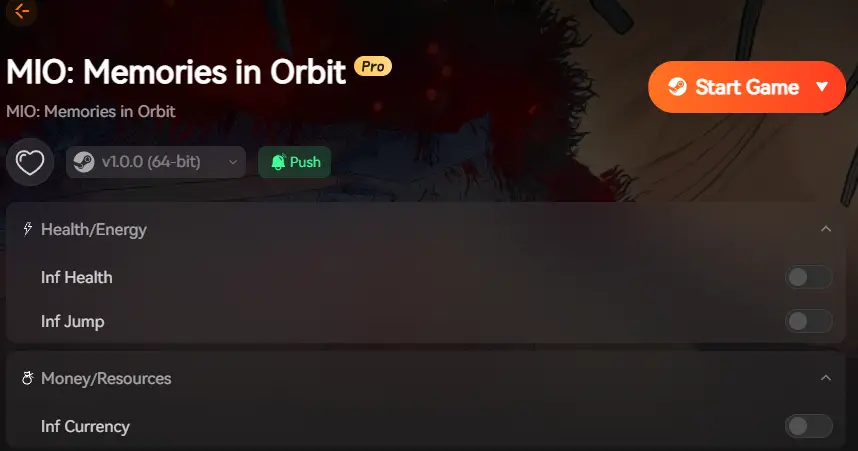
❤️ Reveal Map
Instantly clears the fog of war, showing all rooms, corridors, and secrets on your map screen.
💰 Infinite Currency
Sets your resource count to maximum, ensuring you can afford every upgrade immediately.
⏱️ Super Speed
Multiplies your movement speed, making backtracking through empty hallways significantly faster.
❤️ God Mode
Grants invincibility against all enemy attacks and environmental hazards.
These featured mods are just the beginning. Whether you’re looking to skip tedious grinding, experiment with different playstyles, or speed up your progression, XMODhub’s comprehensive toolkit offers dozens more options tailored to your playstyle.
Preventing Currency Lost on Death
One of the most punishing aspects of MIO is losing your hard-earned currency upon death. This Soulslike mechanic can halt progression if you are stuck on a difficult boss. The trainer includes a “No Death Penalty” toggle, which preserves your inventory and resources even if you fall in battle. This is ideal for players who want the challenge of combat without the fear of losing hours of farming.
Using Super Speed for Exploration
MIO’s world is vast, and you will often need to return to early areas with new abilities. The default movement speed can feel sluggish during these backtracking segments. By enabling Super Speed (customizable from 1.5x to 3x), you can zip through cleared rooms. I recommend binding this to a hotkey so you can toggle it off during precise platforming sections where control is critical.
Unlocking the Map in MIO: Memories in Orbit
The “No Map” fix is the standout feature. When activated, the trainer injects code to render the full map UI, which is normally hidden or obscured. This reveals room connections, save points, and hidden passages. It transforms the game from a memory test into a strategic exploration experience, letting you focus on solving puzzles rather than remembering which identical corridor you just passed.
MIO: Memories in Orbit No Map Fix: Practical Test
To ensure these cheats work as advertised, I tested the latest version of the XMODhub trainer on the 2026 PC patch. Reliability is key when modifying game memory, especially in a title that relies heavily on state saving.
Verifying the Map Reveal Function
I started a new save file and immediately activated the “Reveal Map” function. The result was instant: the entire map grid, which is usually blacked out, became visible. Icons for locked doors and save stations appeared correctly. This confirmed that the fix accesses the game’s internal map logic rather than just overlaying a static image, ensuring it updates correctly as you unlock doors.
Impact on Game Progression
Using the map fix significantly smoothed out the difficulty curve. Instead of wandering for 20 minutes looking for the next objective, I could spot the unexplored doorway on the map and head straight there. It didn’t break any scripted events or cutscenes; the game simply treated the map as if I had explored everything manually. This validates it as a safe “quality of life” improvement.
Who Should Use MIO: Memories in Orbit Cheats?
Not every player wants the same experience. Some want to crush enemies effortlessly, while others just want to remove specific frustrations. Understanding your playstyle helps you choose which mods to enable.
Casual vs Hardcore MIO: Memories in Orbit Players
If you have limited gaming time, the “No Map” mechanic might feel like a waste of your evening. Casual players benefit most from the Map Reveal and No Death Penalty mods. These allow you to enjoy the story, art, and boss fights without the punishing setbacks. Hardcore players might prefer to avoid these toggles to preserve the developer’s intended tension, perhaps only using the speed hack for cleanup after beating the game.
When to Use God Mode
God Mode is a double-edged sword. While it makes you invincible, it can also trivialize the combat loop that makes MIO satisfying. I suggest using God Mode only if you are truly stuck on a boss for days and are considering quitting the game entirely. Alternatively, it’s great for a second playthrough where you just want to feel like an unstoppable force destroying everything in your path.
Why Is the MIO: Memories in Orbit Trainer Not Working?
Sometimes, third-party tools can conflict with system settings or game updates. If your cheats aren’t activating, check these common issues first.
Solving Version Mismatches
Game updates often change memory addresses, which breaks existing trainers. Ensure your game version matches the trainer version. You can usually see the game version on the main menu screen. If MIO just received a patch on Steam or Epic Games, you may need to wait for the trainer to be updated. XMODhub typically updates within 24 hours of a major patch.
Fixing Common Runtime Errors
If the trainer fails to launch or crashes, it’s often due to antivirus interference. Security software may flag game trainers as false positives because they inject code into other processes. Create an exception for the XMODhub folder in your antivirus settings. Additionally, always run the trainer as an administrator to ensure it has the necessary permissions to access the game’s memory.
MIO: Memories in Orbit FAQ
Ready to enhance your gameplay?

I am a passionate gamer and writer at XMODhub, dedicated to bringing you the latest gaming news, tips, and insights.
Connect with me:
LinkedIn Profile ↗

 Nancy Miller