Catherine Hu
Mastering survival in Mad Island can be a brutal experience. Whether you are constantly dying to native attacks, tired of grinding for wood and stone to build your base, or simply want to break the boundaries to fully explore the island’s secrets, using cheats is the fastest way to change the rules.
However, accessing the developer debug menu in modern indie releases isn’t always as simple as pressing the tilde key. Below is the ultimate guide on the reality of the game’s Unity command line, the known multiplayer chat commands, and the safest way to inject cheats since the developers have locked the native resource console.
 You may also like:
Mad Island Cheat Engine Table vs. XMODhub: Best Free Trainer (2026)
How to Enable Console Commands in Mad Island
If you want to use the game’s native chat commands (primarily used for managing multiplayer sessions or spawning specific NPCs), follow these steps:
Press the Enter key to open the in-game chat box.
Type a forward slash (/) followed by the command and press Enter.
💡 Note:
If you are trying to open a traditional developer debug console to spawn items using the Tilde key (~), it will not drop down. The standard Unity debug console is disabled in the retail build.
Expert Note: Are Commands Locked in Mad Island?
“Because Mad Island runs on the Unity engine, the developers at E-Made+ completely compiled out the standard resource and god-mode command console in the final retail release to preserve the core survival-crafting loop. While the chat box allows for basic multiplayer kicks and a few NPC companion spawns, typing classic codes like
godoradd_itemwill just send a blank text message to the server. Modifying the game’s core DLLs via MelonLoader to force a console open often results in fatal crash loops. In these cases, an external memory injector like XMODhub is the only functional way to use progression cheats.”— Catherine Hu, Senior PC Gaming Specialist at XMODhub
Essential Mad Island Console Commands List
Because the native text parser is severely restricted, the only functioning chat commands revolve around session management and a specific hidden /friend command to instantly recruit NPCs if you skipped their quests.
Here is the accurate list of native commands, alongside how you achieve the locked developer cheats via a trainer:
| Command Syntax | Cheat Effect |
|---|---|
/friend 3 |
Instantly spawns and adds Mouse Rider to your party. |
/friend 5 |
Instantly spawns and adds Reika to your party. |
/friend 7 |
Instantly spawns and adds Takumi as an ally. |
/kick [Player Name] |
Removes a disruptive player from your co-op island session. |
/ban [Player Name] |
Permanently bans a player from your hosted game. |
(Via Trainer) God Mode |
Grants absolute invincibility against natives and monsters. |
(Via Trainer) Infinite Stamina |
Allows endless sprinting, gathering, and crafting without fatigue. |
How to Spawn Items: Mad Island Item IDs
In traditional games, you would use a syntax like give_item [Item_ID] [Quantity]. However, because Mad Island’s inventory system relies on complex XML data located deep within the StreamingAssets folder, there is no native chat command to spawn items.
Attempting to guess Unity asset strings or installing outdated DLL mods to force item spawns will frequently corrupt your SaveData.xml files.
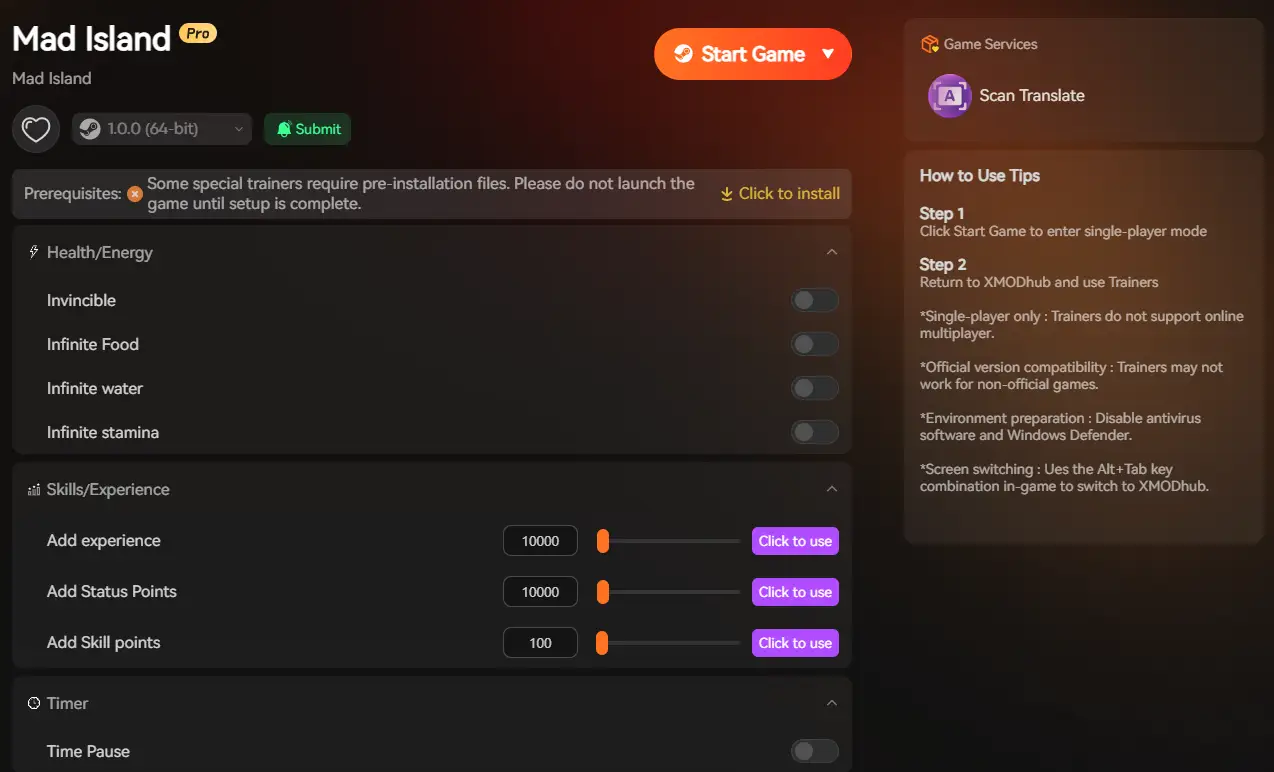
Tired of looking up giant spreadsheets of XML codes or fighting with broken MelonLoader plugins? The XMODhub application features a built-in visual item spawner. Just select the item name (e.g., Iron Ore, Medical Herbs, or High-Tier Weapons) from a dropdown menu and click “Add”.
The Trap: Do Cheats Disable Achievements in Mad Island?
🔥 Yes. If you attempt to use third-party Unity unlockers to forcefully inject raw code into the game, the engine detects the modified DLLs and flags your save file.
This will permanently disable Steam Achievements for that specific playthrough. Furthermore, forcibly modifying your XML save files manually to add items can corrupt script triggers, ruining your 60-hour island base save file.
The Better Alternative: XMODhub Trainer (No Typing, No Bans)
Since the native console is locked for items and god mode, and you want to keep earning achievements while using cheats, the XMODhub PC Trainer is the superior solution. It acts as an external overlay, completely bypassing the game’s internal command restrictions without touching your installation folders.
| Feature | In-Game Console Commands | XMODhub Trainer |
|---|---|---|
| Activation | Memorizing and typing text strings | One-click UI toggles and hotkeys |
| Achievement Status | Disabled instantly via DLL mods (High Risk) | Safe (Achievements remain active) |
| Item Spawning | Locked/Requires complex XML editing | Visual dropdown menu |
| Game Updates | Patches break script mods constantly | Cloud-synced auto-updates |
How to Use XMODhub for Mad Island
Don’t waste time editing XML files or installing risky mod loaders.

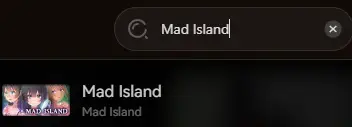
Launch: Open XMODhub; it will automatically detect your Steam installation of Mad Island.
Play: Click “Play” and use the simple sliders to enable God Mode, Infinite Stamina, Unlimited Crafting Materials, and more.
Frequently Asked Questions (FAQ)
Q: Can I use console commands or trainers in Mad Island Multiplayer?
A: You can use native chat commands like /kick and /ban to manage your server. However, XMODhub’s resource cheats are built for Single-Player or local Host modes only. Attempting to force memory cheats on a server you do not host will fail.
Q: I installed a DLL mod to spawn items and Mad Island crashed. Why?
A: Spawning an item using outdated MelonLoader mods causes severe memory leaks when the game updates. Because Mad Island is in active development, updates break manual code injections constantly. Always back up your save file before using raw mod files, or stick to the auto-updating XMODhub trainer.
Conclusion: Cheat Smarter, Not Harder
While classic console commands carry a sense of PC gaming nostalgia, they are increasingly restricted, clunky, and officially disabled in modern survival releases like Mad Island.
The XMODhub PC Trainer offers a highly secure, visual, and achievement-friendly way to customize your single-player island survival experience without memorizing NPC ID numbers or risking a fatal game crash.
XMODhub is the ultimate cheat utility, supporting over 5,000 PC games, including massive survival hits and genre similarities like Subnautica and The Forest.

I am a passionate gamer and writer at XMODhub, dedicated to bringing you the latest gaming news, tips, and insights.
Connect with me:
LinkedIn Profile ↗
 Nancy Miller