Summary: Explore all House Party console commands, cheat codes, and debug tools, and learn how to use them on PC to enhance gameplay, unlock features, and customize your experience.
Discover all House Party console commands and cheats, all in one place. With its branching storylines, multiple character relationships, and surprising outcomes, every playthrough offers something different. But sometimes you want to experiment, skip repetitive tasks, or simply explore every scenario the game has to offer. That’s where console commands come in.
Before we explore the complete list of cheats, it’s worth mentioning that Xmod is a powerful PC tool designed to enhance your single-player gaming experience. With Xmod, you can manage mods, activate cheats more easily, and use built-in features for games like House Party — all without manually editing files or risking your save data.
This comprehensive guide covers everything you need: how to enable the console, the most useful House Party commands, character manipulation tools, and safe ways to customize your party experience.
Table of Contents
- What Are House Party Console Commands?
- How to Enable the Console in House Party
- Most Useful House Party Console Commands
- Full House Party Console Commands List: Updated
- How to Enhance House Party with Xmod
- Conclusion
What Are House Party Console Commands?
Console commands in House Party are developer tools that let players modify gameplay, character interactions, and story progression in real time. By accessing the command console, you can adjust relationship stats, complete quests instantly, manipulate character behavior, customize appearances, and control nearly every aspect of the party environment. These commands are especially popular among players who want to explore different storylines, test scenarios, or experience content without completing lengthy questlines — giving you total freedom over your social simulation adventure.
How to Enable the Console in House Party
Accessing console commands in House Party is straightforward. The console is built into the game and can be opened with a single key press. Here’s how to get started:
How to Open the Console:
- Launch House Party and start a new game or load an existing save.
- Press the ~ (tilde) key on your keyboard to open the console window.
- Alternative keys depending on your keyboard layout: ö, /, or `
- The console command box will appear at the bottom of your screen.
- Type any command and press Enter to execute it.
Helpful Console Commands for Beginners:
- Type help to see a complete list of available commands
- Type help [command name] to get detailed information about specific commands
- Type example [command name] to see practical examples with explanations
- Type clear to clear the console window for better visibility
Important Note: Some commands require exact character names and proper syntax. Character names should match their in-game names exactly, and multi-word values (like quest names or locations) must be enclosed in quotation marks.
Most Useful House Party Console Commands
Here are the essential commands every player should know, organized by function for quick reference.
Relationship & Social Commands
social [character] player [number] friendship add – Increases friendship level with a character.
Example: social Ashley player 50 friendship add
social [character] player [number] romance add – Increases romance level with a character.
Example: social Madison player 50 romance add
You can also decrease relationships by using negative numbers (e.g., -20 instead of 20).
Quest Management Commands
quest list [character] – Displays all available quests for a specific character.
quest complete “quest name” – Completes a specific quest instantly.
Example: quest complete "chasing amy"
Note: Auto-completing quests may skip associated rewards or scenes, so use this command carefully if you want to experience the full story.
Character Movement Commands
[character name] walkto [location] – Makes a character walk to a specific location.
Example: Ashley walkto bed (sends Ashley to the master bedroom)
Common locations: outside, bed, hottubseat1, kitchen, bathroom
[character name] warpto player – Teleports a character directly in front of you.
Example: Brittney warpto player
[character name] roaming false – Prevents a character from moving from their current position.
Example: Frank roaming false
Clothing & Appearance Commands
clothing [character] [clothing item] off – Removes specific clothing items.
Example: clothing Ashley 0 off (removes top)
Clothing slots: 0 = top, 1 = bottom, 2 = pants, 3 = bra, 4 = shoes
bodypart [body part] [character] [value] – Adjusts character body proportions.
Example: bodypart head Brittney 1.5 (increases head size by 50%)
Available body parts: head, hands, feet, and other anatomical features
Value range: 0.1 to 10 (1.0 is default)
Combat Commands
combat [character(s)] fight – Makes characters fight each other.
Example: combat Frank Derek fight
combat [character] passout – Knocks a character unconscious.
Example: combat Patrick passout
combat [character] wakeup – Wakes up an unconscious character.
Example: combat Patrick wakeup
Intimacy Commands
intimacy player [character] [position code] sexualact – Initiates intimate scenes.
Example: intimacy player Amy 10052 sexualact
Position codes: 9000 = makeout, 10030 = missionary, 10050 = doggy, 10052 = cowgirl
values player OrgasmSensitivity equals [value] – Adjusts intimacy sensitivity.
Range: 0 (minimum) to 9 (maximum)
Setting to 0 prevents completion, allowing indefinite scenes.
Personality & Stats Commands
[character] personality [trait] [value] – Modifies character personality traits.
Example: Ashley personality exhibitionism 100 (removes modesty when undressed)
values player drunk [value] – Adjusts player intoxication level.
Example: values player drunk 50
Full House Party Console Commands List: Updated
Below is a comprehensive list of console commands available in House Party, organized by category.
Character Control Commands
[character] walkto [location] – Moves character to specified location
[character] warpto player – Teleports character to player position
[character] roaming [true/false] – Enables or disables character movement
[character] personality [trait] [value] – Modifies personality characteristics
[character] mount item [item] [body part] true – Equips items on characters
Relationship Management
social [character] player [number] friendship add – Increases friendship
social [character] player [number] romance add – Increases romance
social [character] player [number] friendship subtract – Decreases friendship
social [character] player [number] romance subtract – Decreases romance
Quest & Story Commands
quest list [character] – Shows available quests for character
quest complete “quest name” – Instantly completes specified quest
quest start “quest name” – Starts a specific quest
Appearance Customization
clothing [character] [slot] [on/off] – Controls clothing items
clothing all [slot] off – Removes clothing from all characters
bodypart [part] [character] [value] – Adjusts body proportions
[character] mount item glasses head true – Adds accessories
Combat & Interaction
combat [character(s)] fight – Initiates combat between characters
combat [character] passout – Knocks character unconscious
combat [character] wakeup – Revives unconscious character
[character] animation [animation name] – Triggers specific animations
Intimacy & Adult Content
intimacy player [character] [code] sexualact – Initiates intimate scenes
intimacy [character1] [character2] [code] sexualact – Makes characters interact
values player OrgasmSensitivity equals [value] – Adjusts sensitivity settings
Environmental Commands
lock door [location] – Locks specified door
Example: lock door "master bedroom"
unlock door [location] – Unlocks specified door
dance [character] [true/false] – Makes character dance or stop dancing
emote [character] [emotion] – Changes character facial expressions
Debug & Utility Commands
help – Displays all available commands
help [command] – Shows detailed information about specific command
example [command] – Displays example usage for command
clear – Clears console window
gamemsg [text] – Displays custom text messages in-game
crosshair [style] – Changes cursor appearance
changesize [object] [value] – Modifies size of objects or characters
Character Stats Commands
values player drunk [value] – Adjusts intoxication level
values player [stat] equals [value] – Modifies various player statistics
fire [character] off – Removes fire effect from character
How to Enhance House Party with Xmod
To take your House Party experience even further, Xmod offers powerful tools that go beyond standard console commands. With Xmod, you can easily install mods, activate cheats, and customize your gameplay — all from one convenient platform.
Xmod provides:
- One-click mod installation for custom stories, new characters, and enhanced graphics
- Built-in trainers that let you adjust relationships, stats, and progression instantly
- Safe experimentation without risking your game files or save data
- Performance optimization tools to ensure smooth gameplay on any PC
- Automatic updates to keep all mods compatible with the latest game version
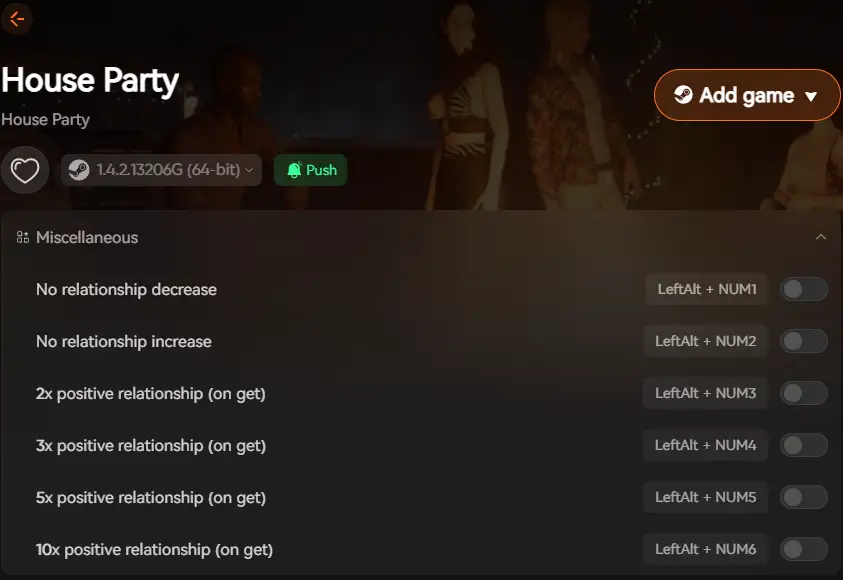
Whether you want to explore every storyline, test different scenarios, or simply enhance the visual experience, Xmod gives you complete control over how you play House Party. It’s the perfect companion tool for players who want to maximize their enjoyment of this unique social simulation game.
Conclusion
Console commands in House Party unlock limitless possibilities for customizing your party experience. From manipulating relationships and completing quests to controlling character behavior and appearances, these commands give you total control over every aspect of the game. Whether you’re exploring different storylines, testing scenarios, or simply having fun experimenting with the game’s mechanics, console commands make it all possible.
Combined with Xmod, you can take your gameplay even further — installing custom content, optimizing performance, and tailoring every element to your preferences. Together, console commands and Xmod transform House Party into the ultimate customizable social simulation, perfect for both new players and veterans looking to experience everything this unique game has to offer.
I am a passionate gamer and writer at XMODhub, dedicated to bringing you the latest gaming news, tips, and insights.
Connect with me:
LinkedIn Profile ↗

 Catherine Hu

 Nancy Miller

