Nancy Miller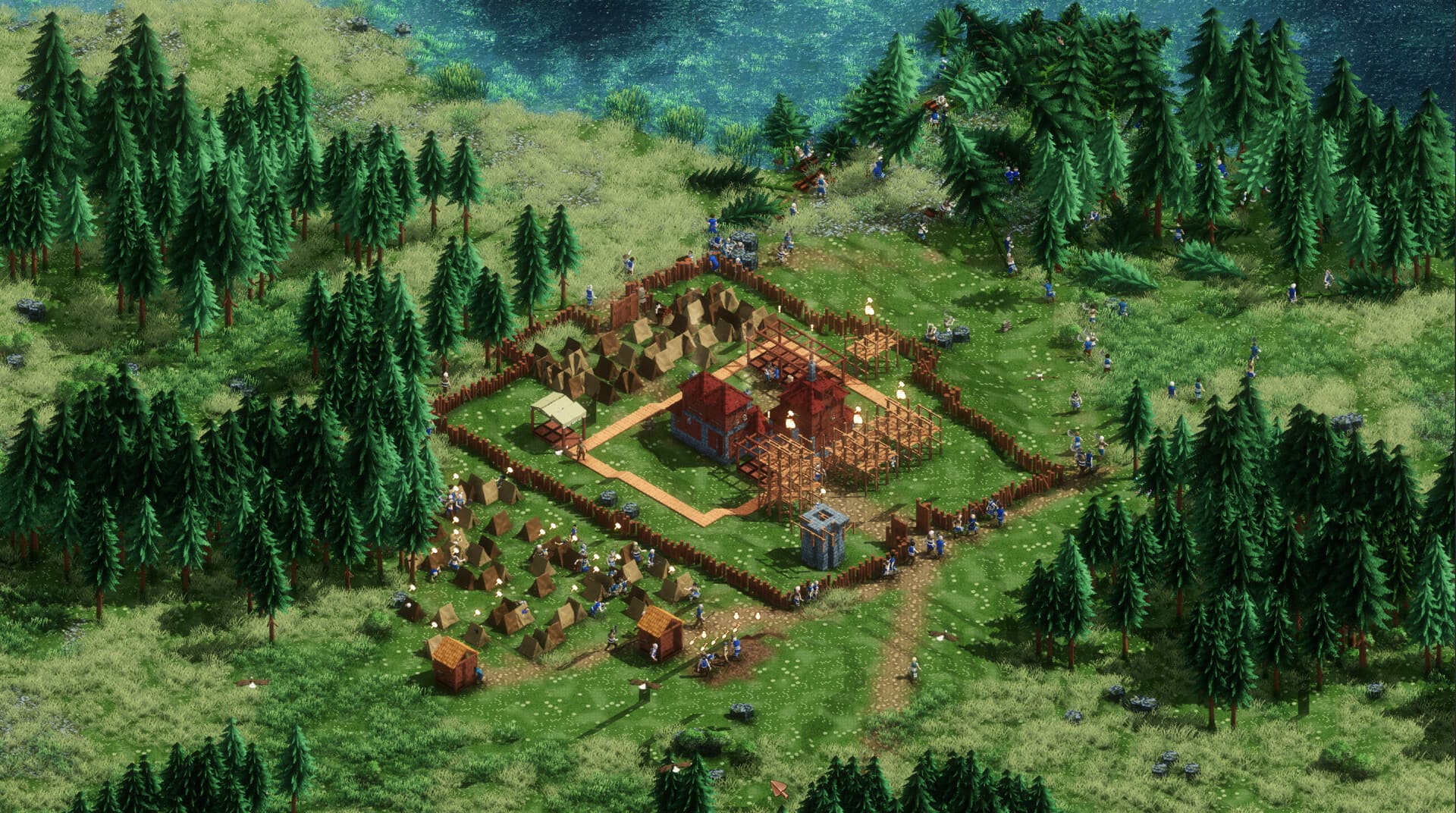
Building a kingdom in city-building games like Earth of Oryn is incredibly satisfying, especially when you nail the complex water management systems. But hitting a resource bottleneck right before a raid? That’s just painful. Honestly, I’ve restarted my civilization three times just because I ran out of wood at the wrong moment or messed up a canal placement. Whether you’re looking to test grand architectural designs without limits or just want to survive the night against bandits, using a trainer can completely change how you experience the game. It transforms the experience from a stressful survival grind into a creative sandbox where your imagination is the only limit.
Key Takeaways
- Infinite Resources – Instantly fill your stockpiles to build without waiting for gatherers.
- God Mode – Protect your units and structures from enemy raids and environmental damage.
- Console Commands – Limited built-in options compared to dedicated trainers in Early Access.
- Safety First – Always backup saves before applying mods in Early Access titles.
Let’s break down the details below.
Essential Earth of Oryn Walkthrough Cheats by XMODHUB
For players who want full control over their kingdom without wrestling with complex file edits or hex editors, XMODhub provides a streamlined trainer. It’s designed to work seamlessly with the current version of the game, bypassing the usual headaches of manual memory scanning. In a game where resource management is tied directly to complex systems like water flow and citizen happiness, having a reliable toggle for resources can save hours of frustration.
💰 Infinite Resources
Instantly max out wood, stone, and gold. Perfect for building massive citadels and aqueducts without the wait.
❤️ God Mode
Make your units and buildings invincible against enemy attacks, ensuring your kingdom stands forever.
These featured mods are just the beginning. Whether you’re looking to skip tedious grinding, experiment with different playstyles, or speed up your progression, XMODhub’s comprehensive toolkit offers dozens more options tailored to your playstyle. The tool is particularly useful for content creators who need to set up specific scenarios without playing through the entire campaign.
Money/Resources
- Infinite Resources (Wood, Stone, Gold)
- Max Storage (Prevents overflow issues)
- Instant Building (No construction time)
Health/Defense
- God Mode (Units & Buildings)
- No Damage (Environmental)
- One Hit Kill (For enemy units)
Installing the Earth of Oryn Trainer
Getting started is dead simple. Unlike manual modding where you risk bricking your save by overwriting DLLs, the trainer runs externally. Download the XMODhub client, search for Earth of Oryn, and click “Play”. The tool automatically detects your game version, which is a lifesaver given how often Early Access titles get patched. This injection method is safer for your installation folder and easier to reverse—simply close the trainer to return to vanilla gameplay.
Activating Earth of Oryn Infinite Resources
Once in-game, you can toggle resources on the fly. I usually keep “Infinite Wood” and “Infinite Stone” active during the initial layout phase. This lets you focus entirely on city planning without pausing every five minutes to wait for gatherers. You’ll see your resource counters freeze at their maximum value immediately after activation. This is distinct from “Creative Mode” because you can still engage with other survival mechanics like hunger or happiness if you choose, giving you a customized difficulty level.
Using Earth of Oryn God Mode Safely
God Mode is particularly useful during surprise raids. If you’ve spent hours building a beautiful aqueduct only to have it smashed by enemies because you forgot to build a wall, toggling God Mode can save your progress. It applies to both your citizens and your structures, ensuring your kingdom remains pristine regardless of the threat level. I recommend toggling it off after the threat passes if you want to maintain some level of challenge, or keep it on if you just want a relaxed city-painting experience.
How Do You Use Earth of Oryn Console Commands?
Accessing the Developer Console in Earth of Oryn
Like many strategy games built on modern engines, Earth of Oryn may offer a developer console, typically accessed by pressing the tilde key (~) or F1. However, developer consoles in indie titles can be inconsistent or disabled in public builds to prevent bug reports stemming from user interference. If the console opens, you can try typing help or ? to see a list of available commands.
Since the game is built on the Unity engine, there are some standard commands that might work if the developers have left the debug overlay active. These often include:
god– Toggles invincibility.unlock_all– Unlocks all tech tree items.add_resource [name] [amount]– Adds specific resources.
Note: These are theoretical commands common to the genre and engine. If they return an “Unknown Command” error, the developers have likely stripped them from the public release.
Limitations of Earth of Oryn Console Cheats
The main downside to relying on console commands is their complexity and lack of persistence. You often have to re-enter codes every time you load a save or restart the game. Furthermore, commands can sometimes be removed or changed by developers without notice in hotfixes. A dedicated trainer provides a more reliable, user-friendly interface that updates alongside the game, offering checkboxes instead of requiring you to memorize syntax.
Best Earth of Oryn Walkthrough Cheats and Mods
Choosing between cheats, mods, or creative mode depends on what you want to achieve. Here is a quick comparison to help you decide.
Top Earth of Oryn Mods for Building
If your primary goal is aesthetics, creative mode or specific “sandbox” mods are your best bet. These often remove all survival elements, allowing you to paint the landscape with buildings. However, if you want to play the campaign but just remove the tedious parts, a trainer is superior because it lets you keep the game structure intact while bypassing specific annoyances. For example, you can keep the need for food and water to maintain the challenge of city planning, but use infinite gold to speed up trade and expansion.
Managing Kingdom Defense with Cheats
Raids in real-time strategy games can be stressful. Using cheats to manage defense allows you to focus on the strategic placement of towers and walls without worrying about your economy crashing mid-battle. It turns a frantic survival experience into a calculated tactical puzzle. You can experiment with different wall configurations and tower placements, knowing that if a breach occurs, you can instantly heal your units or toggle God Mode to prevent a total wipe.
Common Mistakes to Avoid When Using Earth of Oryn Cheats
While cheats offer freedom, using them recklessly can inadvertently ruin your save file or the gameplay experience. Here are the most frequent pitfalls players encounter.
🚫 Breaking Supply Chains
Earth of Oryn relies on complex logistics. If you spawn infinite resources, your carriers may stop working because stockpiles are full, causing a deadlock when you eventually turn cheats off.
🚫 Over-Building
Placing thousands of decorative items in Creative Mode can tank your FPS. The game engine still has to calculate physics and rendering for every object, regardless of how you paid for it.
The “God Mode” Pathfinding Glitch
One specific issue involves pathfinding. When units are invincible, enemy AI often gets confused. Instead of retreating or finding a new target, they might get stuck in an infinite attack loop against a single invincible wall segment. This can cause lag or prevent a raid phase from ending properly. Always clear enemies manually or toggle God Mode off briefly to let the AI reset.
Neglecting Auto-Saves
Never rely on a single auto-save slot when cheating. If the game auto-saves while you have a game-breaking cheat active (like a modified terrain height), you might be stuck with it. Create manual “Clean” saves before every major cheating session.
Why Is the Earth of Oryn Trainer Not Working?
Fixing Earth of Oryn Version Mismatches
The most common headache is a version mismatch. If the game updates on Steam, the trainer might need a day or two to catch up—devs are fast, but they aren’t wizards. XMODhub usually auto-updates, but you can verify your game version in the main menu. Ensure both the game and the trainer are running the latest build. If you are on a beta branch or an experimental build, the trainer may not recognize the game process correctly.
Resolving Antivirus Conflicts with Trainers
Because trainers inject code into the game process, antivirus software often flags them as false positives. This is standard behavior for memory modification tools. If the trainer won’t launch, try adding the XMODhub folder to your antivirus exclusion list. The path is typically found here:
C:\Users\[YourName]\AppData\Local\XMODhuubAdditionally, ensure you are running the trainer as an Administrator. Right-click the XMODhub icon and select “Run as Administrator” to give it the necessary permissions to access the game’s memory space.
Restoring Corrupted Earth of Oryn Saves
Always backup your saves. If a crash occurs while a cheat is active, your save file could get corrupted. Navigate to your save directory and copy the folder before a major session. If things go wrong, simply delete the corrupted file and paste your backup back in. This is especially important in Early Access games where save stability is already volatile.
Practical Test: Is Earth of Oryn God Mode Worth It?
Testing Earth of Oryn Infinite Resources in Sandbox
I tested the “Infinite Resources” cheat on a fresh save to see how it handles the game’s economy logic. Even when spamming high-cost buildings like the Great Hall and complex bridge systems, the resource counter remained locked at maximum. The game engine accepted the values without crashing or glitching the UI. This confirms the cheat overrides the consumption trigger effectively, making it perfectly stable for large-scale construction projects where you might place hundreds of wall segments in one go.
Surviving Raids with Earth of Oryn Cheats
During a late-game raid simulation, I activated God Mode on my defenders. They took zero damage from enemy siege weapons, allowing a small force of five archers to hold off a massive army of fifty invaders. This is incredibly useful if you want to focus on city aesthetics without maintaining a massive standing army. It also allowed me to observe the enemy AI pathfinding without fear of losing the game, which helped me design better kill zones for future legitimate playthroughs.
Frequently Asked Questions
Ready to enhance your gameplay?

I create content for Xmodhub, where I curate and share game mods, tools, and other resources. My goal is to help players discover great add-ons, enjoy a smoother experience, and have more fun.




 Catherine Hu