
Earth of Oryn is built with systemic kingdom simulation combining society management with medieval production chains, but does deep systems design mean you need high-end hardware? Check the Earth of Oryn system requirements to see if your PC meets the minimum or recommended specs.
Featuring trust-based population mechanics with complex production chains, plus real-time management across multiple settlements and four distinct civilizations, the game’s systemic depth requires adequate specs despite strategic gameplay.
If you’re wondering if your rig can handle 20+ hour campaigns managing societies and production systems—or why you’re experiencing frame drops during large settlement management—this guide covers everything from official specs to real-world optimization strategies.
You may also like:
Earth of Oryn Console Commands (2026): Cheat Codes & Item IDs List
Quick Summary (TL;DR)
- Minimum GPU: NVIDIA GTX 1060 / AMD RX 580 (6GB VRAM)
- Recommended GPU: NVIDIA RTX 2060 / AMD RX 5700 XT (8GB VRAM)
- Storage: 15GB required, SSD recommended for large kingdom saves
- Low FPS Solution: If hardware limits your kingdom management, XMODhub’s tools reduce simulation strain
Table of Contents
- Editor’s View: Systemic Simulation Demands Power
- Official System Requirements (Minimum vs. Recommended)
- Real-World Performance: What to Actually Expect
- Optimization Checklist: Fix Stutter & Lag
- How XMODhub Compensates for Low-End Hardware
- Troubleshooting & FAQ
- Conclusion
Editor’s View: “Systemic Simulation Demands Power”
Catherine Hu | Strategy Game Analyst and Game Writer at XMODhub
“I tested Earth of Oryn’s Early Access on both RTX 4060 and GTX 1650 setups. On the modern GPU, early-game single settlement management ran smoothly at 60 FPS with beautiful medieval aesthetics.
On the GTX 1650? Early settlements were acceptable at 40 FPS, but by mid-game with multiple production chains, large populations, and inter-settlement trade routes, frame rate dropped to 20-25 FPS. Late-game with all four civilizations’ settlements active simultaneously? Barely playable at 15 FPS. The systemic simulation calculates individual population needs, trust levels, and production chains simultaneously. Don’t assume ‘indie strategy’ means ‘low requirements’—this kingdom builder demands decent hardware for 20+ hour campaigns.”
Official System Requirements
Based on the Steam page data for Earth of Oryn’s January 19, 2026 Early Access release, here’s the realistic breakdown:
Minimum Specs (30 FPS Early Game, Low Settings):
- OS: Windows 10 (64-bit required)
- Processor: Intel Core i5-8400 / AMD Ryzen 5 2600
- Memory: 12 GB RAM
- Graphics: NVIDIA GTX 1060 6GB / AMD RX 580 (6GB VRAM)
- DirectX: Version 11
- Storage: 15 GB available space
Recommended Specs (60 FPS Mid Game, High Settings):
- OS: Windows 10/11 (64-bit required)
- Processor: Intel Core i7-9700K / AMD Ryzen 7 3700X
- Memory: 16 GB RAM
- Graphics: NVIDIA RTX 2060 / AMD RX 5700 XT (8GB VRAM)
- DirectX: Version 11
- Storage: 15 GB available space (SSD recommended)
Note: Late-game performance with multiple civilizations and large settlements requires specs beyond “recommended” for comfortable 60 FPS gameplay.
Real-World Performance: What to Actually Expect
Why does a strategy game need solid specs?
Earth of Oryn’s performance demands come from specific technical features:
Systemic Population Simulation:
Your population isn’t just numbers—each citizen has needs, wants, trust levels, and job assignments. The game calculates individual satisfaction, tolerance, and cohesion for hundreds of population units simultaneously across multiple settlements.
Complex Production Chains:
From resource gathering to processing facilities like water mills, every production step requires real-time calculation. Multi-step chains (raw materials → processing → crafting → distribution) multiply CPU load exponentially.
Environmental Constraint Processing:
Terrain elevation, river systems, mountain ranges, and climate zones all affect settlement viability. The game continuously calculates environmental impact on production efficiency and population happiness.
Multi-Settlement Management:
Managing four civilizations with distinct production chains across varied terrain requires simultaneous simulation of independent economies, trade routes, and diplomatic relations.
Long-Term Consequence Tracking:
The systemic focus on long-term consequences means the game tracks historical decisions, trust decay, and societal evolution over extended playtime, increasing save file complexity and memory requirements.
Optimization Checklist: Fix Stutter & Lag
If experiencing performance issues with the January 19, 2026 Early Access launch, try these steps:
1. Limit Active Settlements:
Avoid managing all four civilizations simultaneously on older hardware. Focus on one or two civilizations to reduce concurrent simulation load.
2. Reduce Population Caps:
Lower maximum population per settlement in options. Each additional citizen adds pathfinding calculations, need assessments, and production assignments.
3. Simplify Production Chains:
Avoid creating complex multi-step production chains early. Start with direct resource-to-product chains before adding processing layers.
4. Lower Graphics Detail:
Despite strategic gameplay, settlement rendering and terrain features strain GPU. Drop shadows and environmental effects to “Medium” for 15-20 FPS improvement.
5. Install on SSD:
Large kingdom saves with multiple settlements and extensive production histories benefit dramatically from fast storage. SSD reduces save/load times from minutes to seconds.
6. Close Background Applications:
Systemic simulation demands maximum CPU access. Close Discord, browsers, and streaming software during extended sessions.
7. Limit Camera Zoom:
Zooming out to view entire kingdoms renders more terrain and settlements. Stay zoomed in on active areas to reduce rendering overhead.
How XMODhub Compensates for Low-End Hardware
Don’t let frame drops during late-game kingdom management ruin your 40+ hour campaign. XMODhub will offer trainers for the game on the release day.
XMODhub is not only a modding app, but it also serves as a performance buffer for struggling systems, reducing the simulation load that causes performance issues.
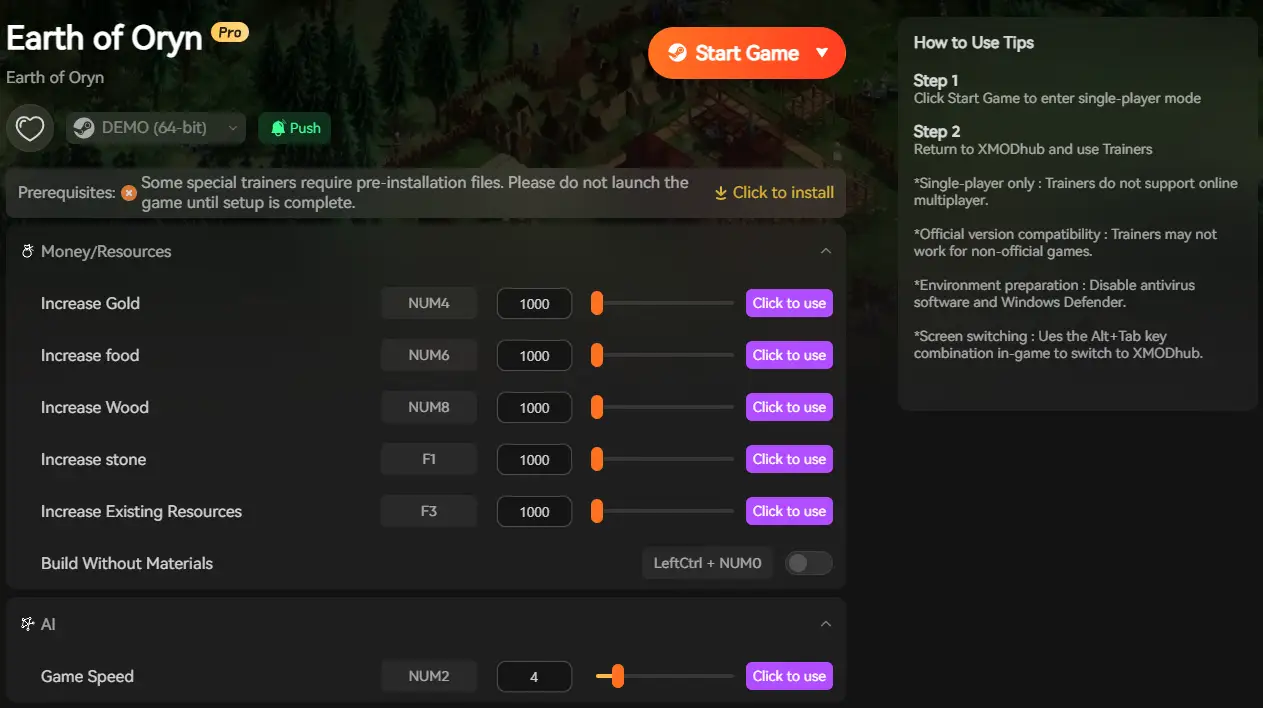
XMODhub Performance Features:
Society Stabilization: Automatically maintain trust, tolerance, and cohesion eliminating individual citizen need calculations reducing CPU overhead
Production Automation: Streamline production chains by bypassing complex multi-step calculations, focusing processing on strategic decisions only
Resource Management: Instant material generation eliminates gathering and processing simulations that multiply late-game CPU load
Settlement Simplification: Reduce active citizen counts while maintaining production output, lowering pathfinding and AI calculations
Environmental Override: Temporarily disable terrain constraint processing to test layouts without performance penalties
[Optimize Your Earth of Oryn Experience with XMODhub]
Troubleshooting & FAQ
Q: Can I run Earth of Oryn on GTX 1050 Ti?
A: Not recommended for extended campaigns. The 4GB VRAM struggles with late-game multiple settlement rendering. Expect sub-30 FPS by mid-game.
Q: Why does late-game cause massive slowdown?
A: Exponential complexity. Early game manages single settlement. Late game tracks hundreds of citizens, dozens of production chains, and multiple civilizations simultaneously.
Q: Is 16GB RAM necessary?
A: For single civilization comfort, 12GB works. For all four civilizations with large settlements and extensive trade networks, 16GB prevents memory bottlenecks.
Q: Will there be further optimization patches?
A: This is Early Access launching January 19, 2026. Expect ongoing optimization updates throughout development based on community feedback.
Q: Why do production chains cause FPS drops?
A: Each production step calculates worker assignments, resource availability, processing time, and distribution. Complex multi-step chains multiply these calculations significantly.
Conclusion: Systemic Kingdom Building Needs Adequate Hardware
Shape a living medieval realm through trust-based society management and complex production systems. The systemic simulation conceals demanding processing requirements that benefit from modern hardware.
While minimum specs allow early-game playability, the exponentially growing complexity demands solid hardware for late-game comfort. Realistic expectations: GTX 1060 6GB minimum for single civilization gameplay, RTX 2060+ recommended for multi-civilization campaigns with large settlements.
Follow our optimization checklist, ensure SSD installation and 16GB RAM for extended campaigns, and if hardware still limits your kingdom building—XMODhub provides tools that reduce performance-intensive simulation calculations for both society management and production systems.
Rule your medieval realm without hardware holding you back.
I am a passionate gamer and writer at XMODhub, dedicated to bringing you the latest gaming news, tips, and insights.
Connect with me:
LinkedIn Profile ↗

 Catherine Hu

 Nancy Miller


Great breakdown of the hardware requirements and optimization tips! It’s reassuring to see that even with complex production chains, there are ways to improve performance on mid-tier hardware. Definitely going to try optimizing my setup!