
 Nancy Miller
The sheer scale of Dynasty Warriors has always been its biggest draw and its most daunting hurdle. Since the franchise redefined the genre on the PS2, fans have loved the power fantasy but dreaded the grind. With a massive roster to recruit and hundreds of hidden weapons locked behind specific battle conditions, seeing everything the game has to offer can take hundreds of hours. Honestly, I love the Musou combat, but I don’t have weeks to grind for a single 4th-tier weapon anymore. If you want to jump straight into the action with your favorite officer fully geared up, using a reliable unlocker or trainer is the smartest move.
Key Takeaways
- Fastest Method – Using a trainer is the quickest way to unlock the full roster without file swapping.
- Instant Completion – Save files can instantly provide 100% completion but overwrite your progress.
- Safety First – Backing up saves is critical before using any Dynasty Warriors Origins cheats.
- Offline Only – Online play should be strictly avoided when using modified stats to prevent bans.
How to Unlock All Weapons, All Character Instantly?
When it comes to bypassing the grind in hack and slash games, you generally have two main options: memory modification (trainers) or file replacement (save games). Both achieve the goal of “Unlock All Weapons, All Character,” but they work very differently. Choosing the right one depends on whether you want to curate your own experience or just jump to the finish line.

Using the XMODHUB Dynasty Warriors Origins Trainer
The most flexible method is using a trainer. This allows you to toggle specific unlocks without erasing your personal story progress. You can unlock characters while keeping your level 1 status, allowing for a fresh “New Game Plus” feel without the overpowered stats if you choose. This is ideal for players who want to play the campaign with a specific officer (like Lu Bu or Zhuge Liang) from the very first mission.
To use the trainer effectively:
- Launch Dynasty Warriors: Origins and reach the main menu.
- Alt-Tab out and launch the XMODHUB client.
- Click “Play” in XMODHUB to attach the trainer to the game process. Ensure the version number matches your game version (e.g., v1.02).
- Once loaded, toggle the specific “Unlock All Characters” script. You may need to enter and exit a menu (like the Gallery or Officer Info) for the changes to refresh visually.
Installing a Complete Save File for Dynasty Warriors: Origins
If you prefer a permanent, instant solution and don’t care about your current progress, replacing your save file is the brute-force method. This gives you a 100% completed game state immediately. Be warned: this removes the sense of progression entirely, as every map, event, and item will be marked as cleared.
C:\Users\%USERNAME%\Documents\KoeiTecmo\DynastyWarriorsOrigins\SavedataNavigate to the directory above. Rename your existing save.dat to save.dat.bak to create a backup. Then, paste the downloaded 100% save file into this folder. When you relaunch the game, every weapon and officer will be available.
Steam Deck and Linux Save Locations
For users playing on the Steam Deck or Linux via Proton, the file path is slightly different due to the wine prefix structure. You will need to locate the compatdata folder for the game.
~/.local/share/Steam/steamapps/compatdata/[AppID]/pfx/drive_c/users/steamuser/Documents/KoeiTecmo/You can find the specific AppID for Dynasty Warriors: Origins in the game’s properties on Steam. The process for swapping the file remains the same: backup your original, paste the new one, and launch.
Instant Unlock Tools with XMODHUB for Dynasty Warriors: Origins
For players who want granular control over their experience rather than a blanket “unlock everything” button, XMODHUB’s toolkit offers specific modules. These allow you to tailor the difficulty and progression to your liking.
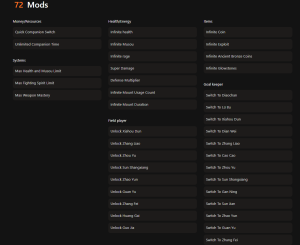
❤️ Infinite Health
Never worry about Lu Bu again. Keeps your health bar full regardless of damage taken.
⚡ Infinite Musou
Unleash your special attacks continuously without needing to charge the gauge.
💰 Infinite Gold
Instantly max out your funds to buy the best weapons and items from the merchant.
⚔️ One-Hit Kills
Clear maps in record time by defeating officers and peons with a single strike.
📈 Max Combo
Keeps your combo counter maxed out for high-score rankings and achievements.
🛡️ Infinite Buffs
Attack x2 and Defense x2 items last indefinitely until the end of the battle.
These featured mods are just the beginning. Whether you’re looking to skip tedious grinding, experiment with different playstyles, or speed up your progression, XMOD’s comprehensive toolkit offers dozens more options tailored to your playstyle.
Activating the Unlock All Characters Cheat
The “Unlock All Characters” function is specific. Unlike simple stat modifiers, this alters the game’s flag system. When you activate this cheat in the XMODHUB menu, it scans the memory addresses responsible for the roster lock state. Once toggled, you should immediately head to the “Officer Select” screen in Free Mode. If the characters are greyed out, enter a battle with a starter character and quit immediately—this forces the game to re-read the unlocked flags.
Enabling Infinite Gold in Dynasty Warriors Origins
Weapon crafting in Origins can be incredibly expensive. Enabling the infinite gold cheat allows you to bypass the economy entirely. I recommend toggling this on, purchasing all the high-tier equipment blueprints and materials you need, and then toggling it off if you want to resume normal gameplay. This ensures you have the gear to tackle “Chaos” difficulty without spending hours farming gold in lower-level skirmishes.
Strategic Unlocks: Best Characters for Chaos Mode
Once you have the full roster unlocked, the question shifts from “how” to “who.” In Dynasty Warriors: Origins, not all officers are created equal, especially when tackling the punishing Chaos difficulty. Unlocking the right characters early can make farming for high-level gems and accessories significantly easier.
Lu Bu: The God of War
It’s a cliché for a reason. Lu Bu remains the undisputed king of raw damage output. His moveset in Origins has been tweaked to include massive area-of-effect (AoE) finishers that can clear entire battalions in seconds. Unlocking him instantly allows you to rush through story missions to unlock map nodes without worrying about difficulty spikes. His unique weapon, the Sky Piercer, also has the highest base attack stat in the game.
Zhuge Liang: The Sleeping Dragon
For players who prefer safety, Zhuge Liang is the ultimate crowd-control character. His laser-focused beam attacks and wind magic can juggle officers indefinitely from a safe distance. In Chaos mode, where peons can kill you in a few hits, Zhuge Liang’s ability to keep enemies airborne is invaluable. Unlocking him early gives you a reliable option for “Defend the Commander” missions where you need to control space rather than just deal damage.
Diao Chan: Speed and Evasion
Diao Chan offers a high-risk, high-reward playstyle. Her attack speed is among the fastest in the game, allowing her to interrupt enemy officers before they can launch their Musou attacks. With the “Unlock All Weapons” cheat, you can equip her with high-tier whips that add elemental effects like Ice or Lightning, turning her into a stunlock machine. She is perfect for 1v1 duels against boss characters.
Practical Test: Skipping the Dynasty Warriors Origins Grind
We tested the impact of these tools on a fresh save file to see exactly how much time is saved. The difference in pacing is night and day, transforming the game from a slow action RPG grind into a pure arcade experience.
Comparing Grind Time vs. Dynasty Warriors Origins Cheats
In a standard playthrough, unlocking the final tier of characters often requires completing specific historical battles with high rankings, which can take upwards of 40 hours. With the “Unlock All” cheat active, this content is accessible at minute zero. For content creators or players who just want to play as Lu Bu or Guan Yu immediately, this saves essentially an entire work week of gaming time.
The Hulao Gate Experiment
To verify the stability of the cheats, we took a level 1 character into the famous Battle of Hulao Gate on the hardest difficulty. Normally, Lu Bu is an impossible boss at this stage, capable of one-shotting the player. With “Infinite Health” and “Max Stats” enabled, the fight became a playground. We were able to test movesets and combo strings against him without fear of death. The game engine handled the modified stats perfectly, with no crashes or frame rate drops during the intense particle effects of the Musou attacks.
Testing Max Stats Cheat in Dynasty Warriors: Origins
We also tested the stability of the Max Stats cheat. Setting Strength and Defense to maximum values (usually 999 or 1000) works flawlessly in the campaign. However, be warned: using max speed cheats can sometimes cause clipping issues in smaller fortress maps. If you find your character running through walls or getting stuck in geometry, disable the speed modifier and reload the checkpoint.

Who Should Use Cheats vs. Traditional Grinding?
Deciding whether to use a trainer often comes down to how much free time you have and what you enjoy about the game. Check this comparison:
- The Busy Gamer: If you have a job, family, or limited gaming hours, grinding for 50 hours just to unlock your favorite character isn’t feasible. Using the “Unlock All Characters” cheat respects your time and lets you enjoy the core combat immediately.
- The Content Creator: For YouTubers or streamers, you often need to show off high-level gameplay or specific weapon movesets on day one. Trainers are essential tools for creating guides and showcase videos without the delay of natural progression.
- The Purist: If you enjoy the slow burn of leveling up, collecting materials, and earning every victory, stick to the vanilla game. However, you might still find value in “Quality of Life” cheats like Infinite Gold to skip the tedious merchant grinding while keeping combat difficulty intact.
Common Mistakes When You Unlock All Weapons, All Character
Even with user-friendly tools, things can go wrong. Here are the most common pitfalls we’ve seen players encounter.
Why the Dynasty Warriors Origins Trainer Stops Working?
The most common reason for a trainer failure is a game update. Koei Tecmo frequently patches the game for bug fixes, which shifts the memory addresses the trainer relies on. If your cheats suddenly stop working, check XMODHUB for an updated version compatible with the new game executable. Additionally, ensure your antivirus hasn’t silently quarantined the trainer file—a common false positive for software that injects code.
Fixing Save Corruption in Dynasty Warriors: Origins
If the game crashes immediately upon loading your save after using cheats, your save data might be corrupted. This is why we emphasized backups earlier. To fix this, navigate to your save folder, delete the corrupted save.dat, and rename your save.dat.bak file back to the original name. This will restore your progress to the state before you attempted the modification.
Confusing System Data with Save Data
A frequent error when manually swapping files is replacing the wrong file. Dynasty Warriors: Origins often splits data into save.dat (your mission progress) and system.dat (your settings and gallery unlocks). If you download a 100% save, ensure you are replacing both files if the instructions say so. Replacing only one can lead to a mismatch where the game thinks you have cleared stages but doesn’t have the corresponding gallery movies unlocked, potentially causing freezes.
Dynasty Warriors: Origins FAQ
Ready to enhance your gameplay?

I create content for Xmodhub, where I curate and share game mods, tools, and other resources. My goal is to help players discover great add-ons, enjoy a smoother experience, and have more fun.



 Catherine Hu
As someone who’s spent countless hours grinding for characters and weapons, I really appreciate the convenience of cheats. Still, it’s great to hear that backing up saves is a must—nothing worse than losing your progress after an accidental glitch!