Summary: Discover all DOOM Eternal console commands and cheats for all of the time. Learn how to unlock restricted commands, use god mode and noclip, and enhance gameplay with powerful tools.
DOOM Eternal delivers one of the most intense and satisfying first-person shooter experiences ever created. From ripping and tearing through demon hordes to mastering the combat dance, the game demands precision and skill. But sometimes you want to experiment freely, test builds, or simply enjoy the chaos without constraints. That’s where console commands come in.
Before diving into the full list of commands, it’s worth mentioning that Xmod is a powerful PC tool designed to enhance your single-player gaming experience.
With Xmod, you can manage mods, activate cheats more easily, and use built-in features for games like DOOM Eternal — all without the complexity of Cheat Engine or the risks of untrusted trainers.
This comprehensive guide covers everything you need: how to unlock the console, enable restricted commands, the most useful DOOM Eternal cheats, and safe ways to customize your demon-slaying adventure.

Table of Contents
- What Are DOOM Eternal Console Commands?
- How to Enable Console Commands in DOOM Eternal
- Most Useful DOOM Eternal Console Commands
- Full DOOM Eternal Console Commands List
- How to Enhance DOOM Eternal with Xmod
- Conclusion
What Are DOOM Eternal Console Commands?
Console commands in DOOM Eternal are developer tools built on the id Tech 7 engine that let players modify gameplay settings, activate cheats, and experiment with features in real time. By accessing the developer console, you can enable god mode, infinite ammo, noclip, unlock all weapons, or adjust visual settings. These commands are especially popular among players who want to experiment with builds, create content, or replay the game without restrictions — offering significant control over your demon-slaying experience.
Important Note: The console exists in DOOM Eternal but most commands are restricted by default. You’ll need third-party tools to unlock full functionality, which we’ll cover in detail below.
How to Enable Console Commands in DOOM Eternal
DOOM Eternal’s console is accessible but restricted by id Software to maintain game balance and prevent cheating in Battlemode. Here’s how to unlock full command access.
Understanding Console Restrictions
Default Console Access:
- The console can be opened with the ~ (tilde) or ` (backtick) key
- Basic settings commands work without modifications
- Gameplay commands like god mode, infinite ammo, and give commands are locked
Why Commands Are Restricted:
- Protect Battlemode integrity (prevent multiplayer cheating)
- Maintain achievement system fairness
- Prevent players from bypassing progression systems
- Preserve intended gameplay difficulty curve
Method 1: Cheat Engine Console Unlocker (Most Popular)
This method uses SunBeam’s console unlocker from FearlessRevolution, the most widely used and trusted solution in the DOOM Eternal community.
Prerequisites:
- DOOM Eternal installed on PC (Steam, Epic, or Bethesda launcher)
- Cheat Engine 7.0 or later downloaded from cheatengine.org (NEVER download from other sites)
- Administrative privileges on your computer
1: Download Required Files
- Visit FearlessRevolution forum:
fearlessrevolution.com/viewtopic.php?t=11889
- Download SunBeam’s DOOM Eternal Cheat Table (latest version)
- Save the .CT file to an accessible location
- Important: Check for updates on page 28+ of the forum thread for fixes
2: Install Cheat Engine
- Download Cheat Engine from the official cheatengine.org website only
- Run the installer with default settings
- Launch Cheat Engine after installation
3: Enable Console Commands
- Launch DOOM Eternal and load into any level or the Fortress of Doom
- Alt-Tab to Cheat Engine
- Click the computer icon in the top-left corner
- Select DOOMEternalx64vk.exe from the process list
- Click File → Load and select the downloaded .CT file
- In the Cheat Engine window, check the box next to “Console Unlocker”
- Wait for the script to activate (status will change to green checkmark)
4: Use the Console
- Alt-Tab back to DOOM Eternal
- Press ~ (tilde) or ` (backtick) to open the console
- Type commands and press Enter to execute
- Press the console key again to close
Troubleshooting:
Console key doesn’t work:
- Try alternative keys: `, ~, or F10
- Check keyboard layout settings
- Some keyboards require Shift + key combination
Commands show as “restricted”:
- Ensure Cheat Engine script is activated (green checkmark)
- Reload the cheat table
- Restart DOOM Eternal with Cheat Engine running
Game crashes when using commands:
- Some commands cause instability (especially visual cvars)
- Start with basic commands like god and g_infiniteAmmo
- Avoid using too many commands simultaneously
Method 2: Eternal Mod Injector (Alternative)
The Eternal Mod Injector automatically unlocks console commands without requiring Cheat Engine.
Installation:
- Download from the Eternal Mods community
- Extract to your DOOM Eternal directory
- Run the injector before launching the game
- Console commands will be unlocked automatically
Note: This method requires keeping the mod injector updated with each game patch.
Method 3: Launch Options for Basic Commands
Some non-cheat commands can be enabled through Steam launch options without third-party tools.
How to Set Launch Options:
- Right-click DOOM Eternal in Steam Library
- Select Properties
- In the General tab, click Set Launch Options
- Add commands with + prefix, separated by spaces
- Example:
+com_skipIntroVideo 1 +com_skipKeyPressOnLoadScreens 1
Useful Launch Option Commands:
+com_skipIntroVideo 1 — Skip intro videos on launch+com_skipKeyPressOnLoadScreens 1 — Auto-proceed through loading screens+r_fullscreen 1 — Force fullscreen mode+r_mode [number] — Set resolution mode
Security Warnings
Only download from trusted sources:
- Cheat Engine: cheatengine.org (official site only)
- Cheat Tables: FearlessRevolution forum
- Eternal Mod Injector: Eternal Mods Wiki
Avoid:
- Random YouTube description links
- Unknown file-sharing sites
- “One-click trainer” downloads from sketchy websites
- Any software requesting admin access without clear purpose
Always:
- Scan all downloads with antivirus
- Backup your save files before using commands
- Disable online features (Battlemode) while using cheats
- Keep Cheat Engine closed when not actively using it
Most Useful DOOM Eternal Console Commands
Here are the essential commands that enhance gameplay without breaking the experience. These require the console to be unlocked via Cheat Engine or mod injector.
Core Cheat Commands
god — Enables invincibility mode. You take no damage from any source.
g_infiniteAmmo 1 — Infinite ammunition for all weapons.
Use g_infiniteAmmo 0 to disable.
noclip — Fly through walls and obstacles. Move with WASD and mouse.
Type noclip again to disable.
notarget — Enemies ignore you completely. Useful for exploration and screenshots.
giveAllMaxedOutWeapons — Unlocks and fully upgrades all weapons instantly.
Item & Resource Commands
give — Shows all available give commands and their syntax when typed alone.
give weapon player — Opens menu of all weapons you can spawn.
Example: give weapon/player/combat_shotgun gives Combat Shotgun
give abilities — Shows available abilities to unlock.
Example: give abilities/double_jump grants double jump early
give resource — Grants resources like health and armor.
Example: give resource/health 100 adds 100 health
Movement & Exploration Commands
noclip — Essential for exploring out-of-bounds areas and finding secrets.
notarget — Peaceful exploration without combat interference.
pm_runspeed [value] — Adjusts movement speed (default: 320).
Example: pm_runspeed 500 for faster movement
pm_jumpheight [value] — Changes jump height (default: 70).
Example: pm_jumpheight 150 for higher jumps
Visual & Camera Commands
g_fov [value] — Changes field of view (default: 90).
Example: g_fov 120 for wider perspective
hands_fovScale [value] — Adjusts weapon viewmodel FOV (default: 1.0).
Example: hands_fovScale 0.8 for less obtrusive weapons
r_fullscreen [0/1] — Toggle fullscreen mode.
0 = windowed, 1 = fullscreen
r_mode [number] — Changes resolution. Number corresponds to preset resolutions.
Time & Speed Commands
timescale [value] — Changes game speed (default: 1.0).
Example: timescale 0.5 for slow motion, timescale 2 for fast forward
com_gameSpeed [value] — Alternative speed control command.
Debug & Utility Commands
conDump [filename] — Exports all console commands to a text file in your save directory.
Example: conDump commands.txt
screenshot — Captures a screenshot at native resolution.
quit — Immediately exits the game.
r_showFPS [0/1] — Toggles FPS counter display.
Full DOOM Eternal Console Commands List
Below is a comprehensive list of all major console commands available in DOOM Eternal when restrictions are removed. Commands are organized by category.
Cheat Commands
god — Toggle invincibility
g_infiniteAmmo 1 — Enable infinite ammunition
noclip — Toggle noclip/fly mode
notarget — Enemies ignore player
giveAllMaxedOutWeapons — Unlock and max all weapons
give all — Gives all items, weapons, and resources (may cause issues)
Give Commands (Weapon Specific)
weapon/player/combat_shotgun — Combat Shotgun
weapon/player/double_barrel — Super Shotgun
weapon/player/heavy_cannon — Heavy Cannon
weapon/player/rocket_launcher — Rocket Launcher
weapon/player/plasma_rifle — Plasma Rifle
weapon/player/ballista — Ballista
weapon/player/chaingun — Chaingun
weapon/player/bfg — BFG-9000
weapon/player/unmaykr — Unmaykr
weapon/player/crucible — Crucible
weapon/player/pistol — Secret Pistol (yes, it exists!)
Get Commands (Equipment & Abilities)
equipment/frag_grenade — Frag Grenade
equipment/ice_bomb — Ice Bomb
abilities/double_jump — Double Jump
abilities/dash — Dash ability
abilities/blood_punch — Blood Punch
abilities/flame_belch — Flame Belch
Grip Commands (Resources)
resource/health [amount] — Add health
resource/armor [amount] — Add armor
resource/ammo_shotgun [amount] — Shotgun ammo
resource/ammo_bullets [amount] — Bullet ammo
resource/ammo_rockets [amount] — Rocket ammo
resource/ammo_cell [amount] — Cell ammo
resource/ammo_bfg [amount] — BFG ammo
Rune & Upgrade Commands
Runes_maxallrunes — Unlock all runes
campaign_giveupgradedweaponsandmods — Give upgraded weapons with mods
Note: Using these may prevent you from earning collectible completion
Movement & Physics Commands
noclip — Toggle noclip mode
pm_runspeed [value] — Adjust run speed (default: 320)
pm_jumpheight [value] — Adjust jump height (default: 70)
pm_stamina [0/1] — Toggle stamina system
g_gravity [value] — Change gravity (default: 1076)
Visual & Graphics Commands
g_fov [value] — Field of view (default: 90)
hands_fovScale [value] — Weapon viewmodel FOV scale
r_fullscreen [0/1] — Toggle fullscreen
r_mode [number] — Set resolution mode
r_showFPS [0/1] — Toggle FPS counter
r_displayRefresh [hz] — Set refresh rate
r_antiAliasing [0-4] — Anti-aliasing quality
Audio Commands
s_volume_master [0-1] — Master volume
s_volume_music [0-1] — Music volume
s_volume_sfx [0-1] — Sound effects volume
s_volume_dialog [0-1] — Dialogue volume
Difficulty & Gameplay Modifiers
g_permaGodMode [0/1] — Permanent god mode
g_showProjectilePerc [0/1] — Show projectile warnings
hands_show [0/1] — Toggle first-person weapon visibility
Screenshot & Media Commands
screenshot — Take screenshot
screenshotJPEG — Take JPEG screenshot
screenshot [filename] — Save screenshot with custom name
recordDemo [name] — Start recording demo
System & Debug Commands
conDump [filename] — Export all commands to text file
quit — Exit game
restart — Restart current level
set [cvar] [value] — Set any console variable
toggle [cvar] — Toggle boolean cvars
vstr [variable] — Execute variable as command
Launch Option Commands (No Unlock Required)
These can be used in Steam launch options with + prefix:
+com_skipIntroVideo 1 — Skip intro videos
+com_skipKeyPressOnLoadScreens 1 — Skip loading screen prompts
+r_fullscreen 1 — Force fullscreen
+r_mode [number] — Set resolution
Important Command Notes
Syntax Rules:
- Commands are not case-sensitive
- Use quotes for paths:
give weapon/player/bfg
- Separate multiple commands with semicolon:
god; g_infiniteAmmo 1
- Press TAB for autocomplete suggestions
Performance Considerations:
- Some visual commands may impact FPS
- Using too many commands simultaneously can cause instability
- Save your game before experimenting with commands
- Keep Cheat Engine running while using restricted commands
Known Issues:
give all command may cause game crashes or progression bugs- Unlocking weapons/mods early prevents collectible completion
- Some commands require specific game states to work properly
- Console access disables achievement earning during that session
How to Enhance DOOM Eternal with Xmod

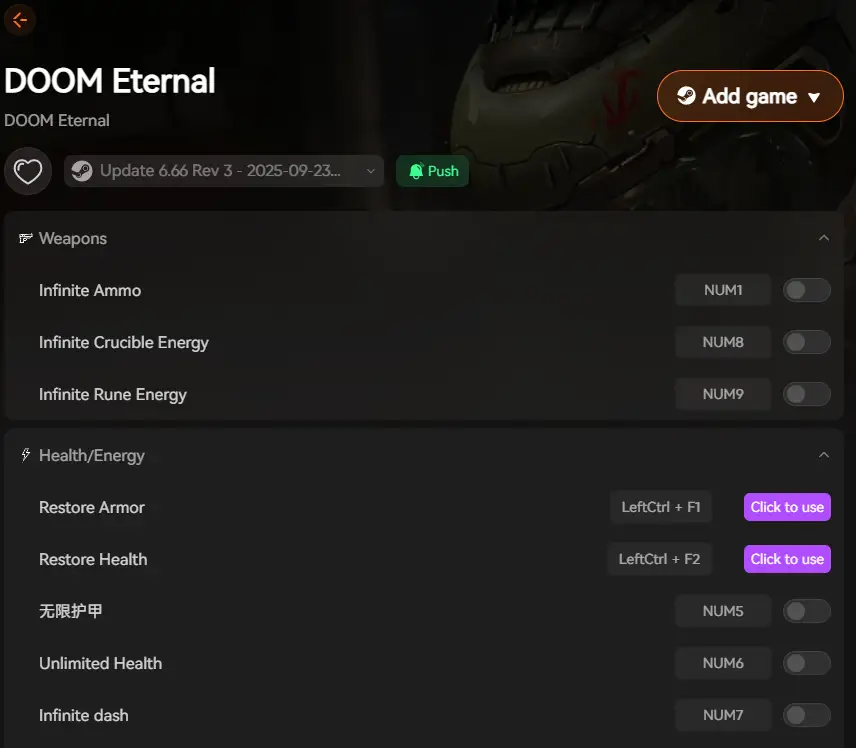
To take your DOOM Eternal experience even further, Xmod offers powerful tools that go beyond console commands and eliminate the complexity of Cheat Engine. With Xmod, you can safely enhance your gameplay without technical setup or security concerns.
Xmod provides:
- One-click trainer activation for god mode, infinite ammo, and stat modifications
- No Cheat Engine required — Xmod handles everything through a user-friendly interface
- Safe, verified software without the risks of untrusted trainers or malware
- Built-in mod management for community mods and visual enhancements
- Performance optimization tools to boost FPS and reduce stuttering
- Automatic updates ensuring compatibility with the latest DOOM Eternal patches
- Integrated protection keeps your original game files safe and untouched
Whether you want to experiment with builds, create epic screenshot moments, or simply enjoy the campaign without difficulty stress, Xmod gives you complete control while maintaining system security. It’s the ideal solution for players who want the power of console commands without the complexity of Cheat Engine tables and manual file editing.
Conclusion
Console commands in DOOM Eternal unlock incredible possibilities for customizing your demon-slaying experience. From god mode and infinite ammo to noclip exploration and weapon unlocks, these commands give you total control over how you play. While accessing them requires third-party tools like Cheat Engine or mod injectors, the effort is worthwhile for players who want to experiment freely, create content, or replay the campaign with new twists.
Combined with Xmod, you can enhance your gameplay even further — safely activating cheats, installing quality mods, and optimizing performance without the technical complexity or security risks of traditional methods. Together, console commands and Xmod transform DOOM Eternal into a fully customizable experience, perfect for both new Slayers and veteran demon hunters looking to experience id Software’s masterpiece in entirely new ways. Rip and tear, until it is done — on your own terms.
I am a passionate gamer and writer at XMODhub, dedicated to bringing you the latest gaming news, tips, and insights.
Connect with me:
LinkedIn Profile ↗

 Catherine Hu

 Nancy Miller