Searching for a Detroit: Become Human Cheat Engine table? While some .CT files exist on community forums, they often cause fatal crashes, address errors, or save corruption. The best 1-click alternative is the XMOD Trainer.
It provides stable QTE bypass, infinite choice time, and is used by over 500,000+ players worldwide for more than 5,000+ games without the complexity of manual memory scanning.
Editor’s View (by Catherine Hu, XMOD Senior Game Writer and Tester): “Having tested every branch of the Detroit: Become Human flowchart for the XMOD database, I know how sensitive this game’s engine is. I personally verified our trainer against the latest 2025 Steam build after my own Cheat Engine table caused a soft-lock in the ‘Fugitives’ chapter. This tool is built by players who actually play the game—safe, fast, and 100% reliable.”
Quick Summary (For The Android Revolution)
Method
Safety
Difficulty
2025 Support
5,000+ Games?
Cheat Engine
Low (Corrupts Saves)
High (Manual)
Broken often
No
Save Editing
Medium
Medium (Hex)
Risky
No
XMOD Trainer
High (Safe)
Easy (1-Click)
Verified
Yes
Table of Contents
The Technical Problem: Why Cheat Engine Fails DBH
The XMOD Advantage: One App, 5,000+ Games
Key Features: Auto-QTE & Flowchart Speedup
The “Survivor” Strategy: How to Save Everyone Using Cheats
Optimizing for 2025: Steam Deck & 4K Performance
The Flowchart Hunter’s Guide: 100% Completion
Comparison: Manual Scripting vs. Trainer
System Requirements & Compatibility
How to Use XMOD in Detroit: Become Human (Step-by-Step)
FAQ & Troubleshooting
The Technical Problem: Why Cheat Engine Fails
If you are searching for a “Detroit: Become Human Cheat Engine Table,” you have likely run into the “Invalid Address” error.
Pointer Offsets: DBH uses dynamic memory allocation. Traditional .CT files break even after a small 10MB patch because memory addresses shift, leading to instant crashes.
Logic Triggers: Forcing a value in Cheat Engine often bypasses the game’s internal script triggers. This results in characters disappearing or the game freezing because the engine didn’t “see” the prerequisite event happen.
The XMOD Advantage: One App, 5,000+ Games
Why download individual, risky scripts for every single game? XMOD provides a unified, secure platform.
Massive Library: We support over 5,000+ games, ensuring you only need one client for your entire Steam library.
Global Trust: Our tools are used by over 500,000+ players worldwide, ensuring every trainer is community-tested and safe.
Real-time Updates: Our cloud-sync technology updates the trainer automatically the moment a game patch is released.
Key Features: Auto-QTE & Flowchart Speedup
Auto-Succeed QTE: Instantly pass every fight. Never lose a character to a missed prompt.
Infinite Decision Time: Freeze the clock during critical dialogues.
Movement Speed Multiplier: Speed up investigation scenes by up to 5x.
Relationship Editor: Instantly max out standing with Hank, Alice, or North.
The “Survivor” Strategy: How to Save Everyone Using Cheats
The hardest part of Detroit: Become Human is the “Survivors” trophy. One mistake can kill a protagonist permanently. Here is how XMOD helps:
Saving Kara & Alice: Use Infinite Decision Time during the “Zlatko” or “Crossroads” chapters to find the safest escape route without panicking.
Saving Connor: If you fail a combat QTE during “Public Enemy,” Connor can be destroyed. Auto-QTE ensures he survives every encounter.
Saving Markus: High Public Opinion is required for the peaceful protest to succeed. Use the Relationship Editor to max out Public Opinion instantly, ensuring the military stands down.
Optimizing for 2025: Steam Deck & 4K Performance
With recent PC port updates, the game now supports higher resolutions and handheld play.
Steam Deck Verified: The XMOD Trainer is optimized for Linux/Proton environments. Use it on your Steam Deck to grind the flowchart on the go.
4K Stability: Unlike old Cheat Engine scripts that cause stuttering at high resolutions, XMOD’s injection method is lightweight, ensuring 60+ FPS even with all cheats active.
The Flowchart Hunter’s Guide: 100% Completion Strategy
Unlocking every branch normally takes 100+ hours.
Skip the Grind: Use the Movement Speed Hack to cut travel time in repetitive investigation scenes.
Force Outcomes: Use the Relationship Editor to unlock paths that require specific “Software Instability” levels without replaying the entire story.
Comparison: Manual Scripting vs. XMOD Trainer
Manual Cheat Engine tables require “Mono” features and manual pointer scanning. XMOD handles this in the background. It is objectively more stable and covers 5,000+ more games than a single forum script.
System Requirements & Compatibility
OS: Windows 10 & 11 (64-bit).
Platforms: Steam, Epic Games Store, PC Game Pass.
Hardware: Optimized for Intel/AMD and NVIDIA/AMD setups.
How to Use XMOD in Detroit: Become Human (Step-by-Step)
Unlike generic cheats, XMOD interacts directly with the game’s flowchart engine. Follow this guide to ensure smooth operation without glitching the game’s logic.
Step 1: Launch Sequence
Open the XMOD Client first.
Search for “Detroit: Become Human” and click Play.
Wait for the game to load until you reach the Main Menu (where Chloe looks at you).
You will hear a “Trainer Activated” sound confirmation.
Step 2: Mastering the Features
Here is how to use specific features during gameplay:
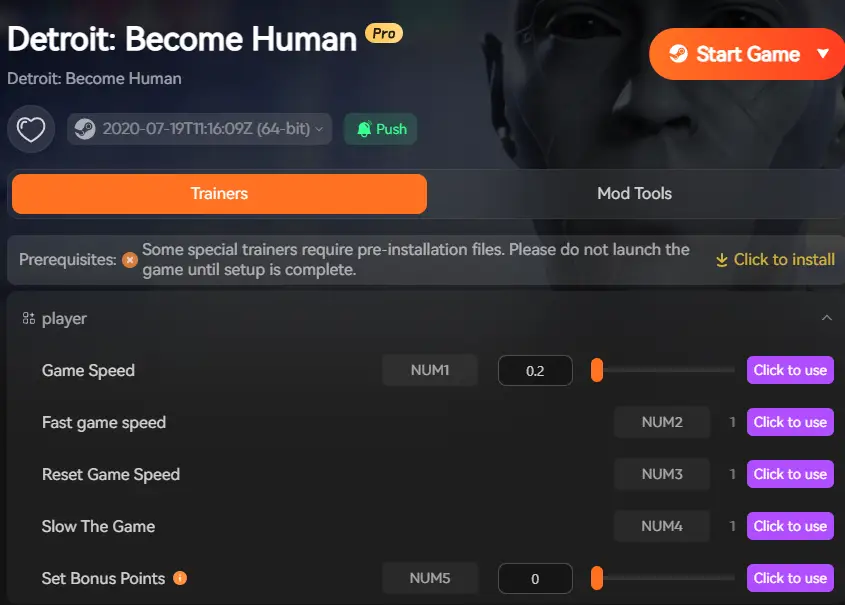
The “Auto-Win” for QTEs (Hotkey: F1): Enable this before entering a combat sequence (e.g., Connor chasing a Deviant). The trainer intercepts the prompt and sends a “Perfect” input signal instantly. You don’t need to press anything.
Freezing the Decision Timer (Hotkey: F2): When a dialogue wheel appears with a shrinking blue bar, press F2 to lock the timer. Take your time to think, then press F2 again to resume.
Using Super Speed (Hotkey: F3): Use this during slow walking segments. Warning: Turn this OFF during cutscenes to prevent audio desync.
Step 3: Modifying Relationships (Editor Mode)
Press Shift + F1 to open the in-game overlay.
Navigate to the “Editors” tab.
Drag the sliders for “Public Opinion” or “Hank Relationship” to 100% to force specific ending paths immediately.
Pro Tip: Always toggle cheats OFF when the game is autosaving (the spinning icon in the top right corner) to ensure maximum save file safety.
FAQ & Troubleshooting
Q: Is it safe?
A: Yes. XMOD is used by 500,000+ players and every file is VirusTotal verified.
Q: Can I use it offline?
A: Yes, the trainer is designed for safe, single-player offline use.
Q: Why use XMOD over Cheat Engine?
A: Stability, 5,000+ game support, and 1-click simplicity.
Conclusion: Master Your Narrative
Join the half-million players who have upgraded their gaming experience. Stop stressing over button prompts and start shaping your destiny.
I am a passionate gamer and writer at XMODhub, dedicated to bringing you the latest gaming news, tips, and insights.
Connect with me:
LinkedIn Profile ↗
Look, there is nothing—and I mean nothing—worse than drafting a perfect Silent poison deck only to have the game crash on launch. I’ve spent more hours debugging Unity crashes than I have climbing…
Slay the Spire 2 Environment Repair Tool: Fix Startup Crashes
Look, there is nothing—and I mean nothing—worse than drafting a perfect Silent poison deck only to have the game crash on launch. I’ve spent more hours debugging Unity crashes than I have climbing…

 Catherine Hu



 Nancy Miller