Catherine Hu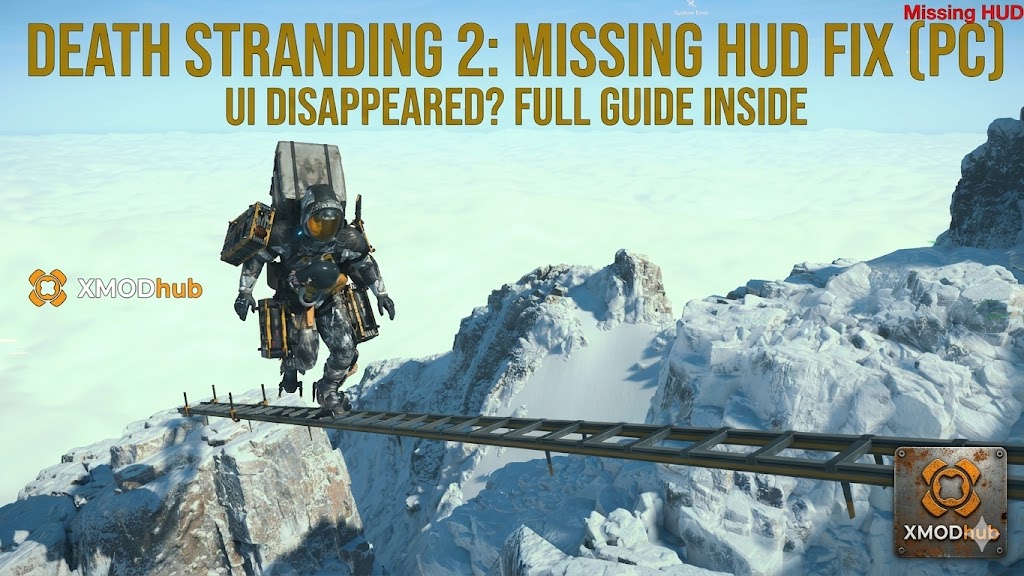
Death Stranding 2: On the Beach is a game of meticulous management. You constantly need to monitor Sam’s stamina gauge, BB’s stress levels, boot degradation, and your Odradek compass to survive the harsh, shifting environments of Pywel.
However, many PC players are encountering a terrifying Decima Engine bug: after exiting a cinematic cutscene, closing the Cuff Links map, or stepping off a Drawbridge vehicle, the entire HUD (Heads-Up Display) completely vanishes. You are left flying completely blind, with no crosshair, no stamina bar, and critically, no button prompts.
Editor’s Take: Flying Blind in Pywel
“I was in the middle of a heavy Tar flood zone when my UI just refused to load back in. Suddenly, BB started crying. Because the HUD was gone, the ‘Soothe BB’ button prompt didn’t appear on screen. I panicked, mashed the wrong keys, alerted a massive BT, and lost 2 hours of progress because I couldn’t even see my own health bar.”
“Navigating this game blind is a nightmare. I’ve outlined the immediate fixes to force the engine to redraw your UI below. And if you are stuck in a dangerous area with no HUD, check out the XMODhub survival workaround at the bottom so you don’t ruin your delivery.”
Quick Answer: How to Restore Your Missing UI
If your screen is completely clear of all indicators, try these four steps in order to force the game to reload your 2D interface layer:
- Check the HUD Display Setting: Press ESC (or Options/Start) to pause. Navigate to Options > Game Settings. Scroll to HUD Display and ensure it is set to Standard. Cutscenes sometimes falsely trigger the “Off” state.
- Spam the Compass Button: Press and hold G on your keyboard (or L1/LB on your controller) multiple times. Forcing the game to pull up the first-person compass can “kickstart” the UI rendering.
- Change Resolution (Force Redraw): Go to Options > Graphics Settings. Lower your resolution (e.g., to 1920×1080), apply the changes, and instantly switch back to your native resolution. This forces the GPU to flush the screen.
- Enter a Private Room: If you are near a Drawbridge facility or Safe House, go inside. The game unloads the open-world UI and loads the Private Room menus. Leaving usually refreshes the outdoor HUD perfectly.
The DLSS Frame Gen Bug (UI Flickering)
If your UI isn’t completely gone but is violently flickering, flashing, or disappearing randomly when you move the camera, you are experiencing a known Frame Generation bug.
Like many modern PC ports, Death Stranding 2 sometimes struggles to render the 2D UI layer perfectly over the interpolated 3D frames generated by NVIDIA DLSS 3 or AMD FSR 3.
- The Fix: Open your Graphics Settings and temporarily disable Frame Generation. Keep DLSS/FSR Upscaling turned on for performance, but turning off the AI frame generation usually instantly stabilizes a flickering or disappearing HUD.
How to Fix HUD Too Small (4K UI Scaling)
Sometimes the UI hasn’t disappeared; it is just microscopically small. If you are playing on a 4K OLED monitor or a massive TV, the default UI scaling makes reading Cuff Links emails or checking cargo weight nearly impossible.
- •Increase Text Size: Go to Options > Display Settings and change the Text Size to Large or Extra Large.
- •Add UI Backgrounds: In the same menu, enable UI Background Opacity. This adds a dark, semi-transparent box behind your compass and stamina bars, preventing the thin white UI lines from becoming invisible against the bright snow of the Kweiden region.
Did You Accidentally Trigger Photo Mode?
Death Stranding 2 features an incredibly robust Photo Mode, which intentionally hides the entire HUD to let you capture cinematic screenshots of the breathtaking landscapes. It is very easy to accidentally brush against the Photo Mode hotkey during a chaotic BT encounter.
- On PC Keyboard: Press F8 to ensure you haven’t accidentally toggled Photo Mode.
- On Controller: Press the bottom left side of the Touchpad (PlayStation) or the View button (Xbox) to verify you didn’t inadvertently activate the camera suite.
The Blind Survival Tool: XMODhub PC Trainer
If your UI glitches out while you are 20 minutes deep into a snowy mountain trek or surrounded by a Tar flood, you are in serious trouble. Without a stamina bar, you don’t know when Sam will collapse. Without button prompts, you can’t properly soothe BB. Without a cargo meter, you don’t know if your delivery is ruined.
If the UI won’t come back and you cannot safely reach a terminal to save your game, do not risk walking blindly into a Voidout. Use the XMODhub PC Utility to survive the blind trek. Survive Without a HUD: XMODhub safely injects into the Decima Engine, giving you an unbreakable safety net when the game’s interface completely abandons you.
- •God Mode & Infinite Stamina: If you cannot see your health or stamina bars, make them irrelevant. Toggle Infinite Stamina and God Mode. Sam will never pass out from exhaustion and will survive any blind BT encounters.
- •Perfect Balance: Without UI prompts warning you that your cargo is slipping, you will fall over. Toggle Perfect Balance so Sam automatically handles rough terrain without you needing to hold the strap buttons.
- •Teleport to Waypoint: If you are completely lost without your Odradek compass, open your map, place a marker on the nearest Magellan ship or Safe House, and use the XMODhub hotkey to teleport there instantly to reload the UI safely.
How to Use XMODhub (3 Simple Steps)

- Download: Get the verified, digitally signed XMODhub client from the Official XMODhub Trainers Page.
- Launch: Open the app alongside your Steam or Epic Games copy of Death Stranding 2.
- Activate: Click “Play” on the module. Use the clean in-game overlay or your keyboard numpad to toggle “Infinite Stamina” and “God Mode” to survive until you can reach a save point and restart your game.
🚀 Download the Death Stranding 2 XMODhub Trainer Free Here
Frequently Asked Questions (FAQ)
Q: Is there an Immersive Mode that naturally hides the HUD?
A: Yes. In the Game Settings menu, there is a HUD option labeled “Dynamic.” This setting hides the UI while you are walking normally and only makes it appear during combat or when you press the scanner button. Change it to “Standard” if you want the UI on screen permanently.
Q: Why is my crosshair missing when aiming the Bola Gun?
A: If the rest of your UI is visible but your weapon crosshair is missing, this is a known first-person aiming glitch. Try swapping to a different weapon (like a Hematic Grenade), aim it, and then swap back to your primary gun to force the reticle to redraw.
Q: Will reinstalling the game fix a permanently missing UI?
A: If the UI is permanently missing across all save files and adjusting the resolution does not fix it, your game files might be corrupted. Before doing a massive 100GB reinstall, right-click the game in Steam, go to Installed Files, and select “Verify integrity of game files.”
Conclusion: Don’t Walk Blind
Losing your HUD in Death Stranding 2: On the Beach strips away all your vital survival information, turning a routine, peaceful delivery into a nightmare scenario.
Usually, the Decima Engine just needs a quick kick to reload the UI layer. By toggling your HUD settings, cycling your screen resolution to flush the GPU, or temporarily disabling Frame Generation, you can usually bring Sam’s vital displays back online in seconds.
However, if you are caught in a blizzard with no stamina bar and no compass to guide you, do not let a visual bug destroy your hard work. Equip the XMODhub PC Trainer to lock your health, freeze your stamina, and utilize Waypoint Teleportation to instantly escape the danger zone. Keep your deliveries flawless, even when you are forced to fly blind.

I am a passionate gamer and writer at XMODhub, dedicated to bringing you the latest gaming news, tips, and insights.
Connect with me:
LinkedIn Profile ↗
 Nancy Miller