
 Catherine Hu
Want to test out the endgame Lumina Sword early to cut through the shadow creatures? Or maybe you accidentally wasted all your Light Crystals on the wrong upgrade path and now you are stuck before a major boss? Using console commands to spawn items is a staple of PC gaming freedom, especially in punishing action RPGs.
Below is the most comprehensive, categorized list of internal Item IDs and memory codes for DarkSwitch, updated for the latest Unity engine patch.
You may also like: DarkSwitch Cheat Engine Alternative Guide
Editor’s View: The “Typo” Nightmare
“Typing spawn res_dark_matter 50 into a modded console is fine once. But if you are trying to max out your shadow skill tree and need to type that code 50 times? It’s repetitive, and one wrong character in the Unity engine means a frustrating ‘Syntax Error’ that breaks your rhythm.
While the internal asset lists below are fully verified for memory editing, I personally switched to the Visual Spawner. Seeing the item icon and just clicking ‘Add’ is how modern tweaking should feel. It keeps you immersed in the game’s beautiful dark fantasy world instead of staring at a text box.”
— Catherine Hu, Content Lead at XMODhub
Quick Reference: Top 10 Most Wanted DarkSwitch IDs
Don’t want to scroll? Here are the internal codes for the most essential items (Lumens, Upgrade Materials, and Best Weapons) to help you conquer the abyss.
| Item Name | Item ID / Code | Effect / Stats |
|---|---|---|
| Lumens (Currency) | currency_lumens | Used for basic upgrades |
| Dark Matter | res_dark_matter | High-tier shadow upgrades |
| Light Crystal | res_light_crystal | High-tier light upgrades |
| Health Flask | cons_health_flask | Full HP restoration |
| Stamina Elixir | cons_elixir_stamina | Temporary infinite stamina |
| Lumina Sword | wpn_sword_lumina | Best light-stance weapon |
| Void Dagger | wpn_dagger_void | Best dark-stance weapon |
| Shadow Cloak | gear_cloak_shadow | Increases dodge invincibility |
| Sunfire Tome | magic_tome_sunfire | Casts heavy light AoE |
| Abyss Gate Key | item_key_abyss_gate | Unlocks the final area |
How to Enable Console & Use Commands
Before you can use the IDs below, you need to open the developer console.
- •
The Reality: Because DarkSwitch is built on the Unity engine, the native developer console is completely locked in the retail version to preserve the game’s strict difficulty. Pressing the Tilde key (~) will not work natively. - •
The Solution: To use these text commands, you must install a third-party modding API (like BepInEx) to force the debug menu open. - •
The Command: Once the modded console is active, the standard format is:spawn [Item ID] [Quantity] - •
Example: To spawn 500 Lumens, typespawn currency_lumens 500and press Enter.
(Don’t want to mess with mod folders? Skip to the XMODhub solution below.)
The Easy Way: XMODhub Visual Spawner
Stop Alt-Tabbing to check tables. Typing long, case-sensitive ID codes breaks your immersion and risks crashing the engine. XMODhub includes a Visual Spawner feature built specifically for DarkSwitch.
- ✔ Icon-Based: See exactly what the weapon or relic looks like before you spawn it.
- ✔ Search Bar: Just type “Sword” or “Crystal” in the overlay and click the one you want.
- ✔ Batch Add: Get 999x of every crafting material with one single button.
XMODhub: More Than Just a Visual Spawner
XMODhub is your ultimate all-in-one toolkit for PC single-player gaming. Whether you need powerful Trainers, real-time Translation Tools, or detailed Interactive Maps, XMODhub has everything covered to customize your experience.

Our library supports over 5,000+ games, ensuring that whether you are playing DarkSwitch or similar hits like Hollow Knight and Ori and the Will of the Wisps, you always have the best tools at your fingertips.
How to Use XMODhub for DarkSwitch: Getting started is easy.
Just follow these steps:
- Download and Install the XMODhub client safely from our official site.

- Search for DarkSwitch in the client’s search bar.
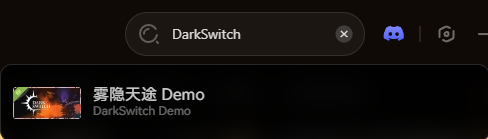
- Select the specific tool you need (Visual Spawner, Trainer, or Save Manager).
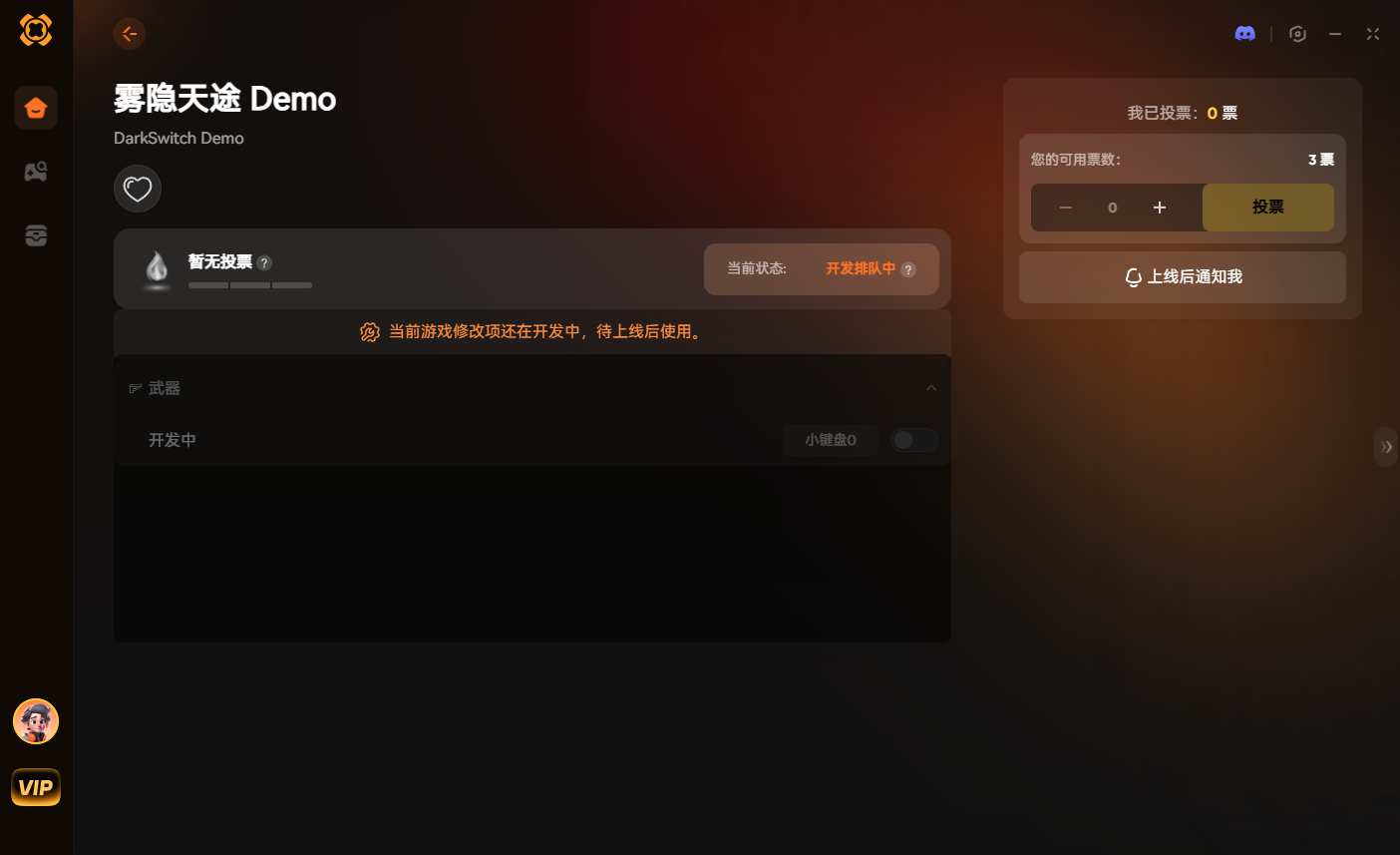
- Launch the game directly from the client and enjoy your enhanced gameplay!
Weapon & Magic IDs List
Here are the internal asset codes for all melee weapons and magic tomes you can wield.
| Weapon Name | Item ID | Rarity |
|---|---|---|
| Iron Broadsword | wpn_sword_iron | Common |
| Twilight Scythe | wpn_scythe_twilight | Rare |
| Lumina Sword | wpn_sword_lumina | Legendary |
| Void Dagger | wpn_dagger_void | Legendary |
| Moonbeam Tome | magic_tome_moonbeam | Rare |
Armor & Relics IDs List
Equip your character with the best protective gear and passive buffs using these codes.
| Armor Name | Item ID | Slot |
|---|---|---|
| Leather Tunic | gear_chest_leather | Body |
| Shadow Cloak | gear_cloak_shadow | Accessory |
| Ring of the Eclipse | relic_ring_eclipse | Ring |
Consumables & Upgrade Materials IDs List
Never run out of healing flasks during a massive boss fight.
| Item Name | Item ID | Quantity Advice |
|---|---|---|
| Health Flask | cons_health_flask | Spawn 20+ |
| Dark Matter | res_dark_matter | Spawn 100+ |
| Light Crystal | res_light_crystal | Spawn 100+ |
Skills, Perks & Traits IDs
You can also use memory injection to instantly learn skills or add traits without grinding experience points.
Command format: addperk [Perk ID]
| Perk / Skill Name | Perk ID | Effect |
|---|---|---|
| Endless Breath | perk_stamina_max | Unlimited running and dodging |
| Master Merchant | perk_barter_100 | Better prices at the sanctuary shop |
| Shadow Step | perk_dash_invincible | Increases i-frames during dodges |
Troubleshooting: Why Commands Fail
“Command not found”: You must install a modding API (like BepInEx) to enable the console. The vanilla Unity engine locks these commands entirely.
“Item ID invalid”: Check if you made a typo. Internal Unity strings are strictly case-sensitive. currency_lumens will work, but Currency_Lumens will return a syntax error.
Square Boxes: If the modded console shows boxes [][][], your game language might not support the font. Switch the game to English while inputting codes.
FAQ
Q: Are these Item IDs case-sensitive?
A: Yes. Console commands in the Unity Engine for DarkSwitch are strictly case-sensitive. Always copy the formatting exactly as shown in the tables.
Q: Can I spawn items in Multiplayer?
A: No. DarkSwitch is a single-player game. These console commands only work for your local save file.
Q: How do I find IDs for modded items?
A: It is extremely difficult manually. We recommend using the XMODhub Item Browser, which automatically detects modded items added by the community and lets you spawn them without knowing the exact ID string.
Conclusion
Using DarkSwitch Item IDs is the fastest way to experiment with light-and-dark builds and skip the intense resource grind. Bookmark this page so you can find the codes when you need them.
However, if you want a smoother experience where you don’t need to memorize item_id_long_string or install third-party mod loaders, the XMODhub Visual Spawner is the superior choice.
Browse items visually. Spawn instantly.

I am a passionate gamer and writer at XMODhub, dedicated to bringing you the latest gaming news, tips, and insights.
Connect with me:
LinkedIn Profile ↗
 Nancy Miller