You finally mastered the dodge roll timing. You are deep in the ruined facility, aiming for that perfect headshot on a biomechanical soldier. Then suddenly—BAM. You get cornered by a swarm of “Church” machines. You panic, miss the shot, and watch the brutal execution animation play out in full gore.
This is the reality of CYAN BRAIN. While the game features over 30 types of enemies and traps with unique attack patterns, the punishing difficulty can turn exciting battles into frustrating repeats. The visceral side-scrolling combat and “clothing damage” mechanics create an unforgettable aesthetic, but the high difficulty often blocks players from seeing the full story or unlocking the gallery content.
Gamers naturally look for a CYAN BRAIN Cheat Engine alternative, but in 2026, traditional Cheat Engine tables (.CT files) are becoming obsolete. They break with every game update, trigger antivirus warnings, and require complex manual memory scanning. If you want to experience the dark sci-fi narrative without constant “Game Over” screens, XMOD is the verified, safe solution you need.
Table of Contents
Editor’s View: Why Cheat Engine Tables Fail
Deep Dive: Why Is CYAN BRAIN So Hard? (Game Mechanics)
Why Cheat Engine is Dangerous for Story Shooters
Comparison: Cheat Engine vs. XMOD Trainer
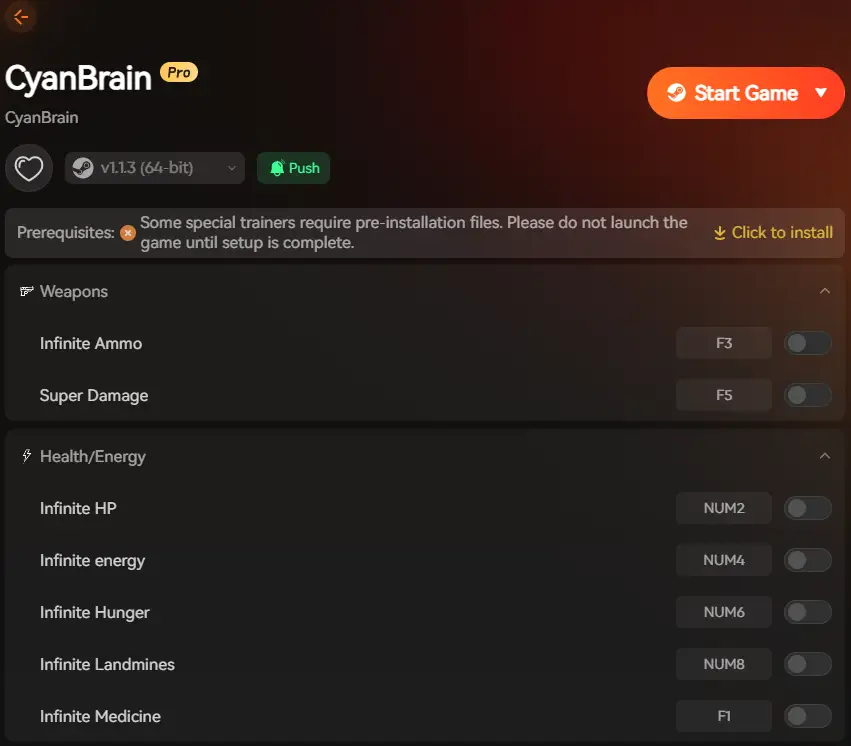
The Solution: XMOD Trainer Features (Gallery & God Mode)
Step-by-Step: How to Use XMOD Safely
Troubleshooting: If XMOD Isn’t Working
Safety & False Positives Explained
FAQ: Safety & Unlockables
Conclusion & Discussion
Editor’s View
“Stop Fighting the Memory Addresses”
Catherine Hu | XMOD Gamer and Writer
“CYAN BRAIN is a game about rhythm and visuals. The ‘Clothes Damage’ system is unique, but dying resets your progress and forces you to replay long sections.
I tried using a public Cheat Engine table from a forum, but it crashed my game immediately because the memory pointers had shifted after the v1.1 update. Switching to XMOD’s Infinite Health and One-Hit Kill let me breeze through the combat to focus on collecting the Memory Fragments and unlocking the full gallery. It transforms the game from a masochistic challenge into the cinematic experience it deserves.”
Deep Dive: Why Is CYAN BRAIN So Hard?
It is not just you—the difficulty is by design. CYAN BRAIN falls into the “Ryona” sub-genre, where the protagonist’s struggle and defeat are part of the aesthetic.
The Trap: To see the full gallery of “Execution Animations” and “Clothes Damage” states, you normally have to lose on purpose. But losing resets your progress, forcing you to replay tedious levels just to see the art.
The Fix: XMOD’s Gallery Unlocker allows you to separate the content from the punishment. You can unlock these artistic animations and scenes without sacrificing your save file or your time.
Why Cheat Engine is Dangerous for Story-Driven Shooters
Using Cheat Engine for CYAN BRAIN feels like hacking a terminal without a manual. It is risky, unstable, and creates more problems than it solves:
The Update Problem:
The developers, NEKOUJI, frequently release patches (like the recent v1.1.1 update) to fix bugs. Every time the game updates, the memory addresses change. Old Cheat Engine tables will point to the wrong data, causing instant crashes or corrupting your save file.
Malware Exposure:
Most .CT files for niche games are hosted on unverified forums or file-sharing sites. One wrong download can compromise your PC with bloatware or trojans.
Save Corruption Risk:
The game’s progression relies on unlocking specific “Death Cards” and gallery items. Manually editing hex values in Cheat Engine can accidentally lock these achievements permanently, forcing you to restart the game from scratch.
Comparison: Cheat Engine vs. XMOD
We designed XMOD to solve the specific pain points of action game modding:
Feature
Cheat Engine Table (.CT)
XMOD Trainer
Ease of Use
Difficult (Requires manual scanning/hex editing)
Easy (One-click toggles)
Stability
Breaks with every game patch (v1.0 vs v1.1)
Auto-Updates with the game
Safety
High Risk (False positives & unverified sources)
Safe (Signed code, tested modules)
Features
Basic Health/Ammo edits
Advanced (Gallery Unlocks, Speed Hacks)
The Solution: XMOD Trainer Features
Think of XMOD as a “Custom Difficulty Slider” for your CYAN BRAIN experience. Here are the verified features for the 2026 version:
God Mode (Invincibility):
Ignore damage from enemies and traps. This prevents the “Clothes Damage” mechanic from triggering, keeping your character’s outfit intact if you prefer.
Infinite Ammo & No Reload:
The game features 16 different weapons. XMOD lets you fire heavy weapons continuously without scavenging for ammo drops.
One-Hit Kill:
Tired of bullet-sponge bosses? Clear rooms instantly to speed up your run.
Gallery & Scene Unlocker:
CYAN BRAIN has over 34 execution animations and 3 full-screen HCGs. XMOD can help you unlock these without needing to trigger every specific death condition manually.
Game Speed Control:
Speed up the backtracking sections or slow down combat to dodge attacks with matrix-like precision.
Step-by-Step: How to Use XMOD Safely
Ready to experience CYAN BRAIN without the frustration? Here is how to set up XMOD in under 60 seconds:
Download XMOD: Get the lightweight client from the official site (Compatible with PC Steam versions).
Auto-Detect: Open XMOD. It automatically scans for your CYAN BRAIN installation path.
Launch via XMOD: Click “Play” inside XMOD. This safely injects the code into the game memory without modifying the executable files.
Activate Features:
Press F1 for God Mode.
Press F2 for Infinite Ammo.
Press F3 to Prevent Outfit Damage.
Enjoy: You are now ready to uncover the protagonist’s lost memories without fear of death.
Troubleshooting: If XMOD Isn’t Working
If you pressed the hotkeys but nothing happened, try these quick fixes:
Check Game Version: Ensure your copy of CYAN BRAIN is up to date on Steam. XMOD is optimized for the latest v1.1+ builds.
Run as Administrator: Right-click the XMOD client and select “Run as Administrator.” This gives the trainer the necessary permission to access the game’s memory.
NumLock Key: Some hotkeys rely on the Number Pad. Make sure your NumLock is ON.
Borderless Mode: Sometimes, full-screen exclusive mode blocks the trainer overlay. Try switching the game to “Borderless Window” in the video settings.
Safety & False Positives Explained
Security is our top priority. Unlike random .CT files found on forums, the XMOD client is digitally signed and tested.
However, you might encounter a warning from Windows Defender or your antivirus software. This is normal for all game trainers.
Why does this happen? Game trainers work by “injecting” code into the game’s memory to change values (like Ammo = 999). Antivirus software often mistakes this “injection” behavior for a virus, even though it is harmless to your system.
What should you do? If XMOD is blocked, simply whitelist the application or temporarily disable your antivirus while playing. We guarantee no malware, miners, or data theft tools are included in our software. CYAN BRAIN cheat engine alternative
FAQ: Safety & Unlockables
Q: Will I get banned for using this?
A: No. CYAN BRAIN is a single-player, offline action shooter. There are no anti-cheat systems like VAC or BattlEye to ban you. XMOD is designed strictly for single-player use.
Q: Does this work with the Android/APK version?
A: XMOD is primarily optimized for the PC (Steam) version. While some users report success with emulators, we recommend playing on PC for the best stability with trainers.
Q: Can I unlock the “Death Cards” without dying?
A: Yes. The game normally requires you to die to unlock specific cards. XMOD’s “Unlocker” features can add these to your gallery so you don’t have to ruin your perfect run.
Conclusion & Discussion
CYAN BRAIN combines high-octane shooting with a dark, mysterious narrative, but it shouldn’t feel like a second job. You deserve to see the ending and the art without losing hours to difficult boss patterns.
By choosing XMOD over unstable Cheat Engine tables, you are choosing stability, safety, and a better gaming experience. Stop struggling with hex codes and start enjoying the action.
Have you encountered the infamous “Spider Bot” in Chapter 4 yet? Did you manage to dodge it, or did it end your run? Let us know in the comments below, and tell us which XMOD feature helped you get your revenge!
I am a passionate gamer and writer at XMODhub, dedicated to bringing you the latest gaming news, tips, and insights.
Connect with me:
LinkedIn Profile ↗
Machine Mind Cheats for PC: How to Install Trainers & Mod Safely
Quick Answer Machine Mind Cheats & Trainers for PC are third-party modification tools that allow players to bypass difficult sections in this complex strategy video game. To use them safely without risking malware,…
Marathon System Requirements: PC Specs & Tiger Engine Performance (2026)
Marathon marks Bungie’s highly anticipated return to its roots, reimagined as a high-stakes PvPvE extraction shooter. Built on a heavily upgraded version of the Tiger Engine, players will deploy as cybernetic “Runners” onto…

 Catherine Hu


 Nancy Miller