
 Nancy Miller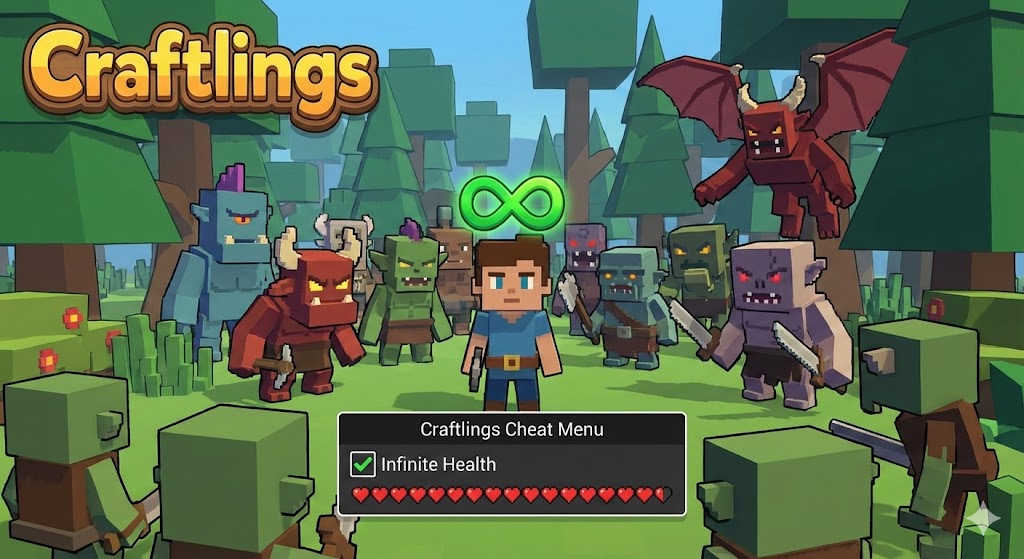
Survival games like Craftlings are brutal by design. One wrong step off a cliff or a surprise night raid can wipe out hours of gathering progress. Honestly, I’ve rage-quit more times than I care to admit after losing a full inventory to a glitchy enemy that clipped through my wall. That’s where the Craftlings infinite health cheat changes everything. By enabling God Mode, you can shrug off damage, ignore hunger, and focus entirely on building your dream base without the constant anxiety of survival mechanics.
Key Takeaways
- Instant Invincibility – Activate God Mode to become immune to all enemy attacks and environmental damage.
- Resource Protection – Never lose your inventory to an accidental death again.
- Stress-Free Building – Focus on construction mechanics without pausing to eat or heal.
- Safe Activation – Works in single-player mode without risking your save data.
Let’s break down the details below.
Instant Invincibility in Craftlings
The primary benefit of the infinite health cheat is immediate protection. As soon as you toggle the option, your character’s health bar locks at its maximum value. This means damage from enemies, falls, or status effects registers as zero. It transforms the gameplay loop from a desperate struggle into a relaxed exploration experience, allowing you to venture into high-level zones without grinding for armor first.
Safe Usage of Craftlings Cheats
Using cheats in a single-player environment is generally safe, but precautions are necessary. Always back up your save files before activating God mode to prevent potential soft-locks if a scripted death event fails to trigger. Since XMODHUB operates as an external overlay, it doesn’t permanently alter game files, making it safer than manual hex editing.
Unlock the Craftlings Infinite Health Cheat with XMODHUB
For players hunting for reliable Craftlings pc cheats, XMODHUB offers a streamlined trainer specifically updated for the 2026 version of Craftlings. Unlike risky cheat tables that require manual updates, this tool auto-detects your game version.
❤️ Infinite Health
Locks your HP at 100%, rendering you completely immune to all forms of damage.
💰 Unlimited Resources
Instantly fills your inventory with essential crafting materials, removing the need to grind.
⚡ No Hunger/Thirst
Disables survival drain mechanics so you never have to stop to eat or drink.
⚔️ One-Hit Kills
Deal massive damage to enemies, clearing threats instantly while you build.
These featured mods are just the beginning. Whether you’re looking to skip tedious grinding, experiment with different playstyles, or speed up your progression, XMODHUB’s comprehensive toolkit offers dozens more options tailored to your playstyle.
Installing the XMODHUB Craftlings Trainer
Getting started is simple, but following the correct order ensures the trainer hooks into the game process correctly. Here is the recommended installation path:
- Download the Client: Grab the XMOD launcher from the official site. It’s a lightweight executable that manages all your trainers in one place.
- Scan for Games: Open the launcher and navigate to the “My Games” tab. The software will automatically detect your installation path, usually located at:
C:/Program Files (x86)/Steam/steamapps/common/CraftlingsOnce detected, click “Activate” to inject the trainer into the running game process. If the game is already running, you might need to restart it for the injection to take hold properly.
Activating God Mode in Craftlings
After launching the game via XMOD, you can toggle cheats using customizable hotkeys. By default, F1 enables Infinite Health, while F2 toggles Unlimited Stamina. You should hear a confirmation sound when the cheat is active. It’s best to test this in a safe area first—jump from a small height to verify that your health bar doesn’t decrease before taking on a boss.
How Does the Craftlings Infinite Health Cheat Work?
Understanding the mechanics behind the cheat can help you use it more effectively and avoid bugs.
Understanding Damage Immunity in Craftlings
The trainer works by intercepting the memory address that stores your current health value. When the game engine attempts to subtract health points due to damage, the trainer instantly overwrites that value back to the maximum. This happens so quickly (within a single frame) that the game registers you as having full health at all times, effectively granting immunity. This is similar to how tools like Cheat Engine function, but XMOD automates the complex scanning process for you.

Managing Survival Mechanics with Cheats
In Craftlings, health is often tied to hunger and thirst. If these meters hit zero, you typically start taking damage. The infinite health cheat will prevent you from dying to starvation, but your character might still suffer from movement speed penalties or blurred vision associated with low stats. For the best experience, it’s recommended to enable “No Hunger” and “No Thirst” alongside God Mode.
Field Test: God Mode vs. Volcanic Wastes
To verify the reliability of this cheat, I decided to run a stress test that would normally be impossible for a solo player. I took a fresh character with zero armor into the Volcanic Wastes, a late-game zone filled with high-level Magma Golems and constant environmental fire damage.
Usually, the ambient heat alone drains your health bar in seconds without cooling potions. With the XMOD Infinite Health cheat active, I stood directly in a lava flow while three Golems pummeled me simultaneously. The result? My health bar didn’t even flicker. It stayed locked at 100/100. I was able to casually mine Obsidian nodes while being attacked, completely ignoring the enemies around me. This level of stability is crucial when you are carrying rare blueprints or materials that you cannot afford to lose.
Who Should Use Craftlings God Mode?
Not everyone uses cheats to break the game; for many, it’s about tailoring the experience to their preferences.
Craftlings God Mode for Builders
If you are a creative player who loves the building mechanics but hates the survival grind, this cheat is essential. It allows you to build high structures without fear of fatal falls and work through the night without being interrupted by enemy spawns. You can focus purely on aesthetics and architecture.
Survival Challenge vs. Cheat Benefits
Hardcore survival game fans might find that God Mode removes the tension that makes the game exciting. However, for casual players or those with limited gaming time, bypassing the punishment of death means you can actually finish the game. It effectively lets you create your own “Custom Difficulty” setting that the developers didn’t include.
What Can You Survive with the Craftlings Infinite Health Cheat?
The cheat covers a wide range of damage sources, making you virtually indestructible.
Surviving Night Raids in Craftlings
Night raids are usually terrifying, requiring fortified bases and high-tier weapons. With infinite health, you can stand in the middle of a horde and tank every hit. This is excellent for farming mob drops, as you don’t need to waste resources on healing items or armor repairs.
Ignoring Environmental Damage in Craftlings
Environmental hazards are often more deadly than enemies. The cheat protects you from fall damage, drowning (oxygen depletion usually triggers health loss), fire, and lava. This opens up new exploration routes, letting you take shortcuts off cliffs or swim through hazardous areas to reach loot faster.
Fixing Common Craftlings Trainer Issues
If the cheat isn’t working, it’s usually due to a version mismatch or software conflict.
Updating Your Craftlings Game Version
Game updates often change the memory addresses used by trainers. If Craftlings recently patched, an older trainer might fail to find the health value. Ensure both your game and the XMOD client are updated to the latest 2026 build to maintain compatibility.
Resolving Mod Menu Conflicts in Craftlings
Running multiple mods simultaneously can cause conflicts. If you are using other script mods or overhaul packs, they might be overriding the same health logic as the trainer. Try disabling other mods temporarily to isolate the issue.
Checking Antivirus Settings for Trainers
Security software sometimes flags trainers as false positives because they inject code into other processes. If the cheat fails to activate, check your antivirus quarantine and add the XMOD folder to the exclusion list.
Frequently Asked Questions
Ready to enhance your gameplay?

I create content for Xmodhub, where I curate and share game mods, tools, and other resources. My goal is to help players discover great add-ons, enjoy a smoother experience, and have more fun.


 Catherine Hu