Tóm tắt: This guide covers everything you need to know about Stellar Blade System Requirements to ensure your PC is ready for an optimal gaming experience.
Wondering if your PC can handle the action-packed world of Stellar Blade?
Knowing the minimum and recommended system requirements is key to enjoying the game without hiccups.
In this guide, we’ll cover the essential Stellar Blade system requirements, show you how to check if your PC can run it, and share tips on enhancing your gameplay with XMOD. Get ready to level up your gaming experience!

Mục lục
- Stellar Blade System Requirements
- Can My PC Run Stellar Blade
- How to Enhance Stellar Blade Gaming Experience with XMOD?
- Kết luận
Stellar Blade System Requirements
Check the Stellar Blade system requirements to see if your PC is ready for smooth, high-performance gameplay.
Stellar Blade Minimum System Requirements
| Thành phần |
Requirement |
| CPU |
Intel® Core™ i5-7600K / AMD Ryzen™ 5 1600X |
| Bộ nhớ truy cập ngẫu nhiên (RAM) |
16 GB |
| Video Card |
NVIDIA GeForce GTX 1060 6GB / AMD Radeon RX 580 8GB |
| Dedicated Video RAM |
6 GB (AMD: 8 GB) |
| Operating System |
Windows 10 64-bit |
| Shader Model Version |
6.0 |
| Free Disk Space |
75 GB |
Stellar Blade Recommended System Requirements
| Thành phần |
Requirement |
| CPU |
Intel® Core™ i5-8400 / AMD Ryzen™ 5 3600X |
| Bộ nhớ truy cập ngẫu nhiên (RAM) |
16 GB |
| Video Card |
NVIDIA GeForce RTX 2060 SUPER / AMD Radeon RX 5700 XT |
| Dedicated Video RAM |
8 GB |
| Operating System |
Windows 10 64-bit |
| Shader Model Version |
6.0 |
| Free Disk Space |
75 GB |
Make sure your system meets the requirements to enjoy the game without lag or issues.
If you still feel confused, the next part will tell you straight away whether your PC can run Stellar Blade.
Can My PC Run Stellar Blade

If your PC meets or exceeds the requirements—like a modern quad-core CPU, 16 GB RAM, and a GTX 1060 or better GPU—then yes, it can run the game. Check your specs to be sure!
If you can, check the next part to learn how to enhance the Stellar Blade gaming experience with Xmod.
How to Enhance Stellar Blade Gaming Experience with XMOD?
Want to take your Stellar Blade experience to the next level? Try using XMOD to unlock cheats and custom gameplay features. With XMOD, you can enhance your single-player sessions with ease.
Here’s how to get started:
- Download the XMOD app to your device.

- Search for Stellar Blade within the app.
- Launch the game directly through XMOD.
- Activate your preferred trainers to enjoy a personalized and upgraded gaming experience.
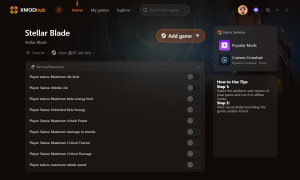
- Additionally, Xmod offers a curated selection of popular mods to elevate your gaming experience even further.
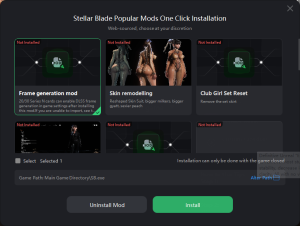
Additionally, XMOD offers a curated selection of popular mods to elevate your gameplay even further. Some recommended mods include:
- Frame Generation Mod: Smooth out your gameplay with enhanced frame rates.
- Skin Remodelling: Customize your characters’ appearances beyond the base game.
- Club Girl Set Reset: Easily toggle exclusive outfits for a fresh look.
Using XMOD to customize and enhance your Stellar Blade gameplay is a simple way to enjoy a more personalized and exciting gaming experience.
Kết luận
To sum up, checking the Stellar Blade system requirements is the first step toward a seamless gaming experience. Whether you’re upgrading your PC or using tools like XMOD for performance boosts, making the right adjustments will help you enjoy Stellar Blade at its best. Get your system ready and dive into the act
Tôi là một game thủ và nhà văn đam mê tại XMODhub, cam kết mang đến cho bạn những tin tức, mẹo vặt và phân tích mới nhất về game.
Liên hệ với tôi:
Hồ sơ LinkedIn ↗

 Catherine Hu
 Nancy Miller



 English
  Spanish
  German
  French
  Portuguese
  Italian
  Thai
Thai  Vietnamese