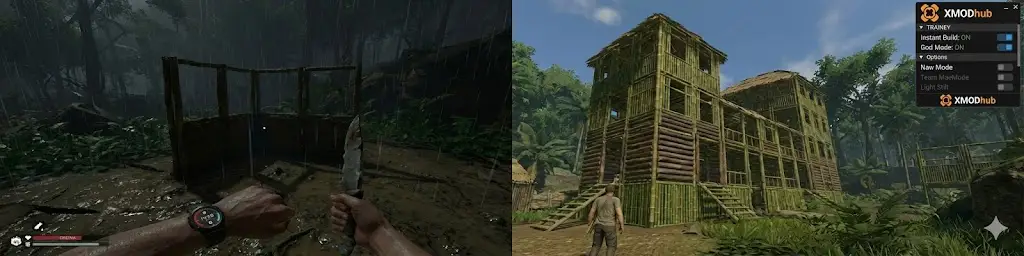
You just spent 4 hours collecting mud and bamboo for your riverside base. Then, a rattlesnake bit you, your sanity dropped, and you passed out before saving. Welcome to Green Hell.
While the hardcore survival mechanics are the game’s selling point, sometimes they just get in the way. Maybe you just want to finish the story without managing “Macro-elements” every 5 minutes, or maybe you want to build a massive fortress without chopping down the entire Amazon rainforest. Green Hell cheat engine alternative.
The developers didn’t give us a toggle for “Creative Mode,” and searching for a Green Hell Cheat Engine alternative usually leads to broken scripts.
Today, we’re showing you how to turn Green Hell into Green Heaven using the XMOD Trainer—a tool that effectively unlocks a customizable Sandbox Mode for your game.
Editor’s View (by Catherine Hu, XMOD Senior Game Tester):
“I love the story of Green Hell, but the ‘Permadeath’ anxiety ruined it for me. I didn’t want to restart 10 hours of progress because of one infected wound. XMOD changed the game for me. I toggled ‘God Mode’ to treat it like a walking simulator, enjoyed the narrative, and then turned the cheats off when I wanted a challenge again.”
Mục lục
- Survival vs. Sandbox: Why Players Quit
- Why Cheat Engine isn’t “User Friendly”
- The “Jungle Overlord” Tool: XMOD Trainer
- Feature Spotlight: Solving the 3 Big Problems
- How to turn Green Hell into Minecraft (Step-by-Step)
- FAQ: Story Mode & Achievements
- More Survival Trainers
Survival vs. Sandbox: Why Players Quit
Green Hell is notorious for its steep difficulty curve.
- The “Micro-Management” Trap: You spend 90% of your time staring at your smartwatch checking Carbs, Fats, and Water, and only 10% exploring.
- The Building Grind: Want to build a Mud House? Be prepared to carry hundreds of heavy mud bricks one by one. It’s realistic, but is it fun?
Why Cheat Engine isn’t “User Friendly”
Many players turn to Cheat Engine to skip this grind, but they hit a wall.
- Hex Codes are Scary: Changing your inventory requires finding complex “Memory Addresses.” If you edit the wrong line, your save file corrupts forever.
- Zero Visuals: Cheat Engine is just a list of numbers. You can’t “see” what you are spawning.
The “Jungle Overlord” Tool: XMOD Trainer
Think of XMOD not as a “hack,” but as a Control Panel for the game. It gives you the power to customize the difficulty on the fly, effectively creating your own “Creative Mode.”
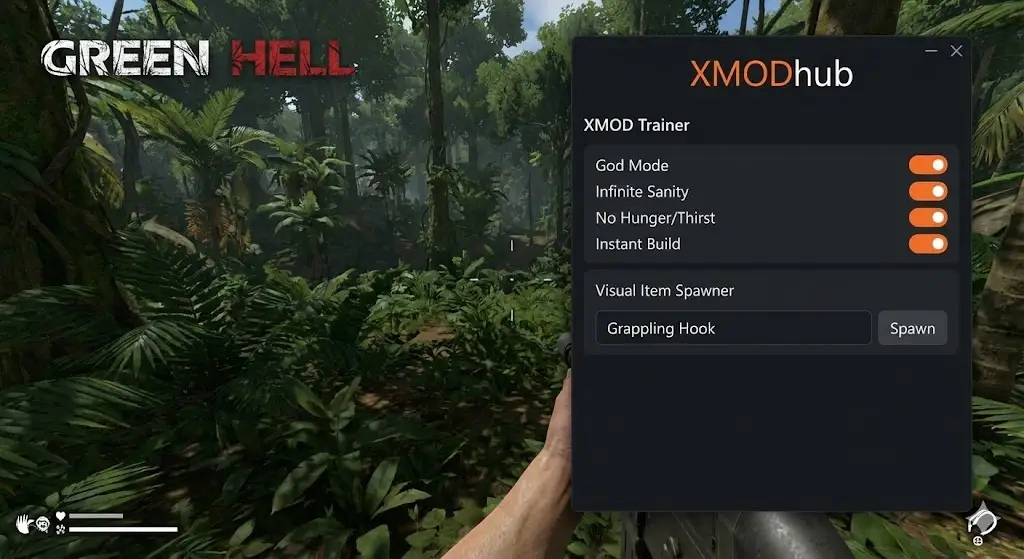
Feature Spotlight: Solving the 3 Big Problems
Problem #1: The “Insanity” Loop
Once your sanity drops, voices appear, and tribesmen attack. It’s a death spiral.
- XMOD Fix:
Infinite Sanity [Toggle]. Keep your mind clear, no matter how many leeches are on your legs.
Problem #2: The “Walking Simulator”
Need Obsidian? It’s a 20-minute walk to the cave. Forgot a Rope? Walk back.
- XMOD Fix:
Visual Item Spawner. Need a Grappling Hook hoặc Metal Spear? Just type the name in the XMOD menu and click spawn. It appears at your feet instantly.
Problem #3: The “Mud Brick” Grind
Building a cool base takes literally days of real-time carrying resources.
- XMOD Fix:
Instant Build. Place your blueprints (ghosts). Hit them once. Done. You can build a multi-story treehouse in 10 minutes instead of 10 hours.
How to turn Green Hell into Minecraft (Step-by-Step)
Ready to focus on creativity instead of survival?

- Launch XMOD: Open the client and find Green Hell.
- God Mode ON: Press F1. Now you can ignore Jaguars and focus on the view.
- No Hunger ON: Press F2. Forget about finding bananas and hunting capybaras.
- Open Item Spawner: Press Shift+X.
- Search: “Log” -> Click Spawn (x10)
- Search: “Long Stick” -> Click Spawn (x10)
- Build: Create your dream Amazonian resort without breaking a sweat.
FAQ: Story Mode & Achievements
Q: Can I use this to speedrun the Story Mode? A: Absolutely. With Speedhack (F4) and Chế độ Thần, you can breeze through the narrative to see the ending without the survival stress.
Q: Will this unlock Steam Achievements? A: Yes. Even with cheats enabled, achievements like “Green Hell” (Beat the game on hardest difficulty) will still pop. We won’t tell if you don’t.
Q: Does it work on the “Spirits of Amazonia” DLC? A: Yes. The XMOD Trainer is fully updated for 2026 and covers all DLC maps and items.
Conclusion: Your Jungle, Your Rules
Green Hell is a masterpiece, but it shouldn’t feel like a second job. If you want to explore the mystery of the jungle or build incredible structures without the headache, the XMOD Trainer is your key to a better experience.
[Download the Green Hell Creative Mode Tool]
Explore More Survival Trainers
Enjoyed breaking the rules in Green Hell? Check out our top-rated trainers for other hardcore survival games:
Forest & Horror Survival:
Open World Crafting:
Tôi là một game thủ và nhà văn đam mê tại XMODhub, cam kết mang đến cho bạn những tin tức, mẹo vặt và phân tích mới nhất về game.
Liên hệ với tôi:
Hồ sơ LinkedIn ↗

 Catherine Hu
 Nancy Miller


 English
  Spanish
  German
  French
  Portuguese
  Italian
  Thai
Thai  Vietnamese