สรุป: This guide breaks down the full VOID/BREAKER system requirements, covering both minimum and recommended specifications, so you can ensure smooth gameplay on your PC.
VOID/BREAKER is an action-packed game that immerses players in a dynamic world of combat, strategy, and exploration.
Before diving in, it’s crucial to understand the ข้อกำหนดของระบบ to ensure your PC can run the game smoothly.
Knowing whether your hardware meets these requirements can prevent performance issues and allow for an optimal gaming experience.
Additionally, there are several ways to enhance gameplay, from adjusting settings to using helpful tools.
This guide covers what VOID/BREAKER is, its system requirements, how to check if your PC can run it, and tips to maximize your experience.
สารบัญ
- What is VOID/BREAKER?
- VOID/BREAKER System Requirements: Minimum & Recommended Specs
- Can I Run VOID/BREAKER on a Low-End PC?
- Can My PC Run VOID/BREAKER?
- Tips to Enhance Gameplay
- สรุป
What is VOID/BREAKER?

VOID/BREAKER is an action-packed adventure game that combines fast-paced combat, exploration, and strategic gameplay. Players take on the role of powerful characters tasked with battling formidable enemies across dynamic environments, uncovering secrets, and mastering unique abilities. With a focus on both solo and multiplayer experiences, the game offers engaging mechanics, immersive visuals, and a rich world that keeps players coming back for more. VOID/BREAKER กำหนดจะเปิดตัว August 20, 2025, giving fans a date to look forward to for diving into its thrilling gameplay.
VOID/BREAKER System Requirements: Minimum & Recommended Specs
Before diving into VOID/BREAKER, it’s important to know what kind of hardware your PC needs to run the game smoothly. Meeting the right specifications ensures a stable, immersive experience without lag or performance issues.
ข้อกำหนดขั้นต่ำ
These are the basic specs needed to launch and play the game at lower settings. Meeting them allows you to experience the core gameplay, though visual quality and performance may be limited.
| องค์ประกอบ |
Specification |
| ระบบปฏิบัติการ |
Windows 7 SP1 or newer |
| โปรเซสเซอร์ |
Intel Core i5-4590 or AMD FX 8350 |
| ความทรงจำ |
8 GB RAM |
| กราฟิก |
NVIDIA GTX 970 or AMD Radeon R9 290 |
| DirectX |
เวอร์ชัน 11 |
| การจัดเก็บ |
25 GB available space |
Recommended Requirements
For the best experience with higher-quality graphics and smoother performance, it’s recommended to meet these specifications. Doing so ensures full immersion in the world of VOID/BREAKER without compromise.
| องค์ประกอบ |
Specification |
| ระบบปฏิบัติการ |
Windows 10 or newer |
| โปรเซสเซอร์ |
Intel Core i5 8400 |
| ความทรงจำ |
แรม 16 GB |
| กราฟิก |
NVIDIA RTX 2070 |
| DirectX |
เวอร์ชัน 12 |
| การจัดเก็บ |
25 GB available space |
By understanding these requirements, players can make informed decisions about upgrades or adjustments, ensuring a seamless gaming experience.
Can I Run VOID/BREAKER on a Low-End PC?

Yes, VOID/BREAKER can run on low-end PCs that meet the minimum requirements: Windows 7 64-bit, Intel Core i5-4590/AMD FX-8350, 8 GB RAM, NVIDIA GTX 970/AMD R9 290, DirectX 11, and 25 GB storage. To improve performance, lower graphics settings, reduce resolution, close background apps, and keep drivers updated.
Can My PC Run VOID/BREAKER?
Wondering if your PC can handle VOID/BREAKER? The first step is to compare your system specifications with the game’s minimum and recommended requirements. Meeting the minimum specs will let you play the game, but for a smoother experience with better graphics and performance, your system should meet or exceed the recommended specs.
If you’re unsure about your hardware, tools like คุณสามารถรันมันได้หรือไม่ can scan your PC and provide a detailed compatibility report. This makes it easy to see if upgrades are needed or if you can jump straight into the action. Keeping your drivers updated and closing unnecessary background applications will also help maximize performance and reduce lag.
Tips to Enhance VOID/BREAKER Gameplay
To get the most out of VOID/BREAKER, consider the following tips:
- Optimize Graphics Settings: Adjust resolution, shadows, and visual effects according to your PC’s capabilities to maintain smooth performance.
- Update Drivers: Ensure your GPU and system drivers are up to date to avoid crashes and enhance stability.
- Close Background Applications: Free up system resources by shutting down unnecessary programs while playing.
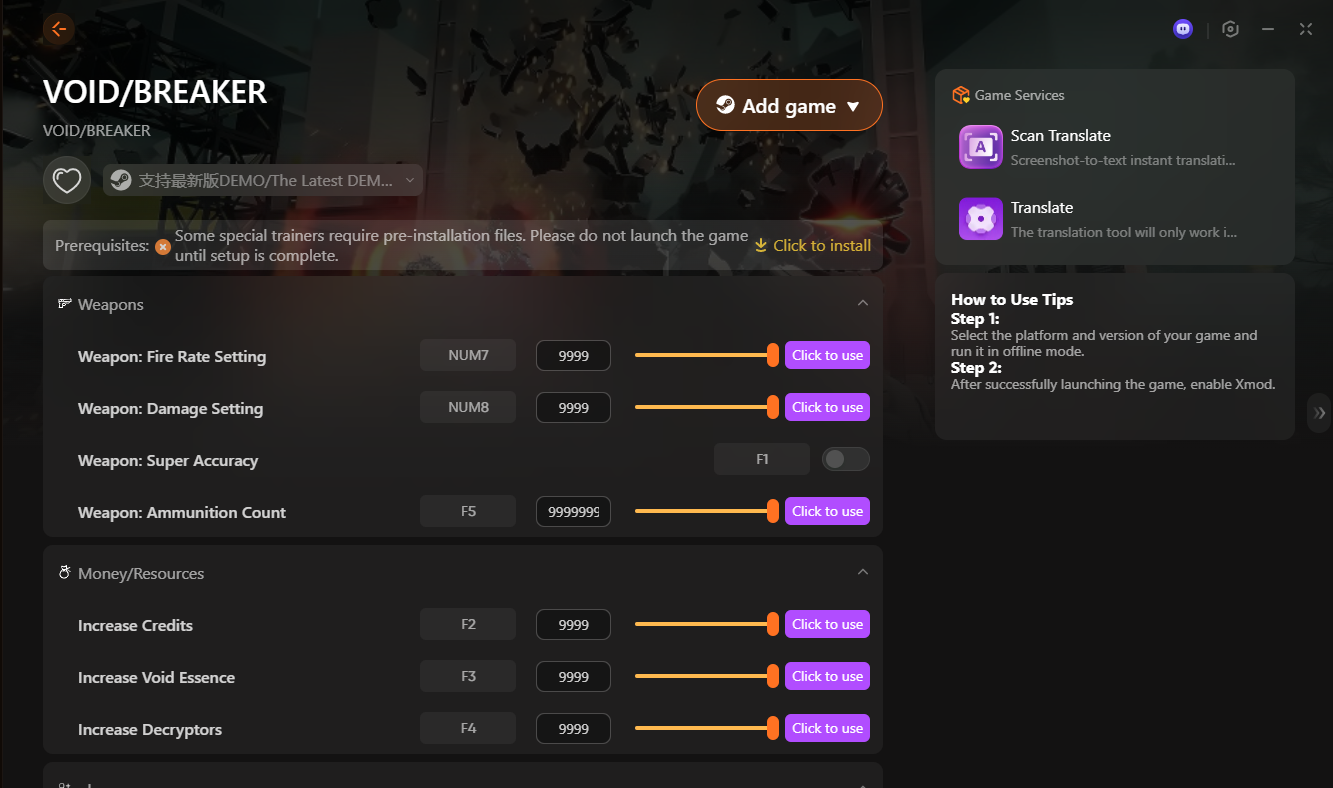
- Use XMOD Tools: The XMOD trainers for VOID/BREAKER offer a wide range of cheats to supercharge gameplay. Players can tweak weapons with options like boosted fire rate, higher damage, perfect accuracy, and unlimited ammo, making every fight easier and more exciting. On the resources side, you can instantly add credits, void essence, and decryportors, removing grind and letting you unlock upgrades quickly.
- Controller Support: For a more immersive experience, use a compatible controller if the game supports it.
- Explore Thoroughly: Take your time to discover hidden areas, secrets, and environmental interactions that enhance the overall experience.
By following these tips and leveraging XMOD, players can enjoy smoother gameplay, enhanced exploration, and a more engaging experience in VOID/BREAKER.
สรุป
VOID/BREAKER delivers an intense and immersive gaming experience, blending fast-paced combat with strategic exploration. Understanding the system requirements ensures that your PC can run the game smoothly, while tools like เอ็กซ์เอ็มโอดี offer additional ways to enhance gameplay through cheats, trainers, and customizable features. By preparing your hardware, optimizing settings, and leveraging helpful tools, players can fully enjoy the world of VOID/BREAKER with minimal performance issues and maximum fun.
ฉันเป็นเกมเมอร์และนักเขียนที่มีความหลงใหลที่ XMODhub มุ่งมั่นที่จะนำเสนอข่าวสารเกมล่าสุด เคล็ดลับ และข้อมูลเชิงลึกให้กับคุณ.
ติดต่อฉัน:
โปรไฟล์ LinkedIn ↗

 แคทเธอรีน ฮู

 แนนซี่ มิลเลอร์

