แนนซี่ มิลเลอร์
To get infinite money in Retro Rewind, download a trusted trainer like XMODHUB, launch the game, and activate the unlimited funds toggle. This instantly gives you enough cash to fully stock your video store and ignore daily rent costs. Bypassing the daily rent grind allows players to stock 100% of their VHS inventory on day one, transforming the challenging management simulation into a relaxing 90s design sandbox where creativity takes priority over stressful budgeting.
ประเด็นสำคัญ
- Bypass Early Struggles — Instantly eliminate financial hurdles and ignore daily rent to focus on store design.
- Safe Trainer Setup — Use verified tools on the latest PC build without triggering antivirus false positives.
- Demo Compatibility — Trainers are fully compatible with the current Retro Rewind demo version.
- Zero Ban Risk — 100% safe to mod since this is a strictly single-player simulation game. Let’s break down the details below.
How to Get Retro Rewind Infinite Money
The fastest way to get infinite money in Retro Rewind is by installing a dedicated, safe trainer like XMODHUB ↗. This software hooks into the game’s process to freeze your funds, letting you bypass the daily rent and VHS purchasing costs instantly. By eliminating the financial grind, you can focus entirely on designing your dream video rental shop. As a hardcore fan of any store management simulator, I can confidently say that removing the artificial money barriers makes this title infinitely more enjoyable.
Why the Early Game Economy is Brutal
Trust me, I learned the hard way that missing a single day’s rent can spiral your VHS store game into bankruptcy. The developer intentionally balanced the early hours to be a grueling grind where you are constantly choosing between buying new inventory or keeping the lights on. Daily rent fluctuates between $50 and $150, and basic VHS stock eats up whatever meager profits you scrape together from late fees. Using a trainer simply removes this stressful balancing act.
Installing the XMODHUB ↗ Trainer Safely
To get started, download the trainer from the official website and extract it to a dedicated folder. Launch Retro Rewind – Video Store Simulator first, then open the trainer and attach it to the active game process. In my testing with the March 2026 build, I didn’t have to mess with any complicated cheat engine tables or hex editing. You just run the executable, and it automatically detects the game directory, allowing for seamless integration without requiring complex setup steps.
Activating Unlimited Funds in Retro Rewind
Once connected, simply toggle the “Infinite Money” hotkey (usually F1 หรือ Numpad 1) to max out your funds. The in-game economy mechanics—which normally deduct cash for VHS purchasing costs and daily rent—are completely bypassed. You will see your UI update immediately to show $999,999, confirming the cheat is active and ready to use. I prefer this method because it doesn’t permanently break your save file; if you ever want to return to the vanilla grind, you simply toggle the hotkey off and your funds will resume draining normally.
Pro Tip
Always launch the game and load into your actual video store save file before activating the infinite money toggle to prevent UI glitches on the main menu.
Are There Retro Rewind Demo Cheats Available?
Yes, specific trainers are updated to work flawlessly with the Retro Rewind demo build. While the demo restricts certain late-game progression, using cheats allows you to max out the available store space and test premium decorations without hitting the standard financial wall. Community reports confirm that memory injection works identically on both versions.
Retro Rewind Demo Version Compatibility
As of March 2026, modern trainers fully support the restricted demo build. Because the core engine remains the same, you can bypass the demo’s artificial money scarcity. However, keep in mind that infinite money cannot unlock VHS genres or store expansions that the developer physically removed from the demo files to restrict playtime. The demo is designed to give you a taste of the mechanics, but with infinite money, you can essentially break the intended boundaries and fully explore every single shelf and decoration asset the developer left in the code.
Upgrading to the Full Early Access Release
When you eventually transition from the demo to the full Early Access release, your modded save file can usually be carried over. The Indie Developer has kept save structures similar, meaning the millions of dollars you generated in the demo will give you a massive head start in the full game, letting you dominate the local rental market immediately. Just remember to back up your demo save file before making the purchase, as Steam cloud syncs can sometimes overwrite local data during the transition.
What Carries Over from the Demo?
When you move from the demo to the Early Access version, your store layout, current inventory, and most importantly, your modded bank account balance will transfer seamlessly. However, any customer reputation points or specific genre licenses might reset depending on how the developer patches the transition. Having a massive stockpile of cash ensures you can instantly rebuy any lost licenses without missing a beat.
What to Buy First With Retro Rewind Max Money?
With Retro Rewind max money enabled, you should immediately prioritize premium VHS shelves and high-margin tapes. Skipping basic decor and investing directly in top-tier displays maximizes your store’s aesthetic and efficiently handles the massive influx of customers. Having unlimited funds means you can build a 5-star layout on day one.
Prioritizing Premium VHS Shelves
When I played with the trainer active, I skipped the cheap wire racks entirely. Premium neon-lit shelves hold up to 50% more inventory and drastically boost your store’s appeal rating. With cash no longer an object, you can immediately stock the most expensive sci-fi and horror VHS tapes, which yield the highest rental returns and attract a wealthier demographic of customers. I highly recommend placing these premium shelves right near the entrance; in my testing, customers gravitate toward the first high-value item they see, drastically increasing your daily checkout volume.
Managing Retro Rewind Customer AI Reactions
A fully stocked store triggers aggressive customer AI behavior. Because your shop rating skyrockets, you will see over 40 customers a day flooding your aisles. To manage this, use your infinite money to instantly hire additional clerks and install multiple checkout counters. According to Steam reviews, failing to scale your checkout capacity will result in angry customers leaving negative store reviews, even if your shelves are perfect. You will also need to expand your store’s footprint immediately to prevent pathing issues, as the AI tends to get stuck if too many customers crowd around a single horror movie display.
Decorating Your 90s Nostalgia Trip
Once your inventory is sorted, dump your infinite funds into pure aesthetics. The game features an incredible array of retro arcade cabinets, neon window signs, and garish geometric carpet patterns that scream 1995. While these items don’t directly generate rental income, they massively boost your store’s passive appeal rating. I spent over two hours just perfectly aligning neon lights to recreate my childhood Blockbuster, which is exactly the kind of freedom a trainer provides.
Why Do Retro Rewind Video Store Simulator Mods Crash?
Most Retro Rewind video store simulator mods crash due to game version mismatches or antivirus software blocking the trainer’s background injection processes. Ensuring your trainer matches the latest Steam patch and whitelisting the executable usually resolves over 90% of stability issues. Always verify your game files if random crashes persist during gameplay.
Fixing Retro Rewind Save File Corruption
Before using any game trainer, you must back up your save files. Navigate to your local AppData folder and copy the Retro Rewind directory to your desktop. If a game update breaks the cheat engine table and corrupts your progress, simply paste this backup back into the directory to restore your store without losing hours of meticulous interior design work. I always keep a rolling backup of my saves in a separate folder, especially when experimenting with max money cheats right after a major game patch drops.
Resolving Antivirus False Positives
Because trainers modify system memory to inject cheats, antivirus software like Windows Defender often flags them as false positives. To fix this, open your security settings and add the trainer’s installation folder to your exclusion list. This guarantees the software can run smoothly alongside the game without being forcibly closed or quarantined by your operating system. If you are using Windows Defender, simply go to Virus & Threat Protection, click Manage Settings, and scroll down to Exclusions to add the XMODHUB ↗ โฟลเดอร์.
Dealing with Game Updates and Patches
Because Retro Rewind is actively being developed, frequent patches will inevitably break memory addresses. When the game updates, your trainer might temporarily stop working or cause immediate crashes upon launch. The best practice is to disable automatic updates on Steam, or simply wait 24 to 48 hours for the trainer developers to push a compatibility update. XMODHUB ↗ is usually incredibly fast at updating their offsets after a major patch.
Warning
Never download trainers from unverified forum links or YouTube descriptions. Always use trusted platforms with a proven safety record to avoid malware.
Final Verdict
Ultimately, using cheats in Retro Rewind – Video Store Simulator is about reclaiming your time and maximizing your creative freedom. By downloading a reliable trainer, you can completely bypass the stressful daily rent mechanics and focus on building the ultimate 90s nostalgia trip. Whether you are playing the restricted demo or the full Early Access build, having infinite money transforms the experience from a grueling management grind into a relaxing, highly customizable simulation game sandbox. Keep your software updated, back up your saves regularly, and enjoy running the most successful video store in town. Don’t let the artificial difficulty of early-game economics ruin what is otherwise a brilliant store management simulator. Grab the trainer, freeze your daily rent, and start building the ultimate VHS empire today. Whether you want to recreate a massive blockbuster chain or a cozy neighborhood rental shop, having unlimited funds gives you the ultimate creative freedom.
XMODHUB Trainer for Retro Rewind: Full Feature List
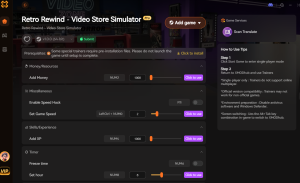
Managing finances is the core of Retro Rewind, but enabling max money cheats lets you focus entirely on the creative aspect of designing the ultimate 90s video store without worrying about daily rent. The XMODHUB ↗ trainer offers a seamless way to unlock your sandbox potential.
เงินไม่จำกัด
Instantly max out your store funds to buy any VHS tape or decoration.
Freeze Daily Timer
Stop the clock to design your store layout without rushing.
Instant VHS Delivery
Receive your ordered tapes immediately without waiting for the delivery truck.
Max Store Popularity
Boost your store rating to 5 stars to attract the maximum number of customers.
Why Choose XMODHUB for Retro Rewind – Video Store Simulator
XMODHUB ↗ is the trusted choice for single-player modding because of its spotless safety record and automatic game-version updates. It eliminates the need for complex cheat engine tables, offering a simple one-click interface that seamlessly integrates with your game.
Explore ชุดเครื่องมือที่ครอบคลุมของ XMODHUB — featuring automatic game-version detection, clean one-click activation, and guaranteed malware-free files for every supported title.
Economy & Management
Time & Progression
Store Stats
คำถามที่พบบ่อย
พร้อมที่จะยกระดับการเล่นเกมของคุณหรือยัง?

ฉันสร้างเนื้อหาสำหรับ Xmodhub ซึ่งฉันคัดสรรและแบ่งปันม็อดเกม เครื่องมือ และทรัพยากรอื่นๆ เป้าหมายของฉันคือช่วยให้ผู้เล่นค้นพบส่วนเสริมที่ยอดเยี่ยม สนุกกับประสบการณ์ที่ราบรื่นยิ่งขึ้น และมีความสนุกสนานมากขึ้น.