The Nine Realms are unforgiving. Whether you are facing down the Berserker King in the post-game or simply want to maximize Kratos’s gear without grinding the Muspelheim trials for hours, you are likely searching for God of War Ragnarök คำสั่งคอนโซล.
However, players migrating from สกายริม หรือ ผลกระทบ often hit a frustrating wall. Unlike those titles, God of War Ragnarök does not feature a developer console accessible to players. There is no “tilde key” magic to spawn Hacksilver instantly.
As experts in PC port optimization and game memory injection, the XMODhub team is here to explain why the console is locked, compare the risky “Cheat Engine” alternative, and show you the safest method to become the true God of War.
สรุปอย่างรวดเร็ว (TL;DR)
Does a Console Exist? No. Santa Monica Studio disabled the developer console in the retail PC version.
Can you type codes? No. Typing GodMode หรือ GiveHacksilver will do nothing.
ทางแก้ไข: You must use a memory trainer. XMODhub is the recommended tool to safely inject cheats like Infinite Rage and One-Hit Kill without crashing your game.
สารบัญ
Editor’s View: Surviving the Endgame
The Hard Truth: Why There Are No Console Commands
Comparison: Console vs. Cheat Engine vs. XMOD
Method 1: The “Manual” Way (Cheat Engine Tables)
The Essential Cheats Players Want
Method 2: The XMODhub Solution (Recommended)
How to Use XMOD for God of War Ragnarök
Frequently Asked Questions (FAQ)
Verdict
Editor’s View
“The Berserker King Broke Me (and My Frame Rate)”
แคทเธอรีน ฮู | Gamer and Tester at XMODhub
“I pride myself on playing games on ‘Give Me God of War’ difficulty. The PC port is stunning, especially with DLSS enabled, but the post-game boss fights—specifically King Hrolf and the new Valkyrie Queen Gna—are absolutely brutal.
I spent three evenings memorizing attack patterns, only to die because I ran out of Spartan Rage at the last second. I went looking for console commands to test a theory about damage scaling, hoping to find a simple GodMode command like in older games.
I quickly realized Santa Monica Studio’s proprietary engine is a fortress. Instead of risking a corrupted save file with sketchy scripts, I used our internal Trainer to give myself Infinite Rage. It didn’t just help me beat the boss; it let me actually enjoy the combat sandbox without the frustration of a two-shot death.”
The Hard Truth: Why There Are No Console Commands
Unlike ไซเบอร์พังก์ 2077 หรือ เดอะ วิทเชอร์ 3, which allow mods to re-enable developer consoles, God of War Ragnarök runs on a highly specialized proprietary engine developed by Santa Monica Studio.
What this means for you:
You cannot press ~ (Tilde) to open a command line.
There are no text codes (like give_hacksilver) that the game recognizes.
คำเตือน: Websites claiming to have a “list of text codes” for this game are misleading you or copying codes from other games to generate clicks.
To modify the game, you must manipulate the system memory directly using external tools.
Quick Comparison: Finding the Best Way to Cheat
We compared the three most common methods players try to modify the game. This table highlights why a Trainer is superior for this specific title.
คุณสมบัติ
Native Console Commands
Cheat Engine Tables
XMOD Trainer
Availability
Not Available
Available
Available
ความปลอดภัย
N/A
High Risk (Crashes)
Safe (Anti-Crash)
ความสะดวกในการใช้งาน
N/A
Complex (Hex/Scripts)
1-Click Toggle
อัปเดต
N/A
Slow (Community based)
Instant (Auto-Update)
Valhalla DLC
N/A
Inconsistent
Fully Supported
Method 1: The “Manual” Way (Cheat Engine Tables)
If you are technically inclined, you can use a tool called Cheat Engine. This involves downloading community-made scripts (Cheat Tables or .ct files).
The Process:
Download and install Cheat Engine (Watch out for bloatware in the installer).
Find a reliable .ct file for God of War Ragnarök on forums like FearLess.
Launch the game, then launch Cheat Engine.
“Hook” the software to the GoWR.exe process.
Manually toggle scripts.
ความเสี่ยง: Game updates (patches) from Sony frequently break these tables. Using an outdated table on a new version of the game can corrupt your save file or cause the game to crash immediately upon loading.
The Essential Cheats Players Want
Since you cannot type commands, here are the features that XMODhub and Cheat Tables replicate. These are the equivalent “commands” you are looking for:
Combat & Survival
Infinite Health (God Mode): Kratos takes zero damage. Essential for “Give Me God of War” difficulty runs.
Infinite Spartan Rage: Keep your Rage meter full at all times. Use Valour หรือ Fury indefinitely.
One Hit Kill: Deal massive damage to enemies. Great for speeding through New Game+.
Resources & Progression
Infinite Hacksilver: Never worry about the cost of upgrading armor.
Max XP (Kratos & Atreus): Unlock all skill tree abilities immediately.
Ignore Crafting Requirements: Upgrade weapons even if you lack the specific “Chaos Flame” or “Frozen Flame.”
Method 2: The XMODhub Solution (Recommended)
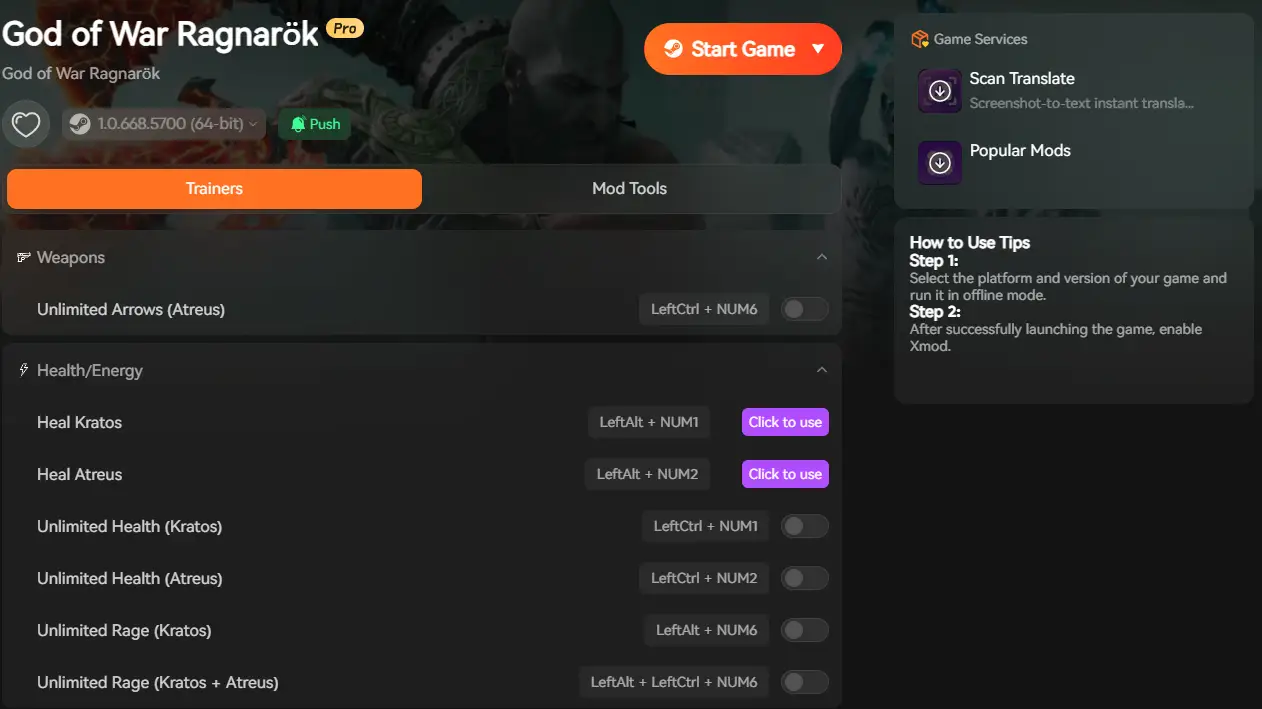
Why risk a save corruption with manual tables? XMODhub offers a dedicated, auto-updating Trainer for God of War Ragnarök that bypasses the need for a console.
Why XMOD is safer:
Memory Protection: Our tool injects code safely, preventing the crashes common with raw Cheat Engine scripts.
อินเตอร์เฟซแบบกราฟิก: No hex codes or process hooking. Just clean, clear buttons.
Version Check: The tool automatically detects if your game has been patched and adjusts the cheats accordingly.
How to Use XMOD for God of War Ragnarök
Unlock the full power of the God of War in three simple steps:
Step 1: Auto-Detect
Open XMODhub. It instantly identifies your game installation (Steam or Epic Games Store).
Step 2: Select Your Power
Toggle the cheats you want.
Stuck on a puzzle? ใช้ ความเร็วของเกม to slow down time.
Tired of grinding? สลับ Set Hacksilver to 10,000,000.
Just want chaos? Turn on Fast Cooldowns for Runic Attacks.
Step 3: Play
Click Activate and launch the game. You can toggle these effects On/Off anytime using custom hotkeys (e.g., NumPad 1).
Frequently Asked Questions (FAQ)
Q: Will using cheats prevent me from getting Steam Achievements?
A: Generally, no. XMODhub cheats do not disable achievements. However, if you use “One Hit Kill” on a boss, ensure you let the cutscene play out to trigger the achievement properly.
Q: Can I use this for the Valhalla DLC?
A: Yes! Our trainer is updated to support the Valhalla roguelite mode. You can give yourself infinite stats to make the runs easier or test different builds.
Q: Is there a command to unlock all armor?
A: While there is no text command, the XMOD “Inventory Editor” allows you to add specific items or maximize your crafting materials so you can craft any armor set instantly at Brok and Sindri’s shop.
Verdict
While the developers at Santa Monica Studio locked the door on God of War Ragnarök คำสั่งคอนโซล, they didn’t account for the ingenuity of the PC community.
You don’t need to struggle through the Muspelheim trials if you don’t want to. For a stable, virus-free, and easy-to-use solution, XMODhub is the Leviathan Axe of game modification tools—reliable, powerful, and always ready.
XMODhub is not just for God of War Ragnarök. As the “Leviathan Axe of game modification tools,” our platform supports a vast library of similar high-performance PC titles.
Whether you want to enable God Mode in เอลเดน ริง, get infinite materials in ผีแห่งจิมูสะ, or bypass the grind in trending hits like ตำนานดำ: วุยกง และ Horizon Forbidden West, XMODhub provides the same safe, auto-updating trainer technology for your entire library. Stop searching for individual cheat tables and access a unified solution for all your gaming needs.
Where to Find DarkSwitch Save File & Config Location (PC/Steam)
There is nothing worse than sinking 50 hours into DarkSwitch, perfecting your light-and-dark stance switching, gathering thousands of Lumens, only to worry about a corrupted save file or a Steam Cloud sync error.…
Slay the Spire 2 Steam Launch Fix Tool: Complete Guide
Look, there is nothing—and I mean nothing—worse than finally booting up your PC to play a few rounds of your favorite deckbuilder, only to have the game instantly crash to the desktop. I’ve…

 แคทเธอรีน ฮู



 แนนซี่ มิลเลอร์