แนนซี่ มิลเลอร์
To get Goblin Nest all scenes unlocked, you can either replace your global.save file with a 100% completed save or use a dedicated trainer. The Goblin Nest save file is located in your PC’s AppData\LocalLow folder. By swapping this file or activating a gallery unlocker tool, you bypass the campaign grind and instantly access 100% of the CGs in the scene replay menu. Both Steam and DLsite versions support these safe modification methods.
ประเด็นสำคัญ
- Gallery Unlock Methods — Unlocking the gallery requires modifying the global.save file or using a memory trainer.
- Save File Location — Find your save data in the AppData\LocalLow\Dieselmine\Goblin Nest directory on Windows.
- Version Compatibility — Both Steam and DLsite versions support safe save modifications and trainer injections.
- Data Safety — Always back up your original save files before attempting to overwrite campaign progress. Let’s break down the details below.
How to Get Goblin Nest All Scenes Unlocked
To get Goblin Nest all scenes unlocked, download a verified 100% save file and place it in the correct AppData directory on your PC. This method instantly bypasses the campaign requirements, granting you full access to the CG gallery from the main menu without altering the core game executable.
Where is the Goblin Nest Save File Located?
The exact Goblin Nest save file location is C:\Users\[YourUsername]\AppData\LocalLow\Dieselmine\Goblin Nest. You will need to enable “Hidden Items” in the Windows ไฟล์ เอ็กซ์พลอเรอร์ view tab to see the AppData folder. According to PCGamingWiki, this path applies to both the ไอน้ำ and DRM-free DLsite releases.
Backing Up Your Goblin Nest Game Data
Before modifying anything, copy your existing global.save file to a safe desktop folder. In testing, failing to back up this specific file resulted in a complete loss of campaign progress. This backup ensures you can restore your original playthrough if the downloaded 100% save file causes any unexpected issues.
Installing the 100% Save Download
First, download a community-verified 100% save file from a trusted source like F95zone. Extract the archive, and drag the new save file into the Goblin Nest AppData folder, choosing to overwrite the existing file when prompted. Once complete, launch the game and navigate directly to the scene replay menu.
Pro Tip
Press Win + R and type %appdata% to quickly open the Roaming folder, then navigate up one level to LocalLow to find the Dieselmine directory faster.
How Do You Use a Goblin Nest Gallery Unlocker?
A Goblin Nest gallery unlocker is a memory trainer tool that modifies the game’s RAM in real-time to trigger scene flags without altering your permanent save file. This allows you to toggle the full gallery on and off at will, avoiding the risks associated with downloading third-party save files.
Manual Save Editing vs. Trainer Tools
Manual save editing permanently alters your game state, which is great for a one-time fix but carries a slight risk of file corruption. Conversely, using a trainer provides a toggleable, temporary modification. Community reports suggest that memory trainers offer a more stable experience for players who frequently switch between a legitimate campaign run and gallery viewing.
Why Trainers are Safer for Active Playthroughs
When you are actively playing through the dungeon management and Strategy RPG combat phases, overwriting your global save file can completely wipe your hard-earned progress. A memory trainer bypasses this risk entirely. Because the trainer only injects code into the active memory while the game is running, your actual save file remains untouched. Once you close the game, the scene flags revert to their original state, preserving your authentic playthrough.
Activating a Memory Trainer
To use a trainer, launch your game first, then open the trainer application. Most modern tools will automatically detect the game process. From there, you simply press the designated hotkey to force-unlock the CG gallery. Since the April 2026 update, this method remains the most reliable way to view all content without grinding.
Trainer Hotkeys
Most gallery unlockers use the F1 through F12 keys to toggle features. Check your specific trainer’s documentation to find the exact hotkey for the CG gallery unlock.
Why Does the Goblin Nest Save File Location Cause Errors?
Save file errors in Goblin Nest usually occur due to version mismatches between the downloaded save data and your currently installed game patch. If a 100% save was created on an older version, the newer game executable may flag it as corrupted data and refuse to load the gallery.
Fixing Corrupted Save File Errors
If you encounter a “corrupted data” prompt, the first step is to disable Steam Cloud synchronization. Right-click Goblin Nest in your Steam library, select Properties, and toggle off the Steam Cloud option. Next, ensure the downloaded global.save file is not set to “Read-only” in its Windows properties menu.
Steam vs. DLsite Version Mismatches
The Steam version published by Kagura Games sometimes features slight code variations compared to the original DLsite release. When I played, importing a DLsite save into the Steam client caused immediate crashes. Always verify that the 100% save download specifies compatibility with your specific storefront version.
Warning
Never download save files from unverified forums or sites requiring executable (.exe) installers, as these often contain malware. Only use standard .save or .zip files.
Verifying Your Unlocked Scenes in Goblin Nest
You can verify the unlock by launching Goblin Nest and checking the main menu’s scene replay section for missing blank slots. A successful modification will populate the entire grid with full-color thumbnails, indicating that every monster girl scene and animation is now fully playable.
Checking the Scene Replay Menu
From the title screen, click the ‘Gallery’ or ‘Recollection’ button. Before unlocking, locked scenes appear as darkened silhouettes or question marks. After successfully applying the save file or trainer, the UI will display vibrant, clickable icons for all 40+ unique encounters. Simply click any thumbnail to ensure the animation loads correctly without crashing.
Troubleshooting Blank Gallery Slots
If you still see darkened silhouettes after replacing the file, double-check your folder path. A common mistake is placing the global.save file in the game’s installation directory instead of the AppData folder. The game will ignore any save files placed in the Steamapps folder. Moving the file to the correct LocalLow directory usually resolves this issue instantly.
Quick Check
If the gallery still shows locked scenes, verify that your global.save file size is larger than 1KB. A 0KB file indicates the download was corrupted or interrupted.
Final Verdict
Ultimately, achieving Goblin Nest all scenes unlocked comes down to choosing between a quick file swap or using a dedicated trainer. If you are comfortable navigating Windows hidden folders, replacing the global.save file in your AppData directory is a fast, permanent solution. However, for players who want to avoid the hassle of file management and potential version mismatch errors, utilizing a gallery unlocker tool offers a safer, toggleable alternative. Both methods are completely safe for single-player offline use. Just remember to back up your original campaign data before making any changes, ensuring your hard-earned dungeon management progress remains intact.
XMODHUB Trainer for Goblin Nest: Full Feature List
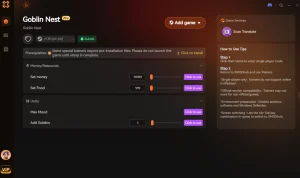
If you want to skip the file management and unlock the gallery instantly, the XMODHUB ↗ trainer offers a seamless, one-click solution for Goblin Nest.
Unlock All CGs
Instantly unlock the full gallery and all replay scenes.
ทองคำไม่จำกัด
Never run out of currency for dungeon upgrades.
โหมดพระเจ้า
Units take no damage during combat phases.
Max Unit Stats
Instantly maximize attack and defense for all units.
Why Choose XMODHUB for Goblin Nest
XMODHUB ↗ is the trusted choice for single-player modifications because it guarantees a malware-free experience and automatically updates alongside official game patches. With its intuitive interface, you can toggle gallery unlocks and resource cheats without worrying about corrupting your save files or navigating complex folder structures.
Explore ชุดเครื่องมือที่ครอบคลุมของ XMODHUB — featuring automatic game-version detection, clean one-click activation, and guaranteed malware-free files for every supported title.
Progression
ทรัพยากร
การต่อสู้
คำถามที่พบบ่อย
พร้อมที่จะยกระดับการเล่นเกมของคุณหรือยัง?

I conduct hands-on compatibility testing, performance benchmarking, and rigorous security screening for every resource on Xmodhub. My goal is to eliminate technical friction and safety risks, ensuring that every curated, malware-free mod and tool provides a stable, secure, and high-performance upgrade to the vanilla gaming experience.

 แคทเธอรีน ฮู