การเชี่ยวชาญ โลกแห่งโอริน อาจโหดร้ายได้ ไม่ว่าคุณจะกำลังดิ้นรนเพื่อจัดการเศรษฐกิจในภูมิภาค “บาร์น” พยายามออกแบบระบบคลองที่สมบูรณ์แบบโดยไม่มีหินเพียงพอ หรือเพียงแค่ต้องการทดลองกับฟิสิกส์ของน้ำในโหมดสร้างสรรค์ การใช้ คำสั่งคอนโซลของ Earth of Oryn เป็นวิธีที่ได้รับความนิยมในการหลีกเลี่ยงความน่าเบื่อ.
อย่างไรก็ตาม การเข้าถึงเมนูดีบักสำหรับนักพัฒนาในเกมอินดี้ที่ใช้ Unity นี้ไม่ใช่เรื่องง่าย.
ด้านล่างนี้คือคู่มือฉบับสมบูรณ์เกี่ยวกับวิธีการบังคับให้คอนโซลเปิดขึ้น, ตรรกะของคำสั่งที่ทราบ, และทางเลือกที่ปลอดภัยกว่า – XMODhub เทรนเนอร์ , โกงโดยไม่ทำให้ข้อมูลบันทึกของอาณาจักรของคุณเสียหาย.
คุณอาจสนใจ:
ตารางโกง Earth of Oryn เทียบกับ Trainer: ทางเลือกฟรีที่ดีที่สุด
สารบัญ
หมายเหตุจากบรรณาธิการ: คุณสามารถโกงในเกม Earth of Oryn ได้หรือไม่? วิธีเปิดใช้งานคอนโซลใน Earth of Oryn รายการคำสั่งคอนโซลที่จำเป็น รายการรหัสไอเท็มของโลกแห่งโอริน
ปัญหา: ความสำเร็จและความเสี่ยงในการบันทึก ทางเลือกที่ดีกว่า: XMODhub Trainer (ไม่ต้องพิมพ์) คำถามที่พบบ่อย สรุป
หมายเหตุจากบรรณาธิการ: คุณสามารถโกงในเกม Earth of Oryn ได้หรือไม่? โลกแห่งโอริน ทำงานบน Unity Engine . ในเวอร์ชันปัจจุบัน นักพัฒนาได้ ซ่อนกุญแจคอนโซล โดยค่าเริ่มต้นเพื่อป้องกันปัญหาความเสถียรและรายงานข้อบกพร่องที่เกิดจากการแทรกแซงของผู้ใช้.
แม้ว่าคุณจะสามารถลองแก้ไขไฟล์คอนฟิกหรือใช้โปรแกรมปลดล็อก Unity (เช่น BepInEx) เพื่อเข้าถึงได้ แต่วิธีนี้มักจะทำให้ระบบจำลองน้ำทำงานผิดปกติหรือทำให้เกมล่มได้บ่อยครั้ง ที่ XMODhub เราแนะนำให้ใช้โปรแกรมเสริมหน่วยความจำภายนอก (external memory trainer) เพื่อฉีดสูตรโกงอย่างปลอดภัย วิธีนี้จะช่วยให้คุณสามารถปรับเปลี่ยนทรัพยากรต่าง ๆ ได้โดยไม่ต้องแตะต้องโค้ดสำคัญของตัวเกม และลดความเสี่ยงที่จะถูกแบนเมื่อมีการอัปเดตในอนาคต.
— แคทเธอรีน ฮู, นักเขียนกลยุทธ์เกมอาวุโส ที่ XMODhub
วิธีเปิดใช้งานคอนโซลใน Earth of Oryn หากคุณตั้งใจที่จะเข้าถึงเมนูดีบักดิบ ให้ลองใช้วิธีมาตรฐานของเอนจิน Unity เหล่านี้ โปรดทราบว่าวิธีเหล่านี้อาจถูกปิดใช้งานในแพตช์บางเวอร์ชัน:
วิธี A (คีย์ลัดเริ่มต้น):
กดปุ่ม Tilde (~), F1 หรือ F12 ระหว่างการเล่นเกม ในบางเวอร์ชัน คุณอาจต้องกดปุ่ม Shift ค้างไว้พร้อมกับ F1.
วิธี B (ตัวเลือกการเปิดตัว):
คลิกขวา โลกแห่งโอริน ในคลัง Steam ของคุณ. เลือก คุณสมบัติ . ใน ตัวเลือกการเริ่มต้น ฟิลด์, ประเภท: -คอนโซล, -dev, หรือ -debug. เปิดเกมและลองใช้ปุ่มลัดอีกครั้ง.
วิธี C (การปรับแต่ง):
ผู้ใช้ขั้นสูงสามารถใช้เครื่องมือจากบุคคลที่สาม เช่น UnityExplorer เพื่อบังคับให้คอนโซลโอเวอร์เลย์ปรากฏขึ้นได้ โปรดทราบ: การทำเช่นนี้จะเปลี่ยนแปลงไฟล์เกมและอาจต้องติดตั้งใหม่ทั้งหมดหากเกิดความเสียหาย.
(หากวิธีใดวิธีหนึ่งไม่ทำงาน คอนโซลถูกล็อกโดยนักพัฒนา ให้ข้ามไปที่ โซลูชัน XMODhub ด้านล่างสำหรับวิธีการรับประกัน
รายการคำสั่งคอนโซลที่จำเป็น หากคุณสามารถบังคับให้บรรทัดคำสั่งเปิดขึ้นได้ นี่คือคำสั่งมาตรฐานที่มักใช้ในระหว่างการพัฒนาเพื่อทดสอบ.
ทรัพยากรและการจัดการอาณาจักร
เพิ่มทอง [จำนวน] – เพิ่มเหรียญทองในคลังของคุณทันที. เพิ่มไม้ [จำนวน] – เติมไม้ลงในคลังของคุณ. เพิ่มหิน [จำนวน] – เติมหินลงในคลังของคุณ. การสร้างทันที – อาคารสร้างเสร็จทันทีโดยไม่มีความล่าช้าจากคนงาน. เทคนิคการปลดล็อก – ปลดล็อกทุกโหนดการวิจัย/เทคโนโลยีทันที.
คำสั่งระดับโลกและระบบ
พระเจ้า หรือ โหมดพระเจ้า 1 – หน่วย/อาคารของคุณไม่ได้รับความเสียหายจากศัตรูหรือภัยพิบัติ. ตั้งค่าเวลา [0-24] – เปลี่ยนเวลาของวัน (มีประโยชน์สำหรับการจับภาพหน้าจอและการทดสอบแสง). killall – กำจัดศัตรูทั้งหมดในบริเวณใกล้เคียง (ผู้บุกรุก/โจร). แสดง FPS – แสดงอัตราเฟรมปัจจุบันและความเร็วในการจำลองของคุณ. กล้องฟรี – ถอดกล้องออกเพื่อถ่ายภาพหน้าจอแบบภาพยนตร์.
รายการรหัสไอเท็มของโลกแห่งโอริน เพื่อใช้เฉพาะ ให้ [ID] คำสั่ง, คุณจะต้องใช้ชื่อสินทรัพย์ภายในของ Unity. ชื่อเหล่านี้เปลี่ยนแปลงบ่อยครั้งทุกครั้งที่มีการอัปเดต และต้องระวังตัวอักษรใหญ่เล็ก:
ทรัพยากร:
ID_Res_Wood ID_Res_Stone ID_Res_Iron ID_Res_Clay
สกุลเงิน:
(เบื่อกับการเดารหัสหรือได้รับข้อผิดพลาด “คำสั่งไม่ถูกต้อง” หรือไม่? คำสั่ง XMODhub เทรนเนอร์ มีเมนูสร้างไอเท็มในตัวพร้อมไอคอนที่ชัดเจน คุณจึงไม่จำเป็นต้องจำโค้ด)
ปัญหา: ทำไมคำสั่งคอนโซลถึงปิดการใช้งานความสำเร็จ การใช้คอนโซลนักพัฒนา มีค่าใช้จ่ายที่ซ่อนอยู่ โดยเฉพาะในเกมกลยุทธ์:
ล็อกความสำเร็จ: การใช้สูตรโกงในการพิมพ์มักจะทำให้ไฟล์บันทึกของคุณถูกระบุว่า “ถูกแก้ไข” ซึ่งจะทำให้ความสำเร็จใน Steam เช่น “Master Architect” ถูกปิดใช้งานอย่างถาวร” บันทึกการทุจริต: การเกิดของทรัพยากรเหนือขีดจำกัดการเก็บรักษาอาจทำลายตรรกะเศรษฐกิจของเกม และทำให้เกิดการล่ม. ความไม่สะดวก: คุณต้องพิมพ์รหัสใหม่ทุกครั้งที่คุณโหลดเกม.
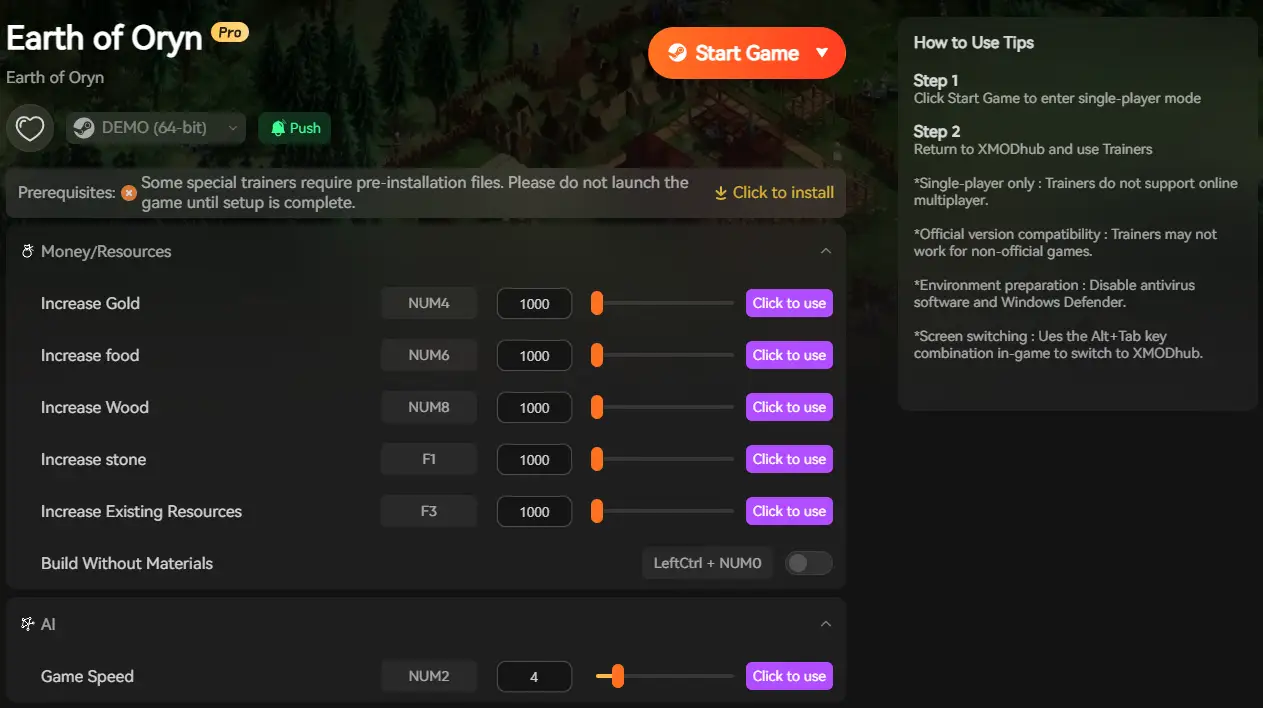
ทางเลือกที่ดีกว่า: XMODhub Trainer (ไม่ต้องพิมพ์) หยุดท่องจำรหัสเลขฐานสิบหก. XMODhub ทำหน้าที่เป็นภาพซ้อนทับที่ข้ามความจำเป็นในการใช้คอนโซลนักพัฒนาไปโดยสิ้นเชิง.
คุณสมบัติ คำสั่งคอนโซล XMODhub เทรนเนอร์ วิธีการ การพิมพ์ข้อความด้วยตนเอง ปุ่มลัดคลิกเดียว ความสำเร็จ ผู้พิการ (ความเสี่ยงสูง) ปลอดภัย (งานความสำเร็จ) สร้างทันที คำสั่งดีบักที่ซับซ้อน สวิตช์เปิด-ปิดแบบง่าย เวอร์ชันเกม หยุดชั่วคราวพร้อมการอัปเดต อัปเดตอัตโนมัติผ่านคลาวด์
[ ดาวน์โหลด Earth of Oryn Trainer ได้ที่นี่ ]
วิธีใช้ XMODhub Trainer สำหรับ Earth of Oryn
อย่าเสียเวลาไปกับการแก้ไขไฟล์คอนฟิก.
นี่คือวิธีการใช้ XMODhub ใน 3 ขั้นตอนง่ายๆ:
เปิดตัว: เปิด XMODhub—มันจะตรวจจับเวอร์ชันที่คุณติดตั้งโดยอัตโนมัติ โลกแห่งโอริน .
เปิดใช้งาน: คลิก “ทรัพยากรไม่จำกัด” หรือ “สร้างทันที” และเพลิดเพลินกับเกม.
คำถามที่พบบ่อย ถาม: ฉันสามารถใช้คำสั่งคอนโซลในโหมดผู้เล่นหลายคนของ Earth of Oryn ได้หรือไม่?
A: ไม่ คำสั่งคอนโซลเป็นฝั่งเซิร์ฟเวอร์ XMODhub ทำงานฝั่งไคลเอนต์สำหรับการปรับแต่งภาพและการเล่นคนเดียวเท่านั้น ใช้อย่างมีความรับผิดชอบและหลีกเลี่ยงการทำลายประสบการณ์เกมของผู้อื่น.
ถาม: มีสูตรโกงสำหรับลบ “หมอกแห่งสงคราม” หรือไม่?
A: ใช่, ผ่านทาง XMODhub Trainer คุณสามารถสลับ “แสดงแผนที่” เพื่อดูตำแหน่งทรัพยากรทั้งหมดได้ทันทีโดยไม่ต้องสำรวจ.
ถาม: เคล็ดลับสำหรับทองคำไม่จำกัดคืออะไร?
A: คุณสามารถลองพิมพ์ add_gold ได้ แต่เนื่องจากคอนโซลอาจถูกล็อกอยู่ การใช้ XMODhub Trainer เป็นตัวเลือกเดียวที่สามารถทำให้คุณได้รับเงินไม่จำกัดได้ทันที.
ถาม: ฉันจะเข้าถึงโหมดสร้างสรรค์ในเซฟโหมดเอาชีวิตรอดได้อย่างไร?
A: ปกติแล้ว คุณจะไม่สามารถเปลี่ยนโหมดได้เมื่อเริ่มบันทึกเกมแล้ว อย่างไรก็ตาม XMODhub อนุญาตให้คุณสลับ “เครื่องมือสร้างสรรค์” (เช่น การสร้างแบบอิสระ) ได้แม้ในโหมดแคมเปญเอาชีวิตรอด.
สรุป: ฉลาดโกง แม้ว่าคำสั่งคอนโซลแบบคลาสสิกจะชวนให้นึกถึงอดีต แต่พวกมันมักจะมีความเสี่ยงและใช้งานยากในเกม Unity สมัยใหม่ เช่น โลกแห่งโอริน .
อย่าให้การขาดแคลนหินหรือทองคำมาหยุดยั้งการสร้างอารยธรรมในฝันของคุณ XMODhub มอบวิธีการที่ปลอดภัยกว่า สวยงาม และเหมาะสำหรับการสะสมความสำเร็จในการปรับแต่งประสบการณ์ของคุณ.
รองรับเกมที่คล้ายกัน
โลกของโอรินเป็นเพียงจุดเริ่มต้นเท่านั้น XMODhub รองรับเกมมากกว่า 5,000+ เกม รวมถึงเกมแนวกลยุทธ์ที่คล้ายกันเช่น:
ไม่ว่าคุณจะกำลังสำรวจโลกเปิดหรือจัดการกลยุทธ์ที่ซับซ้อน XMODhub ครอบคลุมคลังเกมทั้งหมดของคุณด้วยการสมัครสมาชิกเพียงครั้งเดียว.
[ ดาวน์โหลด XMODhub สำหรับ Earth of Oryn ตอนนี้ ]
ฉันเป็นเกมเมอร์และนักเขียนที่มีความหลงใหลที่ XMODhub มุ่งมั่นที่จะนำเสนอข่าวสารเกมล่าสุด เคล็ดลับ และข้อมูลเชิงลึกให้กับคุณ.
ติดต่อฉัน:

 แคทเธอรีน ฮู





 แนนซี่ มิลเลอร์