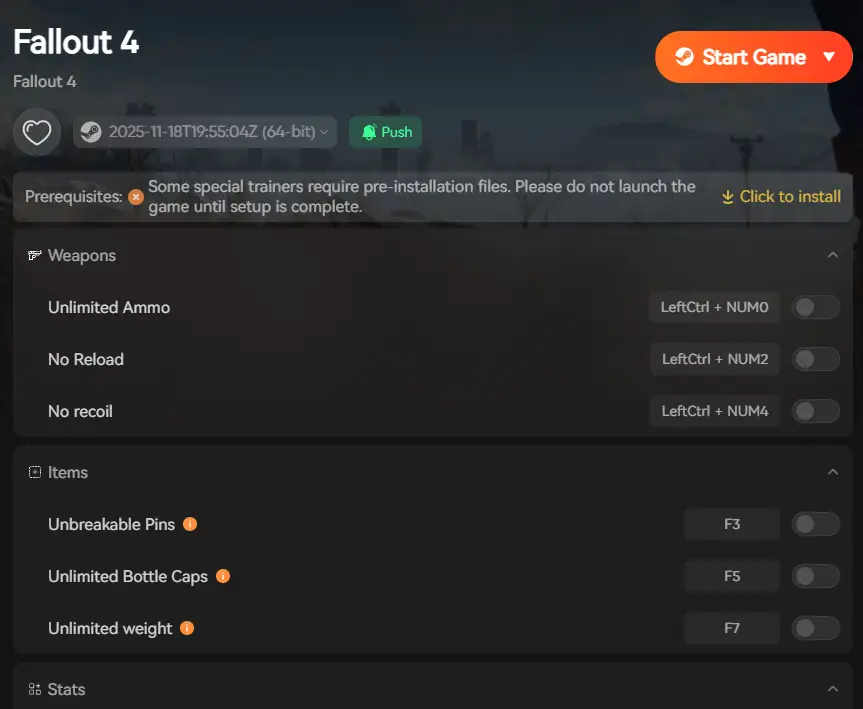
summary:ฟอลล์เอาท์ 4item codes allow PC players to instantly obtain weapons, armor, ammo, resources, and quest items using console commands. Whether you want to skip grinding, test builds, or experiment with the game’s mechanics, item codes provide a fast and flexible way to customize your ฟอลล์เอาท์ 4ประสบการณ์.
For enhanced management and smoother gameplay, เอ็กซ์เอ็มโอดี can be used alongside item codes, offering PC players resource management support, quality-of-life features, and simplified console command usage.
สารบัญ
What Are Fallout 4 Item Codes?
How Console Commands Work in Fallout 4
How to Use Item Codes (Step-by-Step)
Fallout 4 Item Code Format Explained
Full Fallout 4 Item Code Lists
Full DLC Item Code List
Using XMOD for Fallout 4
Useful Console Commands Beyond Item Codes
Common Problems & Fixes
Are Item Codes Safe to Use?
คำถามที่พบบ่อย
สรุป
What Are Fallout 4 Item Codes?
ฟอลล์เอาท์ 4 item codes are unique hexadecimal IDs assigned to every item. When used with the console command:
ผู้เล่น.เพิ่มไอเท็ม
the game instantly adds the item to your inventory.
These codes are PC-only and work best in single-player mode. Using เอ็กซ์เอ็มโอดี alongside item codes makes inventory management and console command usage easier and more organized.
How Console Commands Work in Fallout 4
The Fallout 4 console allows players to input commands that interact directly with the game engine. Commands can:
Add or remove items
Spawn weapons, armor, and ammo
Adjust player stats and perks
Fix stuck quests or bugs
เอ็กซ์เอ็มโอดี integrates smoothly with the game, providing a user-friendly interface to apply these commands without manually typing them repeatedly, making it ideal for long play sessions.
How to Use Fallout 4 Item Codes (Step-by-Step)
Launch Fallout 4 on PC
กด ~ (tilde) key to open the console
Enter the command:
player.additem ITEMID QUANTITY
Press Enter
Close the console with ~
Example
player.additem 0000000F 1000
Adds 1,000 bottle caps.
เคล็ดลับ: Using XMOD, you can save commonly used item codes and spawn them with a single click, reducing errors and saving time.
Fallout 4 Item Code Format Explained
ผู้เล่น.เพิ่มไอเท็ม = command
ITEMID = unique item code
QUANTITY = number of items
DLC items may require adjusted IDs depending on load order. XMOD can help track DLC items and codes for easier management.
Full Fallout 4 Item Code Lists for 2026
Weapons
Weapon
Item Code
10mm Pistol
00004822
Combat Rifle
0000463F
Assault Rifle
0000463D
Sniper Rifle
00005F55
Minigun
0001F669
Fat Man
000BD56F
Institute Laser Rifle
0018A6FB
Ammo
Ammo Type
Item Code
10mm Round
0001F66A
.45 Round
0001F66B
.308 Round
0001F66C
5.56mm Round
0001F66E
Fusion Cell
000C1897
Mini Nuke
000E6B2E
Armor & Power Armor
Armor
Item Code
Leather Chest Piece
000001DB
Combat Armor Chest
00013D99
Synth Armor Chest
001E58F4
Power Armor Frame
00021B3B
T-60 Power Armor Helmet
00140C4C
X-01 Power Armor Helmet
00154ACD
Aid Items & Chems
Item
Item Code
Stimpak
00023736
RadAway
00023742
Rad-X
0002373C
Med-X
00033778
Jet
0002373F
Psycho
00023735
Crafting Materials
Material
Item Code
Adhesive
001BF72E
Aluminum
0006907A
Screws
00069081
Gears
0006907E
Oil
00069086
Nuclear Material
00069087
Caps & Misc Items
Item
Item Code
Bottle Caps
0000000F
Bobby Pin
0000000A
Pre-War Money
0000000E
Fusion Core
00075FE4
Full DLC Item Code List in 2026
Automatron DLC Items
DLC Item
Example ID (replace xx with load order)
Robot Chest Piece
xx00863F
Assaultron Helmet
xx00864A
Mechanist’s Armor
xx008BC1
Tesla Rifle
xx003E07
Mr. Handy Buzz Blade
xx0020F8
Far Harbor DLC Items
DLC Item
Example ID (replace xx)
.45‑70 Ammo
xx02C8B1
Harpoon
xx010B80
Trapper Chest Piece
xx00EE79
Marine Tactical Helmet
xx03A557
Fisherman’s Outfit
xx00914F
Vault‑Tec Workshop DLC Items
DLC Item
Example ID (replace xx)
Vault 88 Jumpsuit
xx0042AE
Vault 88 Chemical Research
xx004BC6
Typewriter (decor)
xx001BE5
Nuka‑World DLC Items
DLC Item
Example ID (replace xx)
7.62mm Ammo
xx037897
Disciples Metal Chest Piece
xx026BB8
Disciples Spiked Helmet
xx026BB6
Disciples Strapped Chest Piece
xx026BAB
Wasteland Workshop & Contraptions Workshop
Primarily settlement/building items; spawnable with DLC codes once the correct xx load order prefix is applied.
How to Use DLC Item Codes
Open the console (~) on PC
Enter:
player.additem xx00863F 1
(Replace xx with your DLC prefix and adjust item/quantity)
การใช้ เอ็กซ์เอ็มโอดี, you can store DLC item codes for quick spawning and resource tracking.
Using XMOD for Fallout 4
เอ็กซ์เอ็มโอดี enhances the Fallout 4 experience, especially for players using item codes and DLC items:
Inventory Management: Spawn multiple items at once
Resource Tracking: Monitor ammo, crafting materials, and caps
DLC Support: Manage DLC-specific items with correct Form IDs
Quality-of-Life Enhancements: Simplify repetitive tasks and testing builds
Combined with item codes, XMOD makes PC gameplay smoother, safer, and more organized.
Useful Console Commands Beyond Item Codes
คำสั่ง
ผลกระทบ
tgm
โหมดพระเจ้า
tcl
No-clip mode
player.addperk
Add a perk
player.setlevel X
Set player level
unlock
Unlock doors/containers
resurrect
Revive NPCs
Common Problems & Fixes
Item not appearing?
Check the item ID and DLC prefix (xx)
Verify DLC load order
Try smaller quantities
Game instability?
Avoid spawning extremely large quantities
Save before using console commands
XMOD reduces typing errors and organizes codes
Are Fallout 4 Item Codes Safe to Use?
Yes. Safe for single-player, achievement-friendly, and compatible with XMOD. Excessive spawning may reduce challenge or cause minor instability—moderation is recommende
Frequently Asked Questions (FAQ)
Do Fallout 4 item codes still work?
Yes, all console commands and item codes work on PC.
Can item codes break my save file?
Rarely, but excessive use may cause issues. Backups are recommended.
Do console commands disable achievements?
No, achievements remain enabled on PC.
Can item codes be used with DLCs?
Yes, but DLC items require correct xx prefixes depending on load order.
How does XMOD enhance item code usage?
XMOD stores item codes, allows batch spawning, and helps manage resources efficiently, reducing errors and repetitive typing.
สรุป
ฟอลล์เอาท์ 4 item codes give PC players freedom to customize inventory, test builds, and manage resources instantly. With the Full DLC Item Code List และ เอ็กซ์เอ็มโอดี integration, you can optimize gameplay, improve resource management, and enjoy a smoother, more efficient Fallout 4 experience.
How to Fix Far Far West Crash on Startup & Black Screen
There is nothing more agonizing in PC gaming than having your highly anticipated session ruined by technical failures. When Far Far West crashing issues occur, it completely kills the momentum of your team.…
Far Far West Mounts Guide: Where to Tame the Fastest Horse
The fog rolls in thick across the Weeping Canyons, and the extraction timer is flashing red on your screen. Without a reliable mount, getting caught in the open terrain of Far Far West…

 แคทเธอรีน ฮู